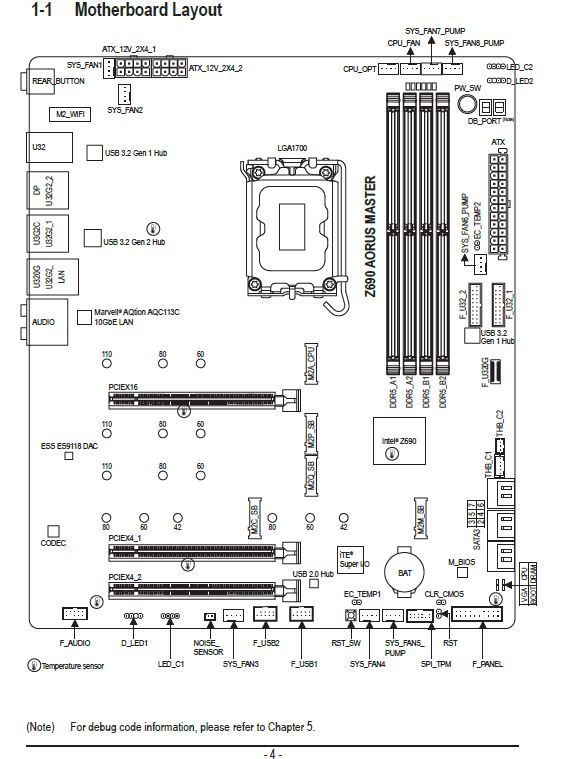
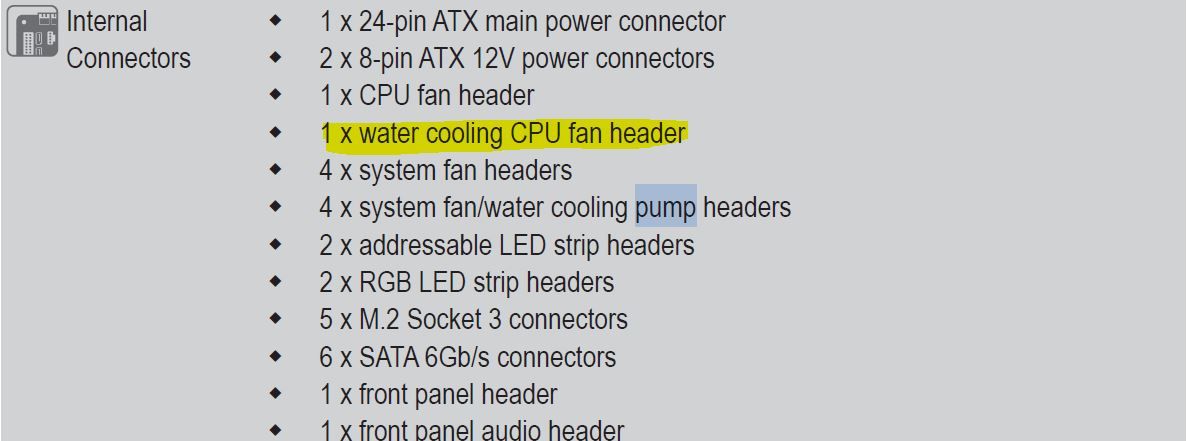
Aorus Master Z690 connections
-
@clipper Well that's what I had to do after messing up with the Gigabyte application that really messed me up.
But I still need to do the image thing. -
@defaultuser That's what I'm going to do, but tomorrow. I'll get up, have some tea, and pray that I don't mess up the bios update.
-
@qvengador the image thing first tpm is almost certainly correct, you can confirm it by opening its properties.
And the controller on other devices is a matter of the chipset, unless it is something more connected to the board, wifi or another peripheral. -
@qvengador said in Aorus Master Z690 Connections:
@defaultuser Well that's what I'm going to do, but tomorrow. I'll get up, have some chamomile tea, and pray not to mess up the bios update.
Remember to set it to default before flashing (there's an option for that), do it from the bios with a USB drive, read the instructions while having that chamomile tea you mentioned, and if the light doesn't fail everything should go well.
Now they are more complex than the pure old bios, just follow the instructions and update everything it tells you. -
@qvengador
By parts....
Make sure you are downloading the drivers for your M.B. Watch out for the rev
Like: Rev 1.5
1.7
By default, since your board is new, you will have dual BIOS.
And a BIOS reset button on the back.
What I usually do.
Clean installation of the OS
Pen with the M.B driversYou install the OS
And you put the basic drivers, network and little more.
When the OS works with network.
You put the graphics drivers.
And what it asks you, already pulling from the web of your board.
The thing about the BIOS... I don't think it's necessary to update, since it's "new" and you use compatible components.
Another thing would be that the M.B asks you to update BIOS for another "not compatible" processor without updating the BIOS.
Regards -
@clipper said in Aorus Master Z690 Connections:
The BIOS thing... I don't think it's necessary to update, since it's "new" and you use compatible components
And the bug fixes and/or improvements? You'll have to look at it at least, I say
-
@defaultuser some new BIOS are for optimizing new processor.
Others for RAM
And others Bugs.
Updating to tun tun can be worse.
Regards -
Look where you have it, it has a bios from this month, last month it released two.... and the first one is from a year ago.
By the way, no matter how new the board is, it came out of the factory on a date with a certain bios. And the updates are not just for compatibility with new hardware, there is much more to it, modern bioses are linked with all sorts of things.
@clipper said in Aorus Master Z690 Connections:
since it's "new"
Better put it to me, I don't think it will come with one of the two bios from November, not even with the one from December, and with the next one closer that is six months old, I give it a 50% chance that it will bring it.
gigabyte.com/es/Motherboard/Z690-AORUS-MASTER-rev-1x/support#support-dl-bios -
@clipper said in Aorus Master Z690 Connections:
@defaultuser some new BIOSes are for optimizing new processors.
Others for RAM
And others Bugs.
Updating to the tun tun can be worse.
Regards@clipper said in Aorus Master Z690 Connections:
Updating to the tun tun can be worse.
The latest already includes all that, and there is no tun tun tun in the matter, they are incremental.
Manufacturers and others say that if you are doing well you don't need anything. If you look at it well it is something a bit delicate, not because it is difficult at all, but because a power outage or an anxious user can render the bios and the entire board useless, and advocate for the saying "what works should not be touched".
@clipper said in Aorus Master Z690 Connections:
some new BIOSes are for optimizing new processors.
Others for RAM
And others Bugs.And so what?, and security and stability and improvements in the management of old and new CPUs and performance improvements in a thousand other places and design corrections.... current uEFIs are so much more complex now that I don't even know the list, but if you look at it a bit there is a lot of material.
Late updates are for some new micro, some improvement and things like that. but precisely when the board is relatively new there are easily updates that complete the work on early versions, and bring things that normally imply several improvements.
That is something to look into.
It wouldn't be the first one to realize after 15 days already with Windows upside down. -
In the end I have updated and for now everything is fine.
My old pc has an i7-4820k and with normal activity it has a temperature of 23 or so
The thing is that the one I have now with i9-13900k with normal activity has a temperature of 37 or so.
Both have liquid cooling. But with a difference of 10 degrees. Isn't that too high? -
@qvengador said in Aorus Master Z690 Connections:
In the end I've updated and everything is fine for now.
My old pc has an i7-4820k and with normal activity it has a temperature of 23 or so
The thing is that the one I have now with i9-13900k with normal activity has a temperature of 37 or so.
Both have liquid cooling. But with a difference of 10 degrees. Isn't that too high?Don't believe it.
get used to the idea that it's not like before that with good liquid cooling the micro never saw 50ºC in its life, now it's the other way around, at the slightest that you use half a micro you'll have those degrees at minimum despite putting in good cooling.
It seems that now to get what the micros give us they have used an internal material that blocks a lot of heat, besides they have the same watts and even more than before, but in less space each time.
In theory the micro will lower you at rest (5%) at most to 30º or so, and at the slightest that the micro does something (10-15%) it approaches 40.In my case with a zen 2 the whole micro is perfect except for the cores that always scale temperature as if they were separate. while the L3 cache that is on the same chiplet is at normal temperatures for the cooling employed.
PD:
Apart from that you would have to see if the tower is ventilated, the rpm of the pump, the temp of the water etc, but we're not going to cool like the ones of before, get used to the idea.
oh and another thing, the corsair software may not offer you the control options that you would like, I haven't tried it but @Clipper can tell you. -
In Intel the anchoring system is by screws and in AMD by two staples with tension screws.
In theory and in practice the CPU heatsink contact is better than in AMD.
The icue only has three speed parameters:
Low
Extreme medium
Both for the pump and for the fans.
It does not allow you to make "curves"
In the BIOS if I can (in my case MSI)
With icue I have not managed to put the fans at full speed, corsair ML 120.
Neither with the serial controller nor with a consair comander.
About the corsair aio the only "but" I see is that it always marks the same water temperature in icue (doing a short stress test, which puts the CPU, around 100 degrees)
I have the icue totally updated in version and so on.
As I have been busy with raid 0 and setting up W11 I have not had time (which I have little) to run CPU Z to stress the CPU for longer and see if the water temperature changes.
But according to comments from party colleagues it is something normal.
Regards -
Thank you for your responses. Once again I would like to know if it is normal for the microprocessor to have a speed of 4 GHZ when doing nothing, when the base speed is 3.00 GHZ.
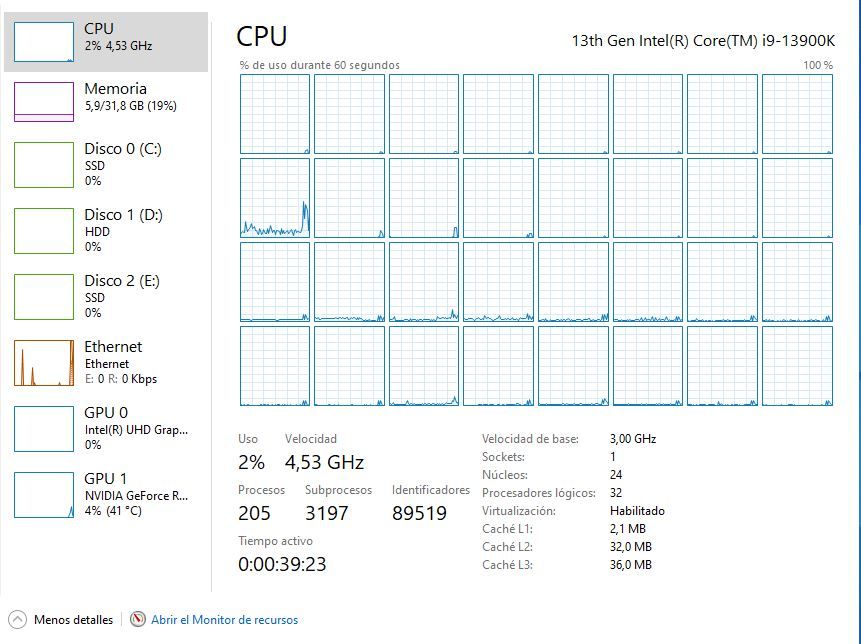
On the other hand, look at the temperature. It seems exaggerated to me for doing nothing and when I play it can reach 80º.
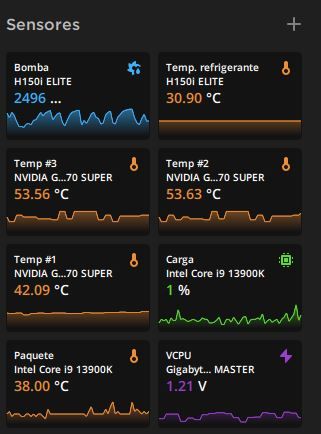
I also do not understand why I am given three temperatures for the Graphics Card.
Anyway. Thank you for your help. -
@qvengador said in Aorus Master Z690 Connections:
Thanks for your answers. Once again I would like to know if it is normal for the processor to have a speed of 4 GHz when doing nothing, when the base speed is 3.00 GHz.
On the other hand, check the temperature. It seems exaggerated to me for doing nothing and when I play it can reach 80°.
I also don't understand why I get three temperatures for the Graphics Card.
Anyway. Thanks for your help.Is the temperature capture without doing anything?
In my case, when playing, I have a temperature difference of 20 degrees in the CPU water.
30 degrees water, 50 CPU
Without doing anything, it is 23 / 35 water/CPURegards
P.d what configuration have you put in the iCUE? Normal or extreme?
Regards 2 -
@qvengador said in Aorus Master Z690 Connections:
Thanks for your answers. Once again I would like to know if it is normal for the processor to have a speed of 4 GHz when doing nothing, when the base speed is 3.00 GHz.
You see, in the task manager you are seeing what we could call "the maximum speed achievable by the entire processor at that precise moment", it is not the real speed of the cores, which I will now explain how to see it better. Also, depending on the power profile you have activated in Windows, the operating system will be asking the processor for a more relaxed state or a more active state of this "maximum available now" value.
@qvengador said in Aorus Master Z690 Connections:
I also don't understand why I am given three temperatures for the Graphics Card.
Anyway. Thanks for your help.Something similar happens here. Now I will explain how to better see the CPU and GPU, because the CPU also has several temperatures, and these generic programs give you the information they think is important and only half of it.
I recommend any in-depth monitoring program, personally I recommend the Hwinfo64
You will be able to see the effective frequency of the cores (the real one), the various temperatures of the CPU, GPU and system, and what each thing really is, and a lot of information.
Later on, once you have everything clearer, you may not even need it, but this one takes away all the veils and teaches you what is really there.@qvengador said in Aorus Master Z690 Connections:
On the other hand, looking at the temperature. It seems exaggerated to me for doing nothing and when I play it can reach 80°.
If the AIO is managed by Corsair's software, it will only care about making little noise, spending little power, and looking very good in the photo. I prefer to connect it to the motherboard and be able to explore its possibilities manually to my liking.
What connector does your AIO have for the pump? Does it have one that goes to the motherboard with two wires, or only with one wire?Likewise, don't expect miracles from an AIO, the temperature values that Clipper has given us lack the fan speed, and with those results it will be admitting a little more noise than what iCUE probably leaves.
-
@defaultuser said in Aorus Master Z690 Connections:
If the aio is managed by corsair software, it will only worry about making little noise, spending little light and looking very good in the photo. I prefer to connect it to the motherboard and be able to explore its possibilities manually to my liking.
Your aio, what connector does it come with for the pump? Does it have one that goes to the motherboard with two wires, or only with one wire?The cable that goes to the fan_CPU contact on the motherboard only has one cable.
I recommend any in-depth monitoring program, personally I recommend Hwinfo64
I'm going to install it. -
@clipper said in Aorus Master Z690 Connections:
Is the temperature capture without doing anything?
In my case, when playing, I have a difference of 20 degrees in CPU water temperature.
30 degrees water, 50 CPU
Without doing anything, it is 23 / 35 water/CPU
Regards
P.d what configuration have you put in the icue? Normal or extreme?
Regards 2Well, yes, without doing anything. Where is the icue configuration done?
-
@qvengador
In icue you select the aio, a menu will appear, select "cooling" and you will get:
Pump
Fans
There you can select the parameters.
Regards -
@qvengador said in Aorus Master Z690 Connections:
The cable that goes to the fan_CPU contact on the board only has one cable.
Ok, too bad because that's just the cable that tells the fan speed, if it also had the next one (two) it would be the pwm control one, and then even though the 12 volts came from somewhere else, you could control the pump from the motherboard.
Technically it can be done the same way, but the connectors don't allow it. The wire they leave for the board (the one for the rotation speed) is only there because if they didn't, the bios would give an alarm for a stopped/broken fan, and the easiest way to avoid it is that.By the way, hwinfo64 can open real-time graphs of whatever you want, just right-click on the value you want and choose it from the context menu.



Hello! It looks like you're interested in this conversation, but you don't have an account yet.
Getting fed up of having to scroll through the same posts each visit? When you register for an account, you'll always come back to exactly where you were before, and choose to be notified of new replies (either via email, or push notification). You'll also be able to save bookmarks and upvote posts to show your appreciation to other community members.
With your input, this post could be even better 💗
Registrarse Conectarse