-
Well, we continue with the task.
At the moment I am encountering some problems, all derived from the storage units:
- Since I do not have any computer with a floppy drive, I have to have the floppy disks in image format (img) and I have had to create the floppy disks with a USB floppy drive, but this does not seem to be very fine because they always fail when booting and even corrupt files. For the moment I have solved this by finding a bootable CD of MS-Dos 6.22.
- The MS-Dos CD did not boot with the ATA100 controller, although until now different Linux and Hiren's Boot had done it for me. For the moment I have connected everything to the ATA33 controller integrated on the board and it is already working.
- The 80Gb hard drive has problems being detected by the controller on the board, so I have changed it for another similar 60Gb one and it does not give problems.
So for the moment I have managed to install MS-Dos, but because of the storage problems I have to do tricks to simply install the CD-Rom drivers or the sound card. I think I am going to get a new USB floppy drive since the one I used was from my job and had too much trouble.
-
What a beautiful post!! I hadn't been back to these parts for many years, I love seeing that it's still active and with such beautiful projects

The 3.5" floppy drives, when they got a bit of a strong shake, the magnetic "went out of alignment" and it read/wrote where it wasn't... that's what has happened to your USB drive (or the internal one), that if you format the floppy in a misaligned one it will work in that one but not in a well-aligned one, and vice versa...
Regarding the HDD issue, there was a limitation by jumper of the capacity of hard drives to 32Gb, but it was a limitation of the BIOS that doesn't affect your motherboard...
Good luck with the project, I hope to see an update soon!
-
I don't know if it's cheating but, what if instead of MS-DOS 6.22 you put FreeDOS 1.1? More for the drivers than anything else.
Edit: sorry, but if I don't put it I'll explode.
!

The marks are from the tape with which I attach it to a piece of foam rubber to preserve the connectors. -
Hello interesting project
what do you need this for?
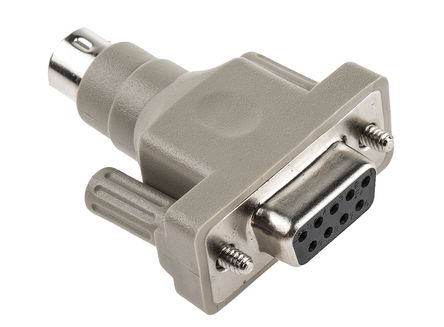
http://uk.rs-online.com/largeimages/F0828296-01.jpg
if so I have a couple of them in the storage room that I could give you for free
best regards -
First of all, I'm sorry for the delay in responding, the beach, beers, good company, and bad habits were calling out to me :troll:
What a beautiful post!! I hadn't been back to these parts for many years, I love seeing that it's still active and with such beautiful projects
The 3.5" floppy drives, when they got a bit of a rough shake, would "misalign" the magnetic field and read/write where they shouldn't... this is what happened to your USB drive (or the internal one), if you format a floppy on a misaligned drive it will work on that one but not on a properly aligned one, and vice versa...
Regarding the HDD issue, there was a jumper limitation on hard drive capacity to 32Gb, but it was a BIOS limitation that doesn't affect your motherboard...
Good luck with the project, I hope to see an update soon!
Hello!, I actually remember your username from when I started on the forum, because you've been registered longer than I have, I imagine you weren't around during the Ngasis era by much.
I need to update things I've already done, and one of them is to send the USB floppy drive to the wind and use an old Dell laptop with a floppy drive and Windows 2000 that has been running smoothly for formatting diskettes and being able to exchange data with the K6-2.
I'm not sure what's up with the hard drive, but since the 60Gb one I put in works perfectly, I'll leave it that way.
I don't know if it's cheating, but what if instead of MS-DOS 6.22 you put FreeDOS 1.1? More for the drivers than anything else.
Edit: sorry, but if I don't post it I'll explode.
!
The marks are from the tape with which I secure it to a piece of foam to preserve the connectors.I understand that FreeDOS might cause problems with some games, but if I can get everything to work, I might consider trying it in version 2.0 of the project.
Was that K6-2 the one you used back in the day?
Hello interesting project
what do you need this for?http://uk.rs-online.com/largeimages/F0828296-01.jpg
if so I have a couple of them in the attic that I could give you
regardsHello!. Thank you very much for the offer, for now I have a serial mouse, although it doesn't quite convince me how it works. If I finally switch to PS/2 I could try it, although I'm not sure if it will cause any problems with the mouse drivers.
-
I think I have something for that team somewhere. I'll look into it and let you know.
-
Let's see if I can get back to it, because between summer getaways, the imminent return to work, and setting up my 2nd PC with the Xeon, I haven't touched it. And the heat from 3 computers and a NAS is a small room!, hehe.
-
For winter it will be fine fine.
-
In winter is where you feel best, without a doubt.
-
We are back in business, little by little… Operating system installation The goal is for the two operating systems, MS-Dos 6.22 and Windows 98SE to be completely independent of each other and not interact in any way. To do this, we will follow these steps:- We will install MS-Dos 6.22 using floppy disks on its 2Gb FAT16 partition, which is the maximum supported by this file system. You will surely find guides and videos on the internet about the process, but basically it is about creating the partition from fdisk of MS-Dos, formatting it and proceeding to the installation.
- Once MS-Dos is installed, we will hide the partition. I have done this with the Smart Fdisk tool included in the famous Hiren’s Boot among others. Why do we do this? Well, to prevent the installation of Windows 98SE from taking over it or wanting to install itself on top.
- We proceed to install Windows 98SE in the usual way, trying not to delete the MS-Dos partition. When we finish the process, we will not be able to boot MS-Dos or see its partition from Windows 98SE, but we will put a solution to the boot problem.
- Now it’s time to use Smart Fdisk again to make the FAT16 partition of DOS visible again, and I have also left it as active. For now, we will not boot any system again without first doing the next step.
- To be able to boot both systems, we will download GAG, a graphical boot manager. It has multiple ways to install itself, but I have preferred to burn a rewritable CD with the ISO that comes with it. We boot with said CD and add the partitions of DOS and Windows to the boot options along with the floppy one that already comes by default. Then we save the changes. It is quite intuitive and finally we can restart and see that everything works.
-
...could Windows 10 32 bits?
-
I think that the RAM would not let me, and maybe even some more modern instruction set. Maybe one day I'll try it...
-
Well. It's not bad at all. But... you can get more out of it since you have the IDE cable shared between the hard drive and the CD drive.
That chipset usually doesn't have a heatsink on top. It has a protection system that, with processors over 450mhz, tends to activate and lower its performance. You already know the solution. Dissipate on top and that's it. Do the same with the other chipset. Because if I remember correctly, it also had failures for the same reason. -
I take note, when I already have the main thing working I will do all that kind of optimization, and the same until I put the Enermax ATX power supply that I have and another heatsink, that although the noise brings back memories I prefer silence, hehe.





Hello! It looks like you're interested in this conversation, but you don't have an account yet.
Getting fed up of having to scroll through the same posts each visit? When you register for an account, you'll always come back to exactly where you were before, and choose to be notified of new replies (either via email, or push notification). You'll also be able to save bookmarks and upvote posts to show your appreciation to other community members.
With your input, this post could be even better 💗
Registrarse Conectarse