my computer doesn't have 3D sound
-
the thing is that I use my computer mostly for gaming and well I don't know if it's a defect or something but it doesn't have 3D sound or I don't know what it's called but it sounds like everything comes from both sides so this complicates things a lot when I play games where sound is important to hear where the enemy is coming from and stuff like that, the thing is that if anyone knows how I can fix it or if I have to take it to a technician I would really appreciate their help
-
@martens said in my computer has no 3D sound:
what happens is that I use my computer mostly for gaming and well I don't know if it's a failure or something but it doesn't have 3D sound or I don't know what it's called
It's called stereo sound.
What sound card/motherboard do you have? What do you play?
Toda la actualidad en la portada de Hardlimit
Mis cacharros -
Buenas:
It is also important if you play with speakers or headphones. That's what they call 8D sound, the thing is that it is perceived correctly when we are with headphones, and there are many games that use it. And that is why cobito's question is also important -
@martens By 3D sound I assume you mean hardware acceleration; if you play with the one integrated on the motherboard, they generally do not offer such acceleration.
In any case, check the sound settings (control panel - Realtek sound manager). There you can check if the channels are working well (make sure the "Headphone virtualization" box is unchecked) and check that you do not have any sound effects (reverberation, echo or type of environment) that are bothering you.
For the latter, I have left the most basic thing. Do you have the headphones properly connected? Remember that a bad connection of the stereo jack can cause a monaural sound.
-
@cobito I wouldn't know, I play games like csgo, raimbow six and league of legends
if it helps, my computer is an ideapad520 -
@garfield I always play with headphones but in all the games I've played the sound has never worked like this
-
@whoololon between where you pointed me and when I was testing nothing has changed, even in the test where it is supposed to work, one side of the headphones sounds, and I have the headphones well connected, and I don't think it's a problem with the headphones since this works with all the headphones I have, I even have some that are high-end and the same thing happens
-
@martens If you use the front tower connector, try the one that comes with the motherboard on the back.
Edit: If you use Windows 10, try Start - Settings - Ease of Access - Other options - Audio options. Check that mono audio is not enabled.
If on the other hand you use Windows 7 /8 / 8.1, you can only enable mono audio through third-party programs, so it must be the connector's fault. -
@whoololon I was using a notebook so I don't know what the problem is, this should have come with the computer
-
@martens In that case it is the connector for sure, unless all the headphones you use have a built-in microphone and we are plugging a four-pole stereo jack into a three-pole connector.
-
@martens it happens to me with any headphone with or without earpiece
-
And the silliest thing:
Do you have the Realtek control panel installed for the audio, right? Because that's where you configure the 3D sound -
@garfield I have it but it still doesn't work, do I need help please or should I send it to a technician to have a look at it?
-
What surprises me is that you don't hear it. 3d sound has nothing to do with the driver or other things, but it depends on how the sound is recorded and reproduced. They are algorithms that are used so that your ear thinks it's coming from several places. A normal stereo sound, I think that no matter how much 3d you put into it, you're not going to hear it in different places.
The 5.1 headphones and others of that style use that algorithm to go from 5.1 to 8D sound (that's how I've read that it's called). I don't think it's a problem with the pc, but it's possible that this game doesn't have it. I'll give you the example that Jaime Altozano gives. A great guy:
Anyway, I'm not saying that you can't have a problem, but before sending it to a technician, you should check that another person, with that game, and with your same headphones, it works correctly.
Regards
-
@martens said in my computer has no 3D sound:
it sounds like everything is coming from both sides
What I understand from this sentence is that he is hearing the same thing from both channels. Either they are mixed or one is heard from both outputs.
A test you could do to clarify the issue a bit is to play anything (music for example) and vary the balance in the sound properties:
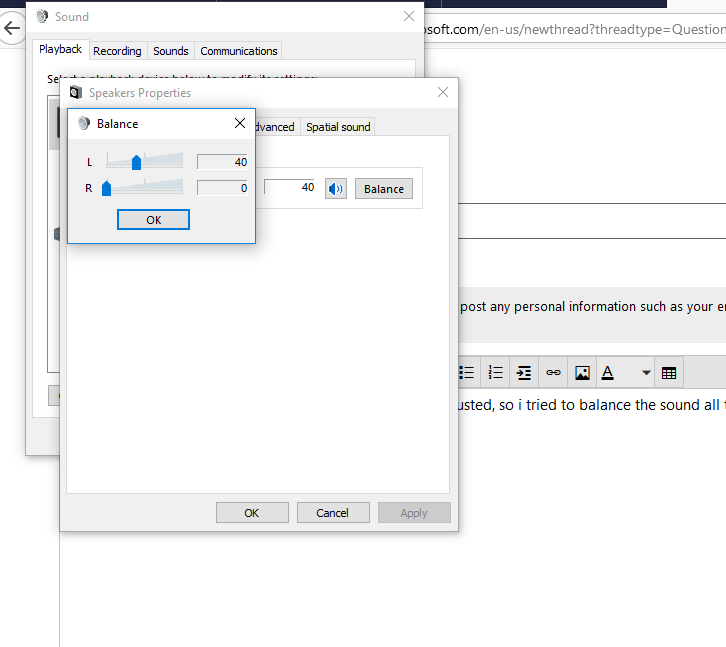
Turn off the right output and check that nothing is heard there and then the left. If it is a hardware problem (like the jack connector being damaged for example), it will be seen there. That is, if when turning off one of the two channels the audio is still heard from both outputs, that's where the fault is.
Toda la actualidad en la portada de Hardlimit
Mis cacharros -
@cobito I did what you told me but it's like my computer can't recognize where the music is coming from for example if the music should only play on the right side it plays on the left and right at the same time I don't know why this is happening. should I take it to a technician or something?
-
@cobito I even put on an 8D song from YouTube and nothing happened, then I tried it on my phone with the same headphones and the 8D effect worked, so I'm completely sure it's a problem with my computer
-
I assume you already have the latest ones, but you can try downloading and reinstalling the audio drivers. Here is the correct link if I'm not mistaken: https://download.lenovo.com/consumer/mobiles/esla03af.exe (Lenovo Ideapad 520-15IKB).
I have not been able to find out which Realtek model it is to check if there is a more updated one on the Realtek page. -
@krampak opened and downloaded the link tells me that it does not update anything because supposedly the driver you gave me is not superior to the one I have, I don't know what to do anymore
-
Although it may not be superior, install it. The updated driver may cause problems and disable 3d. You may have lost the Realtek audio control panel, and that's why it doesn't work. But I find it strange that when you disable one side, you can still hear it in both. I would try uninstalling everything and installing what I gave you, krampak.




Hello! It looks like you're interested in this conversation, but you don't have an account yet.
Getting fed up of having to scroll through the same posts each visit? When you register for an account, you'll always come back to exactly where you were before, and choose to be notified of new replies (either via email, or push notification). You'll also be able to save bookmarks and upvote posts to show your appreciation to other community members.
With your input, this post could be even better 💗
Registrarse Conectarse