Mid-high range gaming PC.
-
@clipper memories
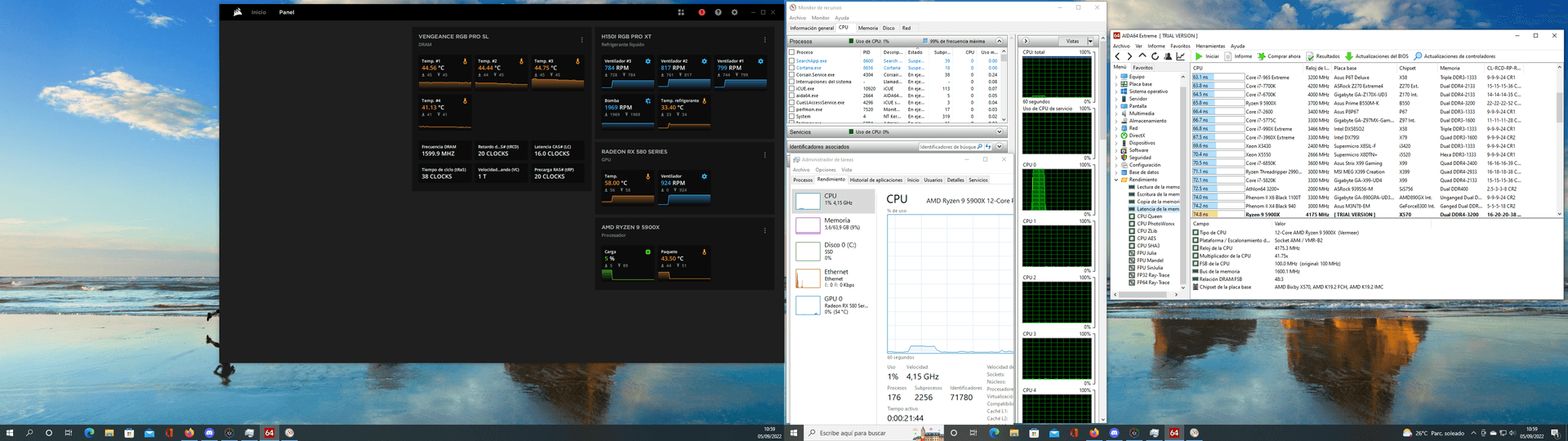
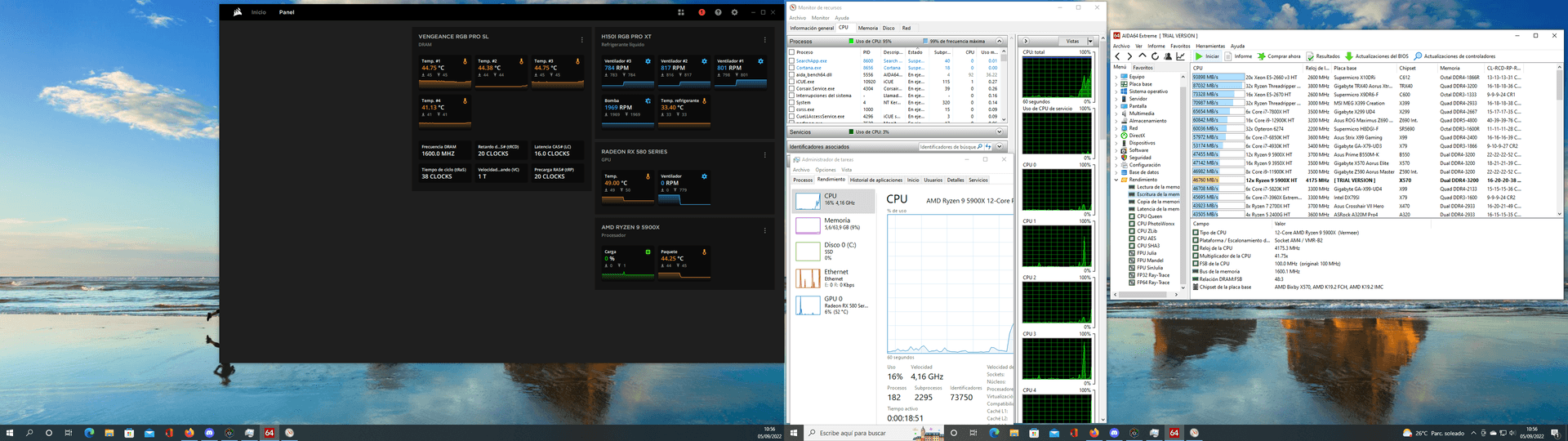
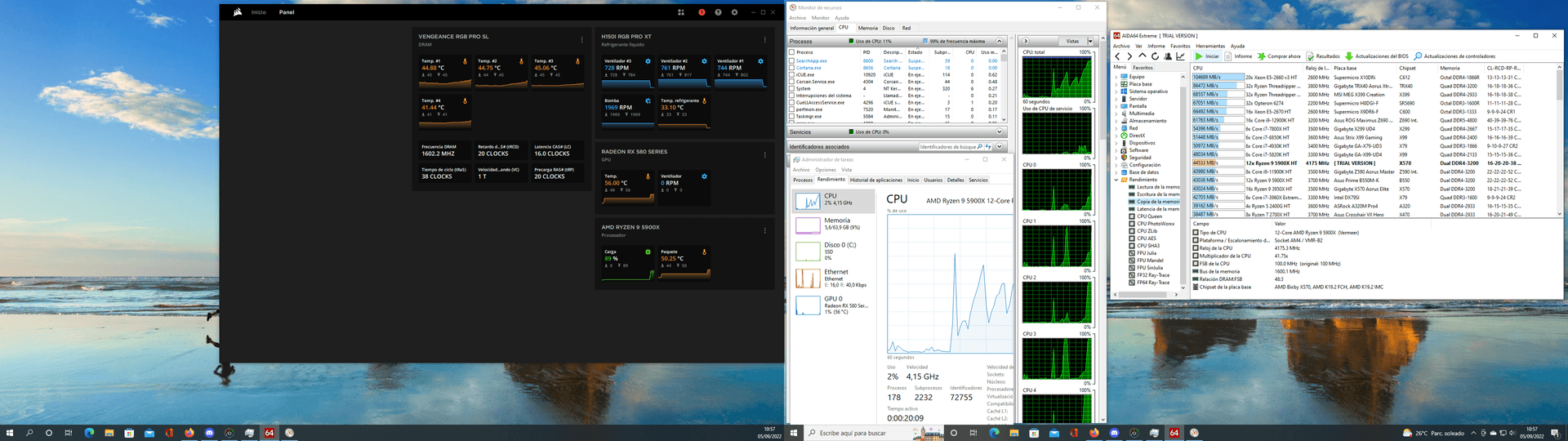
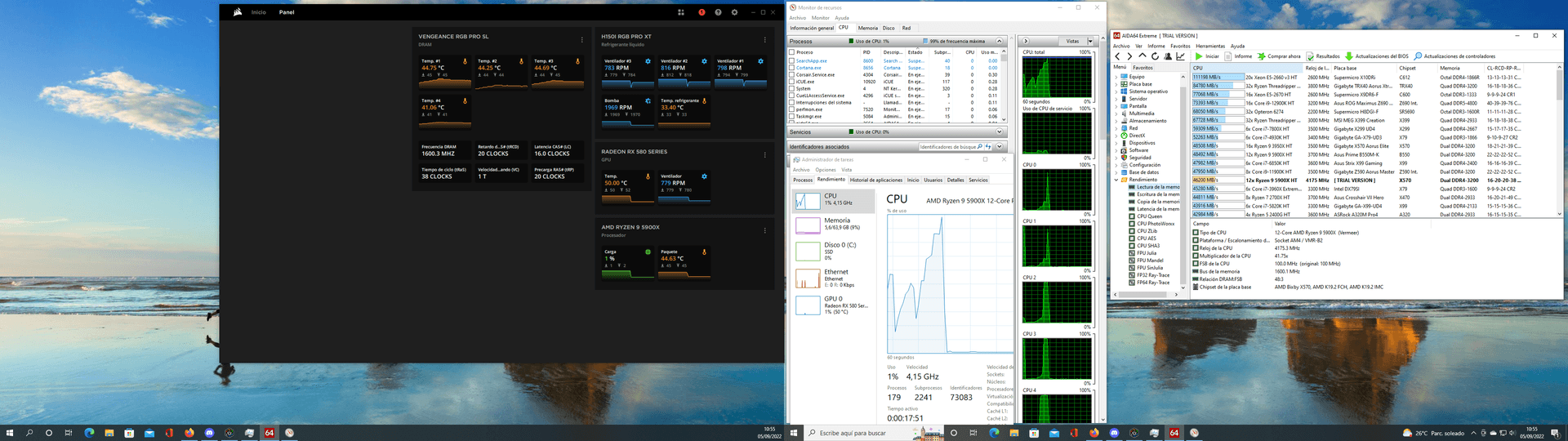
and it's done -
Alright alright.
hdtune? You show us that Raid0?
-
@defaultuser said in Mid-range gaming PC.:
Alright, alright.
hdtune? Will you show us that Raid0?
I ran it this afternoon.
The raid 0 seems to be set up incorrectly, so to compare, I'll have to reinstall everything and try with a single mn2.
As a curiosity, it goes up 2 points if I only have Aida 64 open.
And I can't run the tests all at once because it crashes.
The most curious thing is the latency, number 1 is DDR2
Best regards -
@clipper
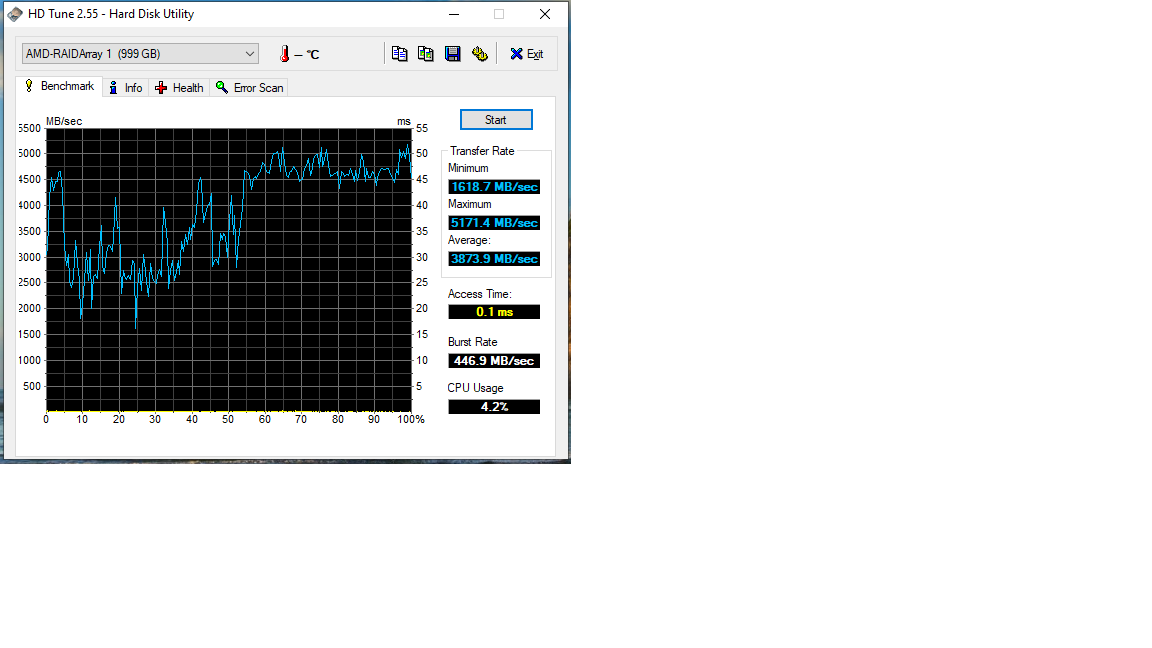
greetings -
@clipper The first M2 slot is controlled by the cpu, the other two by the chipset.
The chipset communicates with the cpu through a pcie x4 channel, in theory it has plenty of bandwidth, but response times will always be worse than in slot 1.A raid0 in the first two slots probably performs poorly, and I think that's what you've set up based on the results.
A raid0 in the chipset should increase the transfer, but we would have to see how much, and in any case with the speed that those disks already give....
In summary, setting up the raid0 in the chipset to have a secondary large disk without paying the prices of "large" disks maybe not, but increasing performance with a raid0 on this platform I don't see it, you will have to "settle" for the speeds of a single disk, which are already the best.
Now you are not really doing badly, but comparing prices, your two disks sold could even pay directly for the 1TB one, or you can have double disk and have system on one side and games on the other and things like that, that is, a disk in the first slot and in the chipset another or a raid.
-
@defaultuser said in Mid-range gaming PC.:
@clipper The first M2 slot is controlled by the CPU, the other two by the chipset.
The chipset communicates with the CPU through a PCIe x4 channel, in theory it has plenty of bandwidth, but response times will always be worse than in slot 1.A raid0 on the first two slots probably performs poorly, and I think that's what you've set up based on the results.
A raid0 on the chipset should increase transfer, but we'd have to see how much, and in any case with the speed that these disks already give...
In summary, setting up raid0 on the chipset to have a large secondary disk without paying the prices of "large" disks is maybe not the way to go, but I don't see an increase in performance with a raid0 on this platform. You'll have to "settle" for the speeds of a single disk, which are already top-notch.Now you're not actually doing badly, but comparing prices, your two disks sold could even directly pay for the same 1TB model, or you could have double the disk space with the system on one side and games on the other and things like that, that is, a disk in the first slot and another in the chipset or a raid.
I already said that the raid 0 is set up incorrectly.
For several reasons, the first one, that of course... With age one thinks they know everything and the manual is just filler
And indeed it's set up in ports 1 and 2.
On the other hand, whenever I've set up a raid (this is my first raid on mn2) it has never added the two or three capacities, it has always indicated one drive, for example two 500gb disks in raid 0 with a size of 500gb.
And this one shows 1 Tera.
And on the other hand, although it's something that never happens, the startup reminds me of mechanical disks, not slow... but the next thing.
So on Saturday if I have some time I'll disassemble the raid and try leaving only one mn2 in port 1 and do the test.
And then the two in ports 2/3 and compare.
Best regards -
@clipper said in Mid-high range gaming PC.:
I already said that the raid 0 is poorly assembled.
Estooo.... it seems like I can't get into the forum in such a hurry


Back in the day, Raid 0 with mechanical drives gave me a performance that was anything but good, and I didn't just throw in three drives willy-nilly, fond memories.
Well, if you end up trying raid0 on the chipset, it will be interesting to see the truth,.
@clipper said in Mid-high range gaming PC.:
On the other hand, whenever I've set up a raid (this is my first raid in mn2) it has never added up the two or three capacities, it has always indicated one drive to me, for example, two 500gb drives in raid 0 as 500gb.
And this one looks like it's 1 Tera.
The previous ones were software-based though.
I imagine it will be better that the drive is seen everywhere as just one, so you never have any issues with anything "strange" that you want to do with the software
With mechanical drives on the nforce4sli chipset, it used to show me one drive with the total capacity (you had to load the driver during the installation of Windows). I haven't seen what came after that. -
@clipper said in Mid-high range gaming PC.:
@defaultuser said in Mid-high range gaming PC.:
@clipper The first M2 slot is controlled by the CPU, the other two by the chipset.
The chipset communicates with the CPU through a PCIe x4 channel, in theory it has plenty of bandwidth, but response times will always be worse than in slot 1.A RAID0 on the first two slots probably performs poorly, and I think that's what you've set up based on the results.
A RAID0 on the chipset should increase the transfer, but we'd have to see how much, and in any case with the speed that these disks already give by themselves...
In summary, setting up RAID0 on the chipset to have a large secondary disk without paying the prices of "large" disks is maybe not the best idea, but I don't see how it would increase performance on this platform. You'll have to "settle" for the speeds of a single disk, which are already top-notch.
Now you're not actually doing badly, but comparing prices, your two disks sold could even directly pay for the same but 1TB, or you could have double the disk space with the system on one side and games on the other and things like that, that is, a disk in the first slot and another in the chipset or a RAID.
I already said that the RAID0 is set up incorrectly.
For several reasons, the first one, that of course... With age one thinks they know everything and the manual is just filler
And indeed it's set up in port 1 and 2.
On the other hand, whenever I've set up a RAID (this is my first RAID in MN2) it has never added the two or three capacities, it has always indicated one drive, for example two 500GB disks in RAID 0 with a size of 500GB.
And this one shows me 1 Tera.
And on the other hand, although it's something that never happens, the startup reminds me of mechanical disks, not slow... but the next thing.
So on Saturday if I have some time I'll disassemble the RAID and try to leave only one MN2 in port 1 and do the test.
And then the two in ports 2/3 and compare.
RegardsI already said that the RAID0 is set up incorrectly.
For several reasons, the first one, that of course... With age one thinks they know everything and the manual is just filler
And indeed it's set up in port 1 and 2.
On the other hand, whenever I've set up a RAID (this is my first RAID in MN2) it has never added the two or three capacities, it has always indicated one drive, for example two 500GB disks in RAID 0 with a size of 500GB.
And this one shows me 1 Tera.
And on the other hand, although it's something that never happens, the startup reminds me of mechanical disks, not slow... but the next thing.
So on Saturday if I have some time I'll disassemble the RAID and try to leave only one MN2 in port 1 and do the test.
And then the two in ports 2/3 and compare.
RegardsA RAID 0 is the sum of several disks, generally two are used. If you add two 500GB disks you will have a 1TB volume, that is, at the moment one of the disks dies, or you do something wrong to it, forget about the data. Advantage: the speeds of the disk are added, which greatly increases performance.
A RAID 1 (Mirror) is the opposite, the capacities are not added, if you have 2TB disks you have 2TB, only that the two disks are copies of each other and if one fails you have the other as a backup until you replace the damaged unit. The disadvantage is that the speed is marked by the slowest disk.
I just mention this as a note,
Regards!! -
@_neptunno_ you also have raid 0+1 and raid 5.
With these you can have concatenated raid just like in raid 0, but protected against a disk failure.Salu2.
-
@defaultuser said in Mid-range gaming PC.:
@_neptunno_ you also have raid 0+1 and raid 5.
With these you can have concatenated raid just like in raid 0, but protected against a disk failure.Salu2.
Si, only I have summarized
-
A question, if I physically disassembled the raid 0 and mounted it on ports 2 and 3, does it work or do I have to reinstall the OS?
Another question, I bought a key (legal) for W10 pro, theoretically it's an OEM for a single computer but... I get an activation error.
Any reliable website to get another one or should I go to Amazon (which didn't give me problems before, on the website I bought it from it does give me problems)
Regards -
@clipper in theory nothing should happen, I have messed around several times with Raid 0 and nothing happened to me... although in case of doubt make a backup if you have important data. But I swear that nothing should happen, the problem is if a disk is damaged since you lose half of the information.
About the Key, insist with the seller and if not use Amazon. But the reliable key pages are very well known if you see any video on Youtube about computer topics you will see the same websites.
Regards.
-
For unknown reasons the crystaldisk does not "see" the raid 0 and I can't pass the test.
Any ideas?
The W issue was resolved by buying a key for W11 pro.
But before installing it I would like to see the performance of the raid 0 and an m2 with only w10.
I prefer to leave W11 mounted on the raid 0 of 3 m2 (if the result does not convince me I will leave only one m2) -
@clipper It seems that CrystalDisk can't read the S.M.A.R.T. values of a disk array, but it can read them separately.
To see performance and health status with the Raid mounted, you need some specific Raid software, or you can also try with HDTune, which in theory allows you to run tests.
Regards
-
In theory, HD tune only allows you to do the read test.
Except in the paid version.
And with that, we are left halfway in serious tests...
Regards -
@clipper If I remember correctly, it does sequential reading and random operations, with that you may have enough to check if the raid improves more or less, you can extrapolate the writes based on the disparity that the disks already have between writing/reading, that shouldn't change.
Knowing the performance of the disks separately beforehand, hdtune is enough to know how much the raid yields in general.
If you want to do a more thorough analysis, look for a limited time demo or something like that, or if there is any freeware out there.
Ryzen 5 3600 - Tuf B550 pro - 2x 8g 3600c18 - Strix rtx 2060 - M2 1TB
-
@Clipper you are on the team of Hwot, could you pass a few benchmarks to improve the team's score. If I'm not mistaken, it's @krampak our captain
Cluster MPI de tres nodos formado por tres SERVIDORRES HP PROLIANT DL360P 1U 2X E5-2680V2 CPU'S, 20 cores, 40 hilos a una frecuencia base de 2,8GHz. 192 GB de memoria RAM DDR3 ECC (8 x módulos de16 GB 800Mhz)´+ 1U 2X E5.-2697 V2 a una frecuencia base de 2,8 Ghz 192 GB de Ram ECC (8 módulos de 16 Gb 800 mhz) 24 Cores 48 hilos ( 44c/88T)+ 1u 2xE5 2603v2 con una frecuencia base de 1,9ghz 64 Gb DDR3 ecc (4x módulos de 16)
-
That's done.
In a few days I'll upload it.

-
Mounted the RAID 0 of three mn2.
The results are...
Curious.
In a while I'll upload the screenshot.
Regards -
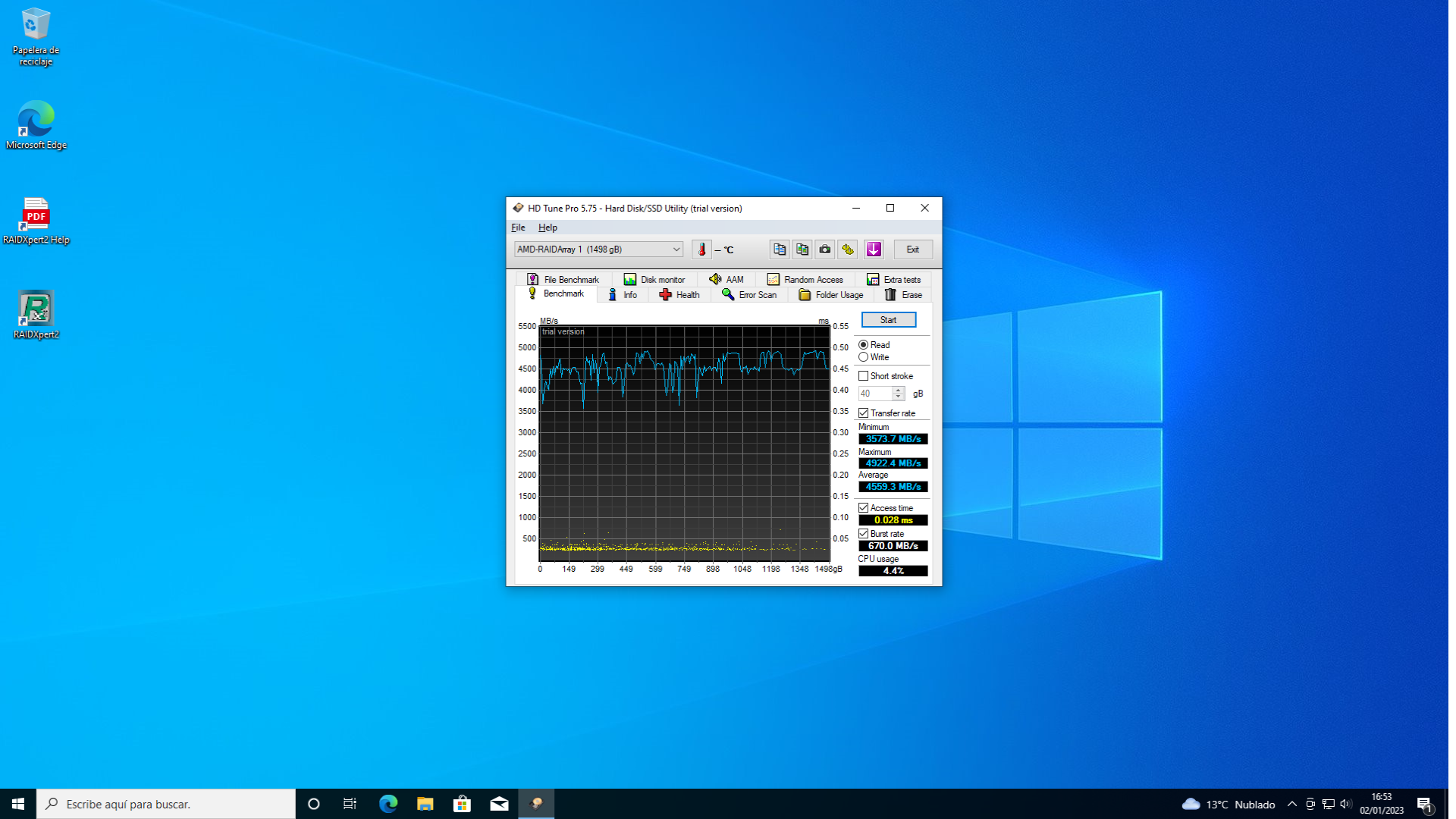
greetings




Hello! It looks like you're interested in this conversation, but you don't have an account yet.
Getting fed up of having to scroll through the same posts each visit? When you register for an account, you'll always come back to exactly where you were before, and choose to be notified of new replies (either via email, or push notification). You'll also be able to save bookmarks and upvote posts to show your appreciation to other community members.
With your input, this post could be even better 💗
Registrarse Conectarse