My PC won't turn on because of the temperature
-
Hello everyone, it's my first time in this forum and I don't understand how it works very well, but I'll try to learn, I have a problem with my pc and it won't start up, it turns off at around 70º, and I know this because the motherboard has a little screen that shows the cpu temperature, the thing is that I had this problem before but I managed to fix it by lowering the cpu voltage so it got less hot and didn't turn off anymore, but everything started last Saturday when I turned it off after playing valorant for a while, the problem started like that and it turned on but only up to the windows screen and then it turned off, because it got to 70º too quickly, and it turned off, now it's the same, only that it can't even turn on, I turn on the fan, put it on super low turbo mode, and wait a few moments for it to cool down and then I try to start it up, but it gets to 70º too easily, does anyone have the solution?
-
@chixz Hola y bienvenid@
It would be important to know what CPU it is, what motherboard it is on, what power supply it has, etc., so that we can get a more concrete idea and thus try to help you.
Saludos
-
@chixz
Does it have OC?
Air or liquid cooling
How long has the thermal paste been in?
To start, I would reset the BIOS to leave it as standard.
Then change the thermal paste and clean the heatsink or radiator, clean the fan blades.
Go into the BIOS and check that the values are correct: temperature and voltages.
Some F.A.s, for example, Corsair have software that tells you the voltages of the F.A.
70 degrees is not that much depending on the micro you have, but getting to 70 degrees at startup...
Smells like a cooling issue. Or a messed up F.A. that gives overvoltages.
Regards -
@clipper has no o.c and its heatsink is fin or finned (I can't remember the name) it's air cooled, I changed the thermal paste yesterday, it was arctic silver 5, it won't let me into the bios
 only a few seconds, it shuts down at 90-100 degrees I've checked it well, it's an atx x79t motherboard
 -
@chixz The board looks like LGA2011, but with a photo showing the board and the heatsink, we would save ourselves a lot of questions, and it would be easier to be able to help you.
Photos of the side of the power supply where the voltage value chart comes from are also very appreciated around here.
Salu2!
Intel i5 3570k / ASRock Z77 Extreme 4 / G.Skill F3-12800CL9D-8GBRL / Sapphire HD5850 / Samsung HD103UJ / TR TrueSpirit / NZXT Source 210 / OCZ ZS550W
Intel i5 4570 / ASRock H87 Pro 4 / 2x G.Skill F3-14900CL8-4GBXM / Samsung 850 EVO 250Gb + ST1000DM003 + ST2000DM003 + HGST HDS723020BLA642 + Maxtor 6V250F0 / CM Seidon 240M / Zalman MS800 / CM MWE 550
AMD Ryzen 7 1800X / B350 / 2x8GB Samsung DDR4-2400 CL17 / NVIDIA GTX 1070 8GB / SSD 120GB + ST4000DM004 + ST6000DM003 / EVGA Supernova 650 G2 -
@chixz
Bueno...
We've gone from a 70-degree safety shutdown to 90/ 100
Degrees
That's 20 degrees more after changing the thermal paste.
I take it for granted that you disassembled the heatsink, cleaned it just like the micro with isopropyl alcohol or normal alcohol and water paper and applied the new paste correctly.
And that the fan or fans are working properly.
(They spin high)If your CPU or M.B have integrated graphics and you have an "external" GPU, disconnect it.
Disconnect the hard drives, leave only one RAM module.
Try to start the pc.
Regards -
@chixz said in My pc won't turn on because of the temperature:
Hello everyone, it's my first time in this forum and I don't understand how it works very well, but I'll try to learn, I have a problem
Hello, welcome, the first and most important thing is the basic information that you must publish, otherwise we won't be able to help you, or it will be very complicated and overwhelming.
1. Specify the exact model of the motherboard, CPU and graphics card, normally all the data is better, but in this case, at least CPU, motherboard and graphics card. If you know the power and model of the power supply, better, we may end up asking you for more data, but at least those.
2. Because of the problem you mention, we would also like to know what temperatures you had before (at rest and also at maximum use) what heatsink you use and how many years you have been using that equipment for gaming or heavy tasks.
Publish that data and we'll talk.
Salu2.Ryzen 5 3600 - Tuf B550 pro - 2x 8g 3600c18 - Strix rtx 2060 - M2 1TB
-
If after changing the thermal paste the temperature went up more, I dare to say that the problem comes because one of the 4 heat sink mounts were not fixed correctly. It has happened to me a couple of times, as there are 4 attachment points, the moment one is not well anchored the pressure falls on the other 3 points, so the heat sink does not make good contact and things can get very hot. That's what the Intel system has
 The best thing is to remove it again, check the mounting system and reapply the thermal paste, try not to apply a lot of it just enough.
On the other hand, be careful when lowering the CPU voltage too much, it is true that it can lower the temperature but if you overdo it you can generate instability when using the PC, especially when more CPU usage is required.
Greetings!!
-
Is this motherboard?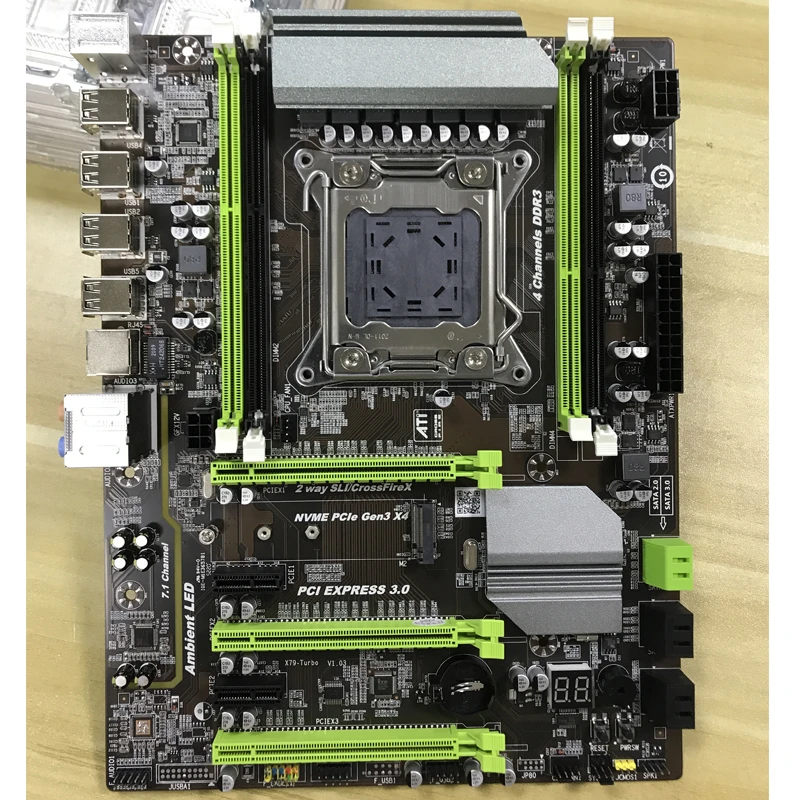
Ryzen 5 3600 - Tuf B550 pro - 2x 8g 3600c18 - Strix rtx 2060 - M2 1TB
-
@defaultuser That plate is spotless. As the colleagues rightly say, default bios. Clean the thermal paste from the cpu and the heatsink well, and in the process, remove all the dust that is there. After having done everything that has been commented on, add a grain of thermal paste and spread it over the cpu. With great care not to stain anything, anchor the heatsink and put the heatsink fans. In full load 70 degrees is not much. But as they also say, if you don't mention all the components, we can do little.
Cluster MPI de tres nodos formado por tres SERVIDORRES HP PROLIANT DL360P 1U 2X E5-2680V2 CPU'S, 20 cores, 40 hilos a una frecuencia base de 2,8GHz. 192 GB de memoria RAM DDR3 ECC (8 x módulos de16 GB 800Mhz)´+ 1U 2X E5.-2697 V2 a una frecuencia base de 2,8 Ghz 192 GB de Ram ECC (8 módulos de 16 Gb 800 mhz) 24 Cores 48 hilos ( 44c/88T)+ 1u 2xE5 2603v2 con una frecuencia base de 1,9ghz 64 Gb DDR3 ecc (4x módulos de 16)
-
@defaultuser that is, forgive me if I don't respond it's that I try to check the forum in my free time which is when I go by public transport and sometimes I can't concentrate
-
@defaultuser before there was no temperature measurement but I guess it's between 34-37 degrees at rest and up to about 40 playing, I've been using the pc for a year to play and for about 4 months I've had this problem
-
@chixz said in My pc won't turn on because of the temperature:
I didn't measure the temperature before, but I guess it's between 34-37 degrees at rest and up to about 40 playing
How do you guess that? Unless you're Charles Xavier, that doesn't count.

Have you already checked what your colleagues are saying? Please report back to us.
What heatsink are you using? Take a picture and upload it to the post, and tell us what micro you're using. If you don't know, it's on your IHS plate. If necessary, disassemble the heatsink to check it, and in the process, follow the steps you've been told and check the heatsink mounts properly.
Also check that the CPU is correctly installed in the socket. Use a lot of light.
If you're using artic silver 5, it could happen that you've pushed the CPU back a bit when removing the heatsink -
@clipper lights up perfectly like this
-
@jordiqui said in My pc won't turn on because of the temperature:
@defaultuser That board is spotless.
It looks like the photo is from the store
@jordiqui said in My pc won't turn on because of the temperature:
In full loaded 70 degrees is not much. But as they also say, if you don't say all the components we can do little.
We don't know anything, 70º for example in the bios just starting up, it's a pc that's going to blow. Just to give an example.
On the other hand, the micros of that socket I think are all at tjmax 100º or maybe 90º, it doesn't shut down at 70º, it's seen to drop sharply and reach much more degrees in a blink, from the looks of it it's not dissipating a thing, or it's getting a huge amount of voltage
-
@fassou
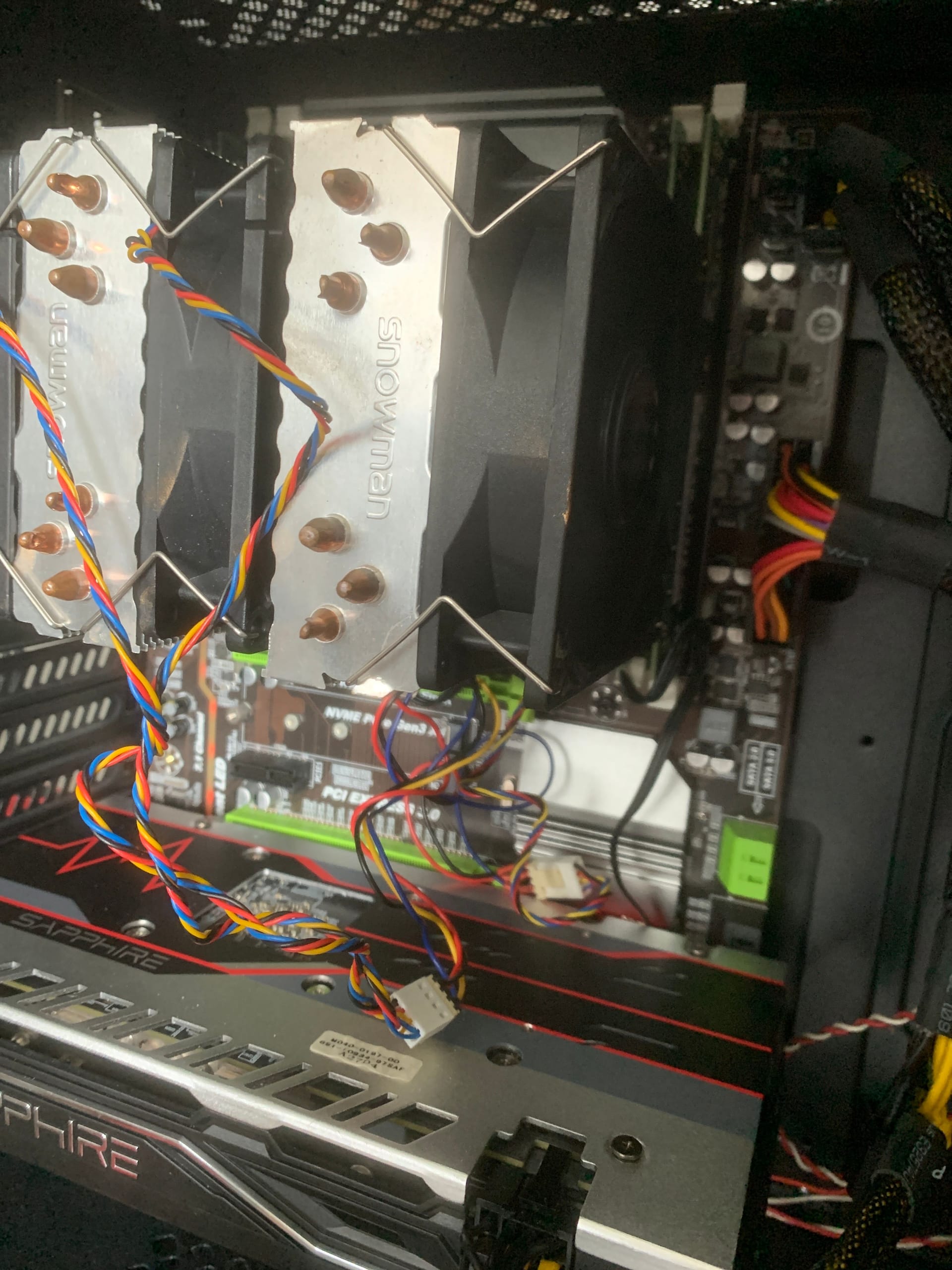 this is the pc, I hope it helps you, I mean I guess because once I had those temperatures and the pc stayed on even I could play, I will follow all your advice and I will post the results
 -
@chixz Well, thanks for the photo, but can you put more, so that it can be seen that it has ventilation all over.
.
Remember first of all to put the bios in its default state and try, to rule out that it has some bad setting, although you have not done overclocking start there.
Since you can't enter the bios to select the default configuration, you will have to reset it, it is done with the equipment turned off and disconnected from the power, and you bridge for a moment two pins of the board that say clr_cmos or clr_rtc (look it up in the manual).The second thing is to check thoroughly the mounting of the heatsink and the mounting of the cpu in its socket, the anchors and their correct and firm hold and that it is not twisted etc etc etc.
that there is no particle in the union or any tiny damage on the contact surfaces etc etc etc. Look at it well and calmly, and with good light.Above the cpu is the VRM circuit with its heatsink capacitors etc. Check it visually very thoroughly (VRM heatsink loose or broken, capacitors swollen, signs of burn or heat that has left marks or change of tonality, or any exploded or missing component, if you manipulated a lot you can also have jumped some micro capacitor.
Behind all this and if everything was perfect then I would go to borrow a heatsink to rule out that one or several heatpipes in yours have been emptied.
Review in your memory all the operations you did before on the pc, when this problem started, what things you touched what you changed etc etc etc.
according to the more info you give us we can help you more.
Regards.
P.D.: as soon as you take off the heatsink and clean the paste, take a photo of the cpu that clearly shows the inscription, save it and put here the photo very important. And photos of the fans that the tower has. -
Re: My PC won't turn on because of the temperature guys the PC is an intel Xeon e5 2690, it has a Radeon R9 580x graphics card and an x79t 2011 motherboard with 4 modules of 8gb of ram, an APEVIA 800watt power supply, an nvmm ssd drive, and a 3 fan heatsink with arctic silver 5 thermal paste.
I did what you suggested and the temperature dropped from 70 at startup to about 40-50 degrees! But when it turns on the graphics card jumps to 90 degrees and turns off after 2 seconds, that's the situation
Did you open a new thread? Put it here better than we're already underway with the topic.
So does anything boot now? when you enter Windows you should monitor all the operating parameters, CPU usage, frequency, temperatures at all times etc, in order to figure out what's strange, to get more info and observe what's happening.
You should have it set up to boot with Windows, the program for monitoring temperatures voltages and frequencies, task manager, and everything that can provide information about the behavior.Another thing, if it boots now, then go into bios and disable the boost modes for the micro, or simply set a much lower speed manually, so it will heat up less and you'll have plenty of margin to analyze the problem.
Ryzen 5 3600 - Tuf B550 pro - 2x 8g 3600c18 - Strix rtx 2060 - M2 1TB
-
@chixz resetea la GPU y cambia la pasta térmica.
Saludos -
@defaultuser in the message where you quote me indicates that as I told you, with only one RAM module and using the integrated GPU it starts up without any problems.
So I point to the GPU for another comment that you have made.
Regards





Hello! It looks like you're interested in this conversation, but you don't have an account yet.
Getting fed up of having to scroll through the same posts each visit? When you register for an account, you'll always come back to exactly where you were before, and choose to be notified of new replies (either via email, or push notification). You'll also be able to save bookmarks and upvote posts to show your appreciation to other community members.
With your input, this post could be even better 💗
Registrarse Conectarse