Help HP ProLiant DL360 Gen8 server
-
Good afternoon, I hope someone can help me. I have an HP ProLiant DL360 Gen8 server with a RAID 5. A few days ago, one of the disks' light turned on amber permanently. I replaced that SSD and now the light is amber permanently with another green light surrounding the amber one, moving in circles. This has been going on for 11 days. I don't have the IP of the ILO to connect to it and check the array, and I can't restart or stop it to see the IP of the ILO. Do you know if there is a way to find out the IP of the ILO or access the server directly to see the IP of the ILO or check the array to see why it doesn't accept the new SSD?
-
@manolo681 said in Help hp proliant dl360 gen8 server:
Good afternoon, I hope someone can help me, I have an hp proliant dl360 gen8 server, it has a raid 5. A few days ago, one of the disks' light turned amber solid, I changed that ssd and the light is now amber solid and another light is green surrounding the amber, making circles, like this for 11 days, I don't have the ilo ip to connect to it to see the array, and I can't restart or stop it to see the ilo ip. Do you know if there is any way to find out the ilo ip or accessing directly to the server to see the ilo ip or see the array to know why it doesn't accept the new ssd?
If I'm not mistaken, the light issue is because one of the drivers for the storage controller is not genuine hp, because that's how I have it and I understand that it's for that reason. Regarding the ilo ip, as it is necessary to have a license to work with that software, the best thing is to ask hpe support with your user account.
"The server is preconfigured with a default static IP address to access iLO (192.168.0.120). The default iLO username and password are on the tab on the back of the chassis. The username is Administrator and the password is an eight-character alphanumeric string."
From HPECluster MPI de tres nodos formado por tres SERVIDORRES HP PROLIANT DL360P 1U 2X E5-2680V2 CPU'S, 20 cores, 40 hilos a una frecuencia base de 2,8GHz. 192 GB de memoria RAM DDR3 ECC (8 x módulos de16 GB 800Mhz)´+ 1U 2X E5.-2697 V2 a una frecuencia base de 2,8 Ghz 192 GB de Ram ECC (8 módulos de 16 Gb 800 mhz) 24 Cores 48 hilos ( 44c/88T)+ 1u 2xE5 2603v2 con una frecuencia base de 1,9ghz 64 Gb DDR3 ecc (4x módulos de 16)
-
@jordiqui Thanks for your reply, regarding the light, it's that a hard drive was damaged from the raid 5, I have changed it but it has been 10 days and it says interim recovery, I don't know if it is recovering the raid 5 or if something is wrong.
-
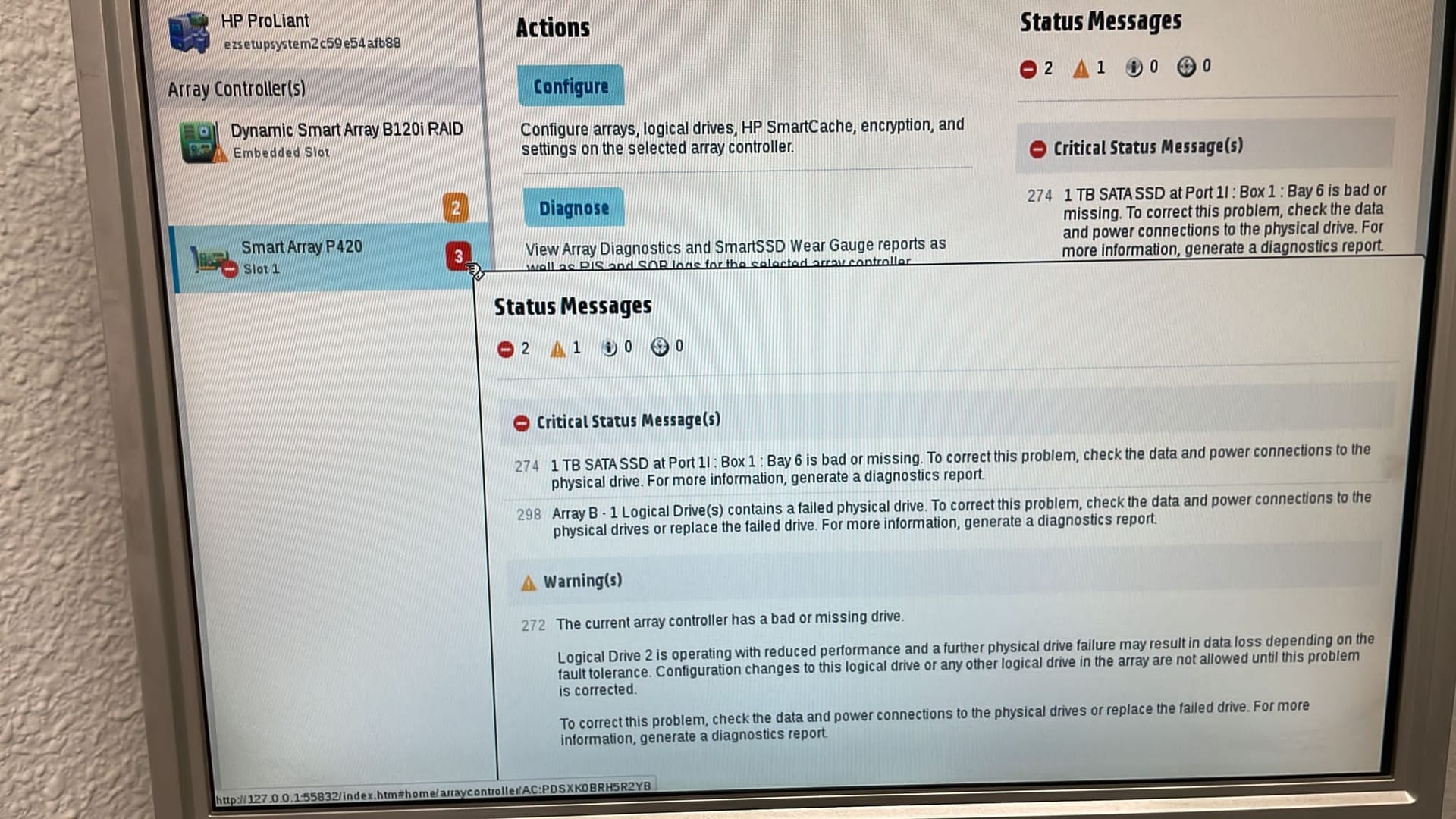 , this is what it says
 -
@manolo681 Has followed the correct process of disk replacement in the array?
-
@defaultuser , not only have I replaced a disk, what is the correct sequence?
-
@manolo681 as far as I know, you need to first enter the array config to formalize in the software that drive replacement, so that the system integrates the new disk, but I am not an expert on the subject, make sure to check the manuals or the HP website for your specific case, that is, for that controller.
Ryzen 5 3600 - Tuf B550 pro - 2x 8g 3600c18 - Strix rtx 2060 - M2 1TB
-
@defaultuser muchas gracias
-
@manolo681 said in Help hp proliant dl360 gen8 server:
@jordiqui Thanks for your reply, regarding the light, it's that a hard drive broke from the raid 5, I've changed it but it's been 10 days and it says interim recovery, I don't know if it's recovering the raid 5 or if something is wrong.
Hello, after reading and replying to you, I remembered that you have the opportunity to try HPE software for free for a while, namely, one month. I don't remember. First of all, they have their operating system and then you have linux or windows (the drivers are always for server versions), but what I'm getting at, there is a software that is crucial for these servers in this brand that is the HPE System Management Homepage that you log in from localhost and you can do quite a few things:
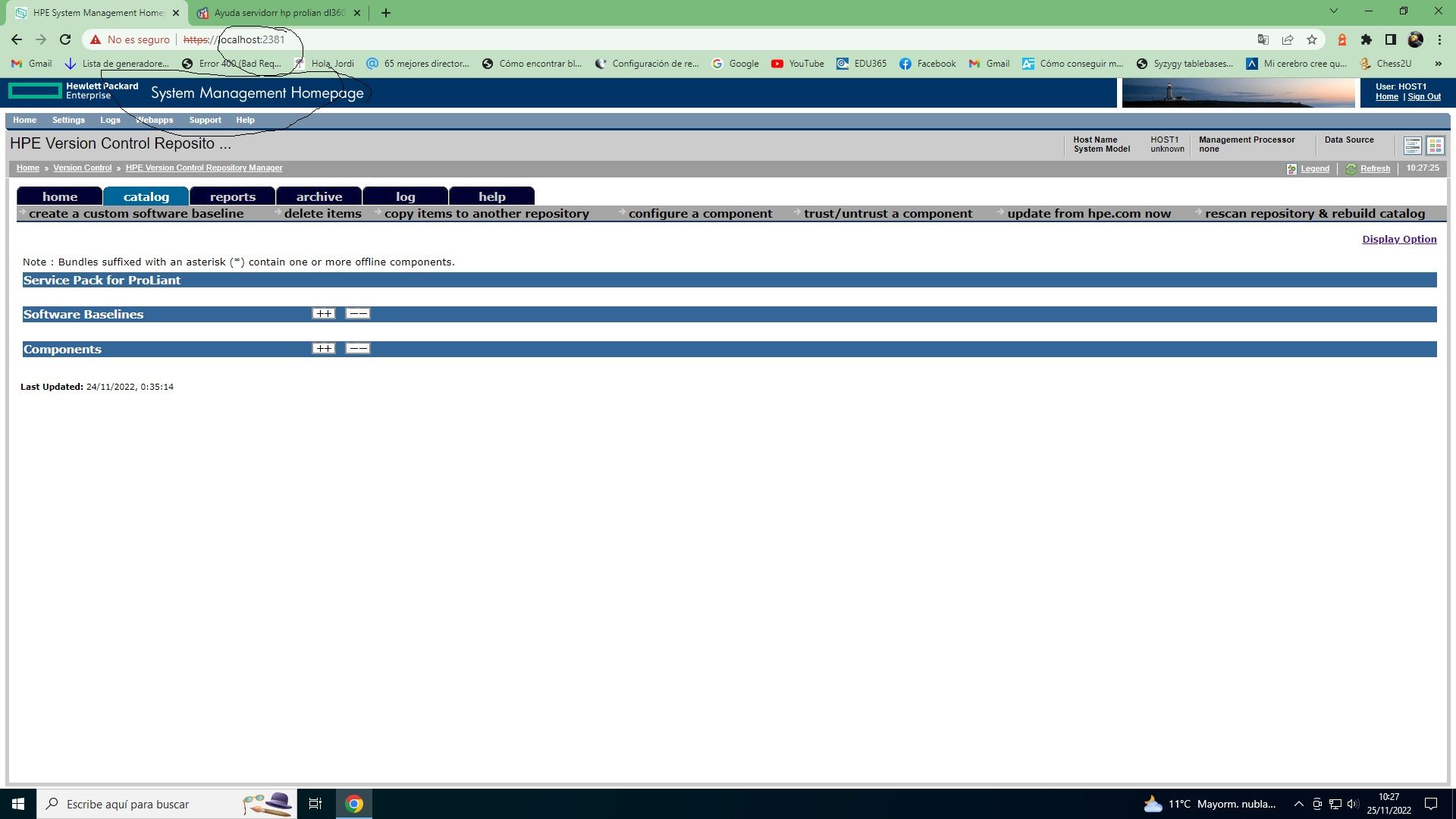
Go to HPE and create an account if you haven't already.
And from your portal you will have access (reduced not complete) to the necessary downloads including the latest firmware. Regarding the Raid 5, if I remember correctly, three or more disks were needed (if there are two, the 5 is in case one fails, the other continues) the forum members can help you more, as they have it on hand. Look at this HPE option and create an account because as you can see in the screenshot I am logged in through localhost, and because my browser is not compatible, I can't do anything, but if you have a compatible browser, it will surely help you improve or fix, install what you need. But the fact that you can't restart the server, I think it's complicated that you can solve anything (with access to ILO you can solve some events), since any update requires restarting the server. You will let us know if you have been able to solve the problem (I have solved several times problems with the disks, by deleting the arrays created, which implies the loss of data, and creating the logical units, then creating the array.
Best regards.Cluster MPI de tres nodos formado por tres SERVIDORRES HP PROLIANT DL360P 1U 2X E5-2680V2 CPU'S, 20 cores, 40 hilos a una frecuencia base de 2,8GHz. 192 GB de memoria RAM DDR3 ECC (8 x módulos de16 GB 800Mhz)´+ 1U 2X E5.-2697 V2 a una frecuencia base de 2,8 Ghz 192 GB de Ram ECC (8 módulos de 16 Gb 800 mhz) 24 Cores 48 hilos ( 44c/88T)+ 1u 2xE5 2603v2 con una frecuencia base de 1,9ghz 64 Gb DDR3 ecc (4x módulos de 16)
-
@defaultuser That's right. You have to go into the array, there's no other way. But as you rightly say, HPE support has tutorials and the necessary software for it.
Cluster MPI de tres nodos formado por tres SERVIDORRES HP PROLIANT DL360P 1U 2X E5-2680V2 CPU'S, 20 cores, 40 hilos a una frecuencia base de 2,8GHz. 192 GB de memoria RAM DDR3 ECC (8 x módulos de16 GB 800Mhz)´+ 1U 2X E5.-2697 V2 a una frecuencia base de 2,8 Ghz 192 GB de Ram ECC (8 módulos de 16 Gb 800 mhz) 24 Cores 48 hilos ( 44c/88T)+ 1u 2xE5 2603v2 con una frecuencia base de 1,9ghz 64 Gb DDR3 ecc (4x módulos de 16)
-
@jordiqui vale voy a probar, muchas gracias
-
@manolo681 said in Help server hp proliant dl360 gen8:
, this is what it saysIt seems that the disk has problems. Can you take a picture to see in which slot you have placed it?
Cluster MPI de tres nodos formado por tres SERVIDORRES HP PROLIANT DL360P 1U 2X E5-2680V2 CPU'S, 20 cores, 40 hilos a una frecuencia base de 2,8GHz. 192 GB de memoria RAM DDR3 ECC (8 x módulos de16 GB 800Mhz)´+ 1U 2X E5.-2697 V2 a una frecuencia base de 2,8 Ghz 192 GB de Ram ECC (8 módulos de 16 Gb 800 mhz) 24 Cores 48 hilos ( 44c/88T)+ 1u 2xE5 2603v2 con una frecuencia base de 1,9ghz 64 Gb DDR3 ecc (4x módulos de 16)
-
@jordiqui could be due to nothing more than a blank disk being inserted, and the disk that the array expects to find as part of the array is not there, and that it is considered as damaged or missing. If we tell the array that we are inserting a new disk, then it will not search for the disk that is part of the array and will start a process to integrate a new empty disk.
It could also be some kind of disk incompatibility, already open to options, or something else might be happening, but that would be more unlikely with the information we have.The first thing is to know the system before sentencing possible failures, there is a lack of checks and clarification of the situation, let's see what he tells us, or what he posts more info.
Salu2.
-
@defaultuser said in Help server hp proliant dl360 gen8:
@jordiqui it could be simply because a blank disk has been inserted, and the disk that the array expects to find as part of the array is not there, and that it is considered as damaged or missing. If we tell the array that we are inserting a new disk, then it will not search for the disk that is part of the array and will start a process to integrate a new empty disk.
It could also be some kind of disk incompatibility, already open to options, or maybe something else is happening, but that would be more unlikely with the information we have.The first thing is to know the system before sentencing possible failures, the compa is missing some checks and to clarify the situation, let's see what he tells us, or if he posts more info.
Salu2.
True, we don't know what system he has installed.
Cluster MPI de tres nodos formado por tres SERVIDORRES HP PROLIANT DL360P 1U 2X E5-2680V2 CPU'S, 20 cores, 40 hilos a una frecuencia base de 2,8GHz. 192 GB de memoria RAM DDR3 ECC (8 x módulos de16 GB 800Mhz)´+ 1U 2X E5.-2697 V2 a una frecuencia base de 2,8 Ghz 192 GB de Ram ECC (8 módulos de 16 Gb 800 mhz) 24 Cores 48 hilos ( 44c/88T)+ 1u 2xE5 2603v2 con una frecuencia base de 1,9ghz 64 Gb DDR3 ecc (4x módulos de 16)
-
I'm going around this topic because something similar happened to me, I think I mentioned it, if not I'll do it now, and it's that no disk was recognized at all. The problem was that on the one hand the controller was not well anchored and on the other, the battery had fallen out, but with such bad luck that it made contact and let it start. Then, having solved these things, I went ahead, deleting the arrays, seeing what logical units there are, if not, create raid 0, 5, whatever is necessary and create the array. Once this was done, if you don't have the hpe operating system and its drivers installed, I think that red light will stay like that. The important thing is that it recognizes the logical units and without errors. Check that the cable that goes from the controller to the battery of the hard drive slots is well connected, as well as the other connectors that are there. If you can format that hard drive on another pc, I think that then you install it on the server and if the unit has no errors, it should recognize it, but as you have been told, you have to add it to the array. Now I can't restart it, but I would make a video entering with f10 so you can see how I have it. @krampak apart from being an exceptional cyclist, he's a great guy with the server thing, he can surely help you along with the rest of the users who touch the topic. Unfortunately, I know just enough about this to get by,
Cluster MPI de tres nodos formado por tres SERVIDORRES HP PROLIANT DL360P 1U 2X E5-2680V2 CPU'S, 20 cores, 40 hilos a una frecuencia base de 2,8GHz. 192 GB de memoria RAM DDR3 ECC (8 x módulos de16 GB 800Mhz)´+ 1U 2X E5.-2697 V2 a una frecuencia base de 2,8 Ghz 192 GB de Ram ECC (8 módulos de 16 Gb 800 mhz) 24 Cores 48 hilos ( 44c/88T)+ 1u 2xE5 2603v2 con una frecuencia base de 1,9ghz 64 Gb DDR3 ecc (4x módulos de 16)
-
Now I see this branch. Just today I changed 1 disk in a Proliant ML360 G10 from a RAID5 and the process is not complicated at all. It is to remove the affected disk (you can identify it through the status LEDs), put in the new one and the controller itself detects the replacement and starts the reconstruction automatically, which depending on the size of the disks and especially of the controller (if it has cache or not) can last more or less.
From the capture you share, it looks like the new disk has not been detected, or it is not properly plugged in or it is defective. Can you confirm if the disk in bay 6 corresponds to the one replaced?
-
@krampak said in Help hp proliant dl360 gen8 server:
Now I see this branch. Just today I changed 1 disk in a Proliant ML360 G10 from a RAID5 and the process is not complicated at all. It's about removing the affected disk (you can identify it through the status LEDs), putting in the new one and the controller itself detects the replacement and starts the reconstruction automatically, which depending on the size of the disks and especially the controller (whether it has cache or not) can take more or less time.
From the screenshot you share, it looks like the new disk hasn't been detected, or it's not properly plugged in or it's faulty. Can you confirm if the disk in bay 6 corresponds to the one replaced?
@krampak for the array to reconfigure I imagine the system and drivers have to be the ones HPE provides with these machines, right? Because if you install Windows 10 for example, I understand it won't be the same or will it?
Cluster MPI de tres nodos formado por tres SERVIDORRES HP PROLIANT DL360P 1U 2X E5-2680V2 CPU'S, 20 cores, 40 hilos a una frecuencia base de 2,8GHz. 192 GB de memoria RAM DDR3 ECC (8 x módulos de16 GB 800Mhz)´+ 1U 2X E5.-2697 V2 a una frecuencia base de 2,8 Ghz 192 GB de Ram ECC (8 módulos de 16 Gb 800 mhz) 24 Cores 48 hilos ( 44c/88T)+ 1u 2xE5 2603v2 con una frecuencia base de 1,9ghz 64 Gb DDR3 ecc (4x módulos de 16)
-
@krampak said in Help hp proliant dl360 gen8 server:
... and the controller itself detects the replacement and starts the reconstruction automatically, which depending on the size of the disks and especially of the controller (whether it has cache or not) can take more or less time.
In this case it will take very little time, it has it mounted with SSD disks.
Let's see if now that you are here we have a little feedback from @manolo681 and we discover something.
-
@jordiqui you don't need to access the operating system to do all this. You enter with F10 in the Intelligent Provisioning (IP) and there you have the smart storage administrator (SSA). The only thing that can give you a hard time is if you made any changes to the RAID configuration from Windows with a newer version of the HP SSA than the one integrated into the IP, then it will tell you that it can't and you have no choice but to download the updated ISO for the IP that updates the version of the program. The good thing is that from the ILO you can mount a virtual DVD through an ISO that you have on the PC and you save yourself the trouble of preparing a pendrive or going physically to the server, at least in ILO5 and with the HTML5 remote console.
@defaultuser my 480GB SSD disks take about 20-25 minutes, so I imagine that yours of 1TB will have it in a maximum of 1 hour (if it finds the problem).
-
@alesmariabelen said in Help hp proliant dl360 gen8 server:
@jordiqui an interesting assumption. by the way, this could be true an interesting assumption.
@alesmariabelen What assumption is interesting?
Toda la actualidad en la portada de Hardlimit
Mis cacharros




Hello! It looks like you're interested in this conversation, but you don't have an account yet.
Getting fed up of having to scroll through the same posts each visit? When you register for an account, you'll always come back to exactly where you were before, and choose to be notified of new replies (either via email, or push notification). You'll also be able to save bookmarks and upvote posts to show your appreciation to other community members.
With your input, this post could be even better 💗
Registrarse Conectarse