Problem with the DNI reader
-
I downloaded the ActiveX for DNI for PC environment, but it's a Dell file I don't know how to install it can you help me, and by the way I had deleted the Chrome certificates and when I reinstalled everything again Chrome still doesn't have certificates.
-
@defaultuser said in Problem with DNI reader:
@cinusara said in Problem with DNI reader:
...and I've uninstalled and cleaned everything again and again, and deleted the certificates I had in Chrome, which is the browser I use the most...
I just don't know what else I can do@fassou said in Problem with DNI reader:
-Use Microsoft Edge (the current one, based on Chrome)
@cinusara said in Problem with DNI reader:
I've tried that too and it doesn't work for me either
@cinusara said in Problem with DNI reader:
and by the way I had deleted the Chrome certificates and when I reinstalled everything again Chrome still has no certificates
Still Chrome?
@cinusara said in Problem with DNI reader:
can you help me
call it intuition or whatever you want, but maybe it's best that you rest and try again tomorrow when you're more clear-headed...
-
Ok Thanks.
-
@cinusara said in Problem with DNI reader:
I have downloaded the active x for DNI for PC environment, but it is a Dell file I do not know how to install it can you help me
It is a DLL file not DELL
The instructions on the same page where it is downloaded: -
Hello everyone
I have done it as you told me and opened cmd as administrator and with this command
cd c:\\windows\\regsvr32x ActiveXDNIe_x64.dll
but it says access denied
why can't I, you have to forgive me I am a little older and sometimes it gets complicated for me.
thanks -
@cinusara Try this:
C:\\Windows\\System32\\regsvr32 <ActiveXDNIe_x64.dll>
Remember that first the file ActiveXDNIe_x64.dll must be inside the folder C:\\Windows\\System32
-
@defaultuser In a hypothetical process of starting from scratch, you would also have to uninstall the update(s) related to the DNI in Windows Update
-
Hello again.
I have done well as you have told me but nothing, I continue with the same problem, it does not recognize the DNI.
Looking for information on all the sites and there is one that says to install java, can you inform me if java is necessary, and in case of uninstalling the DNI updates how would I do it
Thanks again -
@cinusara As I told you, I don't know the whole process, but I've looked it up on Google "check if the dnie works" and I found more detailed instructions
-
@cinusara said in Problem with DNI reader:
in case of uninstalling the DNI updates how would I do it
-
Hello, well I have done everything and for double what you have recommended and it still does not work.
Well I don't know what to do anymore, but one last question before I give up, if I have Windows 10 Pro x64 would it be necessary to have Java installed, on the police page it says yes but they are very old and only up to Windows Vista.
In Windows 10 would it be necessary
thanks -
@cinusara said in Problem with DNI reader:
if I have windows 10 pro x64 would it be necessary to have java installed, on the police page it says yes but they are very old and only up to windows vista
Which ones are very old? The pages? I don't understand.
The truth is that the instructions leave much to be desired when they are supposed to be for the general public, even in the eyes of someone with a little more idea it seems like they were made very reluctantly, and it leaves me perplexed being a national project.If the clarifying information is messed up by the rest of the web, in the tax office and in a thousand places:
"...To install certificates in the Java store instead of in the browser's store the steps to follow are:..."
This is from https://www.viafirma.com/faq/es/instrucciones-para-instalar-certificados-en-el-almacen-de-java-en-windows/
And it turns out that java is another alternative option to the browser for storing certificates, and surely on the dnie website they make a mess that you don't know what they are talking about at each moment -
Come on, with the certificates in the browser you don't need Java...
-
Well, I'm looking in Chrome, in security and managing certificates on the personal screen, I don't have any certificates. I've tried importing them from the DNI installation software and they don't appear in the personal tab, why??
-
@fassou ¿de cual versión es tu DNIe?
Ryzen 5 3600 - Tuf B550 pro - 2x 8g 3600c18 - Strix rtx 2060 - M2 1TB
-
Is it possible that the DNI certificate has expired? I had no idea that they expired until I went to use it a couple of years ago to submit an application, I bought a reader and there was no way it would work. I found out that the certificates expire every two years, so you should go to a police station to check, in principle if it is a recent DNI (or I don't know what specific model) you could update it in a kind of machine by yourself, but if not you should make an appointment for them to do it for you.
I tell you this in case this is the problem... mostly because no matter how many readers you use, if the certificate has expired you won't be able to do anything.
Regards!!
-
the DNI is up to date when the reader did not read it, I went to the police to renew the certificates a week ago, I do not know what version it is, but it must be updated
-
@defaultuser I now have the 3.0 as I suppose most do, but before I had the first DNIe (the top two in the photo).
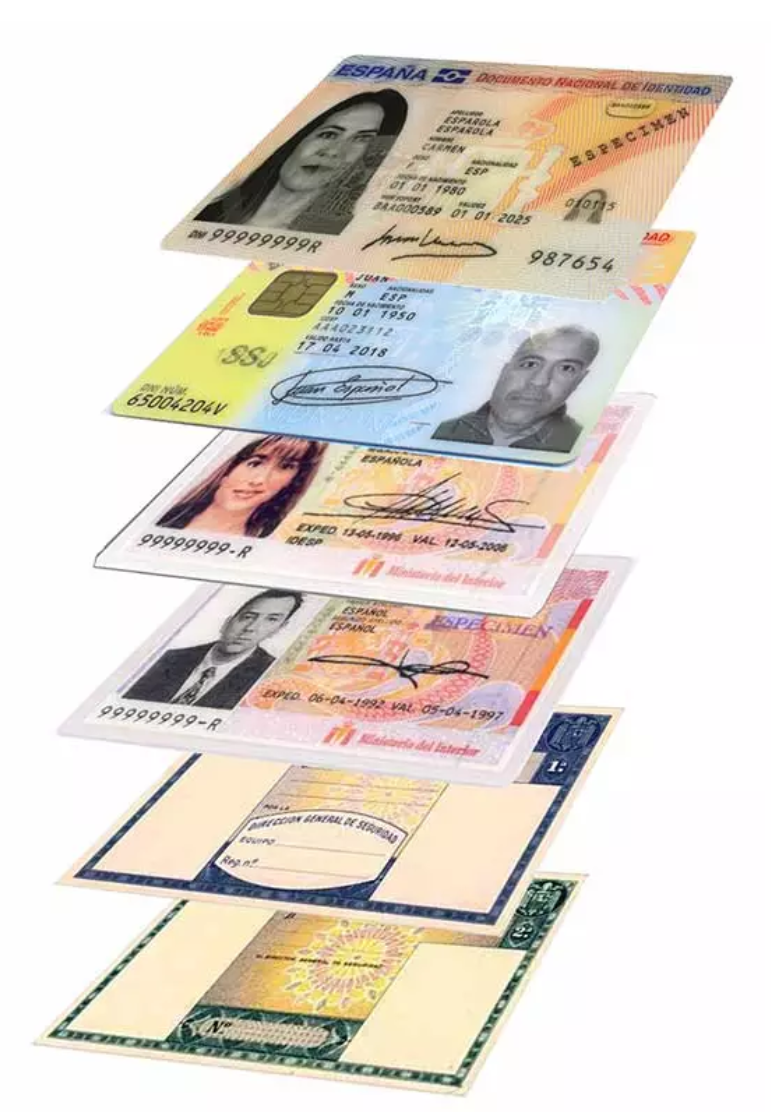
And I have used both without any problem with the same reader, with the known limitations that I talk about above, as a way of advice to use it easily (original and updated Windows 10 / W11, and connect the Smart Card reader a few seconds before opening Microsoft Edge, so that it is configured, a matter of drivers that Windows itself already has and so on).
Simply using another browser, or using it on another OS that is not Windows, requires extra effort and configuration, or it may make the task impossible.
Salu2!
Intel i5 3570k / ASRock Z77 Extreme 4 / G.Skill F3-12800CL9D-8GBRL / Sapphire HD5850 / Samsung HD103UJ / TR TrueSpirit / NZXT Source 210 / OCZ ZS550W
Intel i5 4570 / ASRock H87 Pro 4 / 2x G.Skill F3-14900CL8-4GBXM / Samsung 850 EVO 250Gb + ST1000DM003 + ST2000DM003 + HGST HDS723020BLA642 + Maxtor 6V250F0 / CM Seidon 240M / Zalman MS800 / CM MWE 550
AMD Ryzen 7 1800X / B350 / 2x8GB Samsung DDR4-2400 CL17 / NVIDIA GTX 1070 8GB / SSD 120GB + ST4000DM004 + ST6000DM003 / EVGA Supernova 650 G2


Hello! It looks like you're interested in this conversation, but you don't have an account yet.
Getting fed up of having to scroll through the same posts each visit? When you register for an account, you'll always come back to exactly where you were before, and choose to be notified of new replies (either via email, or push notification). You'll also be able to save bookmarks and upvote posts to show your appreciation to other community members.
With your input, this post could be even better 💗
Registrarse Conectarse