Toshiba Satellite L750 - No video
-
-
First step, try with a lightweight Linux LiveCD to confirm that the screen turns on.
If it doesn't turn on, grab a flashlight and see if the image is really but extremely dark (which will be a symptom that the lamp is not illuminating the panel, probably because the inverter died, a very common and easy to fix fault, by replacing it).
If you get into the LiveCD without any problem, try with one based on Windows, to test if the graphics have any problems.
If everything works except booting directly, then boot from USB with the OS version you have installed and try to do a system restore.
Salu2!
Intel i5 3570k / ASRock Z77 Extreme 4 / G.Skill F3-12800CL9D-8GBRL / Sapphire HD5850 / Samsung HD103UJ / TR TrueSpirit / NZXT Source 210 / OCZ ZS550W
Intel i5 4570 / ASRock H87 Pro 4 / 2x G.Skill F3-14900CL8-4GBXM / Samsung 850 EVO 250Gb + ST1000DM003 + ST2000DM003 + HGST HDS723020BLA642 + Maxtor 6V250F0 / CM Seidon 240M / Zalman MS800 / CM MWE 550
AMD Ryzen 7 1800X / B350 / 2x8GB Samsung DDR4-2400 CL17 / NVIDIA GTX 1070 8GB / SSD 120GB + ST4000DM004 + ST6000DM003 / EVGA Supernova 650 G2 -
Hello again....
I've tried various LiveCDs (Wifislax, Unbuntu) and nothing, the screen remains black...
I've also checked with the flashlight, and the screen is not visible at all, it remains black.
Therefore, I will have to disassemble it and check the inverter.bye
-
@Belzebu
I had the inverter problem on an old Dell Inspiron, the screen backlight broke, and you connected an external monitor via vga and it worked perfectly. What bothered me about it was that you couldn't connect an external monitor. That's why I think it's a hardware problem. BEWARE! It doesn't necessarily have to be a failure of the graphics chip (I think it uses an integrated Intel), it could be from the CPU's own bios, it could be the RAM, don't rule out the CMOS chip either, etc...
First of all, I would remove the RAM modules, blow out the sockets and run an eraser over the pins of the RAM modules to clean them and rule out a false contact... It's more common than it seems. If that doesn't work, I would consider doing deep hardware... -
@pos_yo
In my case, I have tried removing the Ram, Hard drive and DVD....and nothing. I have also changed the ram and cleaned the connectors with rubber (old trick).
Now what worries me the most is to know exactly the component that is causing the damage....if inverter, graphics or anything else.
Any suggestions...salu2
-
@Belzebu Corrupt bios, if you have a programmer you can check if it could also be a failure of the CMOS itself. I don't know if, being a laptop, removing the battery to reset the bios could be useful...
-
Ok, so I'll try the BIOS battery option. The other one with the CMOS I'm afraid I won't be able to do because I don't have a programmer.
About the battery... how would it be, to remove it and leave it out for a while and then put it back?
-
@Belzebu Normally, yes. In laptops, the battery is usually wrapped in a heat shrink and connected with two cables to the board with a connector. The ideal thing is to remove the battery and short-circuit the two pins on the board that are connected to the battery to discharge any capacitor that may be charged. In theory, this resets the settings to the factory configuration, although I would only do this to rule it out, I am 60% sure that the problem is a corrupted bios, which I don't know if it is derived from a failure of the nand of the bios chip or if it is for another more trivial reason...
Likewise, a CH341A programmer is cheap (a kit with a clamp is about 4€ and with all accessories about 6/7€) and saves you a lot of trouble because they are quite practical. That said, I can't guarantee that it's the bios, although I'm pretty sure it is.
-
@pos_yo
In this model the battery is a button cell (CR2032) and it doesn't have a pin connector... but I guess that to short-circuit you'll have to connect the two points that I've put in the image?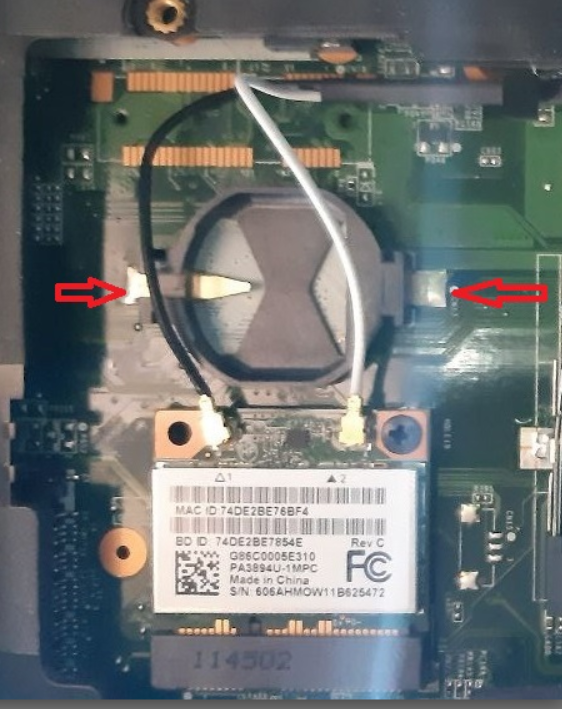
The issue of the CH341A programmer, I'll have to look into that...So you don't think the inverter is the cause of the failure?
-
@Belzebu said in Toshiba Satellite L750 - No video:
So you don't think the inverter is the cause of the problem?
It's just that it would only affect the integrated screen, not an external one from the VGA. It's very strange that you don't have a video signal on any output if it were just the inverter...
@Belzebu said in Toshiba Satellite L750 - No video:
but I guess to short-circuit you would have to connect the two points I put in the image?
In principle yes, but it's only to discharge some capacitor, it's not relevant either. Without power, in theory, the BIOS changes are erased although it's true that not in all. I think there are boards that have other ways to reset the BIOS... I don't know if we'll do anything with that but just to try...
-
Ok, the inverter issue is very clear now... so it's out of the question.
I'll put the battery back.
About the programmer, from what I've seen... I think I have 2 problems.- Knowing the voltage (1.8v, 5v..) of the Eprom to know what kind of programmer.
- Where to find the BIOS BIN file for this model. I've looked on the web ( https://support.dynabook.com/drivers ) putting in these details:
- model
- Part No.
-Serial number
and with none of them I get anything about the model.
-
@Belzebu
Well, normally this type of eeprom, both from the video card and the motherboard, are compatible with the CH341A programmer. Most likely you will need the tweezers, what I don't know is if you will have to desolder the chip or if pinching it while soldered on the board will make good contact. Equally, I think I have found the diagram of the board and I think this is the nand of the bios...
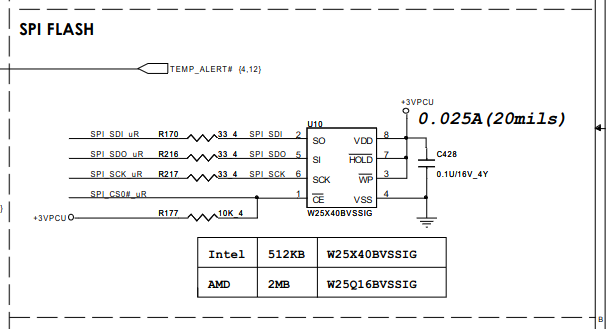
I'll pass on the link where I found the board diagram.
@Belzebu said in Toshiba Satellite L750 - No video:
Where to find the BIOS BIN file for this model. I've looked on the web ( https://support.dynabook.com/drivers ) putting these data :
I've seen this on the web you put:
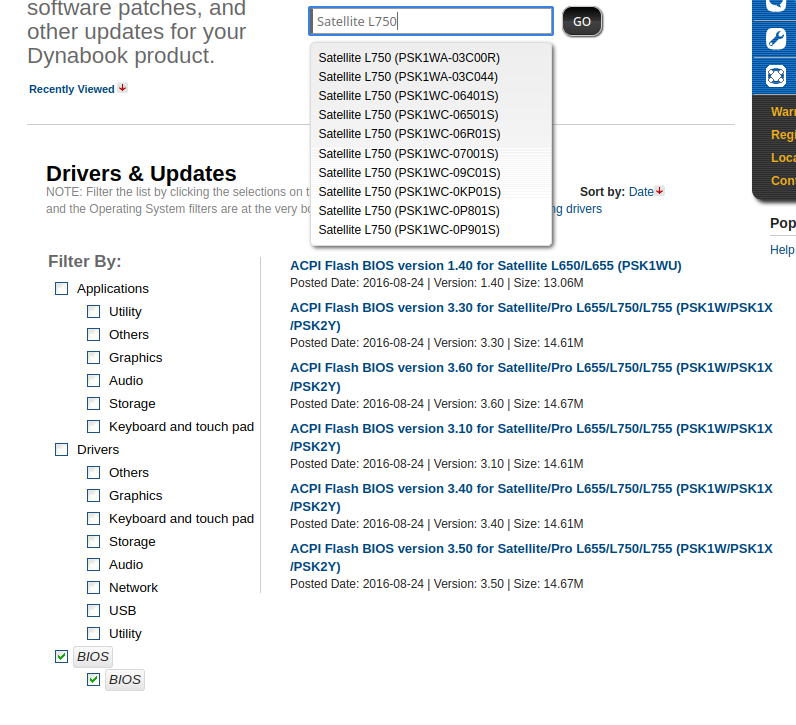
-
@pos_yo
In the menu where all those models appear is where I got stuck because mine (PSK2YE -0RM00CCE) doesn't appear....
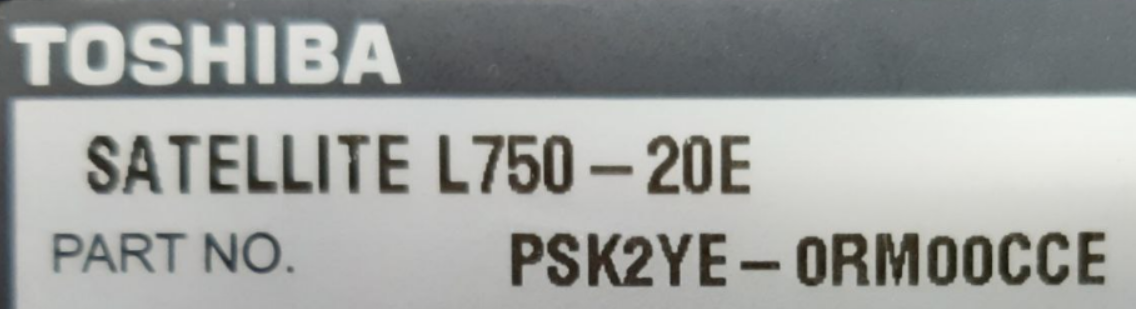
so I didn't know which one to choose.... by the way what version would it be?
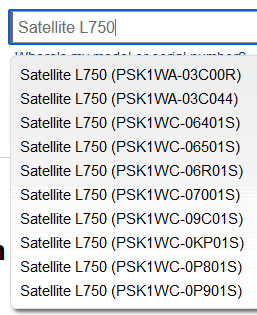
so I guess I'll have to choose the last one......version 3.60
Regarding the location of the eprom, I guess it will be the one I've marked with the yellow box.
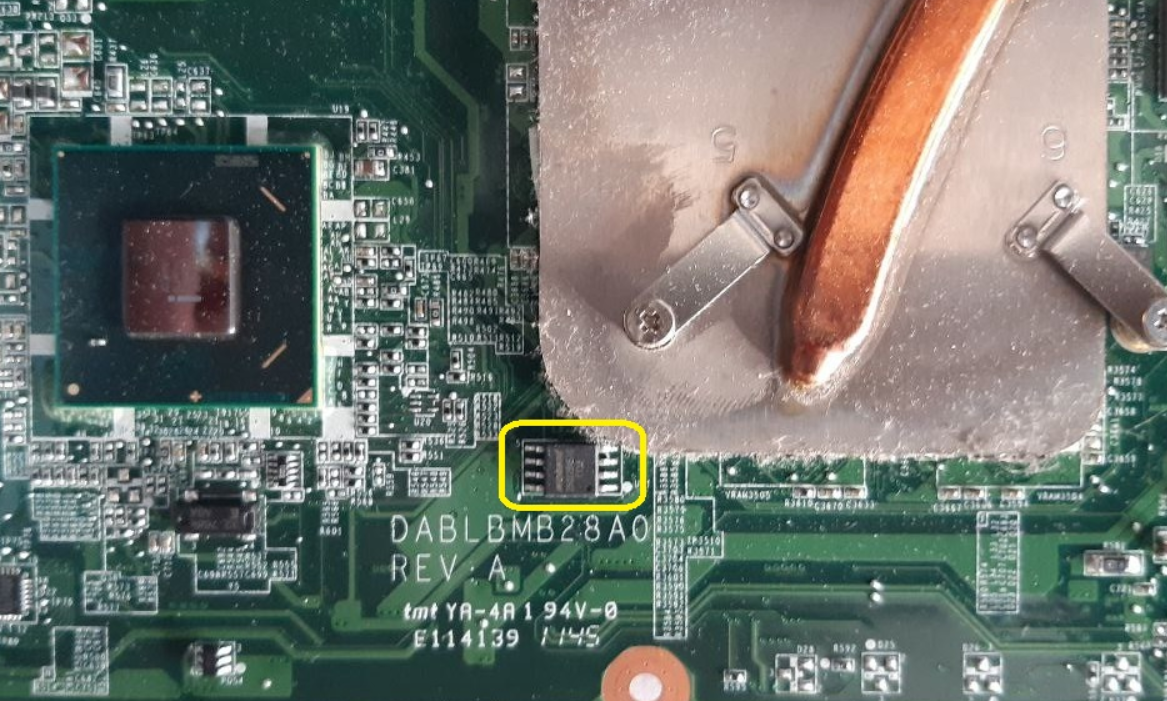
How can I know the voltage...
-
When downloading the executable file *.exe

and run it.... I realize that this way is to update the BIOS working well the boot (Windows or CD-ROM)
In my case, then it would not work this way, I would have to get the BIN file, and then perform the process with the programmer....
Note: Where can I find the CH341A programmer and the clamp. And then how to do the whole process.
-
@Belzebu
I'll send you this link to Youtube that will explain it better than I can.
In the end, I've used it 4 or 5 times and less than once, with removable chips, not soldered. Every time I've used them, I've looked at the type it is (if it's from the CPU or GPU, they are different), I've looked for pin 1 (the one with the dot), I've connected the chip to the programmer and the programmer to the PC and with the software I've installed the BIOS.@Belzebu said in Toshiba Satellite L750 - Sin video:
When downloading the executable file *.exe
Well, that.exe is a self-extracting package. I suppose you can open it with winzip or winrar (I use linux and I've been able to see the contents of the package). Inside, there is an.iso file that inside has an.img file and already inside that.img is the BIOS binary.
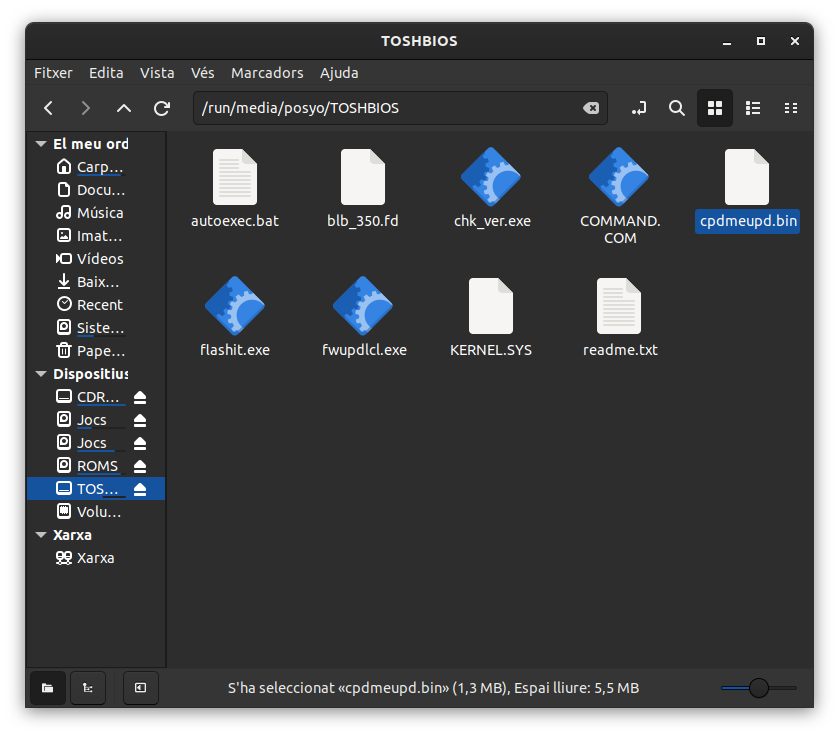
I don't know if that file will be compatible and can be dumped like that without more.@Belzebu said in Toshiba Satellite L750 - Sin video:
Note: Where can I find the CH341A programmer and the tweezers. And then how to do the whole process.
You'll find it on AliExpress or Amazon without any problem.
To be honest, I've come this far. I'm not an expert in this, just an amateur. If the information I've given you is useful, great. But I can't go any further...
-
@pos_yo
I am extremely grateful for your help and patience with me.
I have already ordered a programmer kit, so when it arrives I will try to figure out the process (I have nothing to lose anyway).
I just have these doubts left...
-According to the SPI FLASH scheme, the chip I think is the AMD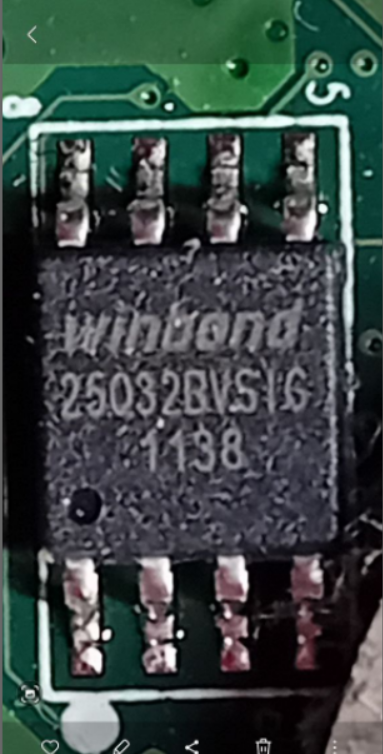
Does this difference affect anything in the whole process?
-Then, and as you rightly say... it is knowing if the BIN is correct.
-
@Belzebu The manufacturer has nothing to do with it because in the end the chip is nothing more than a nand, a memory. You just have to dump a BIOS compatible with the model of the motherboard and CPU and that's it.
-
Ok, understood the manufacturer's issue....
So the reference of the board model to find the compatible BIN would be the one printed on the image (DABLBMB28A0)?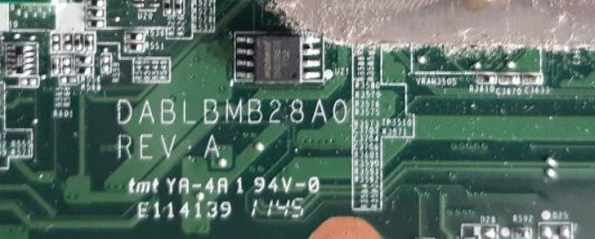
-
@Belzebu It would be a great reference...
-
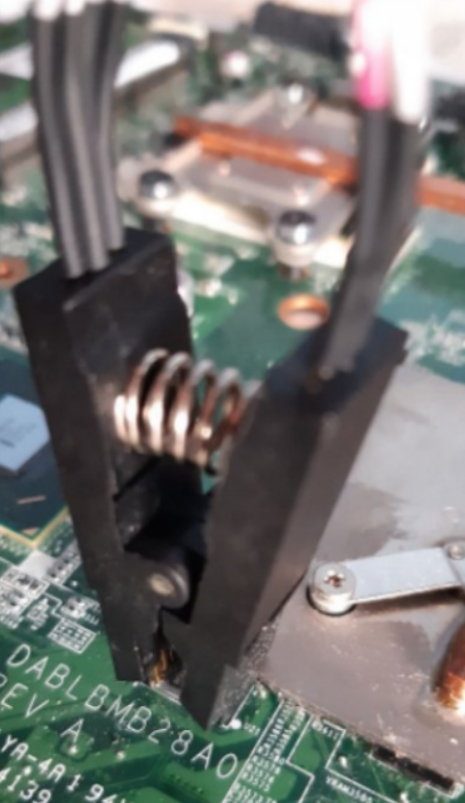
Hello, I am returning to the topic after a while...since I had to get the CH341A programmer. The point is that once I have completed all the steps (Driver, Sof. Programmer) and connected the clamp to the BIOS chip (Winbond 25Q32BV) with the red cable connected to pin 1 or white point. The result is a detection error and it does not find the chip.
I put a capture of the message that appears.
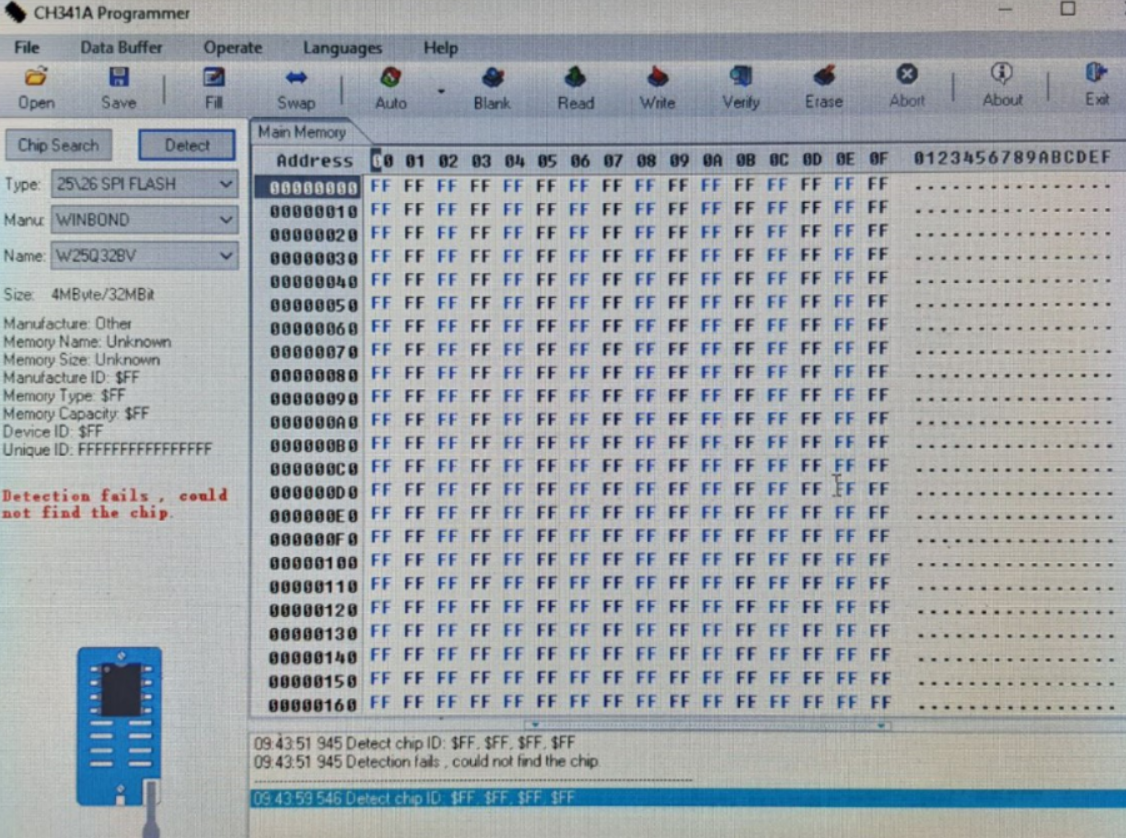
What can happen...this error may be related to the clamp being poorly connected, or maybe the chip is damaged?




Hello! It looks like you're interested in this conversation, but you don't have an account yet.
Getting fed up of having to scroll through the same posts each visit? When you register for an account, you'll always come back to exactly where you were before, and choose to be notified of new replies (either via email, or push notification). You'll also be able to save bookmarks and upvote posts to show your appreciation to other community members.
With your input, this post could be even better 💗
Registrarse Conectarse