Xeon E5472 problem on P5B Deluxe
-
As I mentioned in other threads, I got a Xeon E5472 771 to do the now classic move of putting it on a 775 board. In my case, I have the Asus P5B Deluxe.
A few weeks ago, when it arrived, I tried it out and it worked right away, although it went to 1GHz. I thought that because of the bus difference and having the BIOS parameters set manually, it was more or less normal. I tried to increase the bus frequency to the maximum that the memory allows (DDR2-800) and it wouldn't start up.
The micro is this:
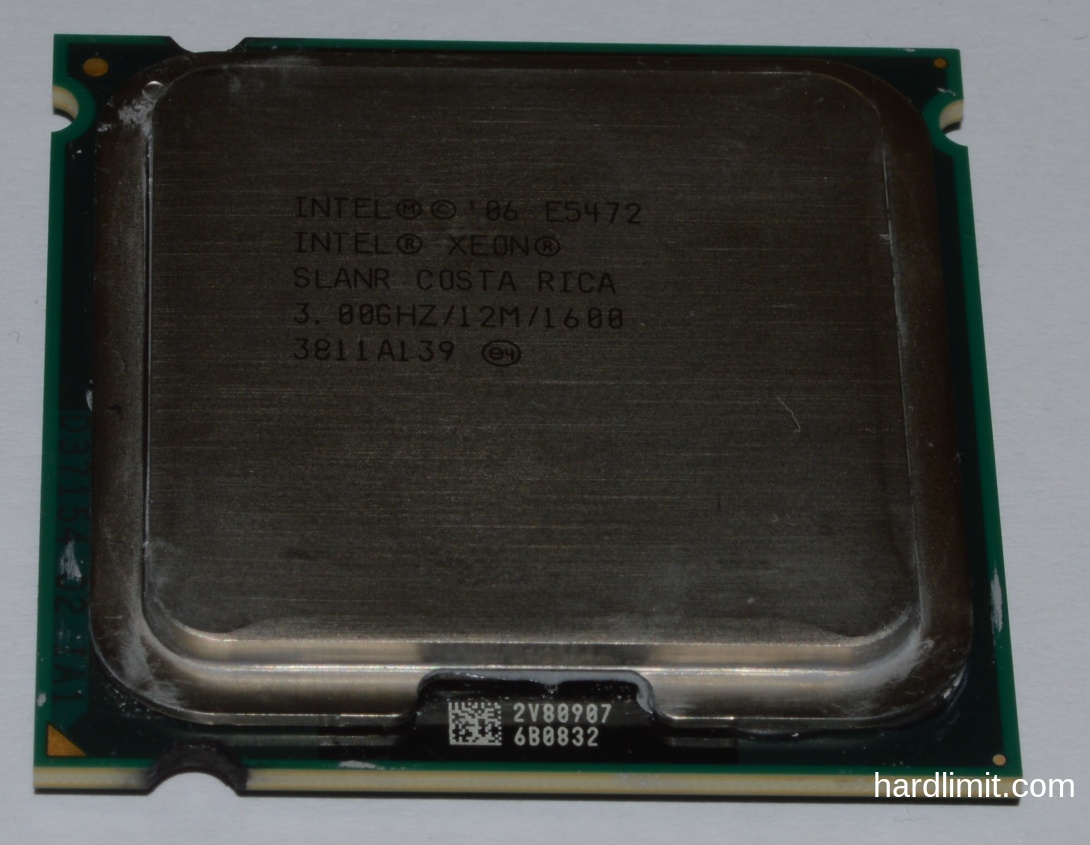
At that moment, I thought I might have made a mistake. This board, when it detects that it doesn't start up, considers that excessive overclocking has been done and returns to the default values so as not to have to reset the CMOS. The reason I considered it normal that it wouldn't start up was that I believed the BIOS had configured the bus to the frequency of the micro and the memories couldn't handle that speed. I didn't think much more about it and left the issue parked.
Today, I felt like doing it all over again, taking advantage of some memory that I had ordered arriving, and I found that it wouldn't start up in any way. I read in other places that with the P5B Deluxe, that Xeon should work, that at most you have to reset the BIOS, but not even that. I tried putting manual values using the E6600 but there's no way to get the POST to work.
The heatsink gets hot. I checked that the sticker that exchanges the two pins makes good contact with a multimeter. Apparently, there should be about 200kΩ and it has that. The bridge is this:
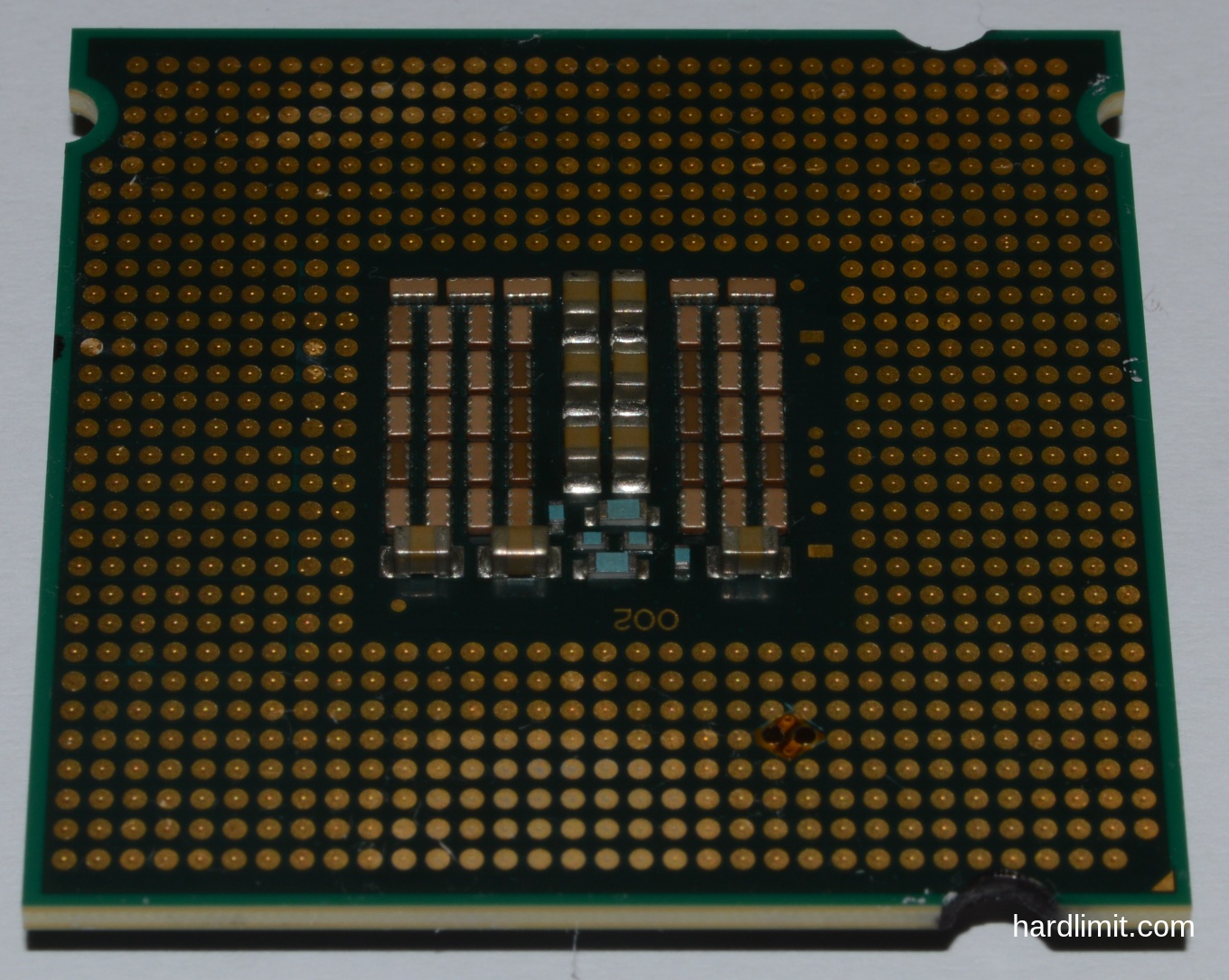
I know for sure that the P5B Deluxe doesn't need to add the microcodes for it to start up, only for it to recognize extra functions. Nevertheless, I decided to add the microcodes of this micro and the result was the same.
As to make modifications in the BIOS I had to remove this one and put the E6660, after a while I realized that one of the damned pins of the socket was bent (I don't know if it was always like that or if it bent in one of those times I swapped micros):
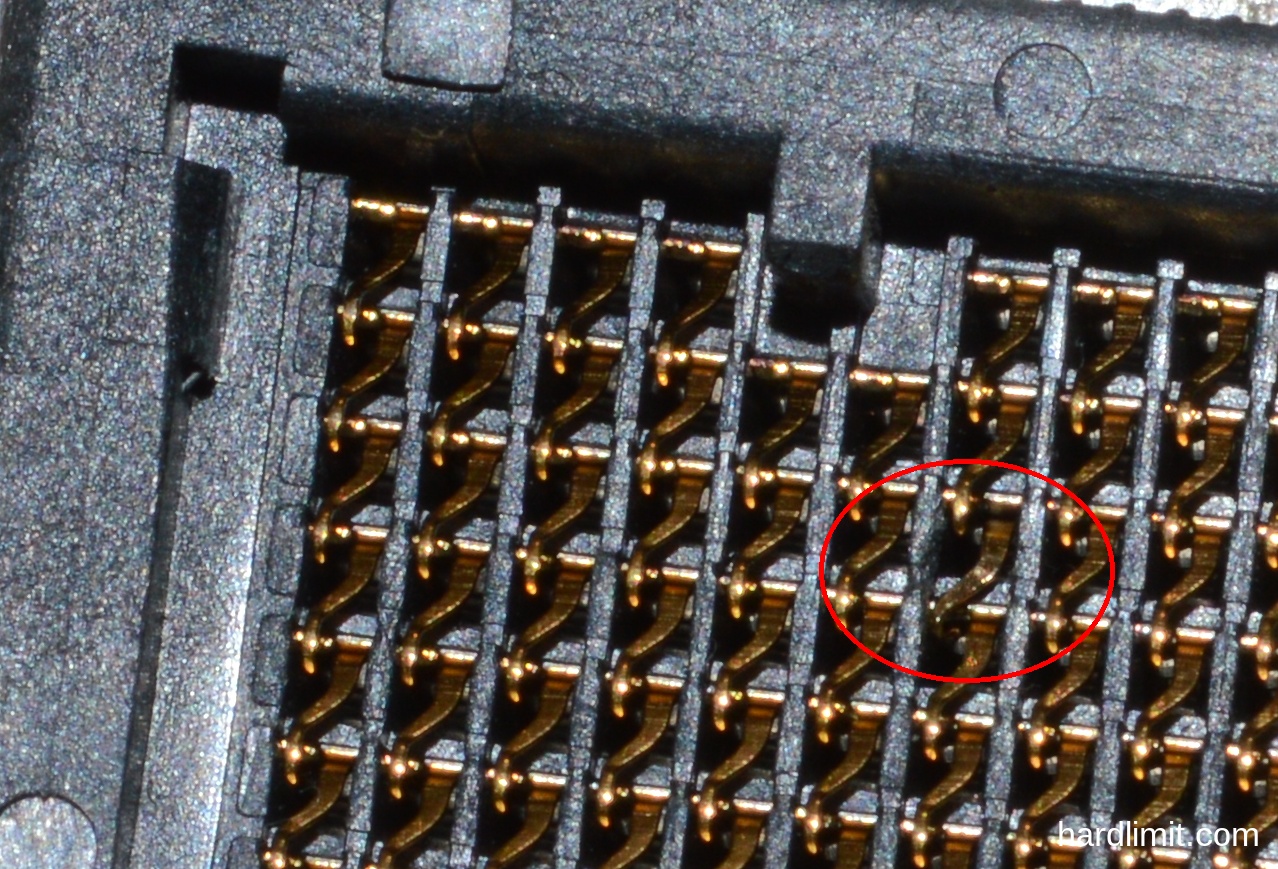
Despite that, the E6600 has continued to work although now I can't overclock it (before I put it to 3GHz and now I have to leave it at stock). It's also true that it has been at stock for a long time and I can't be sure that the inability to overclock it to 3 GHz is due to the pin. I know that the socket is broken. I tried to straighten the pin but I can't: I don't have the tools or the skill.
I can continue swapping processors to continue testing, but at this point I know that at any moment the socket can die and that would be the death of the board.
If you come up with something to put the Xeon in, I would appreciate it. Keep in mind that I only have a few more attempts to put it in before I finish breaking the pin that is loose.
Thanks.
Toda la actualidad en la portada de Hardlimit
Mis cacharros -
What a big mess... The only thing that comes to mind is that someone with a lot of precision (or yourself) tries to do a microsoldering on the faulty pin, although on the one hand to fix it, also to add a little bit of conductive material to the end and so it makes good contact. It might sound like a NASA mission impossible, but at first being the socket the damaged one, I can't think of anything else. Greetings and good luck
>> i7-2600K Sandy Bridge @4.4GHz || Noctua NH-D14 || ASRock Z77 Extreme4 || 4x8Gb G.Skill Ripjaws X DDR3 1600MHz || XFX RX 5700 XT 8Gb || SSD Samsung 850 PRO 256Gb & 850 EVO 500Gb || WD Caviar Green 1Tb || Barracuda 1Tb || Corsair TX650 V2 || M-Audio Fast Track Pro || KRK RP8 RoKit G3 || BenQ GW2750 27"
>> Athlon 64 X2 5600+ Brisbane @2.9GHz || Gigabyte GA-M61PME-S2 || 2x2Gb DDR2 Kingston 800MHz || Sapphire Radeon HD 5850 Xtreme 1Gb || Maxtor 320Gb SATA2 || OCZ ModXStream 500W Modular || TEAC PowerMax 120/2 || Acer X243w 24"
>> Intel Core2Duo E6600 Conroe @2.4GHz || Asus P5N32-SLI SE DELUXE || 2x1Gb DDR2 Kingston 800MHz || Asus nVidia GeForce 9800GT 1Gb GDDR3 || Seagate Barracuda IDE 80Gb 7200RPM || Linkworld LPK12-35 450W -
@Sylver The problem is that I'm not sure if the fault is with the pin. If I start messing around with soldering, I'd be putting all my eggs in one basket for something that might not be related. I'm not even sure if the OC of the e6600 is the cause of this.
This motherboard has served me well and for a long time. It dying wouldn't be a great tragedy, but I don't want it to die in such a miserable way. Let it be because a mosfet pops due to lack of ventilation, because a capacitor bursts, because the soldering on the chipset comes loose... but not because I've fried a damn pin on the socket; not like that!

Toda la actualidad en la portada de Hardlimit
Mis cacharros -
But let's see, if the plaque has really exploded (which is not certain), then notice what elegance it has had.
For next time, get the cheapest one, add a matching font and turn it upside down, and you'll have your Nit del foc guaranteed... ¡i visca València!Are you sure it's the plaque?
-
@whoololon I'm not sure. Looking at the socket's feature sheet, the damaged pin is labeled BCLK1 which seems to be an input clock signal that defines the FSB speed. The issue here is that I'm using the PC right now to write this message. If that pin were really damaged, it wouldn't work (or maybe it does and that's why I can't OC it?). It's probably more likely that it's not making good contact with the Xeon.
Or maybe the pin isn't the problem. The truth is, I don't know.
Toda la actualidad en la portada de Hardlimit
Mis cacharros -
use silver conductive paint. and yes. that pin 5 is necessary. erase all the processor contacts with an eraser and that damaged pin. use a needle to lift it up a little and apply some conductive paint. -
@JuezDred ok, I'll keep that in mind. In the end I'm going to leave it for late summer because I'm going to need my pc operational for the summer and I don't want to take a risk.
I have a can of silver paint from when I used to do bridges on my athlonxp but I suppose it will already be in bad condition.
Toda la actualidad en la portada de Hardlimit
Mis cacharros -
I just realized that we have the same Xeon, and in terms of performance/price right now it's one of the top for reusing 775 boards.
My specific problem is that on a P5KPL-AM EPU it works well at its 3.00 Ghz, with the FSB at 1600 and all, but as soon as I increase it a little bit of frequency (not even 50 mhz more), the board stops detecting the SATA ports... And I don't remember if I did the test, but I think the IDE ones too. I think that the slightest OC causes a failure in the chipset, although despite everything it boots, but it doesn't detect any disk and therefore can't start any S.O.
Mention that I have added the microcodes to the BIOS, updated also to the latest version.
Right now I have it running at 3.00 Ghz, but the interesting thing about this micro is that you can overclock it, so if anyone comes up with something...
PD: Coincidentally, this board of mine also has a messed up socket pin, it's a hassle to disassemble it now, but if I remember correctly it was one of this area that I point out here:
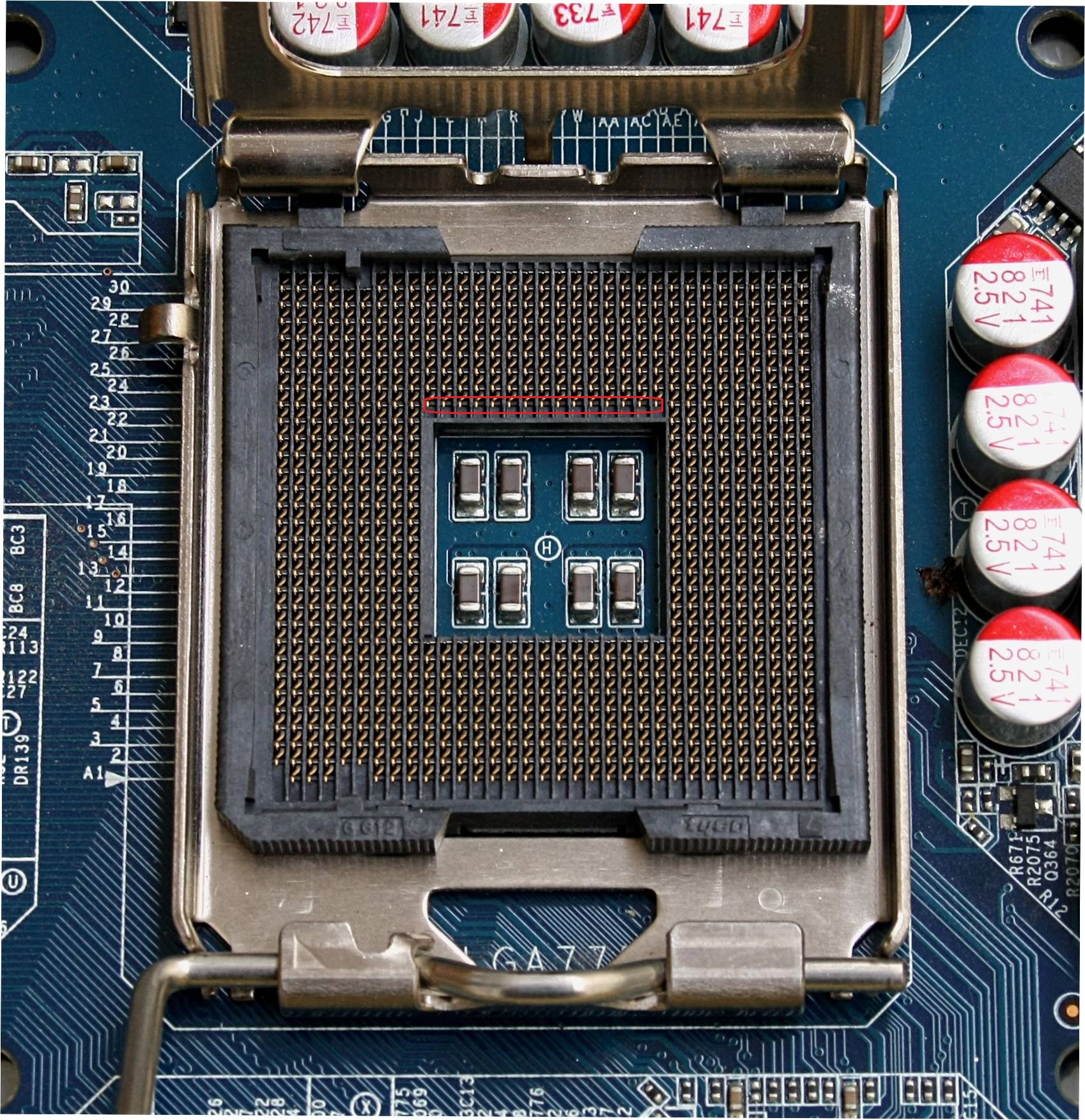
I remember that it was hitting with one of the bands. Anyway, it's the same thing, everything works perfectly below stock frequency and at stock frequency, but as soon as I increase a little bit of frequency, to hell with the disk drives.
Saludos!
-
What a waste of money, look at that, buy yourself an E5420
-
@Xevipiu said in Problem Xeon E5472 on P5B Deluxe:
What a waste of money, look at that buy yourself an E5420
Very good those constructive comments Xevipiu
(leaving aside that they said 5472 not 5420).
Beer and pedals
-
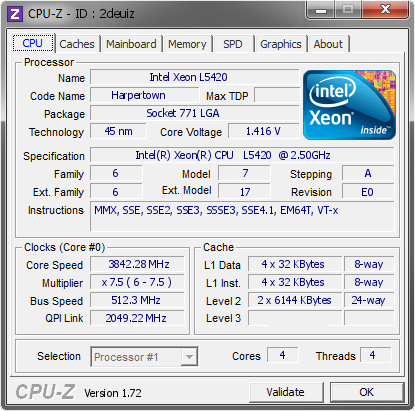
Let's do a theoretical class, the crap about the x5472 is that it's capped at x7.5 400x7.5 = 3Ghz), which is equivalent to an L5420/E5420 at x7.5 (333x7.5 = 2.5Ghz)
The higher the multiplier, the more air you give to the 775 board because of its FSBwall
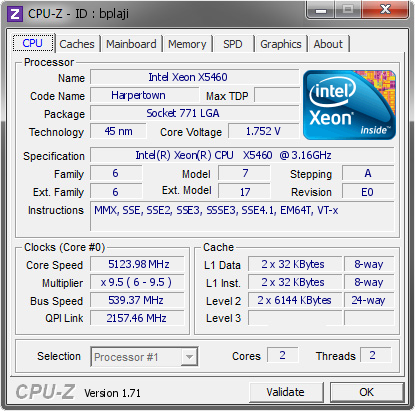
The best investment is an x5470 at x10 or the cheap x5460 at x9.5 for 18€
I've already had a few beers, that's why I'm blind!


-
All of that is true, with the small difference that the X5472 has a 1600 bus stock, which for 13€ is little less than a gift.
¡Saludos!
-
An E5420 costs €5
An x5460 x10 costs €16Intel Xeon X5460 3.16GHz 12M 1333 Processor close to LGA775 Core 2 Quad Q9650 CPU
Does it have native support for Strapp400? All Core2Quad can run at Strapp400/1600, the limitation of dividers comes according to the chipset used, the important thing in these cases is to have a high multiplier, especially in this case that wants to use it under an i965 and its limitations with these 45nm.
Regards.

h
-
Well, I got a practically unused Asus P5K from a PC that was going to be thrown away. Although it is from a lower range than my P5B Deluxe, it has a more modern chipset and what is more important: it has the socket intact.
So in the coming days I will get to work on the subject to see how much I can get out of the Xeon. The only problem remains the frequency limitation of the memories (DDR2-800).
Toda la actualidad en la portada de Hardlimit
Mis cacharros -
I am very happy about the new motherboard. I really regret selling the 775 platform years ago, because I had it with a Q6600 at 3.2 and it went very well, but only having 4 Gigas of RAM made me jump to an FX 8320 that broke... and from the RMA I received an FX 8350.
Although I was able to tinker with it, I changed it for a 2600K some time later. Well I changed it... I have had the FX in the closet for more than half a year.
Good luck with the Xeon and long life to the 775
-
Well I've managed to get it working and for some reason, the micro has reached its native 3GHz with DDR2-800 memory when with the P5B Deluxe it didn't go above 2GHz. I suppose it's because of the support for the 1600Mhz that the P5B didn't have.
The thing is that at 3GHz the system is not stable. Wndows gives a blue screen while booting and in Linux, if a kernel panic doesn't jump at startup, the desktop environment doesn't finish booting. I've lowered the frequency to 2.4GHz and it's perfect, but of course I'm wasting that 20%.
By the way, the BIOS is updated and the micro patch is added. Do you know if something can be done to squeeze out the 3GHz?
Thanks.
Toda la actualidad en la portada de Hardlimit
Mis cacharros -
@cobito ¿Qué fuente montas?
-
It is a Be Quiet! BQT-S6-SYS-700W: https://web.archive.org/web/20150708112537/www.bequiet.com/en/powersupply/291Toda la actualidad en la portada de Hardlimit
Mis cacharros -
I think it's a matter of the FSB. That chipset reaches a maximum of 1333 mhz according to the manufacturer, so theoretically anything you put above that could produce instability.
My Asus P5KPL-AM EPU does support the FSB at 1600 (OC mode according to Asus), and the system stability is full. However, being designed to go to 1333, the 1600 are a luxury allowed but not imposed. That's why I don't scratch even one mhz more than the native 3Ghz of the micro.
In the end I think we will have to invest in top-of-the-range boards to get the most out of these gadgets...
Greetings!
>> i7-2600K Sandy Bridge @4.4GHz || Noctua NH-D14 || ASRock Z77 Extreme4 || 4x8Gb G.Skill Ripjaws X DDR3 1600MHz || XFX RX 5700 XT 8Gb || SSD Samsung 850 PRO 256Gb & 850 EVO 500Gb || WD Caviar Green 1Tb || Barracuda 1Tb || Corsair TX650 V2 || M-Audio Fast Track Pro || KRK RP8 RoKit G3 || BenQ GW2750 27"
>> Athlon 64 X2 5600+ Brisbane @2.9GHz || Gigabyte GA-M61PME-S2 || 2x2Gb DDR2 Kingston 800MHz || Sapphire Radeon HD 5850 Xtreme 1Gb || Maxtor 320Gb SATA2 || OCZ ModXStream 500W Modular || TEAC PowerMax 120/2 || Acer X243w 24"
>> Intel Core2Duo E6600 Conroe @2.4GHz || Asus P5N32-SLI SE DELUXE || 2x1Gb DDR2 Kingston 800MHz || Asus nVidia GeForce 9800GT 1Gb GDDR3 || Seagate Barracuda IDE 80Gb 7200RPM || Linkworld LPK12-35 450W -
@sylver That makes sense to what I have experienced. I have tested by setting the FBS to 333, 340, 350... and from 350 the problems start. I left it at 333 so I could put the memories at 800MHz. In the end I am left with a micro similar to my E6600 series with double the cores and double the cache, which is not bad but it is also not the panacea since little software makes use of more than 2 cores (I have realized that not even games).
Anyway, let's see if they lower the RAM, SSD and graphics cards at once and I retire this pile of junk already.
Toda la actualidad en la portada de Hardlimit
Mis cacharros








Hello! It looks like you're interested in this conversation, but you don't have an account yet.
Getting fed up of having to scroll through the same posts each visit? When you register for an account, you'll always come back to exactly where you were before, and choose to be notified of new replies (either via email, or push notification). You'll also be able to save bookmarks and upvote posts to show your appreciation to other community members.
With your input, this post could be even better 💗
Registrarse Conectarse