Hardlimit test bank
-
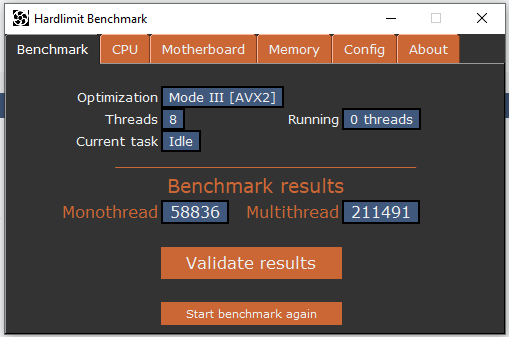
@cobito There is something that has me puzzled. The microphone of my laptop has 4 cores and 4 threads, but it gains about 25,000 points in multithreading if I set 8 threads instead of 4. I understand that it must be that it thus monopolizes more processor time, but then the results would not be totally consistent if the maximum number of threads possible are not used. Would there be any way to test more than 8 threads, to see what result it gives? If it is marginally superior or similar, it is a matter of micro usage. If it is very superior, it must be a bug in the benchmark.
-
@kynes First of all, there is a discrepancy between the program results and the central that is not corrected yet because I am thinking about how to give the most reliable result possible: the program uses the old method which consists of counting the maximum result of each test. In the central, an average of the 10 samples per test is made. In this way, from the program, greater variations between executions are appreciated while in the central, those differences (that can be caused by background processes) are filtered and are less appreciated.
Having said that, of the 4 results you have sent (2 with 4 threads and 2 with 8 threads), I have chosen the extremes to have the worst possible case: the one that gave the lowest score in 4 threads and the one that gave the highest score in 8 threads. The difference in the total multithread score is 4.7%. For reference, the differences between the two results at 4 threads and at 8 threads are 1.3% and 1.2% respectively.
To me, personally, that there is a 4.7% difference between the extremes vs that there is a 1.2% difference in validations with the same number of threads, it seems normal seeing how Windows 10 has a hundred things in the background.
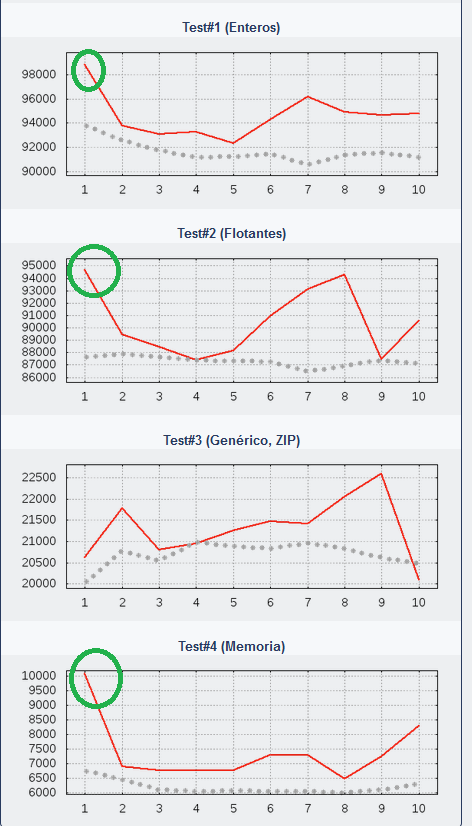
But something that could be a failure of the program (and that would also be quite difficult to diagnose as to correct if it really were a failure), is the fact that in the tests with 8 threads, there is a peak of scores in the first sample. Surely because of that you have measured such a large difference in the program results where those peaks were taken at the same time as in the results of the central, that difference is much smaller, because the average was calculated.
I will see if I have a moment and prepare the version without thread limit that you mention so that you can test that.
Toda la actualidad en la portada de Hardlimit
Mis cacharros -
@kynes Here is a modified version without a thread limit. In general, it seems that the multi-threaded result is proportional to the number of cores regardless of the excess threads, although there is a slight improvement when the number of threads is higher than the processor. But there is a machine where the thread synchronization has failed and has not been detected, generating a meaningless result. The PC has 4 cores with HT and from 32 threads it seems to fail.
This version only works in FPU and AVX 2 mode and the results are not valid.
Toda la actualidad en la portada de Hardlimit
Mis cacharros -
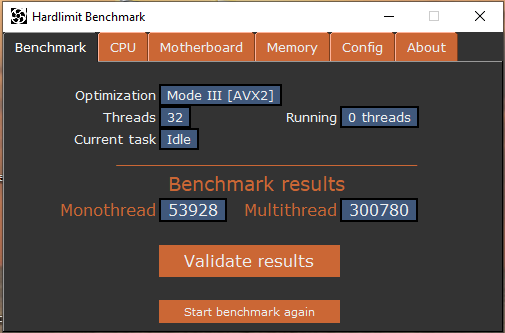
I understand that if you took the average of the threads, the result would be coherent, but there is one that is going off the rails. I'm going to try with 128 to see what happens.
-
With 128 threads I think I hold the world record in multithreading:
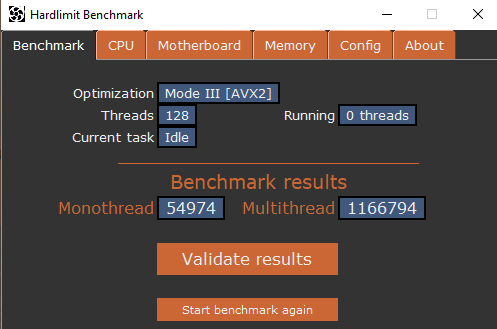
Well, and if I don't have it, I'll try it with 256 threads to see what happens

-
@kynes There is a clear difference here. I am also seeing it in my case. I suppose that in the end I will have to apply a kind of truncated mean: something like eliminating the two highest values, the two lowest and making an average of the remaining 6. Because it is clear that the outliers at the beginning distort the measure.
I am also going to review the synchronization mechanism, to see if the fault was there.
By the way, be careful with the 256 threads, because if the system crashes and the processes lose communication with each other, they can remain permanently waiting consuming 100% of all the cores and you will need to either close each process manually or restart the PC.
Toda la actualidad en la portada de Hardlimit
Mis cacharros -
@kynes said in Hardlimit Test Bench:
With 128 threads I think I have the world record in multithreading:
Well, and if I don't have it, I'll test it on 256 threads to see what happens
There the synchronization has failed. Basically you are passing a handful of threads at different times and the scores are being added as if they had all been passed at once.
Toda la actualidad en la portada de Hardlimit
Mis cacharros -
Some conclusions I draw from this:
-
When the test bench runs with an amount 4 times higher than the number of processor threads, the program fails and gives absurd results. This does not worry me because it will be limited to double the threads.
-
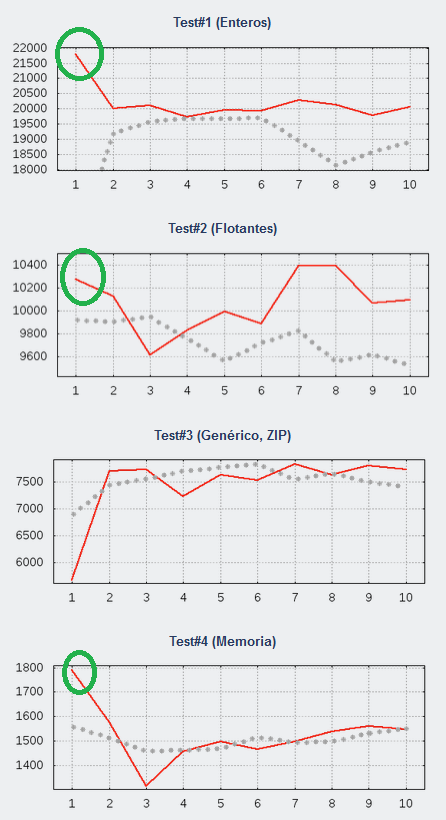
When an amount higher than the number of processor threads is run (but below an absurd amount), false positives usually occur in the first sample. Here are results with double the threads of three different models:
Core i7-6820HQ
Pentium N3540
Core i5-7300HQ
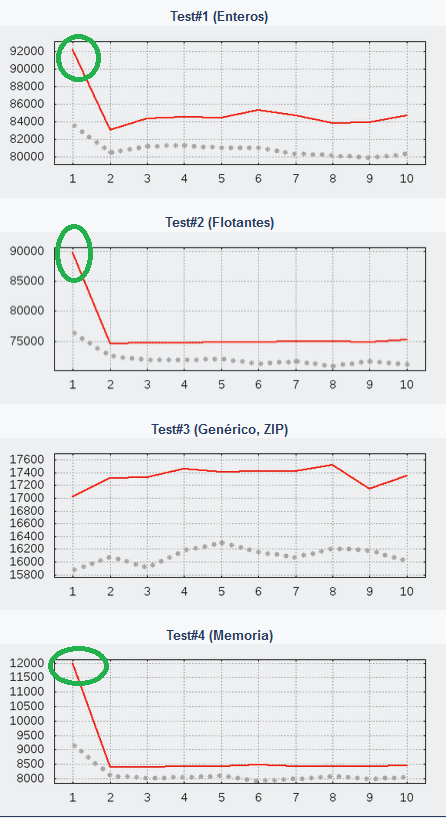
That this happens in three different models makes it clear that it is a generalized behavior. Curiously, these peaks are seen in tests #1, 2, and 4, but not in test 3. That this behavior is not reproduced in test 3 makes me think it's complicated to think of a program failure, but it cannot be ruled out yet.
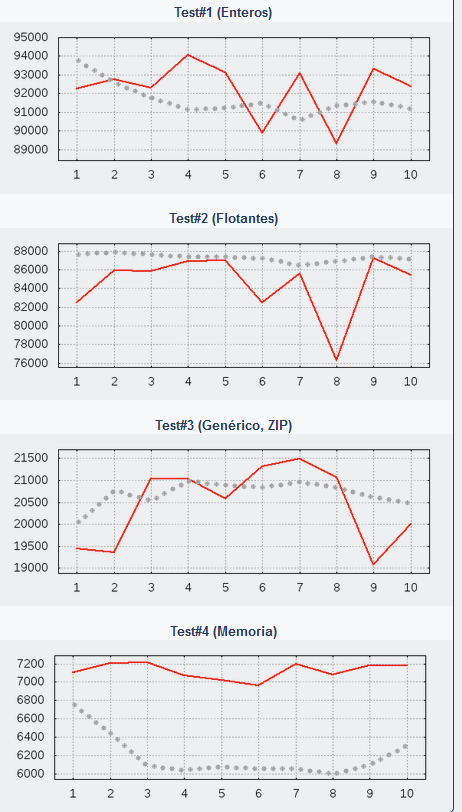
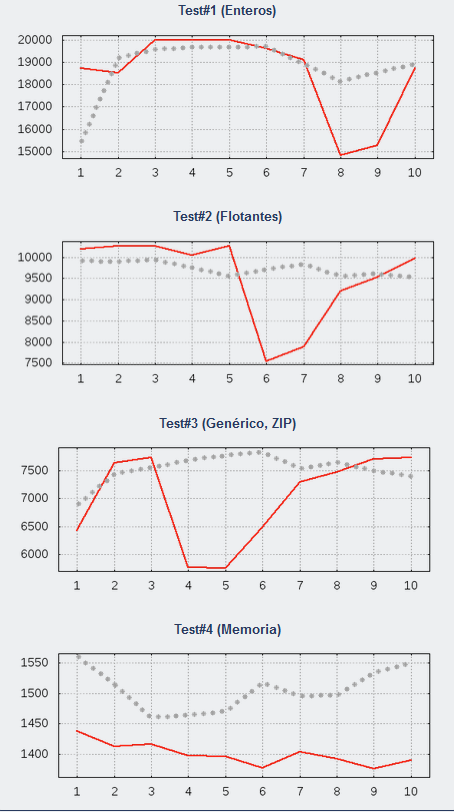
Below are the same models with a number of threads equal to the CPU:
-
Core i7-6820HQ
-
Pentium N3540
-
Core i5-7300HQ
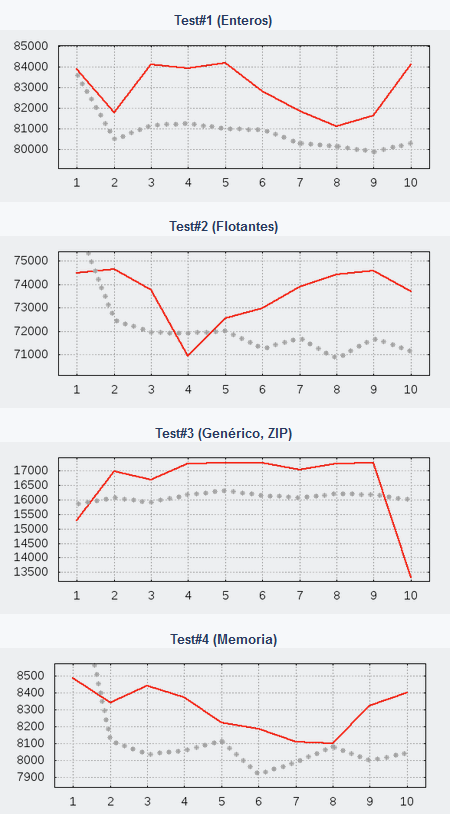
If there are peaks, they are practically imperceptible.
- In the i5 and i7, a sustained improvement is seen throughout the test. Here there are only two options: that a larger amount of CPU is being monopolized or that segmentation is being better utilized. In the case of the Core i7-6820HQ, it is a PC with many programs running in the background along with an antivirus. The Pentium N3540 runs Windows 10 without anything else, with nothing running in the background and no antivirus. Perhaps for this reason, doubling the number of threads does not improve performance in a sustained way.
In general
What distorts the result shown in the program with double the threads is the initial peak. The problem is that I don't know why it occurs. If it were the program, I would expect a peak in all tests or a peak at the beginning and another at the end, but it doesn't happen that way. Could it be a trick of the cache? Honestly, I have no idea. But it is strange and the program will need to be reviewed.
Toda la actualidad en la portada de Hardlimit
Mis cacharros -
-
And why don't we remove the option to specify the number of threads and force it to always run with the number of cores available on the CPU? I say this to avoid unnecessary differences between users.
-
@krampak Initially, the reason for having the freedom to specify the number of threads was in case HT/SMT detection failed. So far, that hasn't happened once. So there's no reason to keep it.
From the point of view of measuring the performance of a processor, choosing the number of threads is useful for seeing how a micro performs at half load, which would be quite interesting for evaluating processors at half load, which is actually how they are used most of the time. But if it's already difficult to receive validations with the default configuration, it's much more so with slightly exotic configurations.
Here a solution, as you say, is either to remove the possibility of choosing the number of threads or perhaps to limit the maximum to the number of threads of the processor to leave that possibility open.
Another possibility (which is complementary) is to do a truncated mean, something that will eventually be applied because this would correct all the results that have been sent so far.
And another possibility is to directly ignore the first sample; a simple but not elegant solution.
The method on how to calculate the final score is something that I have been thinking about for a long time (hence the program and the central use different criteria). The truncated mean is the one that is winning because it avoids this type of problems of unknown origin and because it filters the result in PCs with moderate background load.
The test bench has several mechanisms to prevent tampering with results and at the beginning of the development, it was the part to which more hours were dedicated. Fortunately, this failure has a retroactive solution. One thing is clear is that one of the objectives is to measure the real performance of the machine, without a specific configuration of the program offering a performance superiority that does not exist.
The latter I say to make it clear that this is not a trivial failure and that it will be solved. Until then, I remain open to suggestions.
Toda la actualidad en la portada de Hardlimit
Mis cacharros -
Let me see if I understand it correctly: the program executed by default shows reliable results, but when adjusting the parameter of how many threads we want it to use, it is prone to showing "unusual" results...
If that is the case, personally I would only let the results obtained by default be validated, at least until the incident is resolved... we just needed an army of pollagorders cheating at solitaire and, by the way, falsifying the ranking (this is the most serious thing for me, after all, I think what is intended is for the table to be reliable).
The option to choose the number of threads can be maintained, warning that it may give erroneous results and that they are not "official", for those who like tinkering.
-
Surely, by tomorrow or the day after (from there, depending on how long it takes Microsoft to certify it), version 1.4 will be ready, which will come with the issue of falsified scores fixed, among other changes.
If any of you have a current and powerful processor, I could use a screenshot of the CPU tab to put on the Store page, since I only have a few older PCs around here.
Toda la actualidad en la portada de Hardlimit
Mis cacharros -
This is the most powerful thing I have in my house, I don't know if it's what you're looking for.

-
@whoololon Thanks for the image. In the end I didn't put it because it seems to be very compressed and doesn't look good in the Store.
Regarding the program, version 1.4 is already available. You can find the details in the first message of this thread. In essence, among other things, the issue of falsified punctuation has been corrected and some changes have been made to the interface.
For now, you can still choose twice the number of threads of the maximum processor only in models without HT/SMT.
Toda la actualidad en la portada de Hardlimit
Mis cacharros -
Very cool the latest version!! it looks more professional and you can tell a lot about the reduced loading time.
-
And to celebrate, we inaugurate it with a radiant i3-3120M. Edit: By the way, Smart Screen is still popping up, at least on W8.1.
-
@krampak said in Hardlimit Test Bench:
Very cool the latest version!! It looks more professional and the reduced load time is noticeable.
Thanks. I'm glad you can see the difference in the boot time.
@whoololon said in Hardlimit Test Bench:
And to celebrate, we inaugurate it with a radiant i3-3120M.
Edit: By the way, Smart Screen is still popping up, at least on W8.1.
Perfect, it's been a while since anything new came in.
Smart Screen is still happening on Windows 10 as well. To be honest, it's taking longer than I've read around. Maybe it hasn't been downloaded enough times yet, or maybe it really is important to download it from Internet Explorer or Edge. I hope it disappears in the next few days.
Toda la actualidad en la portada de Hardlimit
Mis cacharros -
-
@Xevipiu Is it a sample of engineering? Perhaps of a Core i9-9900K/S?
Toda la actualidad en la portada de Hardlimit
Mis cacharros -
@cobito said in Hardlimit test bench:
@Xevipiu Is it a sample of engineering? Maybe of a Core i9-9900K/S?
No, it's from a 10th Gen series, an i9 10980HK, throttled, but it holds its own