Hardlimit test bank
-
Bueno, after testing the latest version with various platforms and generations, the frequency reading should work correctly in any scenario (with an error <3%). If there is nothing very serious before next week, there will be no more changes this summer.
Toda la actualidad en la portada de Hardlimit
Mis cacharros -
Performance statistics have been added to the datasheets for each model. You can see an example here.
Toda la actualidad en la portada de Hardlimit
Mis cacharros -
Much better now.
Is there a way to output the LOG of all processes while they are running? -
@Xevipiu In the first post of this thread you can see that it is at the top of the list of things to do. I have my reservations about giving details during the execution but sooner or later there will be at least some information about the progress. The when is what I don't know.
Toda la actualidad en la portada de Hardlimit
Mis cacharros -
Hello very much @cobito and other users...
I just passed the latest version on my I7... and I see very strange things...
I'll pass you a screenshot.
The one on the left is with the Antivirus activated (BitDefender), the ones on the right, consecutive and antivirus deactivated...Very variable results...
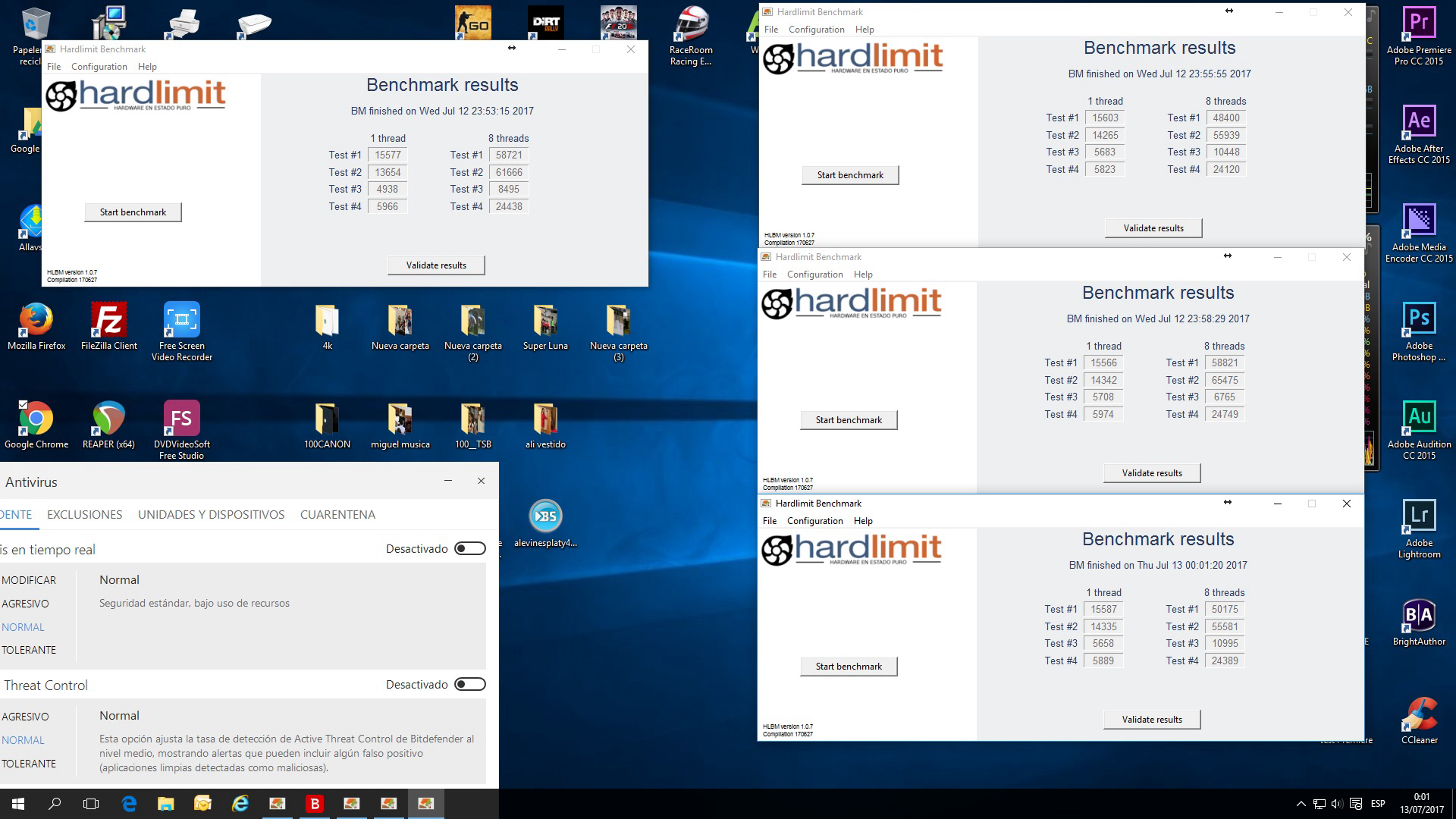
What can this be due to?
Best regards
Siempre Aprendiendo
www.namiga.es
-
@Namiga It looks like there's something besides the antivirus that's sucking up processor power. You can try opening task manager > show processes from all users and sort the list by "CPU" usage. When you're running the multi-threaded test, there will be 8 hlbm-core processes each consuming 12-13%. The rest of the processes should consume 0. If during execution you see that some other process is taking time away from some hlbm-core, there you have the culprit.
Toda la actualidad en la portada de Hardlimit
Mis cacharros -
@cobito said in Hardlimit Test Bank:
@Namiga It looks like there's something besides the antivirus that's eating up the processor. You can try opening task manager > show processes from all users and sort the list by "CPU" usage. When the multi-thread test is running, there will be 8 hlbm-core processes each consuming 12-13%. The rest of the processes should consume 0. If during execution you see that another process is taking time away from any hlbm-core, then you've found the culprit.
Well, as always :), you were right...
I just ran it again and it gives me better values than before... I had to close some widgets, Dropbox and Drive... and there's a task from the Intel Management system... that I can't close and that can eat up to 10% of the CPU...
But even so, the multi-thread Test 3 doesn't come out well precisely.... 6671but improving...
Thanks
P.D.: By the way... Does the central give good results?? I say this because in Monothread the maximum is 47709 from Xevipiu and my i7 gives 42419 and I don't appear in the Top 10... but if an E8400 does

Siempre Aprendiendo
www.namiga.es
-
@Namiga The thing about background processes interfering is something I've thought about. One possibility would have been to run the processes with a high priority. The problem is that this would block the PC during the execution of the benchmark. As what is normally wanted is to obtain the best possible result, I have faith that it will be the user who takes action about it. In the end, with the result validated, it is easy to realize if everything went well during execution (eg mmt ratio less than 0.5 (except in test#3) in micros with HT indicates problems).
The memory test (test#3) is normal to give even worse results in multithreading due to the fact of sharing cache and that the bandwidth of the memory does not increase proportionally to the number of threads. To improve it, you only have to tinker with the RAM.
I see the central results as correct. You are in position 10 of the single-threaded test but I think you are aiming for the Top10 in Mode 0. Below you have the absolute Top tens.
Toda la actualidad en la portada de Hardlimit
Mis cacharros -
How is the topic going?
-
@Xevipiu after the summer break, I will resume it in a couple of weeks.
Toda la actualidad en la portada de Hardlimit
Mis cacharros -
A new version is now available for download that displays information during the execution of the test suite. There may be some visual errors with many threads. Aesthetics are not a priority at the moment, so those kinds of things will be fixed later.
Toda la actualidad en la portada de Hardlimit
Mis cacharros -
Now models similar to the one shown in the datasheet for each CPU appear. Both multi-core and single-core comparisons are shown in all available modes. 3 micros appear above and another 3 below.Example
Toda la actualidad en la portada de Hardlimit
Mis cacharros -
A processor comparator has been included. When you enter two models, a table will appear comparing the specifications, performance, and some statistics. If the models entered are too ambiguous, a list will appear in which to choose which exact model you want to compare.This time, it is not necessary to have results to compare two processors. If there are no results, the specifications will be shown. The list of available models is very wide; between Intel and AMD there are about 2700 models available, although not all are (this was a chore that I did about a year ago for a project that I had in mind very different from the test bench, but in the end this has come out that I think is more interesting).
Example
Toda la actualidad en la portada de Hardlimit
Mis cacharros -
I was doing some tests... is it normal that the Intel(R) Core(TM)2 Quad CPU Q9550 @ 2.83GHz from hAyO has a better result in Mode0 Mono than a Xeon X5660 at almost 4 GHz?
Best regards.
-
@Magog Has a worse performance in mode 0 but in sse3 it surpasses it and both work at a similar frequency. The two results seem reliable and the differences especially in test 2 are important. It seems that your Xeon is quite slower than the q9550 when running unoptimized software (mainly in floating point).
Toda la actualidad en la portada de Hardlimit
Mis cacharros -
Numerous internal changes have been made that have fixed quite a few bugs (there are still a few out there).
By the way @Magog I don't know if you tried it back in the day, but the comparator didn't work with the Q9550 from @hAyO and your Xeon. Now it does.
Toda la actualidad en la portada de Hardlimit
Mis cacharros -
@cobito on some PCs, the program stays stuck in the multithread Test4 with the process hlbm-detect.exe at 100% CPU, any ideas? lowering the mode level doesn't solve the problem.
-
@krampak Which model are you stuck on? In principle, leaving it for a few minutes should finish it even if it seems stuck, but it's something I need to fix.
Toda la actualidad en la portada de Hardlimit
Mis cacharros -
@cobito I think it was on a Pentium D but I can't be sure right now, if I find it again I'll let you know.
Now I was trying to upload the ones from the i3-6100 but there's no way, the Windows 10 antimalware service MsMpEng.exe (even with real-time scanning turned off) messes up the result.

-
@cobito the link on the download page to get the necessary Windows update on non-updated computers leads directly to the 64-bit version. I say this because I have now come across a non-updated computer that is running Windows 7 32-bit and I did not understand why it would not let me install the update until I noticed the bit thing. Perhaps it would be good to add both links mentioning the architecture.