Hardlimit test bank
-
A processor comparator has been included. When you enter two models, a table will appear comparing the specifications, performance, and some statistics. If the models entered are too ambiguous, a list will appear in which to choose which exact model you want to compare.This time, it is not necessary to have results to compare two processors. If there are no results, the specifications will be shown. The list of available models is very wide; between Intel and AMD there are about 2700 models available, although not all are (this was a chore that I did about a year ago for a project that I had in mind very different from the test bench, but in the end this has come out that I think is more interesting).
Example
Toda la actualidad en la portada de Hardlimit
Mis cacharros -
I was doing some tests... is it normal that the Intel(R) Core(TM)2 Quad CPU Q9550 @ 2.83GHz from hAyO has a better result in Mode0 Mono than a Xeon X5660 at almost 4 GHz?
Best regards.
-
@Magog Has a worse performance in mode 0 but in sse3 it surpasses it and both work at a similar frequency. The two results seem reliable and the differences especially in test 2 are important. It seems that your Xeon is quite slower than the q9550 when running unoptimized software (mainly in floating point).
Toda la actualidad en la portada de Hardlimit
Mis cacharros -
Numerous internal changes have been made that have fixed quite a few bugs (there are still a few out there).
By the way @Magog I don't know if you tried it back in the day, but the comparator didn't work with the Q9550 from @hAyO and your Xeon. Now it does.
Toda la actualidad en la portada de Hardlimit
Mis cacharros -
@cobito on some PCs, the program stays stuck in the multithread Test4 with the process hlbm-detect.exe at 100% CPU, any ideas? lowering the mode level doesn't solve the problem.
-
@krampak Which model are you stuck on? In principle, leaving it for a few minutes should finish it even if it seems stuck, but it's something I need to fix.
Toda la actualidad en la portada de Hardlimit
Mis cacharros -
@cobito I think it was on a Pentium D but I can't be sure right now, if I find it again I'll let you know.
Now I was trying to upload the ones from the i3-6100 but there's no way, the Windows 10 antimalware service MsMpEng.exe (even with real-time scanning turned off) messes up the result.

-
@cobito the link on the download page to get the necessary Windows update on non-updated computers leads directly to the 64-bit version. I say this because I have now come across a non-updated computer that is running Windows 7 32-bit and I did not understand why it would not let me install the update until I noticed the bit thing. Perhaps it would be good to add both links mentioning the architecture.
-
@krampak said in Hardlimit test bench:
@cobito I think it was on a Pentium D but I can't be sure right now, if I find it again I'll let you know.
Now I was trying to upload the ones for the i3-6100 again but there's no way, the Windows 10 antimalware service MsMpEng.exe (even with real-time scanning turned off) messes up the result.
I'll see how the issue of the digital signature of the executable goes, which apparently reduces false positives.
@krampak said in Hardlimit test bench:
@cobito the link on the download page to get the necessary Windows update on non-updated computers goes directly to the 64-bit version. I say this because I've just come across an unpatched machine running Windows 7 32-bit and I didn't understand why it wouldn't let me install the update until I noticed the bit thing. Maybe it would be good to add both links mentioning the architecture.
Noted. In principle, with just having Windows updated it works, but yes, if you want to transfer it to a PC with freshly installed Windows, I should put both architectures.
Toda la actualidad en la portada de Hardlimit
Mis cacharros -
@cobito This afternoon I had to terminate the hlbm-detect.exe process (after finishing the last test) because it had been waiting for 10 minutes and nothing happened. I had to kill the process and the result publishing window popped up. It's the test I uploaded with an i5-3470 (I only uploaded 1 mode because I saw that it didn't reach 0.99).
Then I tried with another machine with the same processor and it didn't even let me open the task manager (also 10 minutes stuck in test4, although the test probably, as in the previous case, had already finished). -
@krampak That process is responsible (among other things) for measuring the processor frequency. Sometimes in older models it has problems (the lock you mentioned appears) but I have never seen it in current micros. I have had it noted for a long time, to see if next week I can find some time and fix that part.
Is there something in common between the machines where that has happened to you? Windows version, background programs, updates, Windows execution mode, drivers, etc.
Toda la actualidad en la portada de Hardlimit
Mis cacharros -
Hello.
I'm testing it on the woman's laptop, which has already been updated to Bitdefender 2018.... and, by God, this year's antivirus is a blessing.I don't know why it detects it as malware... and there's no way...
I had to disable everything (of the antivirus), add the folder where the benchmark is and give it to safe applications...
A good while
but it's already ok
Siempre Aprendiendo
www.namiga.es
-
I don't know what's wrong with that 4405U, I installed a Windows 7 (it had Windows 10) and without antivirus or anything, it keeps getting really bad ratios.
-
@krampak Could it be a bad cooling?
By the way, in the coming days I will start working on version 1.1.0 of the test bench. They are still just brushstrokes, but if everything goes well, the blocking problems will be solved and additional information will be added such as details about the RAM (pending timings) and some details about the motherboard. This will allow you to compare something as relevant as the chipsets.
Stay tuned to your screens.
EDITED: A moment, I am seeing that the results of your 4405U are actually fine but the page is showing it as erroneous. It is a micro with 2 cores and HT so the mmt ratio must be greater than 0.5, which it meets. I will see.
EDITED 2: It is already corrected. You have a few results that have turned green.
Toda la actualidad en la portada de Hardlimit
Mis cacharros -
Much better, still doesn't detect the real speed, but at least with the LOG you know it's not hanging
https://bm.hardlimit.com/signature.php?bm=b474fb6b6363fc62b29107ef8ad7fd3b535&style=1 real speed at 4.004mhz both under load and idle -
@xevipiu The measured speed is always at full load of a single core.
PD: Version 1.1 is about to come out of the oven.
Toda la actualidad en la portada de Hardlimit
Mis cacharros -
Well gentlemen, version 1.1.0 is now available. In broad terms, it now detects the brand and model of the motherboard, some details of the RAM in addition to having expanded the information of the processor. The detection of frequency in the program has also been improved although it is still measured since the one displayed does not always coincide with the real one.
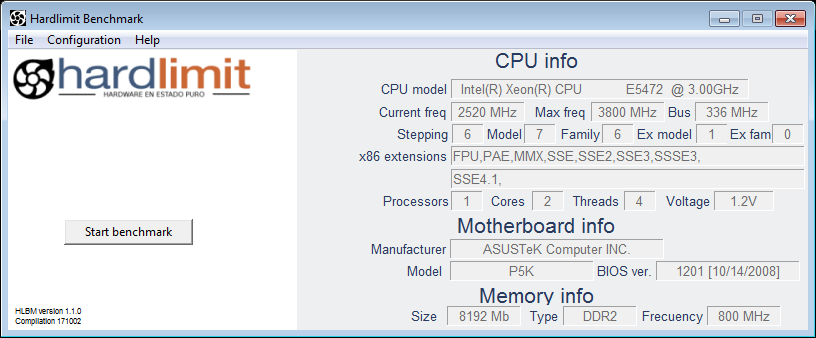
The detection of physical cores is still problematic in old models but that of threads is correct (here without any problems). In addition, the frequency of the memory is not detected with total precision, so those who have a small OC will probably not see the real frequency.
In principle, the blocks in test#4 should disappear and the maximum execution time of all tests should be less than two and a half minutes.
There have also been changes in the page that shows the results where now the hardware on which the test suite has been executed appears. Here is an example.
The amount of changes is enormous (although apparently they are not too many), so the failures must be there. As always, I appreciate it when you inform me of the strange things you see.
Toda la actualidad en la portada de Hardlimit
Mis cacharros -
I like that now the final result comes out when the test is finished. By the way, this has been happening for a while but I hadn't commented on it, the texts overlap from 4 threads when it goes from "waiting" to "test":
Mmmm it won't let me paste an image (before it was automatically uploaded when pasting) have you changed something?
-
@krampak You should be able to paste like before and also drag images. I will look into it anyway.
I haven't done much testing with more than 4 threads but I think I know what you mean. There may be some major interface changes coming up soon so I'll leave that on hold to see what I decide.
Toda la actualidad en la portada de Hardlimit
Mis cacharros -
Los modernos tambien


Intel 8088 7.15Mhz, 512Kb RAM, CGA 4coleretes, HD 10Mb