OC old man C2D E6600 + Asus Commando
-
@cobito said in OC viejuno C2D E6600 + Asus Commando:
With those results, I would try to increase the processor voltage a bit while monitoring those temperatures.
UFF, I left it for 3 hours with the prime at 375x6 and I left and when I came back it was at 87º. I will change the paste, clean the dust and continue later :s
-
@Rober-García x6? If that's less than stock, right?
Best regards!
-
Well, I couldn't take it anymore last night and I opened everything, cleaned it and removed the dust... which I had a little bit:
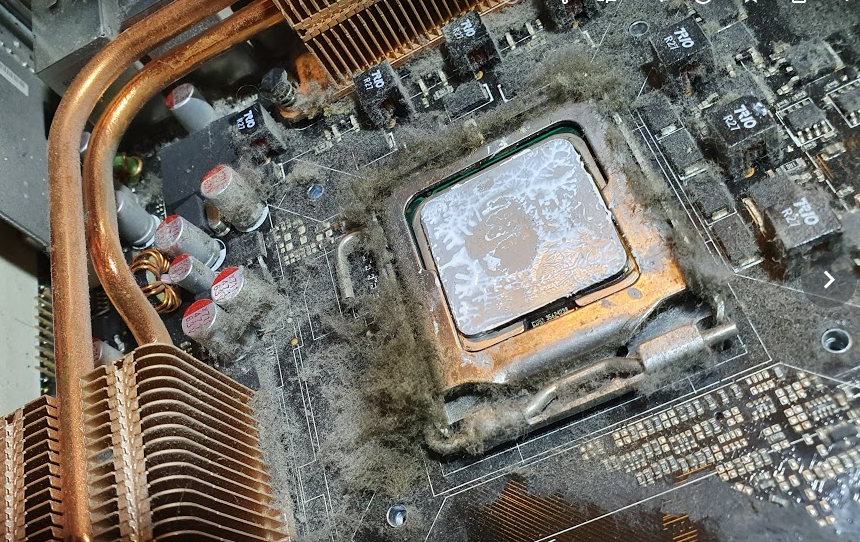
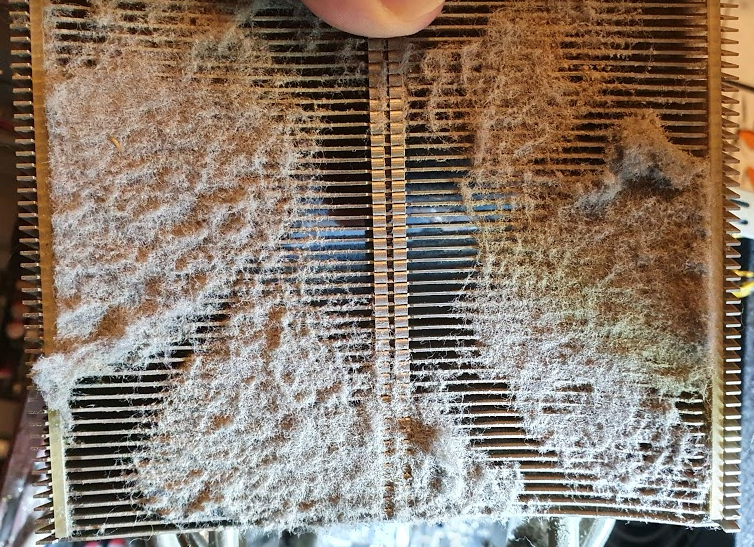
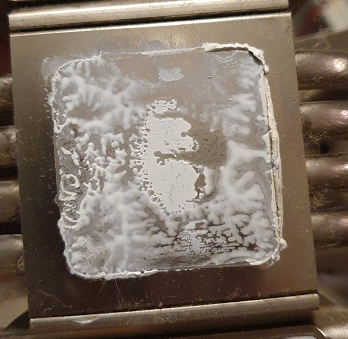
@Sylver yes, 266x9 is the stock. I've lowered the multi to see if it was a problem with the FSB but nothing, the fsb is going like a shot. After cleaning I put it at 410x8 (3280mhz) and it's been an hour and a half in the prime without a problem. Maximum temperature 51º core, 37º MB, 47º CPU
By the way, my other computer is also a 5600+ Brisbane
-
@Rober-García It was too strange that with underclock it raised the temperature so much...
Now it is at more normal values, of course it had dust to stop a ship

You can already try the 3DMark to see what results it gets.
The Brisbane is a great processor, it has given me great joys, although right now it is not with me. In the future I hope to recover it, when I have space

Greetings!
-
Hello again.
With everything clean I have run the tests again... with the same results. I rule out the temperature issue because they are really stable.
I have monitored the voltages during the tests in case there was any peak, but nothing, stable.
I am starting to think it is the motherboard.
Sometimes when I start up I get an error in Overclock, and it loads the default configuration... but I haven't done any OC now ?...
Does any of you know of a situation where this happens, or any way to check it? -
Man, it reminds me a lot of an Asus K8V-X I had, which got worse over the years until it finally died, and gave that error from time to time... I have no idea about the specific reason, I'm convinced that some guru who occasionally stops by should know, but it's just speculation. The battery I imagine is fine, right? To rule out the most basic thing... Regards -
I don't remember if I got a message or not, but my P5B Deluxe had a pin bent on the socket that was precisely used to define the bus frequency. This meant that sometimes, the processor would not be configured at its nominal frequency even when a clear cmos was done. Perhaps if dirt has entered the socket, a pin has been bent, thermal paste has entered, or anything else, something similar might be happening to it.
Toda la actualidad en la portada de Hardlimit
Mis cacharros -
Thanks for the replies. I'll check the battery and the dirt. I think I changed the battery recently, but it can't hurt to check.
More tests: I've lowered the HLBM and I'm doing tests and something weird is happening or I don't understand the results, because no matter what FSB I set on the e6600, I get almost the same results. It only cares about the multiplier

FSBxX CPU Mem Timmings MonoThread MultiThread 375x6 2250 1:1 4-4-4-12 9.48k 15.43k 325x6 1900 1:1 4-4-4-12 9.42k 15.25k 182x6 1090 1:1 4-4-4-12 9.69k 14.97k 375x9 3375 1:1 4-4-4-12 13.52k 22.16k 182x9 1642 1:1 4-4-4-12 13.83k 22.55k -
@cobito No dirt or paste, but the processor was full of a gelatinous substance that I don't remember seeing before. I didn't remove it because I thought "if it has been there for more than 10 years it can't be harmful"
-
@Rober-García Those results don't make sense. I've been reviewing the validations you've sent and the only one under 2Ghz gives a multi-core score of just over 12k (which matches the frequency), but I don't see validations at 1090 and 1642Mhz that give those 14.97 and 22.55k respectively. If you could repeat those two configurations and validate the results, I could look more closely at what might be happening in the performance charts. So far, in the 6 submissions you've made with the micro both over and underclocked, I don't see anything out of the ordinary.
Toda la actualidad en la portada de Hardlimit
Mis cacharros -
@cobito You are right. I was overclocking from Windows with clockgen and cpu-z recognized it, but it seems that the FSB was not being modified... as is evident from the results. I have done the OC from BIOS and it does vary the results accordingly. Also with superpi I had the same behavior.
When I have time I will check the pin you mention -
@Rober-García If it was a failure in the CPU-Z frequency measurement and you can make the modifications via BIOS, I don't think you have any pin problems. In fact, I don't recommend removing that micro if it has been placed for a few years, because that's where a pin can bend no matter how careful you are.
Toda la actualidad en la portada de Hardlimit
Mis cacharros -
@Rober-García what memories those coolers. Have air solutions changed much?
Cluster MPI de tres nodos formado por tres SERVIDORRES HP PROLIANT DL360P 1U 2X E5-2680V2 CPU'S, 20 cores, 40 hilos a una frecuencia base de 2,8GHz. 192 GB de memoria RAM DDR3 ECC (8 x módulos de16 GB 800Mhz)´+ 1U 2X E5.-2697 V2 a una frecuencia base de 2,8 Ghz 192 GB de Ram ECC (8 módulos de 16 Gb 800 mhz) 24 Cores 48 hilos ( 44c/88T)+ 1u 2xE5 2603v2 con una frecuencia base de 1,9ghz 64 Gb DDR3 ecc (4x módulos de 16)




Hello! It looks like you're interested in this conversation, but you don't have an account yet.
Getting fed up of having to scroll through the same posts each visit? When you register for an account, you'll always come back to exactly where you were before, and choose to be notified of new replies (either via email, or push notification). You'll also be able to save bookmarks and upvote posts to show your appreciation to other community members.
With your input, this post could be even better 💗
Registrarse Conectarse