Cluster with the two HP Proliant gen8
-
Hello friends, it's been a while since I wrote anything that is, to put it in some way, technical. The issue is that I had in mind to create a cluster (there are of various types and for various functions) to take advantage of the hardware of both servers that, as the title indicates, are practically the same. Conditio sine qua non for the cluster to work. I will summarize it very briefly, as this is how I was explained it (who helped me, it took him a year to set up with his Epyc, what I have created with the HPs), and since knowledge is not of anyone but of everyone, I will proceed to the explanation as concise as possible.
First of all, have two servers with similar or equal hardware. Have some certified version of Windows Server (it can be done with Linux) in this case, the Datacenter 2022 server and also Windows 10 Pro if possible for workstation. Clean installation of the operating system on both servers.
Server configuration:
https://docs.microsoft.com/es-es/windows-server/failover-clustering/whats-new-in-failover-clustering
(it is indispensable to follow these steps that Microsoft indicates)- The master node will be, for example, HOST1, and the rest of the nodes host2,3,4,5 etc.
- In all nodes, the account and password must be the same.
- For Windows, install MPI
- Ensure that the process smpd is running on all nodes.
- Ensure that in the firewall rules our applications, mpi, rpc, etc. have access (both inbound and outbound).
- Try to open the TCP UDP ports necessary for a cluster. (for Microsoft here.
with this we can use applications that support cluster in parallel processing if everything is configured well. Then the next cluster is to look for redundancy, if one fails, the other should continue. (as they teach me more I will add it here, although I know that many of you already know this more than well)
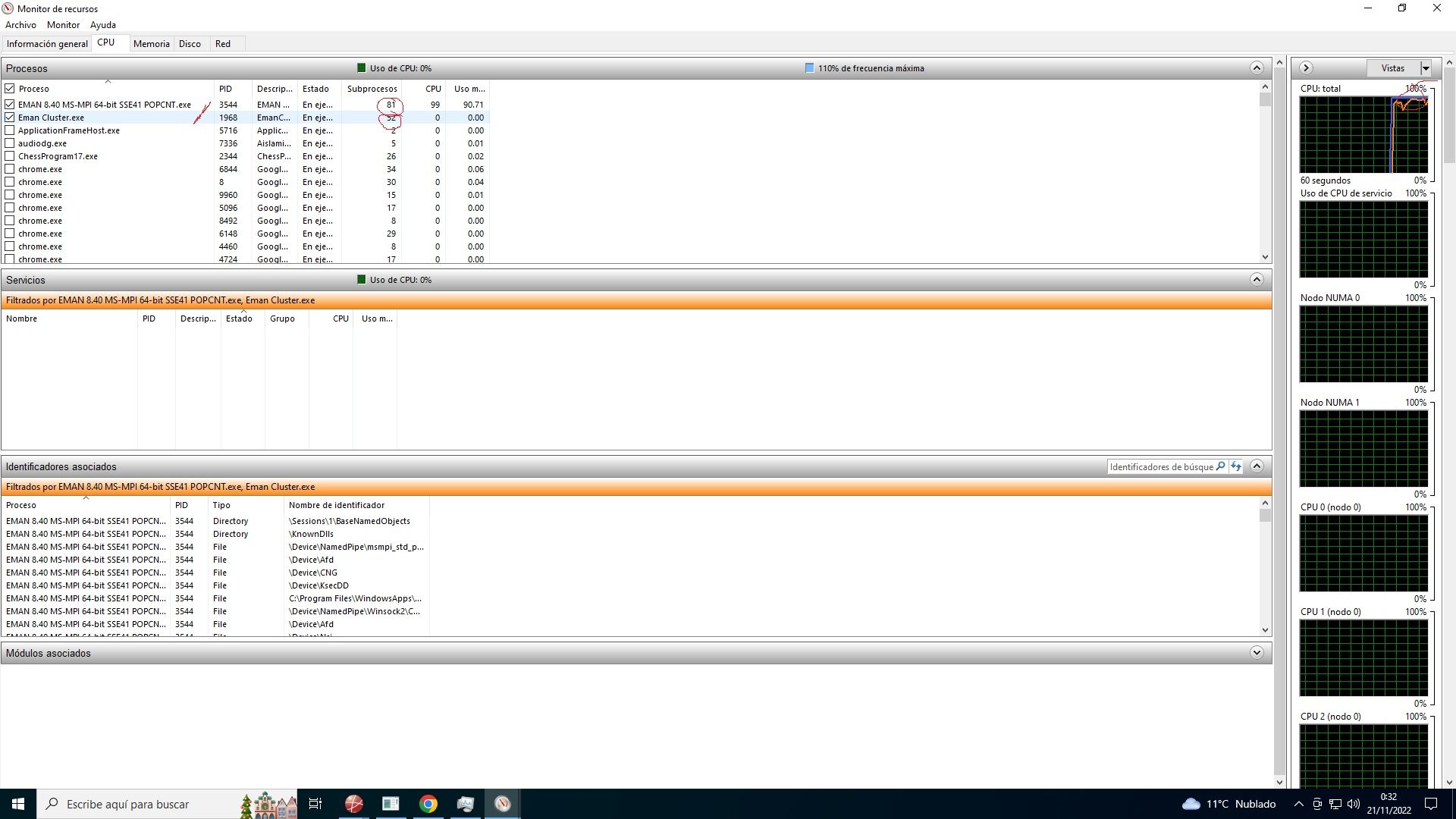
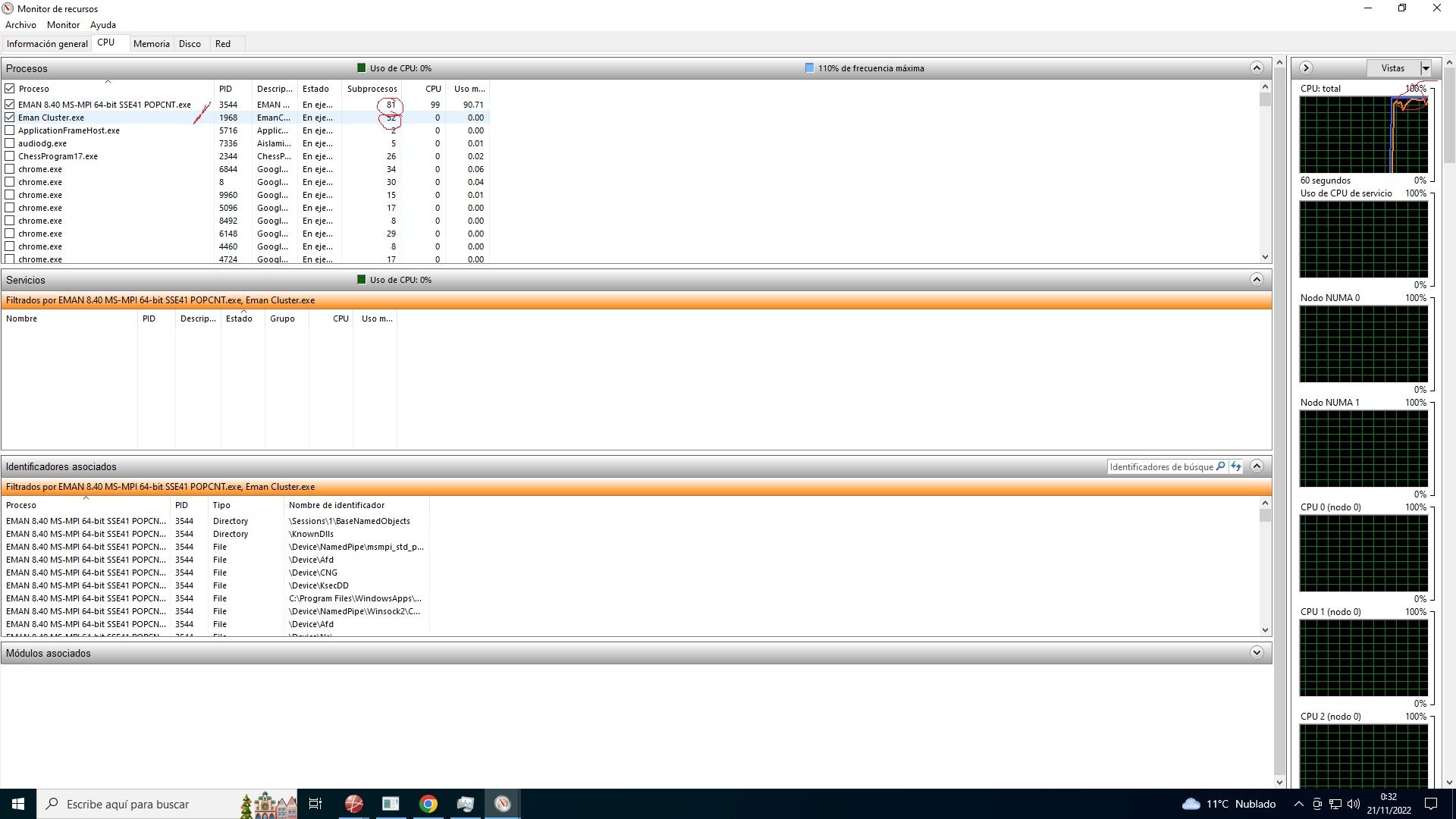
Application working with 88 processes:
Create a failover cluster on both computers (this is done from the server console)
Implementation of a file server in a two-node cluster.
Configuration of cluster accounts in Active Directory )
Essential is everything. But I describe it as I have created it and how it works so that it recognizes the two nodes, that is, 20x2 cores+ 40x2 threads.
Validate the cluster configuration.Configure and manage the quorum
install Microsoft MPI and add permission for this last and for snmp in the firewall.
once all this is done, we have to do the following:
download texel from github, the latest version and install it in the directory c, for example.https://github.com/B4dT0bi/texel/releases
and do the following with the Windows console in administrator mode:
run the following command on both servers:
smpd -d 0Open another console as administrator and run the following command to find the directory where texel was installed:
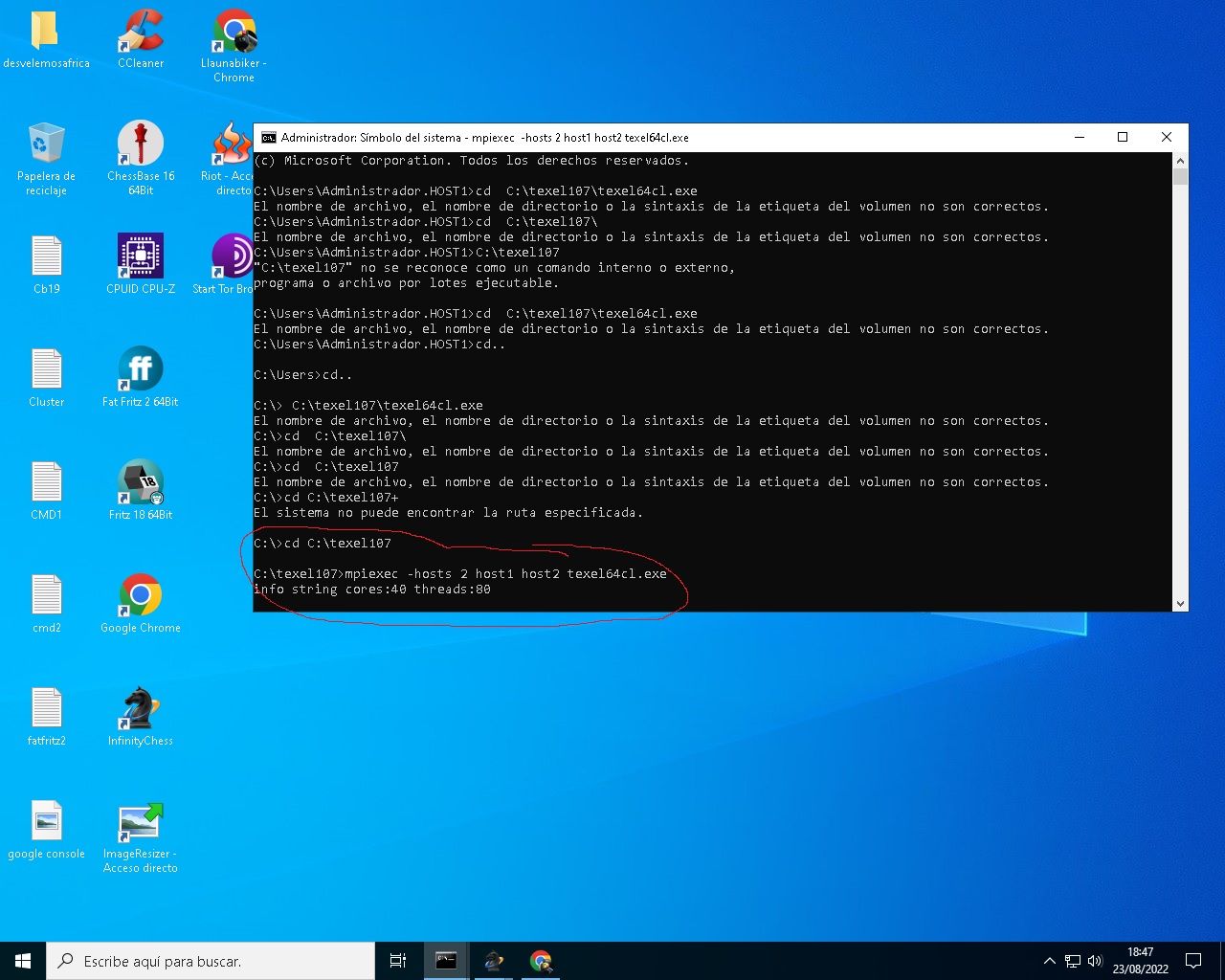
cd \u202aC:\\texel107\\texel64cl.exe
and then the following command:
piexec -hosts 2 host1 host2 texel64cl.exeas a result, you should see what you see in the following screenshot:
I leave you in English if you do this with Linux:
The pre-compiled Windows executable texel64cl.exe is compiled and linked
against MS-MPI version 8.1. It requires the MS-MPI redistributable package
to be installed and configured on all computers in the cluster.Running on a cluster is an advanced functionality and probably requires
some knowledge of cluster systems to set up.Texel uses a so-called hybrid MPI design. This means that it uses a single
MPI process per computer. On each computer it uses threads and shared
memory, and optionally NUMA awareness.After texel has been started, use the "Threads" UCI option to control the
total number of search threads to use. Texel automatically decides how
many threads to use for each computer, and can also handle the case where
different computers have different number of CPUs and cores.- Example using MPICH and linux:
If there are 4 Linux computers called host1, host2, host3, host4 and MPICH
is installed on all computers, start Texel like this:mpiexec -hosts host1,host2,host3,host4 /path/to/texel
Note that /path/to/texel must be valid for all computers in the cluster,
so either install texel on all computers or install it on a network disk
that is mounted on all computers.Note that it must be possible to ssh from host1 to the other hosts without
specifying a password. Use for example ssh-agent and ssh-add to achieve
this.After all this, the possibilities are really diverse, as you can use one computer as support in case the primary fails, etc.
OJo, I have set this up to use chess programs adapted to clusters. The applications, like all, as well as the hardware, do not always work with these configurations. The issue is that we have achieved it in record time, with help. And that is why I leave it here, since I saw that when searching for clusters, it appeared in the software section.
A hug, compañeros.Cluster MPI de tres nodos formado por tres SERVIDORRES HP PROLIANT DL360P 1U 2X E5-2680V2 CPU'S, 20 cores, 40 hilos a una frecuencia base de 2,8GHz. 192 GB de memoria RAM DDR3 ECC (8 x módulos de16 GB 800Mhz)´+ 1U 2X E5.-2697 V2 a una frecuencia base de 2,8 Ghz 192 GB de Ram ECC (8 módulos de 16 Gb 800 mhz) 24 Cores 48 hilos ( 44c/88T)+ 1u 2xE5 2603v2 con una frecuencia base de 1,9ghz 64 Gb DDR3 ecc (4x módulos de 16)
-
@jordiqui said in Cluster with the two HP Proliant gen8:
failover cluster
So this cluster is not for expanding computing capacity, right?
Are the processes replicated on both machines, or does the first one, let's say, pass the tasks to the other if necessary?Great Contribution, all chewed up

You're reminding me of the attempts to make a running Windows could switch from running on a small machine to a large one and vice versa, jeez that would be amazing for the average enthusiast.
A very low-energy board in a home center plan, browsing downloads, NAS etc, and without turning anything on or off, without leaving your Windows session or interrupting anything, it could move games or the most demanding stuff by pulling an ATX board to the max with everything. Passing tasks, the entire session, or with whatever spell was necessary.Salu2.
-
@defaultuser In this specific case, the texelcl.exe file is created so that UCI access engines can use the cluster, that is, all the nodes or CPUs. But by removing texel, you can set up a network server, and if the first one fails, the second one will continue with the tasks, and so on. I didn't want to get into it more because it's a whole world. But I've reduced it as much as possible. A big hug.
Cluster MPI de tres nodos formado por tres SERVIDORRES HP PROLIANT DL360P 1U 2X E5-2680V2 CPU'S, 20 cores, 40 hilos a una frecuencia base de 2,8GHz. 192 GB de memoria RAM DDR3 ECC (8 x módulos de16 GB 800Mhz)´+ 1U 2X E5.-2697 V2 a una frecuencia base de 2,8 Ghz 192 GB de Ram ECC (8 módulos de 16 Gb 800 mhz) 24 Cores 48 hilos ( 44c/88T)+ 1u 2xE5 2603v2 con una frecuencia base de 1,9ghz 64 Gb DDR3 ecc (4x módulos de 16)


Hello! It looks like you're interested in this conversation, but you don't have an account yet.
Getting fed up of having to scroll through the same posts each visit? When you register for an account, you'll always come back to exactly where you were before, and choose to be notified of new replies (either via email, or push notification). You'll also be able to save bookmarks and upvote posts to show your appreciation to other community members.
With your input, this post could be even better 💗
Registrarse Conectarse