Do you know if the Corsair iCUE H150i cooler comes with thermal paste included?
-
@clipper said in Do you know if the Corsair iCUE H150i cooler comes with thermal paste included?:
A pump with two pieces of delrim and acrylic tube and two toric seals is not less than 140€
That's the fault of the pump and reservoir in one fashion, before you could get the D5 loose with a very standard base for under 50 euros and if you looked hard sometimes even cheaper.
@clipper said in Do you know if the Corsair iCUE H150i cooler comes with thermal paste included?:
I only see a central hole in the D5.
Are you not looking at one that comes without a base so that you can add the reservoir of your choice? in that case it comes without a head or threads and what you see is the internal turbine and the motor block.
-
@defaultuser
This is:
€ 59.60 10% OFF | PSW60 PWM Silent D5 Water Pump Core for Computer Water Cooling, Liquid Loop Building, Max 4800rpm, Max Lift 4m
https://a.aliexpress.com/_EIE0dcbBut this other one looks quite interesting:
€ 46.94 20% OFF | FREEZEMOD D5 Water Pump for Computer Cooling, Full Aluminum Alloy Pump Cover, Support Domestic Import, PC Water Cooler PJ-D5QJS
https://a.aliexpress.com/_EuKlZh5 -
@clipper said in Do you know if the Corsair iCUE H150i cooler comes with thermal paste included?:
@defaultuser
This is:
€59.60 10% OFF | D5 Silent Pump Core PSW60 PWM for Computer Water Cooling, Liquid Loop Building, Max 4800rpm, Max 4m Head
https://a.aliexpress.com/_EIE0dcbBut this other one seems quite interesting:
€46.94 20% OFF | FREEZEMOD D5 Water Cooling Pump for Computer, Full Aluminum Alloy Pump Cover, Supports Domestic Import, PC Water Cooler PJ-D5QJS
https://a.aliexpress.com/_EuKlZh5Is it reliable to buy from here? I know people who have bought bikes (replicas at a really outrageous price. Another thing is that on the first descent the frame broke), but with computer components it is, I insist, reliable?
Cluster MPI de tres nodos formado por tres SERVIDORRES HP PROLIANT DL360P 1U 2X E5-2680V2 CPU'S, 20 cores, 40 hilos a una frecuencia base de 2,8GHz. 192 GB de memoria RAM DDR3 ECC (8 x módulos de16 GB 800Mhz)´+ 1U 2X E5.-2697 V2 a una frecuencia base de 2,8 Ghz 192 GB de Ram ECC (8 módulos de 16 Gb 800 mhz) 24 Cores 48 hilos ( 44c/88T)+ 1u 2xE5 2603v2 con una frecuencia base de 1,9ghz 64 Gb DDR3 ecc (4x módulos de 16)
-
@jordiqui
On a bike I can tell you that I've had a 29" carbon frame for years and no problem.
Also handlebars and saddle.
And on the skinny stem and saddle.
In computer components, I haven't bought anything.
I can also tell you that recently my boss spent 8000€ on a Chinese carpentry machine (a mortising machine) bought by a well-known Spanish company that verifies them and puts their brand on them, and it's from PM costing half of a German brand.
The Chinese are no longer stupid, they know they can produce the same and cheaper, but in certain things I personally don't take a chance.
A water pump I don't think will cause problems, a radiator I would think about it (for performance)
The last thing we at work got was a sound suppressor for a cal.4.5 rifle for a buddy.
He's delighted.
That said, they sell it as a motorcycle filter
-
@jordiqui said in Do you know if the Corsair iCUE H150i cooler comes with thermal paste included?:
Is it reliable to buy from here? I know people who have bought bikes (replicas at a really outrageous price. Another thing is that on the first descent the frame broke), but with computer components it is, I insist, reliable?
That's the crux of the matter, comrades. Several brands have emerged that offer products at decent prices that seem perfectly suitable at first glance, but since they come from there and are not from brands with an established reputation... well, they give a lot of creeps, and as we're talking about liquid cooling, creeps x3.
Personally, as I deal with machines, if I had the budget to take a chance, I would buy it and run my own audit and quality control before putting it to use, at the risk of messing it up because my audit would void the warranty in some cases.
If that weren't the case, I don't know what I would do. I would try it because it could be very worthwhile. In a block, not much is needed to make it reliable, and in the pumps, there will be some that were already manufactured for other brands and use a core design that is already a good product.
The o-rings and closures are a bit delicate and precise, but not too much so, and if done properly, it should come out perfect.We would have to test and analyze them, and get information from people who have used them or researched the brands.
It could be very interesting, but not with our eyes closed.If you're looking at blocks, it's better to go for copies of known models, because some have a bad design of the acrylic part that affects the overall solidity.
There are some blocks where I would say no way, and others that could be just as good or almost. -
@clipper
That's what happens, they already have good engineering for a long time, and so on the one hand they produce articles of their own brand that compete with others.
They also have producers without their own brand (a lot) that produced for established brands and this has filtered competition and know-how over time, causing them to now have a lot of specialized and up-to-date industry, and although of low level they participate in very valid final products.The bad part is that at the same time there are also many initiatives at a very low level that put on the market final products with good appearance but with terrible engineering.
And like the marketplace pages these do not filter anything in this sense, so you have everything together and mixed up.From what I have seen sometimes, I am convinced that there are perfectly valid articles and very competitive in price, but see who is going to corroborate their qualities, because from a photo we can say little.
-
@defaultuser I can tell you that in the case of bicycle frames, there are "open mould" ones, and there are some from certain brands that can't even be bought in Spain because certain brands use them and have an agreement not to sell to Spain.
And your balls drop to the floor when you see the price (around 450 / 600) and you see the price of the brands that have the exclusive right to them, which is €1000 -
@clipper said in Do you know if the Corsair iCUE H150i cooler comes with thermal paste included?:
@defaultuser
This is:
€59.60 10% OFF | PSW60 PWM Silent D5 Pump Core for Computer Water Cooling, Liquid Loop Building, Max 4800rpm, Max 4m Head
https://a.aliexpress.com/_EIE0dcb
But this other one looks pretty interesting:
€46.94 20% OFF | FREEZEMOD D5 Water Cooling Pump Core for Computer, Full Aluminum Alloy Pump Cover, Supports Domestic Import, PC Water Cooler PJ-D5QJS
https://a.aliexpress.com/_EuKlZh5The first one, as I told you, comes without the cover that completes the turbine chamber, that's why they call it a core. The cover not only completes the turbine cavity but also has the threads, and the adapter for the reservoir or whatever depending on the cover variant.
The second one already comes with that cover, in the block with threads version. So it's complete and ready to use with an independent reservoir or without a reservoir.
Freezemod is one of the brands that looks good, there's another brisky or something like that that, looking at it quickly, gave me a somewhat less positive impression.
And there are others that just by looking at them I wouldn't even consider it, maybe only for some hard-mod.PD:
The second pump has aluminum, I hadn't noticed, it can't coexist with copper in the loop. -
@defaultuser said in Do you know if the Corsair iCUE H150i cooler comes with thermal paste included?:
@clipper said in Do you know if the Corsair iCUE H150i cooler comes with thermal paste included?:
@defaultuser
This is:
€59.60 10% OFF | PSW60 PWM Silent D5 Pump Core for Computer Water Cooling, Liquid Loop Construction, Max 4800rpm, Max 4m Lift
https://a.aliexpress.com/_EIE0dcb
But this other one seems quite interesting:
€46.94 20% OFF | FREEZEMOD Water Cooling D5 Pump for Computer, Full Aluminum Alloy Pump Cover, Supports Domestic Import, PC Water Cooler PJ-D5QJS
https://a.aliexpress.com/_EuKlZh5The first one, as I told you, comes without the cover that completes the turbine chamber, that's why they call it a core. The cover, in addition to completing the turbine cavity, also has the threads, and the adapter for the reservoir or whatever depending on the variant of the cover.
The second one already comes with that cover, in the mode of block with threads and that's it. So it's complete and ready to use with an independent reservoir or without a reservoir.
Freezemod is one of the brands that looks good, there's another brisky or something like that that, looking a little above, gave me a somewhat less positive impression.
And there are others that just by looking at them I don't even consider it, maybe only for some hard-mod.PD:
The second pump has aluminum, I hadn't noticed, it can't coexist with copper in the loop.The second one is not a pump, it's just the body / support.
I didn't remember the aluminum / copper thing

I don't feel like getting into a mess right now
 but a double radiator of 360 in parallel with a D5 mounted in inverted V could be interesting.
What I am looking at are fans to put pull push in my Corsair RL and I'm between the ones that come standard (Corsair ML 120) and the Noctua industrial ones.
But it's a "small brown" because I have to make a top cover for the tower (Corsair icue 5000X), in my opinion a design flaw on the part of Corsair.
Regards -
@clipper said in Do you know if the Corsair iCUE H150i cooler comes with thermal paste included?:
@defaultuser I can tell you that in the field of bicycle frames, there are "open mould" frames, and some from certain brands can't even be bought in Spain because certain brands use them and have agreements not to sell to Spain.
And you drop your balls to the ground when you see the price (around 450 / 600) and you see the price of the brands that have the exclusive right to sell them, which is 1000€I've been riding bikes since I was 14, and I can assure you that what's out there now is a complete scam. Let me give you an example: the first bike I had to compete in the amateur category is now called something else, and I bought it second-hand for 150,000 pesetas. It came from Euskatel, because the owner and mechanic of the shop in Barcelona had been a mechanic for a professional team and always had some offers like that. New, it would have cost double. It came with Dura-Ace from that era, a Vitus aluminum frame, the best, etc. If we extrapolate that to euros, it would have cost me 1000 euros second-hand. Regarding those frames (Macario and Giant are the biggest frame manufacturers), I doubt they've passed the safety tests that the branded ones supposedly pass. I weighed 69 Kg when I was racing, but now I weigh 80 or more, depending on the case. And when going downhill, which I've always been good at, with a Giant frame, it did some strange things more than once. I always knew that frame wasn't right until it broke. As for the warranty, let's not even talk about it, because I'll never buy Giant again. When you ride a bike, there are way more cars on the road now than 25 years ago, you're risking your life. I understand that the current prices are completely ridiculous, but I'd rather buy something within my means that will last, than one of those that you don't know what's going to happen. But everyone is free to buy what they want. Oh, when they say replica, they lie. For it to be a replica, they must have express authorization from the brand in question. Then, at customs, you might be in for a surprise and they might not let it through. Because it's not a replica, I've had some run-ins on Facebook about this, but lying isn't right either. Regards, comrades.
Cluster MPI de tres nodos formado por tres SERVIDORRES HP PROLIANT DL360P 1U 2X E5-2680V2 CPU'S, 20 cores, 40 hilos a una frecuencia base de 2,8GHz. 192 GB de memoria RAM DDR3 ECC (8 x módulos de16 GB 800Mhz)´+ 1U 2X E5.-2697 V2 a una frecuencia base de 2,8 Ghz 192 GB de Ram ECC (8 módulos de 16 Gb 800 mhz) 24 Cores 48 hilos ( 44c/88T)+ 1u 2xE5 2603v2 con una frecuencia base de 1,9ghz 64 Gb DDR3 ecc (4x módulos de 16)
-
@clipper said in Do you know if the Corsair iCUE H150i cooler comes with thermal paste included?:
I don't feel like getting into a muddle right now, but a double radiator of 360 in parallel with a D5 mounted in an inverted V could be interesting.
Inverted V? what do you mean?
@clipper said in Do you know if the Corsair iCUE H150i cooler comes with thermal paste included?:
What I am looking at are fans to put pull push on my corsair rl and I'm between the ones that come standard (corsair ML 120) and the noctua industrial ones.
The MLs are very good in general and have a lot of pressure, however according to their official specifications they don't pull much air (4.2mm 75CFM 2400rpm).
If the tower is well ventilated I recommend making the sandwich with others that have an acceptable pressure (from 2mm onwards) but a lot of air flow, since the radiator you have is not very restrictive and you will be able to pass a lot more air flow.
I already told you, the convenient pressure/air flow balance in a fan depends on the conditions in which the fans work, I don't know how you have the tower but the interesting thing is that the fans of the radiator are passing air flow through the radiator or even forcing it, but without having to work to move the air flow through the tower or to make it enter or exit either to the extent possible.
In other words, if the other fans already do the rest of the circulation work competently, put something with a lot of air flow and only minimal pressure on the radiator.
You have the Bionix f140 with more than 100 cfm and two and a half of pressure, apparently the tips of the blades stick out a bit at high speed, but if you put it with a spacer or only in push they are an affordable and recommendable option.
You have the thermaltake toghfan with a little less air flow around 100 and three and a half of pressure, with more quality robustness and a very good motor.I'm talking about 14 inch fans in order to put 12-14 cm adapters and come out very benefited.
In any case, unless the radiator has to do all the aerodynamic work of the tower, put high air flow with medium pressure, and that the ventilation that regenerates the air of the tower is capable of moving the same air flow. The original fans are designed to even take care of the ventilation of the whole tower, but if you improve and optimize those aspects you can easily pass a lot more cubic meters of air to the radiator.
-
@defaultuser
The intake fans are these 3 UND
At the front.
Weight and dimensions
Depth 2.49 cm
Weight 140.61 g
Width 11.99 cm
Height 11.99 cm
Fan dimensions (W x D x H) 120 x 120 x 25 mm
Fan(s)
LED lighting Yes
Color of lighting Multi
Number of fan blades 7
Number of LEDs 8
Performance
Quantity per package 1 piece(s)
Suitable for Computer case
Type Fan
Fan diameter 12 cm
Rotational speed (min.) 400 RPM
Rotational speed (max.) 1500 RPM
Maximum airflow 47.7 cfm
Compatible with pulse width modulation (PWM) Yes
Maximum air pressure 1.46 mmH2OThe stock radiator fans are these:
ML120 specifications
Weight and dimensions
Width: 120 mm
Depth: 25 mm
Height: 120 mm
Power control
Rated current: 0.299 A
Technical details
Fan connector: 4 pin
Design
Product color: Black, Grey
Performance
Suitable for: Computer case
Type: Fan
Fan diameter: 12 cm
Supported processor sockets: Not compatible
Compatible processor: Not compatible
Minimum rotational speed: 400 RPM
Maximum rotational speed: 2400 RPM
Noise level (low speed): 16 dB
Noise level (high speed): 37 dB
Minimum airflow: 12 cfm
Maximum airflow: 75 cfm
Minimum air pressure: 0.2 mmH2O
Maximum air pressure: 4.2 mmH2O
Speed detection: Yes
Number of fans: 2
Mean time between failures: 200000 h -
@clipper The intake ones make short of flow, right? The ones in the radiator will be pulling everything from half speed, and in any situation where the front ones don't rotate around 30% faster than the others.
It would be interesting if the intake ones made a little overpressure and over flow, so that the ones in the radiator use all their energy and capacity to cross air through the radiator, and nothing more, like entering or removing air from the tower.
Can't you fit 3 of 14cm in the front? The bad thing will be the noise of the air in the slots for 12cm, with 12-14 adapters it's better but it takes up more space.
And in the radiator would 14cm fit you?
In 14cm you have options of the same pressures but much more flow, it would be the improvement you would notice the most, if it has to be in 12cm it's another independent issue. -
@defaultuser say that the first hunch is the one that counts
 and my tower was not the first... It was the corsair 5000 D that differs from mine in that mine has: front, two sides and top of glass.
And the D has left side of glass and the rest of perforated aluminum (honeycomb grille (to call it somehow))
The 7000D or the 7000 icue seemed to me "expensive" but..
It would have been the smartest option.
I will try to make a review (I have a lot of work to do) of the tower.
After all, both the 5000D
And the 7000D are identical to the icue series, with the exception of the material of the sides.
Aesthetically the icue series is precise, I will not say the opposite.
But in practice...
It has several flaws.
First:
The front glass does not allow the fans to take air directly from the outside, it enters through two gaps between the glass and the sides of approximately 400mm by 30 mm.
That happens exactly the same way on the top.
In the front it is not excessively serious... But in the top it makes it impossible to put a pull/push system.Fan support:
The 5000 series allows you to put 3 of 120 in the front
Right side 3 of 120
Top 3 of 120
Back 1 of 120 or 140
In radiators more or less the same, front, side, top of 360 mm
Depending on how they are mounted, it does not allow you to mount two in the front and side.
The 7000 series allows you to mount the same but in 140 mm
And that the 5000 series has a slot for a two-slot vertical GPU and the 7000 series has a three-slot one. -
@clipper I can't remember what yours was, but the 5000 can definitely fit 14 in the front.
The front cover doesn't really bother you, because there's a lot of air coming in, the air that you're actually going to put in practice comes in without any problems. Plus, it works a little bit by isolating the noise.
The good thing is that with three decent 14cm fans running at half power and like that front, you would have the intake solved but well.
The bad thing is the slots for 12cm that are left in front of the blades, this design has become fashionable and you're not going to do a cosmetic surgery on a 200/300 tower.
If you already have good temperatures, we're here for modding nothing else right
 . How hot does your water get when you're running tests for a while?
 -
@defaultuser said in Do you know if the Corsair iCUE H150i cooler comes with thermal paste included?:
@clipper I don't remember what yours was, but the 5000 can definitely fit 14 in the front.
The front cover doesn't really bother you, because a lot of air comes in there, the air that you'll actually put in practice comes in without problems. Plus, it works a bit isolating the noise.
The good thing is that with three decent 14cm fans running at half power and like that front you would have the intake solved but well.
The bad thing is the slots for 12cm that are left in front of the blades, this design has become fashionable and you're not going to do a cosmetic surgery on a 200/300 tower.
If you already have good temperatures, we're here for modding nothing else right
. How hot does the water get when you run tests for a while?This Saturday I'll upload screenshots

Although it's a mess...
I had the brilliant idea that if I finish the new desk once and for all, I sell my spotless tower for about 150€ and get this one :https://www.thermaltake.com/core-p8-tempered-glass-full-tower-chassis.html
Although I think the 17 fans it can carry cost more than the tower

Best regards -
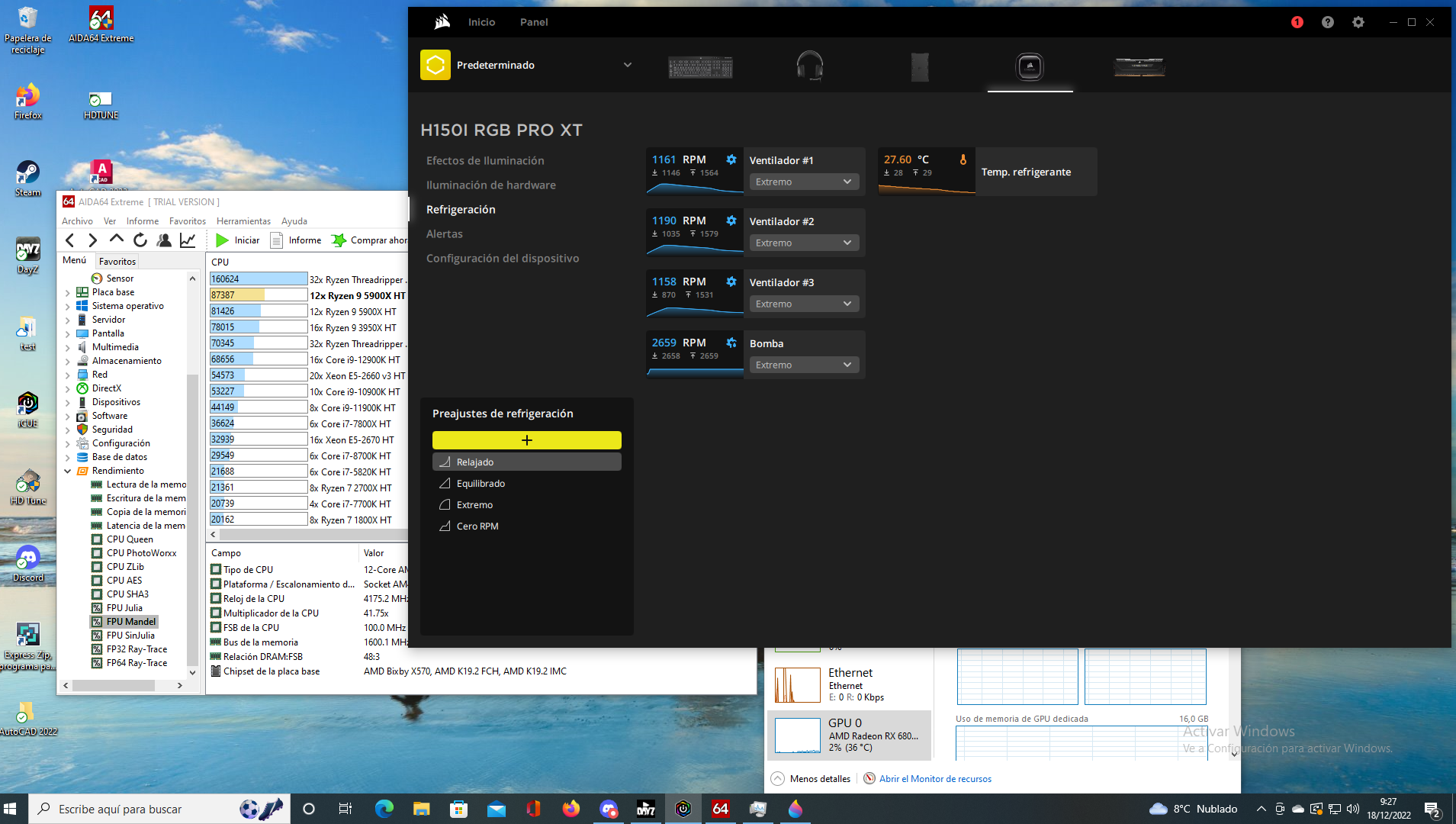
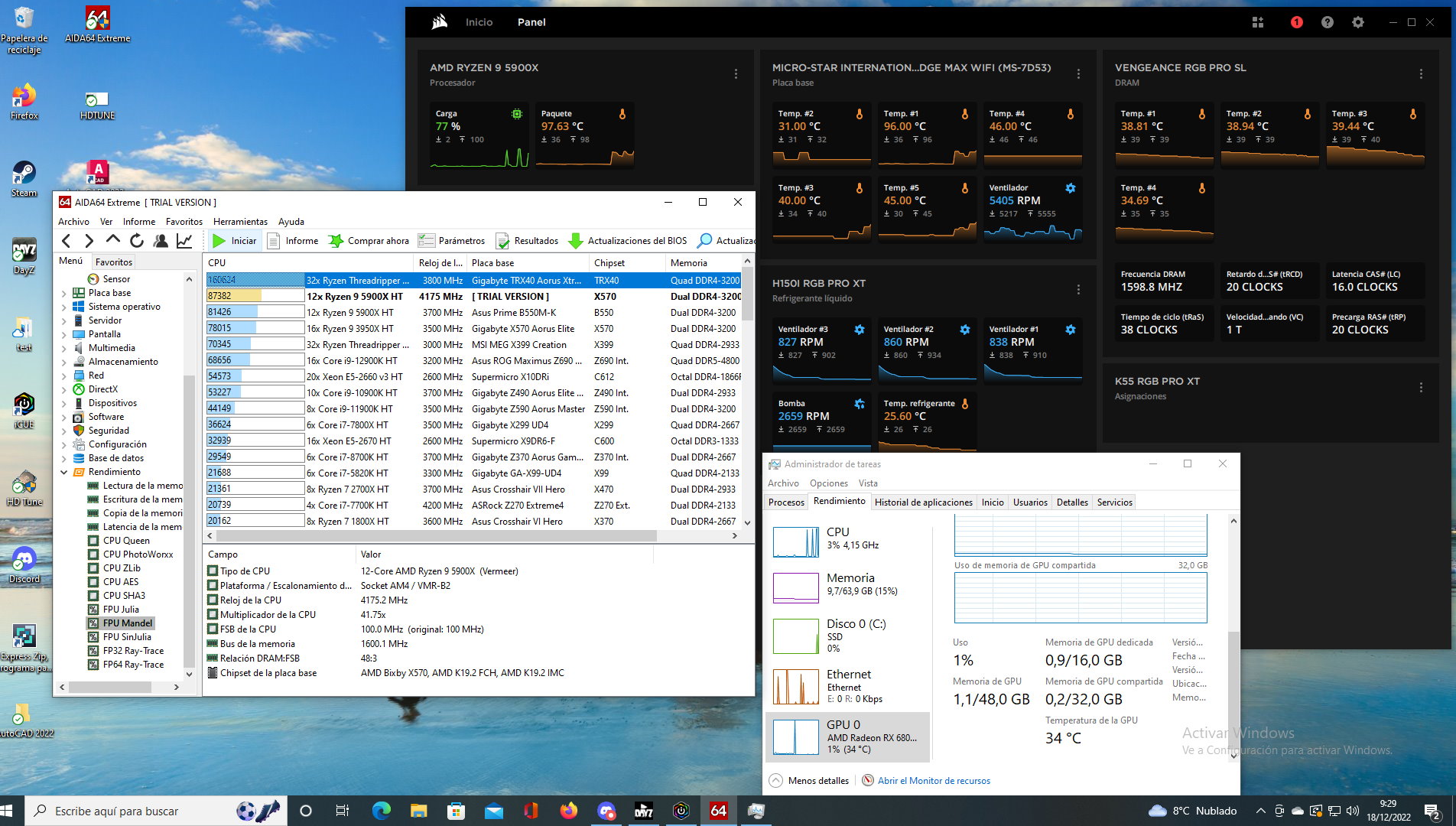
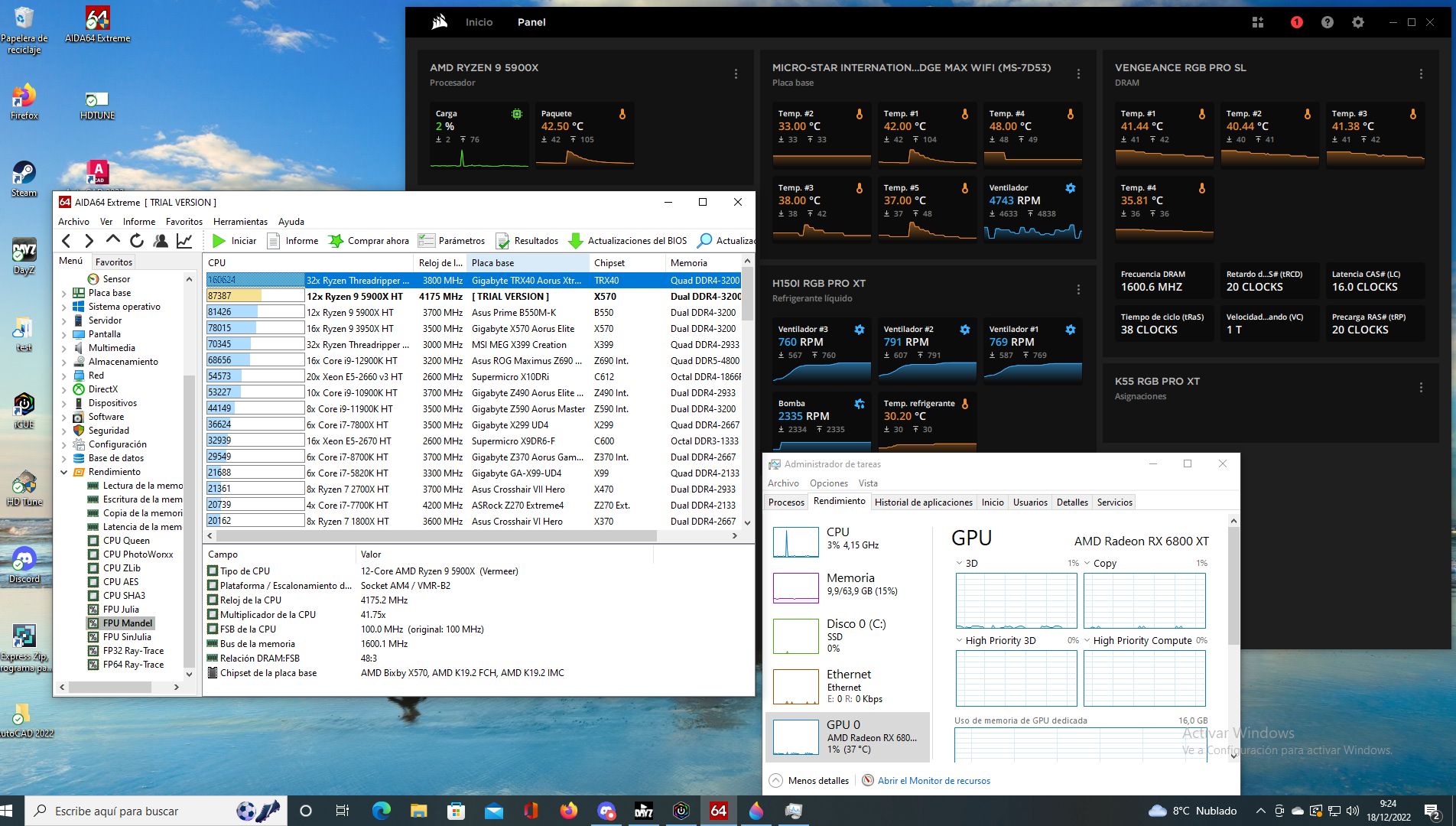
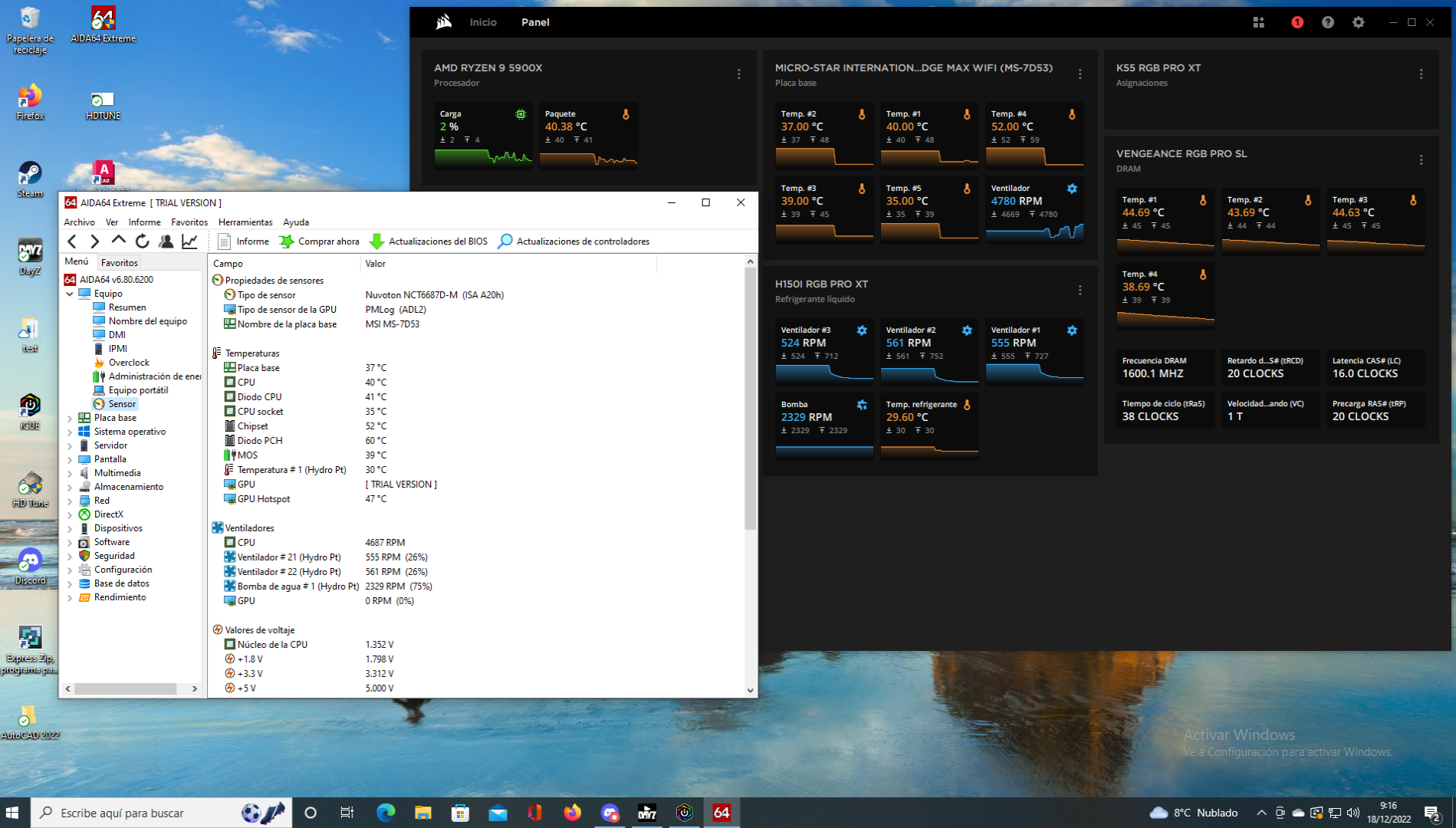
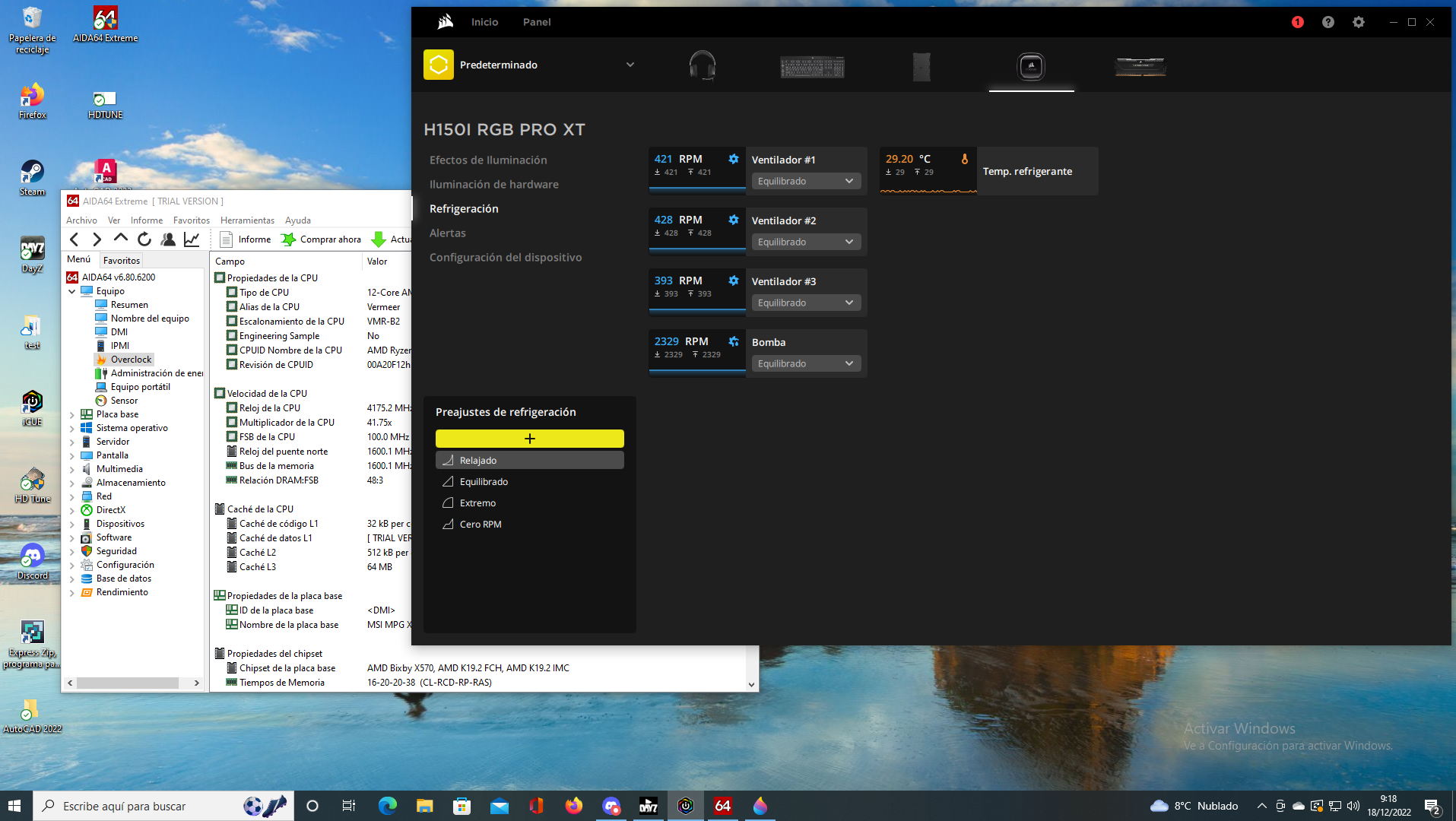
First tests performed.
icue temperature measurement system
Aida 64 CPU stress test, passed 4 times in a row
In two cooling modes, relaxed and extreme.
CPU temperature according to icue 102 degrees and 98 degrees respectively, water temperature 32 degrees.
Something is not working very well...
Then I will upload screenshots.
Regards -
@clipper said in Do you know if the Corsair iCUE H150i cooler comes with thermal paste included?:
Something is not working very well...
I'll upload screenshots later.Also post a picture of how the AIO is mounted, to see if it's in a position where the air pocket stays in the pump or if we have to think about other things, that's not very clear.
Ryzen 5 3600 - Tuf B550 pro - 2x 8g 3600c18 - Strix rtx 2060 - M2 1TB
-
Two things.
My account was blocked on the PC after passing the hard limit test.
So I can't upload the screenshots of the temperature results.
Another thing...
How do you control a D5 on the PC?
Can it be connected to the Corsair Commander to use ICUE? Or does it have to be by BIOS?
Regards -
 )
)

saludos



Hello! It looks like you're interested in this conversation, but you don't have an account yet.
Getting fed up of having to scroll through the same posts each visit? When you register for an account, you'll always come back to exactly where you were before, and choose to be notified of new replies (either via email, or push notification). You'll also be able to save bookmarks and upvote posts to show your appreciation to other community members.
With your input, this post could be even better 💗
Registrarse Conectarse