Aorus Master Z690 connections
-
Hello:
I suppose you are going to be very busy these days. But I am assembling the PC and I have doubts about the connections.
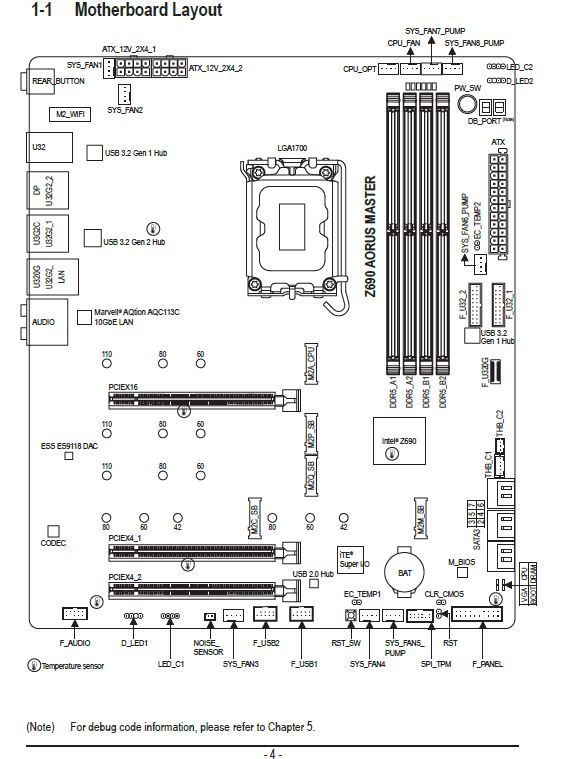
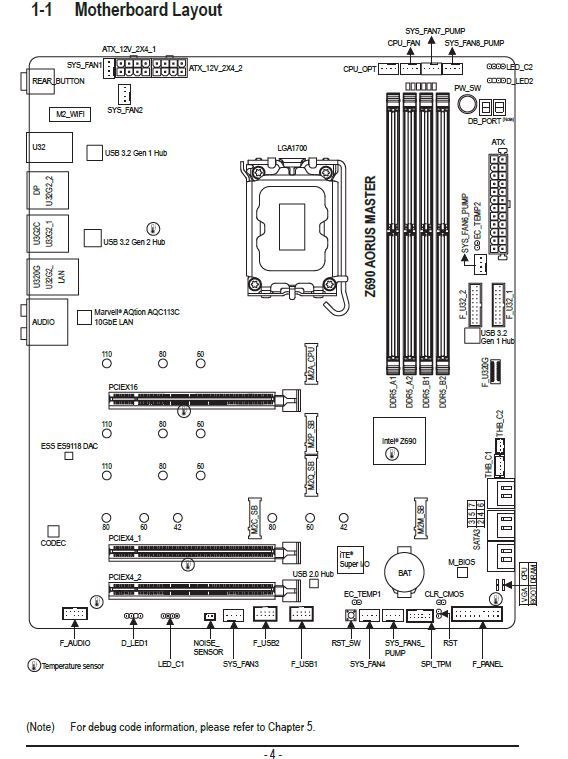
I am referring to the power supply connections. I have one 24-pin ATX but there are two ATX 12V_2x4_1 and I do not know if I should connect it or not in case it explodes.
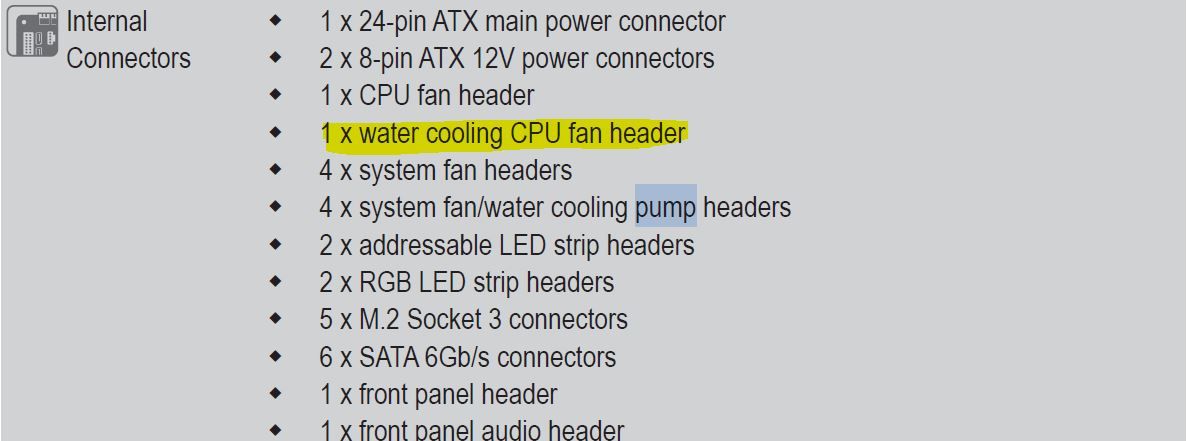
In the same way I have a icue H150i RGB liquid cooling and I do not know where to connect it. I have this in the motherboard book but I am not sure if it is there.
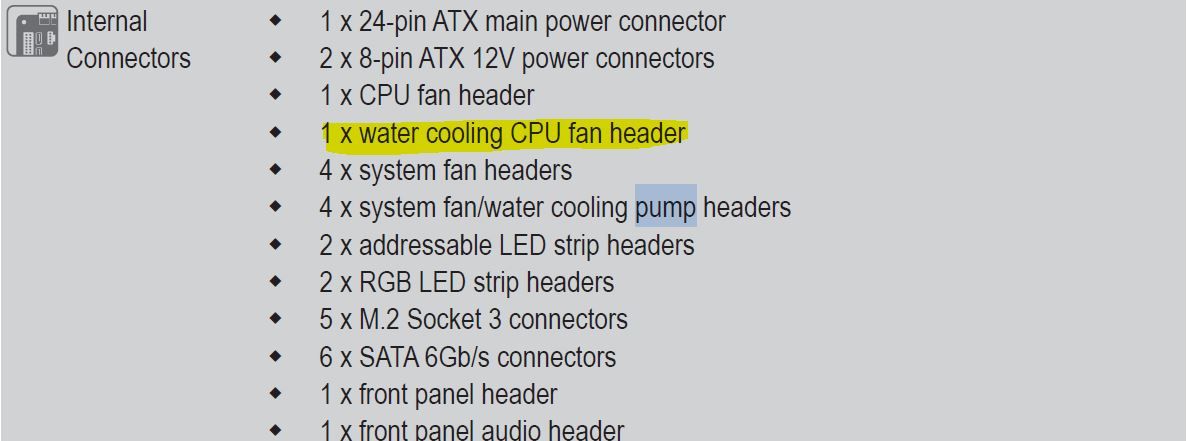
I am referring to the water cooling CPU fan
Happy holidays and happy new year to everyone.
Thank you for reading me. -
Hello @qvengador
Yes of course, connect the two ATX 12V_2x4, nothing will explode.
With just one it should start, the second one is for higher demand/voltage stability in CPU for OC, but in any case if your power supply has both connectors, connect them.About the fan connector for the liquid, I also don't see it in the image, but let's say that connecting them to the different fan connectors is enough. I imagine that all or almost all will be adjustable afterwards.
Regards
-
About the fans, in the picture they are above and to the right of the memory slots.
One is marked as CPU_FAN, so the CPU_OPT will be the one mentioned below as WC CPU Fan header.
But in the end they are options. There are pumps that you just have to power them (a Molex adapter -> FAN would be enough for you) and you can regulate them directly, although others allow you to connect them to the CPU_FAN to use the traditional management to regulate them.
Enjoy it!
Happy New Year!
Intel i5 3570k / ASRock Z77 Extreme 4 / G.Skill F3-12800CL9D-8GBRL / Sapphire HD5850 / Samsung HD103UJ / TR TrueSpirit / NZXT Source 210 / OCZ ZS550W
Intel i5 4570 / ASRock H87 Pro 4 / 2x G.Skill F3-14900CL8-4GBXM / Samsung 850 EVO 250Gb + ST1000DM003 + ST2000DM003 + HGST HDS723020BLA642 + Maxtor 6V250F0 / CM Seidon 240M / Zalman MS800 / CM MWE 550
AMD Ryzen 7 1800X / B350 / 2x8GB Samsung DDR4-2400 CL17 / NVIDIA GTX 1070 8GB / SSD 120GB + ST4000DM004 + ST6000DM003 / EVGA Supernova 650 G2 -
@qvengador the power connectors as you have been told are the 24 and the power supli if you have it in my case I only put the 24 and the 8 pin power supli I have one of 4 pins left but I no longer have free outputs on the F.A
About the r.l:
I have a similar model of corsair, the pump connector can be connected to the CPU fan or to the connectors marked with pum (only has two contacts)
The fans of the R.L if connected to the M.B can be set to full speed otherwise they will be a bit "half gassed" with the icue software.
From memory the R.L has a connector for PWM for the pump, three connectors for the fans and an internal USB and a sata
You will post some photos.
Regards and happy new year -
One question, on which tower are you mounting it?
Regards -
The 12v-8 pin connectors on the board are actually two 4 pin connectors in one.
The fan connectors on that board are all pwm.
The difference is that the cpu and cpu_opt ones can normally only be linked to the cpu temperature, and they also obey a single pwm signal and normally the bios must detect something there to avoid the fan error.And the 4 fan_pump connectors are supposed to either accept a little more current or maybe have a special pwm signal configuration for pump motors. Hmm I'm curious I'll look into it later.
-
Good evening:
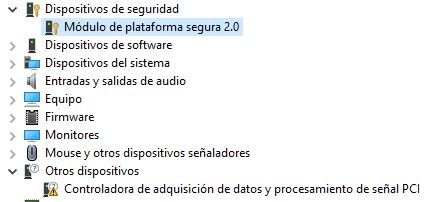
I am asking a new question because I do not want to open another thread. I am installing the motherboard drivers but I am missing the following ones that, even though I have put all the drivers from the page, resist me.
If you can guide me, I would appreciate it. Regards. -
@qvengador First things first, the TPM, because from the image it doesn't seem to be a problem. If you double-click it, you'll see in its properties if it presents any problems and what driver it has installed.
For me, that module comes up with a Microsoft driver, and another one with an AMD driver. I don't know how it will be for you, but check the properties because in theory it should be correct.
In "other devices", does it only show that one?
Ryzen 5 3600 - Tuf B550 pro - 2x 8g 3600c18 - Strix rtx 2060 - M2 1TB
-
The second one seems to be a chipset issue, check out this, it will make it easier for you.
Ryzen 5 3600 - Tuf B550 pro - 2x 8g 3600c18 - Strix rtx 2060 - M2 1TB
-
@defaultuser Indeed it only shows me. I haven't put the whole image to focus on that.
thanks. -
@defaultuser ok voy a ello.
Gigabyte tiene una aplicacion para instalar los drivers. La instale y me ha liado una muy gorda.
He tenido que desinstalar todo los drivers que me puso y la aplicacion. Porque me daba pantallazos azules. Y hacia años que no veia eso. -
@qvengador by default on new boards you have a pen drive with all the drivers and applications, although in my case MSI puts it compressed.
The fastest way is to go to the Asus website and download all the drivers for your board on a pen and from there you load them.
Regards -
@qvengador After the complications with the drivers, it usually becomes a big mess, so make sure to uninstall them thoroughly, or use a restore point.
-
@qvengador said in Aorus Master Z690 Connections:
@defaultuser ok I'll do it.
Gigabyte has an application to install the drivers. I installed it and it messed things up big time.
I had to uninstall all the drivers it installed and the application. Because it was giving me blue screens. And I hadn't seen that in years.When I get a new computer, I prefer to exhaust the Windows updates that already include generic drivers for everything, and then I install the specific ones that are needed. Windows usually manages the change without problems and the system starts with a minimum of functionality that avoids strange glitches from not installing things in order and so on.
What clipper says is the easiest thing, but if it's already been messed up or you clean it, or go back, or do it manually but in the correct order (board/chipset first)
do one more thing, and a very important one, before all that, make sure you have the latest bios.
Regards.
Ryzen 5 3600 - Tuf B550 pro - 2x 8g 3600c18 - Strix rtx 2060 - M2 1TB
-
@clipper Well that's what I had to do after messing up with the Gigabyte application that really messed me up.
But I still need to do the image thing. -
@defaultuser That's what I'm going to do, but tomorrow. I'll get up, have some tea, and pray that I don't mess up the bios update.
-
@qvengador the image thing first tpm is almost certainly correct, you can confirm it by opening its properties.
And the controller on other devices is a matter of the chipset, unless it is something more connected to the board, wifi or another peripheral. -
@qvengador said in Aorus Master Z690 Connections:
@defaultuser Well that's what I'm going to do, but tomorrow. I'll get up, have some chamomile tea, and pray not to mess up the bios update.
Remember to set it to default before flashing (there's an option for that), do it from the bios with a USB drive, read the instructions while having that chamomile tea you mentioned, and if the light doesn't fail everything should go well.
Now they are more complex than the pure old bios, just follow the instructions and update everything it tells you. -
@qvengador
By parts....
Make sure you are downloading the drivers for your M.B. Watch out for the rev
Like: Rev 1.5
1.7
By default, since your board is new, you will have dual BIOS.
And a BIOS reset button on the back.
What I usually do.
Clean installation of the OS
Pen with the M.B driversYou install the OS
And you put the basic drivers, network and little more.
When the OS works with network.
You put the graphics drivers.
And what it asks you, already pulling from the web of your board.
The thing about the BIOS... I don't think it's necessary to update, since it's "new" and you use compatible components.
Another thing would be that the M.B asks you to update BIOS for another "not compatible" processor without updating the BIOS.
Regards -
@clipper said in Aorus Master Z690 Connections:
The BIOS thing... I don't think it's necessary to update, since it's "new" and you use compatible components
And the bug fixes and/or improvements? You'll have to look at it at least, I say