Problem when changing DDR3 memory
-
@clipper said in Problem when changing DDR3 memory:
@ninchi_punkrock I have no idea about that brand.
Patriot does say on its official website that to mount 4 RAM modules, it has to be its kit of 4 modules, otherwise it caps the speed in MHz and it doesn't matter if they are identical.
They might work if you configure them manually, but they don't work with XCM.
In my case, it capped them from 1866 to 1600 MHz.
Check the website.
Regards.
P.d why don't you try if the BIOS recognizes the RAM to install the OS from scratch?
Regards 2The thing is that the BIOS in all cases recognizes the RAM it puts in without problems. It boots, recognizes the capacity, recognizes the voltages it should apply, the latencies, the speed...
But when it comes to booting the operating system, it is unable to manage the RAM and gives blue screens.
And if you run memtest right after booting, it is unable to go beyond 5% and freezes. Which makes me think that no OS will work with those sticks in memtest.It seems like even though the BIOS initially recognizes the memory it puts in, it is then unable to work with it in any way.
-
>> i7-2600K Sandy Bridge @4.4GHz || Noctua NH-D14 || ASRock Z77 Extreme4 || 4x8Gb G.Skill Ripjaws X DDR3 1600MHz || XFX RX 5700 XT 8Gb || SSD Samsung 850 PRO 256Gb & 850 EVO 500Gb || WD Caviar Green 1Tb || Barracuda 1Tb || Corsair TX650 V2 || M-Audio Fast Track Pro || KRK RP8 RoKit G3 || BenQ GW2750 27"
>> Athlon 64 X2 5600+ Brisbane @2.9GHz || Gigabyte GA-M61PME-S2 || 2x2Gb DDR2 Kingston 800MHz || Sapphire Radeon HD 5850 Xtreme 1Gb || Maxtor 320Gb SATA2 || OCZ ModXStream 500W Modular || TEAC PowerMax 120/2 || Acer X243w 24"
>> Intel Core2Duo E6600 Conroe @2.4GHz || Asus P5N32-SLI SE DELUXE || 2x1Gb DDR2 Kingston 800MHz || Asus nVidia GeForce 9800GT 1Gb GDDR3 || Seagate Barracuda IDE 80Gb 7200RPM || Linkworld LPK12-35 450W -
@sylver said in Problem when changing DDR3 memory:
@ninchi_punkrock Yes, I understand what you mean.
Wouldn't this fix your problem?

Best regards!
Well, it's probably the best thing I can find on the second-hand market

I'll send him a message and see if I can get it up and running next week.
-
@ninchi_punkrock said in Problem when changing DDR3 memory:
@sylver said in Problem when changing DDR3 memory:
@ninchi_punkrock Yes, I understand what you mean.
Wouldn't this fix your problem?
Best regards!
Well, it's probably the most accurate thing I can find in the second-hand market
I'll send him a message and see if I can get it up and running next week.
Good luck...
Two weeks ago I bought some Hope brakes for the bike and the useless transport agency lost them...
They have to return to the seller so that he can send them again.
That's it...
Best regards -
@clipper Normally, shipments with wallapop do not give problems, they are certified by correos and with insurance, so they usually work like a clock.
That said, let's hope the seller protects the memories well, that is the most important thing.¡Saludos!
-
That's what I told the seller.
Please pack them well and securely to mitigate the thousand hits the package will take

Regarding the seller and the shipping system, it seems serious.
-
@Sylver
If you choose pickup at post office si.
If you choose pickup at a "pickup point" stores normally, they do it by GLS.
Regards -
@clipper I directly choose to have it delivered to my home in person, and for now, that's perfect.
Because the collection points are a lottery as you rightly say...
Best regards!
-
Well, gentlemen!!!
Incredible but true.
I just received the 2 modules by mail perfectly packed.
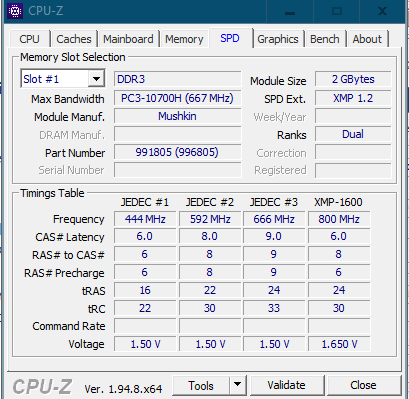
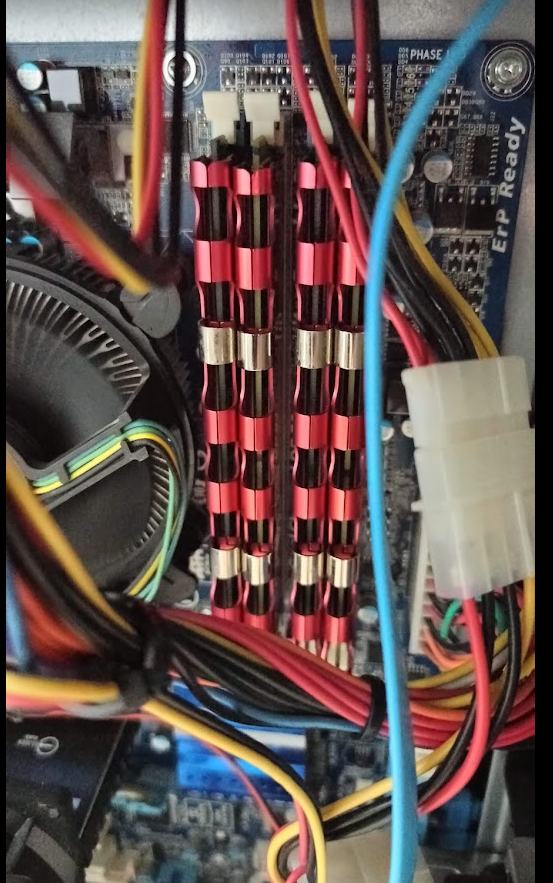
I plug them in and do a boot just as I had everything configured and voila!!!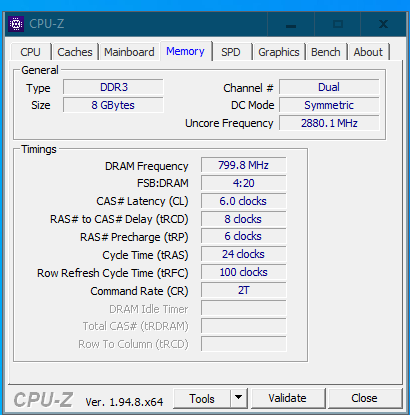
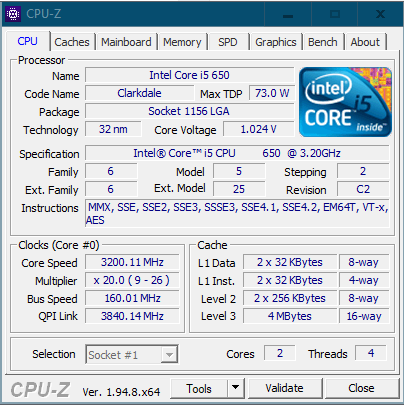
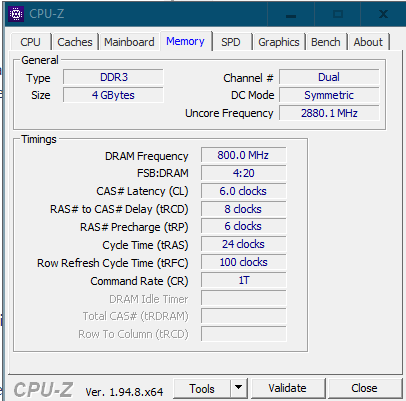
I picked up the 4 ram modules without any problems, no touching bios or anything.
Incredible. It has surprised me for the better.
Now I just have to adjust the Command Rate to 1T since supposedly these mushkin allow it.
But beyond that, 10 out of 10.
Many thanks to everyone as always!!
-
@ninchi_punkrock said in Problem when changing DDR3 memory:
Well, folks!!!
Incredible but true.
I just received the 2 modules by mail perfectly packed.
I plug them in without further ado and do a boot just as I had everything configured and voila!!!It has picked up the 4 modules of ram without any problems, neither touching bios nor anything.
Incredible. It has surprised me for the better.
Now I just have to adjust the Command Rate to 1T since supposedly these mushkins allow it.
But beyond that, 10 out of 10.
Many thanks to everyone as always!!
I'm glad for you.
P.d. Comb or tidy up the cables a "little"
Best regards -
@ninchi_punkrock I'm very happy for you, buddy! If a model worked perfectly, it couldn't fail

Now I hope she enjoyed it a lot, your "new owner".Best regards!



Hello! It looks like you're interested in this conversation, but you don't have an account yet.
Getting fed up of having to scroll through the same posts each visit? When you register for an account, you'll always come back to exactly where you were before, and choose to be notified of new replies (either via email, or push notification). You'll also be able to save bookmarks and upvote posts to show your appreciation to other community members.
With your input, this post could be even better 💗
Registrarse Conectarse