Test of the Real Nvidia Gtx Titan, single-sli-tri Sli, 4 WAY SLI
-
ELP3 now you will have competition unless you come up with it too;D launch date December 9th.-
.jpg)
Features:
- High performance evaporation cooler for competitive overclockers
- Modern, unique design with copper core allows for easy temperature regulation
- Built-in temperature probe slot near contact surface
- Compatible with both Liquid Nitrogen LN2 as well as Dry Ice CO2(s)
- Includes premium thermal grease
Technical data:
- capacity: 190mL
- weight (empty): 1.55kg
- operational range: -196°C to +80°C
Enclosed:
- EK-SF3D Critical Point /w pre-installed G80 mounting plate
- Additional mounting plates: HD7970 (R9 290X), GF560, G92, G200
- universal backplate
- mounting screws
- Gelid GC-Extreme 1.5g thermal grease
- allen key 2mm
Saludos.-
-
ELP3 now you will have competition unless you come up with it too;D launch date December 9th.-
Features:
- High performance evaporation cooler for competitive overclockers
- Modern, unique design with copper core allows for easy temperature regulation
- Built-in temperature probe slot near contact surface
- Compatible with both Liquid Nitrogen LN2 as well as Dry Ice CO2(s)
- Includes premium thermal grease
Technical data:
- capacity: 190mL
- weight (empty): 1.55kg
- operational range: -196°C to +80°C
Enclosed:
- EK-SF3D Critical Point /w pre-installed G80 mounting plate
- Additional mounting plates: HD7970 (R9 290X), GF560, G92, G200
- universal backplate
- mounting screws
- Gelid GC-Extreme 1.5g thermal grease
- allen key 2mm
Saludos.-
And that thing what the hell is..??? a portable LN2 kit?
They don't know what to invent anymore lol…
Patagonico, I don't care...I enjoy playing, that's for sure, always at maximum and 60 stable fps. I think that for what I have paid it is fair to have that minimum requirement. The rest doesn't matter to me..in fact, you learn and stabilize the equipment more by playing all kinds of games than just benchmarking.
Best regards.
-
And that thing what the hell is..??? a portable LN2 kit?
They don't know what to invent anymore lol…
Patagonico, I don't care...I enjoy playing, that's for sure, always to the fullest and 60 stable fps. I think that for what I have paid it is fair to have that minimum requirement. The rest I don't care..in fact, you learn and stabilize the equipment more by playing all kinds of games than just benching.
Best regards.
I totally agree but it's always fun to do a bench to see how far the card goes ;D
Especially now that 4K monitors seem to be within reach at least in 24" and 27" it's always good to have plenty of power.
Best regards.
-
I totally agree but it's always fun to do a bench to see how far the card goes ;D
But now that 4K monitors seem to be aimed at least at 24" and 27" it's always good to have plenty of power.
Best regards.
For a 24" 4K..better you stay as you are..
The minimum required for that resolution on a monitor should be more than 30" and no more than half a meter…and I'm not saying this just to say it,it's that I've tried it.
Already at 1 meter away from viewing,there is no difference at all with a 1600p.
Best regards.
-
For a 24" 4K.. you'd better stay as you are..
The minimum required for that resolution in a monitor should be more than 30" and no more than half a meter…and I'm not saying that just to say it, it's that I've tried it.
Already at 1 meter away from viewing, there is no difference at all with a 1600p.
Best regards.
I have the 27" at 70 cm and I think the 24" is big, I could put it at 40 cm as well, until it arrives in my country it will be 3 months after its launch but as the economy is going, surely one will fall into my house in 2014.
So these Dell monitors will be super tested
 although I want to see what the 28" offers and in the meantime I save the difference for the Maxwell.
Best regards.
-
fjavi…
Apparently, you already have bios for your little monster:
skyn3t-3A-GB-rev4.zip 131k.zip file
Look for it, it is designed for the WF rev.02 B2 from Gigabyte specifically.
Regards.
-
I'm flying with the skyn3t rev2 bios set to 1006Mhz on the Sli.
What bios do you have set on your titans?Regards
Sent from my GT-N7100 using Tapatalk
-
I'm running the skyn3t rev2 bios on my Sli at 1006Mhz and it's going like a dream.
What bios are you guys running on your titans?Regards
Sent from my GT-N7100 using Tapatalk
I have the same one but the one that lets you run it at 928MHZ.
I have it mainly because it's the only one that lets you have a total TDP of 450W. A power consumption that the graphics card will definitely hit if you overclock it past 1400MHZ with a lot of voltage.
I think the techinferno bioses are more balanced, but you can't overclock them as much as the skynet ones. Because the maximum TDP is lower.
Regards.
-
fjavi…
It seems like you already have bios for your little monster:
skyn3t-3A-GB-rev4.zip 131k.zip file
Look for it, it is designed for the WF rev.02 B2 from Gigabyte specifically.
Best regards.
That's the same one I saw a few weeks ago and it's not working for me, it works but it doesn't maintain the voltage and it fails.
I've tried editing mine but it won't let me touch power target, also I see that it comes with a maximum boost of 1293, that I can touch and raise it more but if I can't raise power target and voltage it's useless, I saw another bios from EVGA and it does allow editing power target but in mine it comes blocked and maybe that's why they haven't released it yet, but it says that with the 3A bios it gives some failure, there's also a quote from someone with the WF rv2 and it doesn't respond.
If I download a reference bios from gigabyte it lets me modify power target, but in the customized ones it doesn't
Thanks anyway.
Best regards
-
I'm using the skyn3t rev2 bios on my Sli at 1006Mhz and it's going like a dream.
What bios do you have installed on your titans?Regards
Sent from my GT-N7100 using Tapatalk
I have the same one, because it allows you to increase the TDP a lot... Whatever you do is your own responsibility.......xD.

Cheers…
-
Look at the Jotole that knows how to ocear and everything..;)
Who has taught you?
Haha...
We need to upload more memos, this test is pure bandwidth. But the core is fine.
A hug.
P.D. Fjavi, they said that this was the bios of the Gibayte WF rev0.2.. I don't know what could have gone wrong, anyway if all you need is more TPD, edit it yourself.
A hug.
-
Look at the Jotole that knows how to ocear and all that..;)
Who taught you?
Haha...
We need to upload more memos, this test is pure bandwidth. But the core is fine.
Hugs.
P.D. Fjavi, they said that this was the bios of the Gibayte WF rev0.2..I don't know what could have gone wrong, but if all you need is more TPD, edit it yourself.
Hugs.
I would need the PT and more voltage, I don't know but in this message I understand that he had to remove it and put the original one.
Hi,
I got a Gigabyte GeForce GTX 780 3GB OC Windforce rev2.0 but the bios version on it is: 80.10.3A.00.32, do you know why it is like this? I bought the card 1 week ago.
I tried the rev 4 of vBios but every time I tried to benchmark it, the clock went back to stock 1006Mhz.
So I went back to the original bios from the backup file.
Should I use the: Gigabyte.GTX780.3072.130516WF-PT+VOLT-BD.rev2 instead? Even that I have a rev 2.0 card?My English is bad, that bios rv4 is 80.80 which are the B1, mine is 80.10.3A.00.2C, but I can't edit the voltage or the power target, seeing the one from Skyn3t, I see that he has voltage up to 1.21v, but I don't know with what he edited it.
I also don't think I'll get much with my equipment, it's already a bit short, Windows doesn't detect the frequency well.

Subefotos.com - Share your photos quickly
Let's see trying the one from Skyn3t.

regards
-
Look at the Jotole that knows how to ocear and all that..;)
Who taught you?
Haha...
We need to upload more memes, this test is pure bandwidth. But the core is fine.
Hugs.
P.D. Fjavi, they said that was the BIOS of the Gibayte WF rev0.2.. I don't know what could have gone wrong, but if all you need is more TPD, edit it yourself.
Hugs.
Hahaaaa, I've had good teachers…..
 Although I learn pretty fast............;).
Let's see the 290, that cheap point if it gets close to it… ;).
-
Jajajajaaa, he tenido buenos maestros…..
Aunque aprendo bastante rapido............;).A ver la 290 esa del cutre point si se le acerca… ;).
No solo las 290…sino alguna mas de Nvidia..;)
Como suben las condenadas cuando das voltaje...y porque el ancho de banda en esa prueba es fundamental.Si se pudieran poner las memos a 8000MHZ,como hay gente por ahí que puede tocar el voltaje de las memos con bios creadas a medida,la puntuación sería bastante mejor aún.
Un saludo.
-
Having tried this bios, it doesn't convince me, it seems that the memories aren't working well, with 1,21v it goes up a little more but it doesn't work miracles either, this is what I achieved but it gives me a bad result.
Subefotos.com - Share your photos quickly

this way it goes better and my computer is no longer for competing in benchmarks
Subefotos.com - Share your photos quickly

I think I'm going to put back its bios that works better in games which is what I care about, it heats up less and is quieter.
P.D Jotole, you give the number of the beast that Titan, I without R.L or equipment, or extra voltage, I pass on continuing to force it, although I think it would go up well but I'm already satisfied with what it does, I don't ask for more.
The Ti thing is strange, I think those phases of OC balancing are to blame, but that card if it could go up like the Titans or 780 and apply voltage they would have to perform quite well, besides they would go up very well.
regards
-
Having tried this bios, it doesn't convince me, it seems that the memories aren't working well, at 1.21v it goes up a bit more but it doesn't work miracles either, this is what I achieved but it gives me a bad result.
Subefotos.com - Share your photos quickly
this way it goes better and my computer is no longer for competing in benchmarks
Subefotos.com - Share your photos quickly
I think I'm going to put back its bios that works better in games which is what I care about, it heats up less and is quieter.
P.D Jotole, the beast number that Titan has, I don't have R.L or equipment, or extra voltage, I'm done pushing it, although I think it would go up well but I'm already satisfied with what it does, I'm not asking for more.
The Ti thing is strange, I think those OC balancing phases are to blame, but that card if it could go up like the Titans or 780 and apply voltage they would have to perform quite well, besides they would go up very well.
regards
That 780 works fabulously for you fjavi, on other platforms it would give you more, don't worry... At 1200 it's a real powerhouse that can handle whatever you throw at it.
Yes, I was just messing around with it to see how far it goes, 1400 is a pretty serious number already... This coming week another new one should arrive, as bad as it may be at 1200 I can have them running safely and with that I can move everything in surround without any problem. If it were half good and allowed me 1300 without much voltage like this one it would already be great.....But anyway, with 1200 I already tell you they are amazing...
Best regards
-
That 780 is a fable, fjavi. On other platforms, I would give you more, don't worry your head... At 1200, it's a cucumber of care that can handle whatever you throw at it.
If I was just messing around with it to see how far it goes, 1400 is a pretty serious number already... This week I should get another one, and even if it's bad, at 1200 I can have them secure and with that, I can move everything in surround without any problems. If it was half good and allowed me to do 1300 without much voltage like this one, it would already be great... But with 1200, I already tell you that they are amazing...
Best regards
I'm happy with the graphics, I think the core boosts very well, the memory also goes up but already asks for more voltage. At 1333, I beat Heaven where the dragon is, but I had the memory at 6500mhz, I also think it fails due to lack of voltage and because the phases get hot.
In this game, it eats the SLI of 480 without touching voltage and the other overclocked ones too, it eats it already by default without doing any OC.

This is what I could do with that voltage, although with these cards it seems that Heaven also appreciates fast memory, especially it should go well with voltage because otherwise it yields less.

Before I bought it, I asked for 1200mhz and it does it with the cap, without touching voltage or anything, because with the factory OC it alone sets itself to 1124mhz, the good thing is how cool and quiet they are, which is now when I appreciate the most playing without hardly hearing the PC.
Let's see if you get lucky with the new one and it boosts well, because it would be a shame if one is good and the other not, a pair of good cards brings more joy.
Regards
-
Hello everyone.
After messing around with win 8.1, which hasn't fully convinced me for certain, I decided to try the "little trick" of increasing performance in the 3DMark benchmark, and although I already knew about it, it's still "shocking"... a 10% increase just like that is at least curious.
Although there are 4 slots, only 2 are in SLI. Performance mode. The important thing is the graphics score:
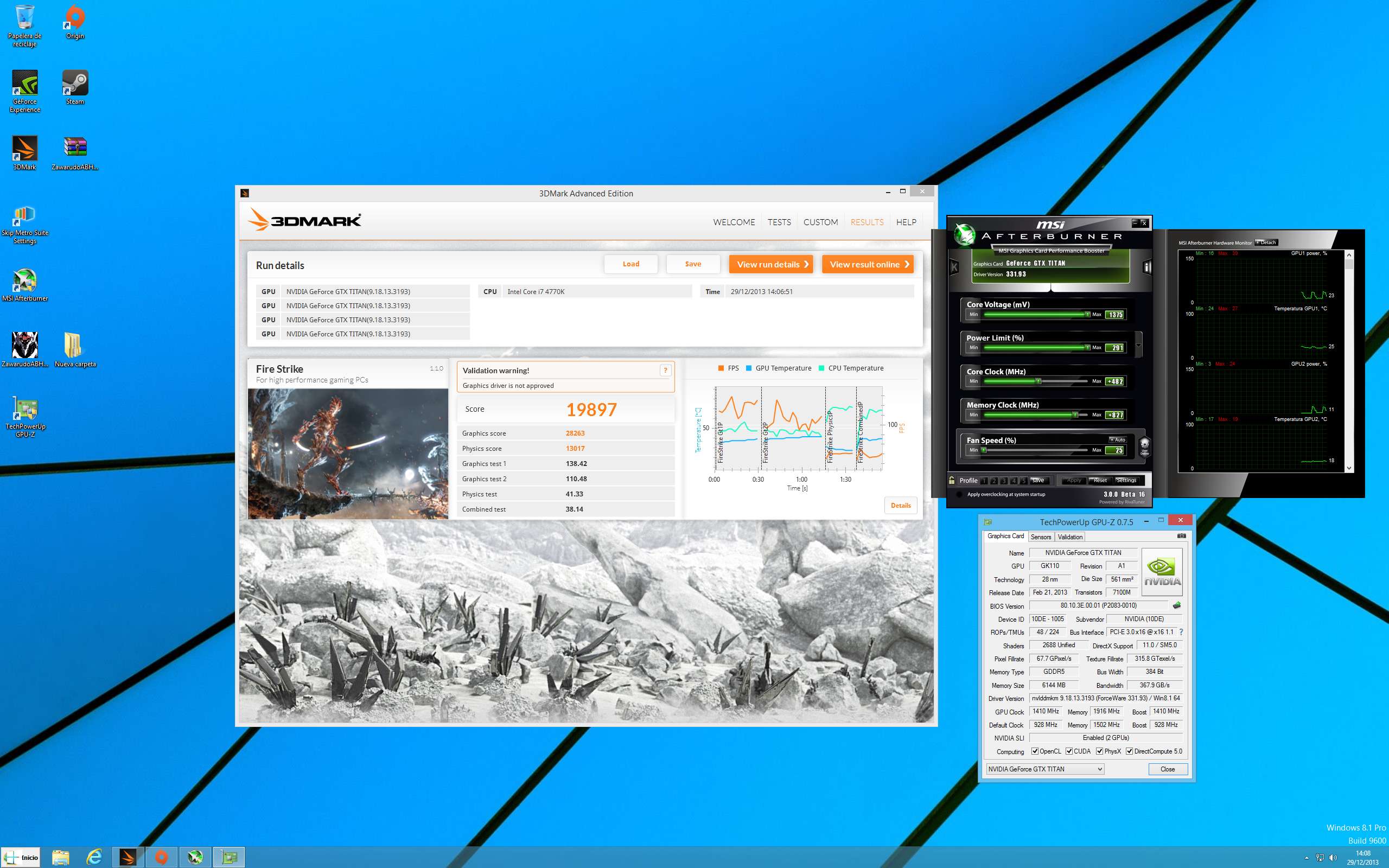
In everything else, I don't notice any improvement, neither in games nor in nada.Si more speed, but not more performance. Even possibly some games run a little worse except for BF4.
However, where I wanted to get to with this 3DMark thing, which personally I think is the most irregular benchmark of all those released in recent years by Futuremark and that only asks for a lot of bandwidth throughout the entire system beyond the actual power of the graphics chip, which also obviously, but not as much as 3D Mark 11 xtreme for ejemplo.Es that there are many people who are unaware of this, they pass the benchmark with their new graphics card and suddenly find that someone has put a capture in win 8 and gets 1500 points and the poor guy goes crazy because it's not usually said that in win 8 it performs almost 10% better than in win7 and not because of that has anything wrong with their graphics card or their computer.
The use of multiple GPUs in this benchmark, is greatly benefited in win 8 since the micro works better.
But well, it's simply a comment and a call for calm for the few who didn't know it. They have everything perfect and win 7 will continue to go very well, the only thing is that this particular test, they are going to lose quite a few points compared to win 8.
Regards.
-
This happens with all 3dmark, it ends up being more influenced by the CPU and system than the graphics. I bought this the other day because of the Steam sale and I think it's one of the worst they've released. The graphics seem really bad to me, similar to or even worse than Vantage. Looking at the graphics from games up to the Firestrike, I think it's a joke. It seems like an outdated engine to me.
That's from Windows 7, maybe from 8.1 it will get more. A system where I have Steam and I must have about 50 games installed, exactly 70 Steam games installed.
The Valley overclocks my graphics card to over 1400 MHz.
Regards

-
Not just the 290…but some more from Nvidia..;)
How the hell do they go up when you give them voltage...and because the bandwidth in that test is fundamental.Si if you could set the memos to 8000MHZ,like some people out there can touch the voltage of the memos with custom bios,the score would be even better.
Best regards.
Does your CPU temperature go up if you put the XMP profile on the memory?
It's that I put the XMP profile and it raises the temperature of the cores by 4º, I can't put the graphics card in the first Pcie because that Corsair one doesn't leave it space.Well this gave me a headache especially the memories it seems to be more precise although I still have to see if it's stable, at least the mouse pointer is working well and everything responds well.

Well I've already figured out the trick with this platform, now it's more precise, I leave it at 4600 with 1,312v and the memory at 2400 configured by hand better than by XMP, it heats up a little less, you can notice the stability in games, the bad thing is that I have the graphics card at 8x because the second Pcie won't let me put 16x let's see if I find a case, to put the graphics card in the first one at 16x, the board is amazing.

This is what I reached for temperature with that test.

regards


Hello! It looks like you're interested in this conversation, but you don't have an account yet.
Getting fed up of having to scroll through the same posts each visit? When you register for an account, you'll always come back to exactly where you were before, and choose to be notified of new replies (either via email, or push notification). You'll also be able to save bookmarks and upvote posts to show your appreciation to other community members.
With your input, this post could be even better 💗
Registrarse Conectarse