Mid-high range gaming PC.
-
For unknown reasons the crystaldisk does not "see" the raid 0 and I can't pass the test.
Any ideas?
The W issue was resolved by buying a key for W11 pro.
But before installing it I would like to see the performance of the raid 0 and an m2 with only w10.
I prefer to leave W11 mounted on the raid 0 of 3 m2 (if the result does not convince me I will leave only one m2) -
@clipper It seems that CrystalDisk can't read the S.M.A.R.T. values of a disk array, but it can read them separately.
To see performance and health status with the Raid mounted, you need some specific Raid software, or you can also try with HDTune, which in theory allows you to run tests.
Regards
-
In theory, HD tune only allows you to do the read test.
Except in the paid version.
And with that, we are left halfway in serious tests...
Regards -
@clipper If I remember correctly, it does sequential reading and random operations, with that you may have enough to check if the raid improves more or less, you can extrapolate the writes based on the disparity that the disks already have between writing/reading, that shouldn't change.
Knowing the performance of the disks separately beforehand, hdtune is enough to know how much the raid yields in general.
If you want to do a more thorough analysis, look for a limited time demo or something like that, or if there is any freeware out there.
Ryzen 5 3600 - Tuf B550 pro - 2x 8g 3600c18 - Strix rtx 2060 - M2 1TB
-
@Clipper you are on the team of Hwot, could you pass a few benchmarks to improve the team's score. If I'm not mistaken, it's @krampak our captain

Cluster MPI de tres nodos formado por tres SERVIDORRES HP PROLIANT DL360P 1U 2X E5-2680V2 CPU'S, 20 cores, 40 hilos a una frecuencia base de 2,8GHz. 192 GB de memoria RAM DDR3 ECC (8 x módulos de16 GB 800Mhz)´+ 1U 2X E5.-2697 V2 a una frecuencia base de 2,8 Ghz 192 GB de Ram ECC (8 módulos de 16 Gb 800 mhz) 24 Cores 48 hilos ( 44c/88T)+ 1u 2xE5 2603v2 con una frecuencia base de 1,9ghz 64 Gb DDR3 ecc (4x módulos de 16)
-
That's done.
In a few days I'll upload it.

-
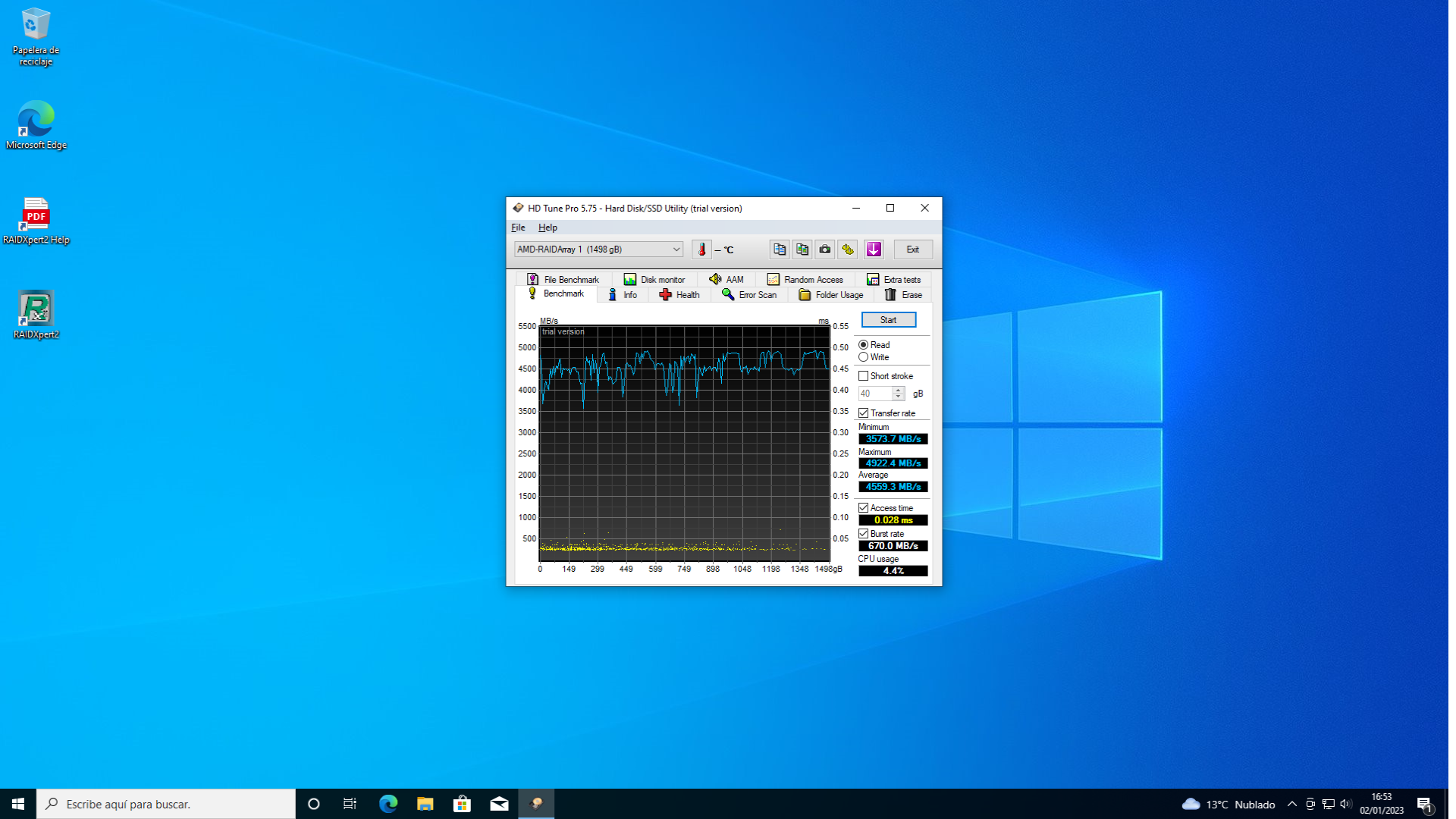
Mounted the RAID 0 of three mn2.
The results are...
Curious.
In a while I'll upload the screenshot.
Regards -
greetings -
@clipper ¿Que discos son?
-
@defaultuser crucial P5 pro 500 gs
But it seems to me that it is not profitable...
Regards -
@clipper said in Mid-range gaming PC.:
crucial P5 pro 500 gs
Most likely it won't.
I would get a good one for the system, and those three I either sell them or I add them to a raid and use it as primary storage. -
@defaultuser what doesn't add up to me is this: https://www.crucial.es/ssd/p5-plus/CT500P5PSSD8/CT20177648
And it is that RAID 0 is below the values that Crucial indicates for a single Mn2.
The only thing that comes to mind is that slot 1 is linked to the CPU and 2 and 3 are not and that creates a bottleneck.
Regards -
@clipper
@defaultuser said in Mid-high range gaming PC.:@clipper The first M2 slot is controlled by the cpu, the other two by the chipset.
The chipset communicates with the cpu through a pcie x4 channel, in theory it has plenty of bandwidth, but the response times will always be worse than in slot 1.
A raid0 in the first two slots probably performs poorly, and I think that's what you've set up based on the results.
A raid0 in the chipset should increase the transfer, but we'd have to see how much, and in any case with the speed that those disks already give by themselves....
To sum up, setting up the raid0 in the chipset to have a secondary large disk without paying the prices of "large" disks maybe not, but increasing performance with a raid0 on this platform I don't see it, you'll have to "settle" for the speeds of a single disk, which are already the best.
Now you're not really doing badly, but comparing prices, your two disks sold could even pay directly for the same but 1TB, or you can have double disk and have system on one side and games on the other and things like that, that is, a disk in the first slot and in the chipset another or a raid. -
@defaultuser two disks not...
Three disks in raid 0.
Regards
P.d the first screenshot I posted was a raid 0 of two disks on ports 1 and 2
The last one is three disks on ports 1 2 3.
Regards -
@clipper If correct, but it doesn't matter for the case.
By putting the chipset into the equation, that is achieved, there are many differences from one way to the other. -
Well, after the fiasco of the RAID 0, I'll leave it on an mn2 for the OS
And I'll look at the raid 0 on ports 2 and 3 to see performance and do tests.After which, depending on the results, I'll do one thing or another, sell the mn2s or keep them.
Since I already have the laser cutter operational at work, I'll make the parts for the pull/push of the CPU aio.
Initially the design was more complex... But simple is more effective.
I'll leave it in a 5mm methacrylate with the holes for the fans/radiator (they are the same) and a 10mm lid with the holes for the fans.
The assembly will be complex but I think effective.
The top cover will be a "four-petal margarita" system, I think it's the most effective.
In a few weeks, photos
Regards -
Curiously for other reasons (noise, I thought the GPU bracket was touching one of the fans) I removed the side cover.
Results...
I went from almost 100 degrees in the same game to 50 degrees.
We're talking about a tower that brings in air with 6 fans plus one in the back and exhausts it all from the top through the AIO.
It didn't have bad temperatures in the CPU but in the GPU.
Conclusion:
The GPU needs direct air intake.
And 80% of the towers don't have it.
Which looks great with the F.A. down below with a cover... But in terms of cooling it's a chestnut.
So for now I will launch the modular tower project without R.L for the GPU.
Regards -
@clipper said in Mid-high range gaming PC.:
The GPU needs a direct air intake.
And 80% of the towers don't have it.You do have it, what is poorly developed.
Do you remember those cheesy photos I sent you?
Made with cardboard?, well it had a dedicated front fan,
and a kind of tunnel that leads that air to the back of the graphics card so that it doesn't get lost going straight to the exit, but without covering the upper half of the card where the hot air comes out.
There was a tower like that but they didn't follow it, I think people put silly objections, maybe like not allowing to show off or look at it daily so they scrapped it.@clipper said in Mid-high range gaming PC.:
It looks great with the F.A. down with a cover... But in terms of cooling it's a chestnut.
Do you say it because you can't put lower fans to supplement the graphics?
It's not essential, a 14cm front fan would give the necessary flow for sure, since most of that air is consumed by the graphics card.
@clipper said in Mid-high range gaming PC.:
I removed the side cover.
Results...
Went from almost 100 degrees to 50 degrees in the same game.@clipper said in Mid-high range gaming PC.:
We're talking about a tower that brings in air with 6 fans plus one in the back and exhausts it all from the top through the AIO.
You should read more of yourself.
If you want, don't listen to me but you already know that I've been telling you that the rear fan should be exhausting air.It's fine that if you build the tower from scratch you'll have it exactly to your liking, but many objections (which they are) that you comment on can be greatly improved even in the generic tower.
 You flip the rear fan, put the cover back on and start a game. Then go to the rear fan and tell me how much is missing for the bread to come out
Best regards.
-
@clipper said in Mid-high range gaming PC.:
Curiously for other reasons (noise, I thought the GPU support was touching one of the fans) I removed the side cover.
Results...
I went from almost 100 degrees in the same game to 50 degrees.
We're talking about a tower that brings in air with 6 fans plus one rear fan and exhausts it all from the top through the AIO.
I didn't have bad temperatures on the CPU but I did on the GPU.
Conclusion:
The GPU needs direct air intake.
And 80% of the towers don't have it.
It looks great with the F.A. cover down... But in terms of cooling it's a disaster.
So for now I'll launch the modular tower project without R.L for the GPU.
RegardsAs @defaultuser comments, check that ventilation system because unless I misunderstood, the 6 fans are bringing in air, right? I'm not an expert and whenever I have doubts I resort to theory, so I'll give you some information about positive, negative and neutral pressure, which may help you or anyone else who reads it:
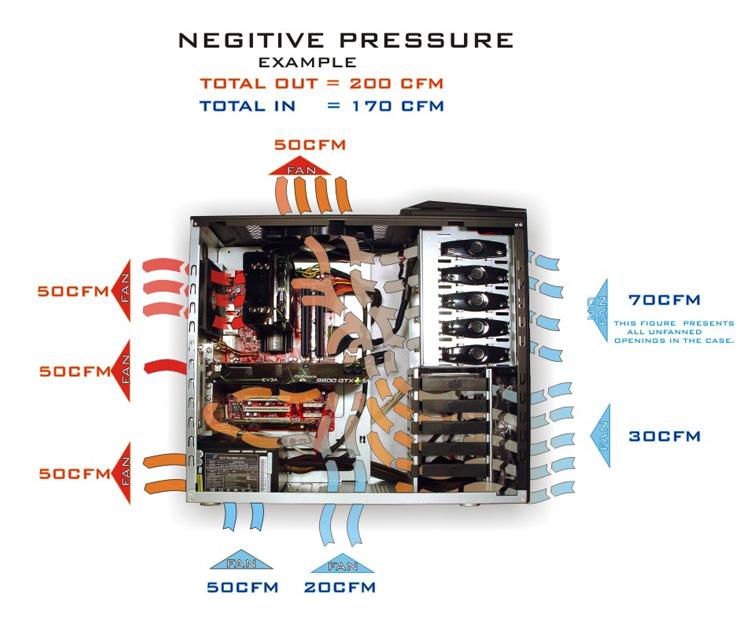
Negative pressure. In these cases, there are more fans exhausting air from the inside of the case than bringing it in. This makes the internal pressure inside the case slightly lower than atmospheric pressure. Therefore, to try to balance the pressures, air will enter wherever it can. From other grilles of the case, up to the seals of this one.
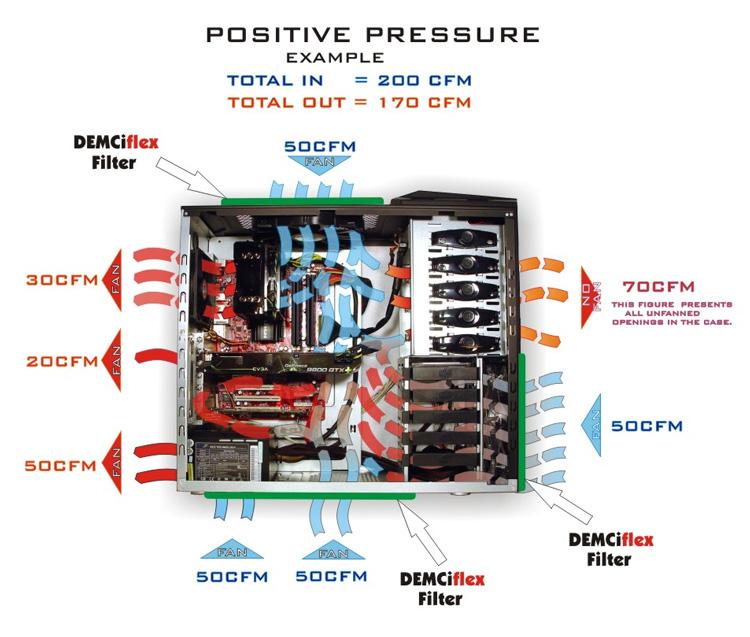
Positive pressure. These cases work with the opposite concept to the previous one. In them there are more fans bringing in air than exhausting it. Given that the pressure inside the case is higher than atmospheric, the air will try to exit wherever it has space to do so.
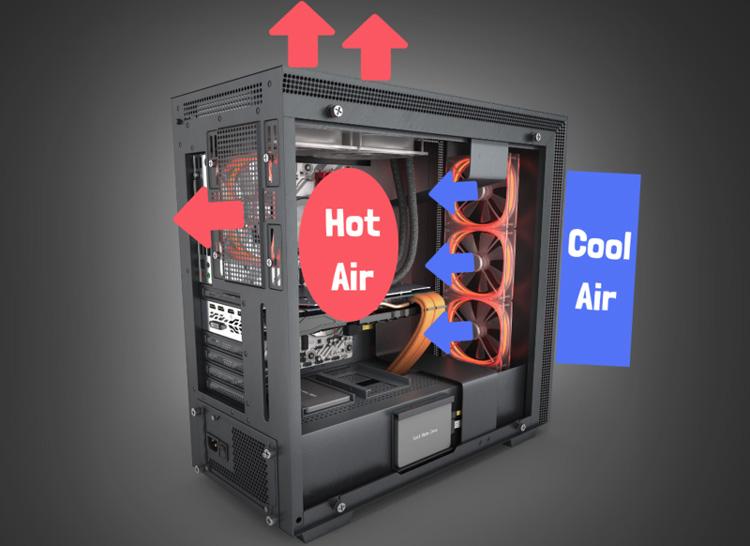
Neutral pressure. As you might guess, in these cases as much air enters as exits, maintaining a stable pressure inside at all times.
As a rule, the vast majority of cases sold today, especially high-end ones, tend to be positive pressure. As a comparison to what happened years ago, when most cases used the negative pressure system inside.
The three types of cooling systems have both advantages and disadvantages:
Negative pressure system: it is the one that evacuates hot air from the inside of the case more efficiently. Not only this, but it also prevents the formation of hot air pockets inside. In general, these types of configurations tend to improve cooling of the processor and its surrounding areas quite a bit. But they have the disadvantage of allowing a lot of dust to enter the case. So, in the case of wanting to use this type of configuration in our case, you will have to clean its interior more frequently.Positive pressure system: the positive pressure system is the one that will accumulate less dust inside the case. But it is also the one that cools the worst. Since the air is forced to exit the inside of the case, it is necessary for it to have grilles that are very little restrictive to the passage of air. Otherwise, the air accumulates inside. The fact is that, these types of cases tend to be quite prone to suffering from hot air pockets.
Neutral pressure system: for its part, the neutral pressure system is the most balanced of the two. It doesn't have the dust accumulation problems of the negative pressure system. Or the hot air pocket problems of the positive pressure cases. Therefore, this system is the one that will cool our components best.
-
@_neptunno_ You've nailed it, this was exactly what was needed, great contribution.
There's one thing missing, in neutral pressure it's also the way in which aerodynamic noise is normally generated the least.





Hello! It looks like you're interested in this conversation, but you don't have an account yet.
Getting fed up of having to scroll through the same posts each visit? When you register for an account, you'll always come back to exactly where you were before, and choose to be notified of new replies (either via email, or push notification). You'll also be able to save bookmarks and upvote posts to show your appreciation to other community members.
With your input, this post could be even better 💗
Registrarse Conectarse