Hardlimit test bank
-
After this piece of news we will have to see how the 1903 affects the Ryzen with this benchmark.
MAIN: Ryzen7 3800X + RTX2070Super + Asus x470 StrixF + KFA2 HOF 16GB DDR4 4000 + NVMe Samsung 970 EvoPlus 500GB + Samsung 850Pro 512GB + Samsung 860QVO 2TB + Asus Xonar STX + Phanteks Enthoo Pro M Se + Seasonic Focus+ 650W
LAPTOP: Asus Strix G531GT Intel i5 9300H + GTX1650 4GB + 16GB DDR4 2666 (8x2) + NVMe 256GB + 1TB HDD
-
@rul3s said in Hardlimit Test Bench:
After this piece of news we'll have to see how the 1903 affects the Ryzen with this benchmark.
I understand that in theory it shouldn't affect much, since the novelty is that instead of separating the threads as much as possible to avoid hot spots, which hindered communication between threads, now they will bring them together as much as possible, occupying a CCX before starting to "deposit" threads on the other, because of the way games are developed. From how the bench should work, I understand that with independent threads that don't communicate with each other because of the type of calculation they have to perform, the result shouldn't vary much.
-
I passed the test to a laptop that's a few years old, and I see that the micro (4702MQ) was not, and it links to the datasheet of a Pentium
The second one in the list https://bm.hardlimit.com/search.php?s=4702
Best regards!
Intel i5 3570k / ASRock Z77 Extreme 4 / G.Skill F3-12800CL9D-8GBRL / Sapphire HD5850 / Samsung HD103UJ / TR TrueSpirit / NZXT Source 210 / OCZ ZS550W
Intel i5 4570 / ASRock H87 Pro 4 / 2x G.Skill F3-14900CL8-4GBXM / Samsung 850 EVO 250Gb + ST1000DM003 + ST2000DM003 + HGST HDS723020BLA642 + Maxtor 6V250F0 / CM Seidon 240M / Zalman MS800 / CM MWE 550
AMD Ryzen 7 1800X / B350 / 2x8GB Samsung DDR4-2400 CL17 / NVIDIA GTX 1070 8GB / SSD 120GB + ST4000DM004 + ST6000DM003 / EVGA Supernova 650 G2 -
@fassou It's already added. It's a 2013 Haswell. It has 4 cores with HT, a max frequency of 3.2GHz, and a TDP of 37W. With the data available, the most similar CPU is an i5-4440, which makes sense considering that they are contemporaries with very similar specs. Although the MQ has a TDP of less than half that i5, which is surprising since in multi-thread, the i5 only beats it by 12%. Going to slightly different processors, the i3-7100U that came out 3 years later, has very similar single-thread performance.
Toda la actualidad en la portada de Hardlimit
Mis cacharros -
The day before yesterday, @krampak brought an i7-7700HQ at stock frequency for the first time, even though there were already results at a lower frequency. I realized that some manufacturers (in my case Dell), limit the speed of the i7 HQs, I imagine for thermal reasons. I have a couple of i7-6820HQs here but since they are capped at 3.2Ghz, they are excluded from the statistics.
To the point: the 7700HQ is a portable processor with 4 cores and HT that reach 3.8GHz. With its 45W TDP, it manages to match the performance of an i5-7500, which is practically the same except that the desktop processor allows a higher TDP and does not have HT.
In the overall ranking, it appears in sixteenth position for single-thread and in twenty-third for multi-processing although if I'm not mistaken, it is the second in both rankings in portable CPUs.
Toda la actualidad en la portada de Hardlimit
Mis cacharros -
@cobito said in Hardlimit test bench:
The day before yesterday, @krampak brought for the first time an i7-7700HQ at stock frequency, even though there were already results at a lower frequency. I realized that some manufacturers (in my case Dell), limit the speed of the i7 HQs, I imagine for thermal reasons. I have here a couple of i7-6820HQs but since they are capped at 3.2Ghz, they are excluded from the statistics.
To the point: the 7700HQ is a portable processor with 4 cores and HT that reach 3.8GHz. With its 45W TDP, it manages to match the performance of an i5-7500, which is actually practically the same except that the desktop processor allows a higher TDP and does not have HT.
In the general ranking, it appears in the sixteenth position for single-thread and in the twenty-third in multi-processing although if I am not mistaken, it is the second in both rankings in portable CPUs.
When comparing with the i5-7300HQ (my laptop) I am surprised by the similarity in the results, is it possible that this 7700HQ had HT disabled?
-
@kynes I obtained the data for what I'm about to comment from these results for the 7300HQ and the 7700HQ, both the best results in AVX2.
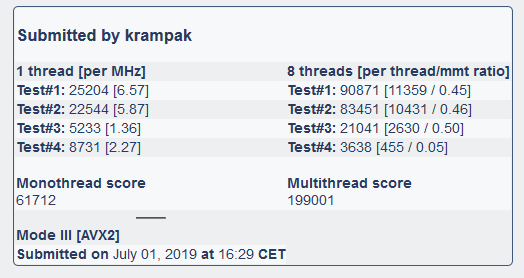
The 7700HQ has a frequency 8.5% higher than your 7300HQ while the former beats you by 5.4% in single-core. In principle, being the same architecture with everything identical except the frequency, a linear increase in performance should be obtained to the frequency, but this is not the case. If we look at the results of each test individually, both micros get a score per MHz very similar in the first three tests in single-core. The difference occurs in test#4 (the memory test).
7700HQ
7300HQ
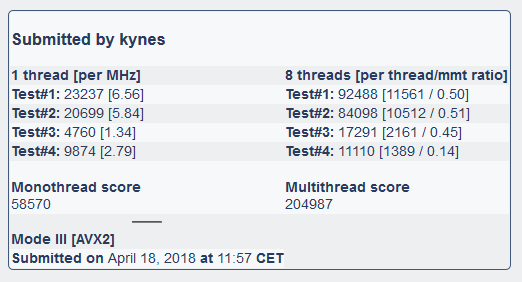
When we go to multi-core, important differences begin to be noticed in tests #1 to #3. And in test #4 (memory), your PC gets 3 times more performance than @krampak's. When we look at the hardware details, we see why this might be happening: your laptop is using two memory slots while @krampak's is only using 1. That is, your PC is probably using dual channel while Krampak's is not.
That you get triple the performance in memory I think is not explained only by having dual channel, so there must be other variables: perhaps different chipsets, different latencies, BIOS with different characteristics or whatever: yours is an MSI and Krampak's is an HP so you go figure out what they've caught or stopped catching.
Toda la actualidad en la portada de Hardlimit
Mis cacharros -
@cobito But my doubt is more about the absence of notable differences between a 4-core processor like the 7300HQ vs an 8-core processor like the 7700HQ. I understand that one should notice a noticeable difference by having hyperthreading activated, right?
-
@kynes I have seen few models where HT brings a noticeable improvement. I specifically set the mmt ratio so that I could evaluate HT/SMT. You can see the value in the multi-threaded results column in brackets. It is the ratio of the multi-threaded result per thread (that is, the multi-threaded result divided by the number of execution threads) and the single-threaded result of the same test. In a processor without HT (where one process runs per physical core), the result should be 1 (or close to 1): this means that by running multiple threads, the performance of each core is the same as if a single thread were running on one of them. If two threads were run per core without HT/SMT, the result should be 0.5, which is that the performance of each thread is 50% of that obtained in the single-threaded result. In one with HT, it should be higher than 0.5 since that would mean that the performance of several threads executed on a physical core is higher than the performance of a single thread executed on a physical core. But the truth is that in few processors have I seen HT results that substantially exceed that 0.5.
In this result of the i7-4790k or in this one of an i7-7700k, you can see a ratio of about 0.6 in tests 2 and 3. This means that in the i7-4790k, HT can increase performance by 20% compared to not having it. It is possible that this lack of tangible results from hyperthreading is a flaw in the design of the benchmark or that HT is nothing more than a gimmick that slightly improves performance only in some models; the benchmark in this aspect is quite simple since all it does is run several processes in parallel and evaluate the result of each one separately and then sum all the results.
Regarding the result of the 7700HQ in particular, I believe that the memory is acting as a bottleneck there. Perhaps more results and more diverse machines would be needed to draw clearer conclusions.
Toda la actualidad en la portada de Hardlimit
Mis cacharros -
Bueno, bueno, bueno. Pues @hAyO has brought us the first Zen 2. It's the Ryzen 7 3700X and you can see the results on the front page.
Toda la actualidad en la portada de Hardlimit
Mis cacharros -
Does @cobito still have the offline version (usb) of the benchmark available? I have a Celeron N4000 1.1Ghz but Windows 10 in S mode won't let me run hlbench xD
-
@krampak Yes, the link is in the thread of the Live-USB. The only drawback of that version is that it is not compatible with AVX. But for that N4000 it will not be a problem.
Toda la actualidad en la portada de Hardlimit
Mis cacharros -
The first update in over a year is here. It's a small thing that I decided to change while reviewing the code to remember it and it has been possible thanks to all the models that you have uploaded during this time: from now on, the main page will switch from showing the top 50 to the top 100 processors.
At the end of the first message of this thread, I have made a wishlist of what I would like to add and improve in the benchmark after the summer. If you come up with something else, say it.
Toda la actualidad en la portada de Hardlimit
Mis cacharros -
@rul3s brought us a new portable CPU yesterday: an i5-9300H that is mounted on an Asus Rog Strix G531GT.
It is a 4-core Coffee Lake with HT that can reach 4.1GHz while maintaining a TDP of 45W. For a portable processor, its performance is really good and is comparable to desktop micros that are not as old as the i7-7700.
According to the result that has been sent, in the best case, the Hyperthreading of this micro improves performance by 20% compared to not having it. And in the worst case, performance increases by 12%, which is within the usual range whenever it has been possible to measure this improvement. In fact, the most similar model we have is an i3-8350K; one of the first Coffee Lakes whose TDP doubles that of the i5-9300H.
In the general ranking, it is in twelfth place in single-thread and in seventeenth in multi-thread. Seen from another perspective (considering only portable processors) and if I'm not mistaken, it takes the silver medal in both rankings, only surpassed by the i7-8750H.
Toda la actualidad en la portada de Hardlimit
Mis cacharros -
An anonymous user has brought us an Celeron N3150. It is an Airmont, that is, the architecture used in Atoms. Its performance is not great, comparable to Core processors from the LGA775 era in single-threaded mode, although in multi-threaded mode (and especially in SSE3), its performance approaches that of Haswell portable processors, and this with a ridiculous TDP of only 6W. In reality, it is very difficult to compare because the simulated processors differ a lot when looking at the single/multi-threaded table and in different modes.
This CPU comes mounted on micro ITX boards for basic desktop PCs and possibly its biggest drawback is the fact that to obtain more or less decent performance (it is a 2015 micro, so it has probably been sold until recently, if not still found out there), it is necessary to be able to get the most out of its 4 cores, something that is a bit complicated given the field to which it is directed (basic tasks: office work, web browsing, HTPC...).
In another order of processors, @NakedCOOL, who dropped by a few days ago to say hello, left us a result of an AMD FX 8320. It is a Piledriver from 2012 with no less than 8 cores and a turbo frequency of 4GHz. Its performance is really complicated to compare since the architecture was not great (in single-threaded mode we have to go to contemporary portables) while its 8 cores allow it to be at a similar level to the mid-range desktop range of the era.
Toda la actualidad en la portada de Hardlimit
Mis cacharros -
@NakedCOOL has brought us a kind of rarity as it is a single-core Athlon II that was marketed in 2010. I am not too sure about the end of the single-core era on the desktop, but this must have been one of the last models (someone correct me if I am wrong).
It is impossible to compare as its single core has a performance similar to the first processors of the Core era. Of those I have found a model (that is not in our database) that is a Peryn Core 2 Solo, appeared a year before this one. Coincidentally, the most similar model is also a Peryn, but with two cores so this Athlon II is possibly a competitor of the ephemeral Core 2 Solo. Looking a little more, Intel only released 4 models of this type, the last one from 2009. The models are the Core 2 Solo ULV U2100, ULV U2200, SU3300 and SU3500. After those, I do not see anything else single-core from Intel for desktop or laptop. Now, in October 2013 appeared the last Intel processor of a single core that I have found: the Atom E3815 intended for industrial and automotive fields.
Looking for AMD processors and more specifically about the Sargas core (like the one in this Athlon II) it turns out that there are only two models: this one and the Sempron 150, both from the same date. So yes, this Athlon II 170u is one of the last of its kind.
Its performance, as I have said, is comparable to one of the two cores of the Core 2 Duo T6600.
Toda la actualidad en la portada de Hardlimit
Mis cacharros -
A few days ago, @krampak brought us an i7-9900K. The processor was already in the database and that's why it hasn't been published on the front page. The thing is that the CPUID of his micro is 906ED while the 9900K of @Xevipiu has CPUID 906EC. I noticed this because the CPUID is taken as a reference along with the processor name to identify it within the database and the fact that there are two models exactly the same with different CPUIDs causes a small problem that I will have to solve (it's the first time it happens).The thing is that when looking for it, it turns out that the 906ED corresponds to an i7-9900 plain and looking a little more I found that sometimes Intel renames models, that is, that instead of having marked this as a 9900 plain, it has marked it as K. The result would be that sometimes 9900K come out that actually have something less performance than the 906EC.
The truth is that this statement does not give me much confidence. Both the micro of Krampak and that of Xevipiu have exactly the same performance per clock cycle, although it is true that the one of Xevipiu goes to a frequency 2.5% higher (I take this percentage as a variation similar to the measurement error).
Do you know what this is about renaming models? Is it something new or has it been going on for a while?
Toda la actualidad en la portada de Hardlimit
Mis cacharros -
@cobito said in Hardlimit test bench:
A few days ago, @krampak brought us an i7-9900K. The processor was already in the database and that's why it hasn't been published on the cover. The thing is that the CPUID of his micro is 906ED while the 9900K of @xevipiu has CPUID 906EC. I noticed this because the CPUID is taken as a reference along with the processor name to identify it within the database and the fact that there are two models exactly the same with different CPUIDs causes a small problem that I will have to solve (it's the first time it happens).
The thing is that when looking for it, it turns out that 906ED corresponds to an i7-9900 plain and looking a little more I found that sometimes Intel renames models, that is, instead of marking this as a 9900 plain, it marked it as K. The result would be that sometimes 9900K come out that actually have something less performance than 906EC.
The truth is that this statement does not give me much confidence. Both the micro of Krampak and that of Xevipiu have exactly the same performance per clock cycle, although it is true that Xevipiu's goes to a frequency 2.5% higher (I take this percentage as a variation similar to the measurement error).
Do you know what this is about renaming models? Is it something new or has it been going on for a while?
Little idea about it... What sounds most similar to me is the stepping, in previous micros it happened that depending on the stepping a same micro could perform a little more or a little less, directly translated into frequency and temperature (the "black foot" were the best). In fact, in some generations those with the "worst" stepping even presented incompatibilities with certain technologies or applications, such as multiGPU, etc.
I don't know if this has something to do or in essence will be similar, but in general we always find that there are no two micros exactly the same.Greetings!
-
@cobito From what I could find, it seems to be due to revisions of the same (as @Sylver says the old stepping that we gave so much importance back then). In fact, BIOS updates are needed in some cases to have support for the new microcode because there is a direct relationship (I understand) between the stepping and the microcode they use.
906EA stepping U0, 906EC stepping P0 and 906ED stepping R0.
On this Intel page, you can see the microcode updates:
https://support.microsoft.com/en-us/help/4494452/kb4494452-intel-microcode-updates
You will see that the 906EC has been updated to 906AE (I don't know if the ED that I posted was in between).
-
@garfield brought us a few days ago an i7 from the U series last year. You have a brief analysis in this entry of the cover.
Toda la actualidad en la portada de Hardlimit
Mis cacharros