The doubt I have with frames
-
Hello, I currently have a team consisting of an i5 2500K, 16 DDR3 1066Mhz ram, Asrock P67 motherboard, 23-inch Asus VZ239HE-W 23" monitor, and a 4 Gb Gigabyte RX570 graphics card (I bought it for 90€).
When I play normally, I have it limited in graphics options to 60 frames because I understand that if I have a 60Hz refresh monitor, it is logical that the maximum frames should be 60 since the fact that it shows more frames is not taken advantage of due to the limitation of the monitor's refresh rate.
I usually play at 1920x1080 full hd resolution with high graphics options and the truth is that I am not very demanding and it looks pretty good.
I appreciate it if you can give me your opinion on the matter since for a while now I have been having this doubt because I am updating my equipment and this summer I will renew the processor for a Ryzen 3600 or 3600X with the motherboard and memory, and next year maybe the graphics card, and this is where my doubt is if the refresh rate of the monitor I currently have limits me from updating the graphics to a more powerful one like a 1660 Ti or 1080.
Thanks in advance. -
As far as I understand, limiting the frames is done to match the generation of images from the graphics card with the screen refresh. If the graphics card generates a higher number of frames, the "tearing" is more visible. In fact, it's better to have a limitation that is equal to or a submultiple of the screen refresh so that the broken frames are less visible. In your case, the limitation to 60Hz is the only acceptable one. I'm not sure if limiting the rate is equivalent to V-Sync because with just limiting, "tearing" will still occur. Although I also don't know if V-Sync generated images in sync with the screen or just managed the fps rate.
In any case, this won't limit you in terms of graphics card but you may end up underutilizing it.
Toda la actualidad en la portada de Hardlimit
Mis cacharros -
@cobito said in Duda que tengo con los frames:
As far as I understand, limiting frames is done to match the generation of images from the graphics card with the screen refresh. If the graphics card generates a higher number of frames, tearing is more visible. In fact, the ideal is to have a limitation equal to or a submultiple of the screen refresh so that the broken frames are less visible. In your case, the limitation to 60Hz is the only acceptable one. I'm not sure if limiting the rate is equivalent to V-Sync because with just limiting, "tearing" will still occur. Although I also don't know if V-Sync generated images synchronously with the screen or just managed the fps rate.
In any case, this will not limit you in terms of graphics card but you may end up underutilizing it.
As cobito tells you, the ideal is to limit it to a multiple of the screen refresh, as long as it can handle it. If you have a 60Hz screen, then 60fps or 120fps,
All this comes from the fact that what is really sought is a "frametime" as stable as possible, since it is better to have a stable frametime at 10ms than at 5ms with peaks of 10ms, since when it hits those peaks is when you will notice it as a "mini-lag"
So adding one thing to the other, the theory is simple, if you limit it to 120fps and always or almost always maintains 120fps, then leave it that way, if you limit it to 120fps and sometimes hits 120 but normally goes to 90-110 and has some dips, better limit it to 60 to have a more stable frametime.
MAIN: Ryzen7 3800X + RTX2070Super + Asus x470 StrixF + KFA2 HOF 16GB DDR4 4000 + NVMe Samsung 970 EvoPlus 500GB + Samsung 850Pro 512GB + Samsung 860QVO 2TB + Asus Xonar STX + Phanteks Enthoo Pro M Se + Seasonic Focus+ 650W
LAPTOP: Asus Strix G531GT Intel i5 9300H + GTX1650 4GB + 16GB DDR4 2666 (8x2) + NVMe 256GB + 1TB HDD
-
@rul3s Now I have a doubt, because I understood that you have to use a submultiple, not a multiple. I'm not sure how digital interfaces refresh data, but in VGA, if you generate two frames in a screen refresh, the first will appear in one half of the screen and the second in the second half (in DVI I think it works the same way). If you generate several frames per refresh, the screen will appear split into several pieces:
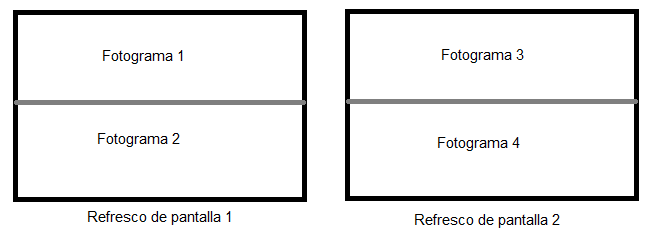
If instead of using a frame rate of double, you use quadruple, 4 cuts will appear on the screen and so on.
On the other hand, if you use a submultiple (eg: 30fps on a 60Hz screen), during two screen refreshes a single frame will be shown, so there will be "no" tearing.
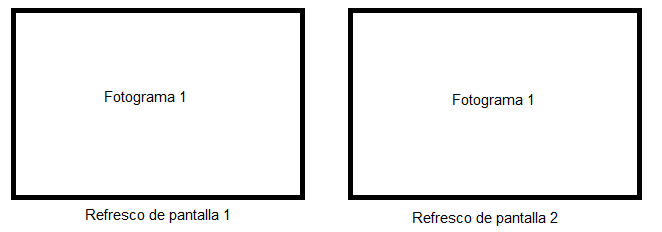
This assuming that the frame generation and screen refresh are perfectly synchronized. If both the GPU and the screen work at 60fps but there is no synchronization, tearing will appear. In this case, the screen will always appear split in the same place:
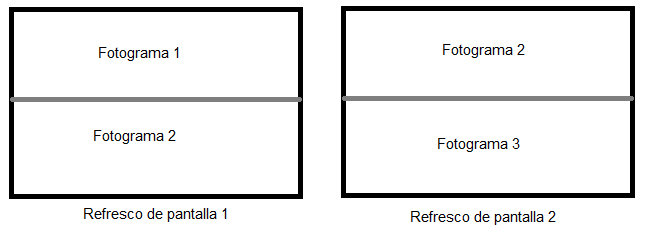
If the frame change catches you in the middle of the screen, it will be clearly seen. If it catches you very high or very low, it will hardly be noticed. I think V-Sync did exactly this: to match the beginning of both cycles, but I'm not really sure.
The point is that if both refreshes go their own way, the line that separates both frames will appear in random places and that is really annoying. But then again, maybe I'm just swinging because it's been a while since I've been up to date on this.
Toda la actualidad en la portada de Hardlimit
Mis cacharros


Hello! It looks like you're interested in this conversation, but you don't have an account yet.
Getting fed up of having to scroll through the same posts each visit? When you register for an account, you'll always come back to exactly where you were before, and choose to be notified of new replies (either via email, or push notification). You'll also be able to save bookmarks and upvote posts to show your appreciation to other community members.
With your input, this post could be even better 💗
Registrarse Conectarse