PC for intensive processing
-
Hello. As I mentioned during the summer, the machinery behind Hardlimit needs an overhaul. The first setup will be aimed at heavy processing, which includes:
- FFMPEG
- Whisper (it's actually AI, but well)
- AI
- New heavy tasks that will arise
The main idea is to relieve the main server of its load, as response times are noticeable when it's loaded and when all functionalities are activated, excessively long processing queues are generated (in the sense that more work appears than can be processed and the queue grows indefinitely). But efficiency in processing is also important, so by switching to a current machine, I hope to significantly reduce energy consumption per unit processed.
At the moment we have this:
- CPU: i5-3570k at stock frequency
- Memory: 4x8GB DDR3 at 1600MTs (F3-1600C9-8GXM) = 32GB
It's a powerful computer, but it's getting old. From the CPU's point of view, FFMPEG and Whisper are very demanding. Moreover, it's very easy to parallelize tasks, so many cores can be utilized. From the memory's point of view, AI is extremely demanding in terms of capacity.
FFMPEG and Whisper don't have minimum requirements (of course they do, but they're not problematic). The change is made to improve processing times and improve energy efficiency. But AI does have minimum memory requirements (although with quite diffuse boundaries).
The initial idea of AI is to be able to translate the subtitles of the Peertube instance to be able to open the register to videos in other languages. I would also like to be able to make summaries of the content of the videos based on the subtitles and ultimately, semi-automate the moderation of the videos. This is what will be done initially, but in the near future, it will expand to other areas. As I said in the summer, in no case will it be used to mess up the forum and turn us into just another participant in the dead Internet. Everything that is done will be to improve the user experience and add new functionalities.
And speaking of user experience, I want all of this to be done with the highest possible quality. I don't want translations that are difficult to understand, follow, and not credible. That's why I look for the largest models. For example, for Whisper we are using the "large" v3 model, the largest and most recent. It consumes a lot, but the subtitles have spectacular quality (at least from my point of view). I want the same for what's to come.
The initial idea was to use a general-purpose model like DeepSeek, which could handle everything. For the complete model (671 billion parameters) of Deepseek R1, it is estimated that around 1TB of RAM is needed. A system of these characteristics would imply a multi-processor Xeon or Threadripper platform with a price that would be touching the 5-figure range, so it's totally out of budget.
The second option is to use specialized models. For example, for translation there's NLLB, whose largest model is estimated to require around 150GB of RAM. And in this league we can play.
The requirements of the team I'm looking for are these:
- It has to be very quiet.
- It has to require very little maintenance considering it will be on 24/7.
- The maximum form factor must be microATX.
- It has to be very reliable.
- It has to be an AMD platform (after more than 15 uninterrupted years with Intel).
I've come up with the following configuration:
CPU: Ryzen 9 9900X (420€)
Motherboard: Gigabyte B850m D3hp Matx (142€)
RAM: 4x64GB DDR5 6000MT/s Corsair (720€)
Case: To be determined, microATX (50€)
Power Supply: Gigabyte GP-UD1000GM PG5 (119€)
Cooler: Noctua NH-D15 G2 HBC (150€)
TOTAL: around 1600€ (this would be more or less the budget)From here, the most disproportionate is probably the power supply. It's 1000W and this team at full power won't even reach a quarter of that. But of all the PCs I've had in the last 20 years, what has broken the most has been the power supply. The idea of oversizing it is to give reliability to the configuration. But tell me if this makes sense or not.
It's also possible that some auxiliary hardware is missing, like fans for the case. I'm also not sure if the cooler is the best option to achieve a quiet PC. Maybe liquid cooling is worth it? But does this add or subtract reliability?
What do you think of this hardware?
Thanks in advance.
Toda la actualidad en la portada de Hardlimit
Mis cacharros -
Hello very much @cobito
First of all, to give you sincere thanks for all the effort and dedication you put into this forum of ours, as well as its extensions and the user experience. It is not and will never be paid.
Continuing with the configuration, it seems quite reasonable to me in general, and I agree with you. The debatable point could be the power supply, although I don't think the excess power is bad. Perhaps the quality of the brand and model could be debated.
It's also not a bad power supply, but others have shown me more reliability in the long term and in adverse conditions. The PSU Tier List also ranks them differently.
I would put for example a Corsair RMe 1000W (or 850W, which is also enough), since it's not outrageously more expensive and will always perform even in the worst conditions. These power supplies are really tough.And regarding the cooling, with a large Noctua like the one you put in, you can never go wrong.
They are generally quite quiet, although I don't know what level of extreme temperatures a 9900X can reach under full load as a server, if it will be enough to rev up the fans to the extreme.
In any case, a liquid cooler is more cumbersome, with more maintenance and also involves fans, it's something you usually can't get rid of.
I, looking for price and little or no maintenance, would always go for Noctua. My NH-D14 doesn't prevent me from sleeping next to it
Best regards!
-
As @Sylver says, you have plenty of power, and personally, I wouldn't go for anything from Gigabyte. \nA good 650W is enough, but if you want to be covered in case you end up adding a powerful graphics card, look for at least 850W Platinum, as you'll be using it 24/7. It's more expensive than a Gigabyte, which are suspiciously cheap, but at the price of electricity, you'll recoup the cost quickly. \nThree examples that are IMHO better than the one you're considering: \nCooler Master MWE Gold 850 V3 ATX 3.1 PCIe 5.1 850W Modular 80 Plus Gold \nP/N: MPE-8501-AFAAG-3EEU **118€** (the reliable old standby, updated) \nFSP 850W 80+ Gold VITA GM850 Modular ATX 3.1 Compact \nP/N: PPA8504202 **128€** (the ugly but reliable old standby) \nBe quiet Power Zone 2 850W 80 PLUS Platinum Modular \nP/N: BP007EU **155€** (quiet and Platinum) \n? \nFor the motherboard, I'd go for an ASRock, which is the same price (ASRock B850 Micro ATX AM5 B850M Pro-A PCIe 5.0 DDR5 256GB USB 3.2 RAID P/N: 90-MXBR8-A0UAYZ **147€** and with WiFi for **159€** P/N: 90-MXBR9-A0UAYZ), although if you're going to put a window in, you might prefer one like this: MSI B850M GAMING PLUS WIFI6E AM5 micro ATX DDR5 PCIe 5.0 RGB P/N: 911-7E81-001 **154€** \nSee you later!Intel i5 3570k / ASRock Z77 Extreme 4 / G.Skill F3-12800CL9D-8GBRL / Sapphire HD5850 / Samsung HD103UJ / TR TrueSpirit / NZXT Source 210 / OCZ ZS550W
Intel i5 4570 / ASRock H87 Pro 4 / 2x G.Skill F3-14900CL8-4GBXM / Samsung 850 EVO 250Gb + ST1000DM003 + ST2000DM003 + HGST HDS723020BLA642 + Maxtor 6V250F0 / CM Seidon 240M / Zalman MS800 / CM MWE 550
AMD Ryzen 7 1800X / B350 / 2x8GB Samsung DDR4-2400 CL17 / NVIDIA GTX 1070 8GB / SSD 120GB + ST4000DM004 + ST6000DM003 / EVGA Supernova 650 G2 -
@Fassou said in PC for heavy processing:
\n\n
\nThe board would be better off with an ASRock that costs the same price
\nAlthough they have released the new BIOS that, according to them, fixes the problems with the Ryzen 9000 series, I would avoid ASRock (a brand I have always defended because I have an AM3+ and holding an overclocked FX is no small feat).
\nHowever, I agree with almost everything said before, the power supply seems overdimensioned to me and I would look at the build quality and, above all, the efficiency curve. It is estimated that the ideal power supply works at about half of its maximum capacity, so a power supply twice the power of the usual use would be the most logical. Although a more powerful one could give you the possibility to expand in the future, perhaps not in the short term, but you would have the possibility to install a GPU to do those AI functions that could be interesting in the future.
\nHowever, one can never be grateful enough for the titanic effort to follow and expand the Hardlimit community that you do.
\nA hug.
-
Thanks to everyone for the responses.
@Sylver @Fassou I've been looking around a bit for Gigabyte sources and I already know why you're reluctant with that brand. I'll think about these that you've proposed:
- Corsair RMe 850W
- Be quiet Power Zone 2 850W 80 PLUS Platinum Modular
About the board, I see that there is controversy. The truth is that Asrock is, in general, my favorite brand of boards. But in recent years I have only dealt with mini ITX rigs with integrated CPU. In fact, it has been many years since I put together a PC that is generally medium-powered.
Looking around a bit, I see why @pos_yo tells me to avoid it. They say they have solved the problem of overcurrents by software, but the truth is that I don't have much confidence in that automatic overclocking.
On the other hand, I don't think it's a good idea to take the CPU out of its nominal regime in a server. This kind of functionality I imagine it is possible to disable, right? Or are they something normal today and stability is guaranteed? Because if they can be disabled, I'll go for an Asrock, but if this is already the norm, I'll look for another option.
Toda la actualidad en la portada de Hardlimit
Mis cacharros -
Finally I'm going to choose the Be quiet Power Zone 2 850W. It's in tier B+ like the Corsair (thanks @Sylver for this concept, I didn't know about it) but it's quieter and more efficient for 12€ more.
About the motherboard, for now I'm sticking with the Gigabyte because of the overcurrent issues that have been found (and supposedly fixed) in the Asrock motherboards.
About the case, I've been thinking about a ASUS Prime AP201 (90DC00G0-B39000) that seems to fit the cooler. The only bad thing is that the rear fan is 120mm, although I see that 120mm rear fans are the norm in these cases. The truth is that there's not much to choose from with the 168mm that the Noctua needs in height.
And about the fans, I think a couple of Be Quiet! Pure Wings 3 PWM, one 120mm for the back and another 140mm for the top, will be enough for now (I'll see later if more is needed).
I'll place the order at the end of this week. If no one says anything, these will be the final components.
Toda la actualidad en la portada de Hardlimit
Mis cacharros -
I've been trying to buy the RAM and it's very complicated with those capacities. At the Corsair store, they've increased the price by €50 for each pair of modules in 3 days. And in the rest, either there's no stock, or the prices are skyrocketing. Moreover, there are only three models available and the only one with acceptable frequency and latencies is the one from Corsair.
So I'm going to change the strategy. As I will buy a PC for my own use and enjoyment in a few weeks, I'm going to get a Mushkin Redline ST (2x32GB) at 6400MT/s and CL30 that was what I had planned for that PC and with that I can hold on a bit. When I buy my PC, I will return to see how the issue of 2x64GB is going, to see if there is more variety, more stock and more reasonable prices.
Toda la actualidad en la portada de Hardlimit
Mis cacharros -
Things are starting to arrive. Let's see if I can get my hands on it this weekend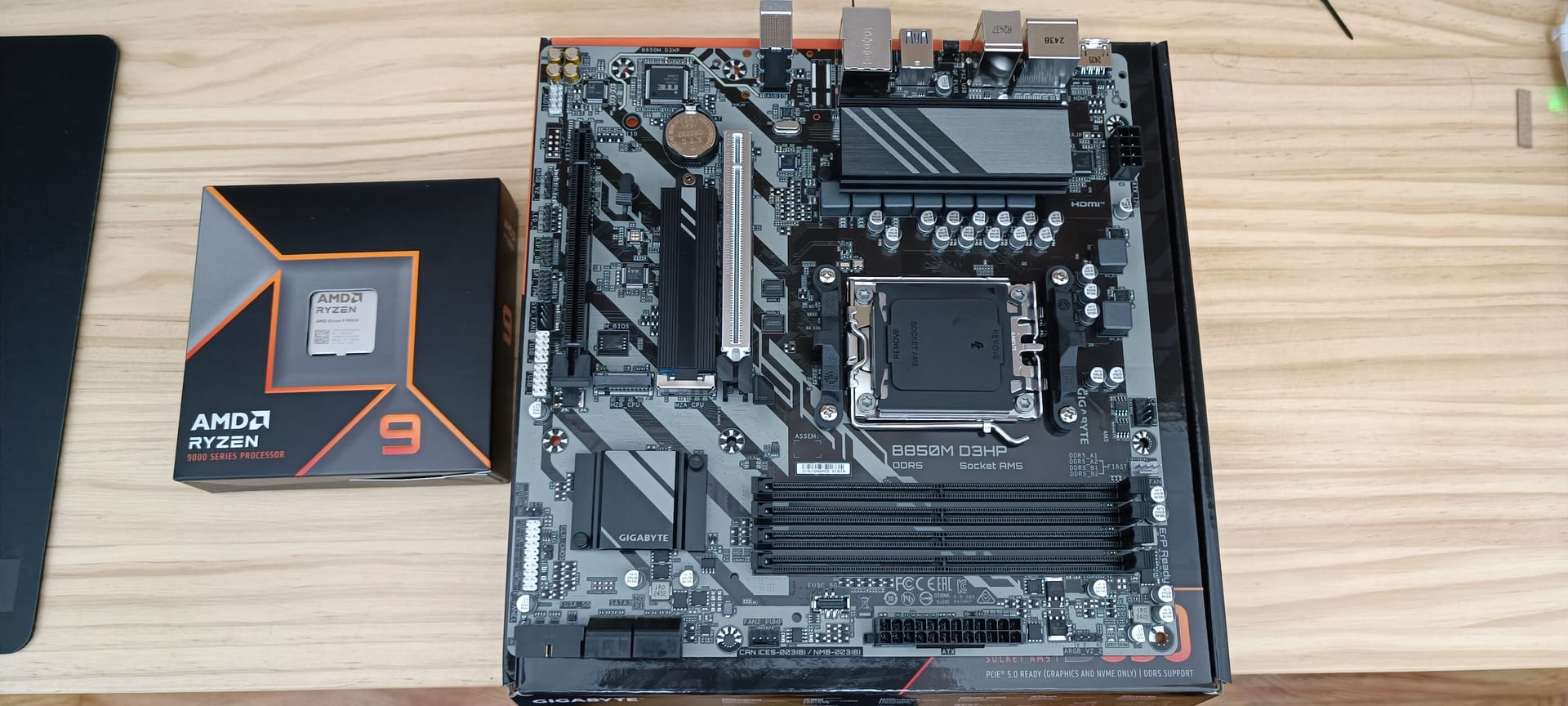
Toda la actualidad en la portada de Hardlimit
Mis cacharros -
Everything is ready and I have scheduled a few hours this weekend to work on it. I will do a lot of testing before putting it into production.
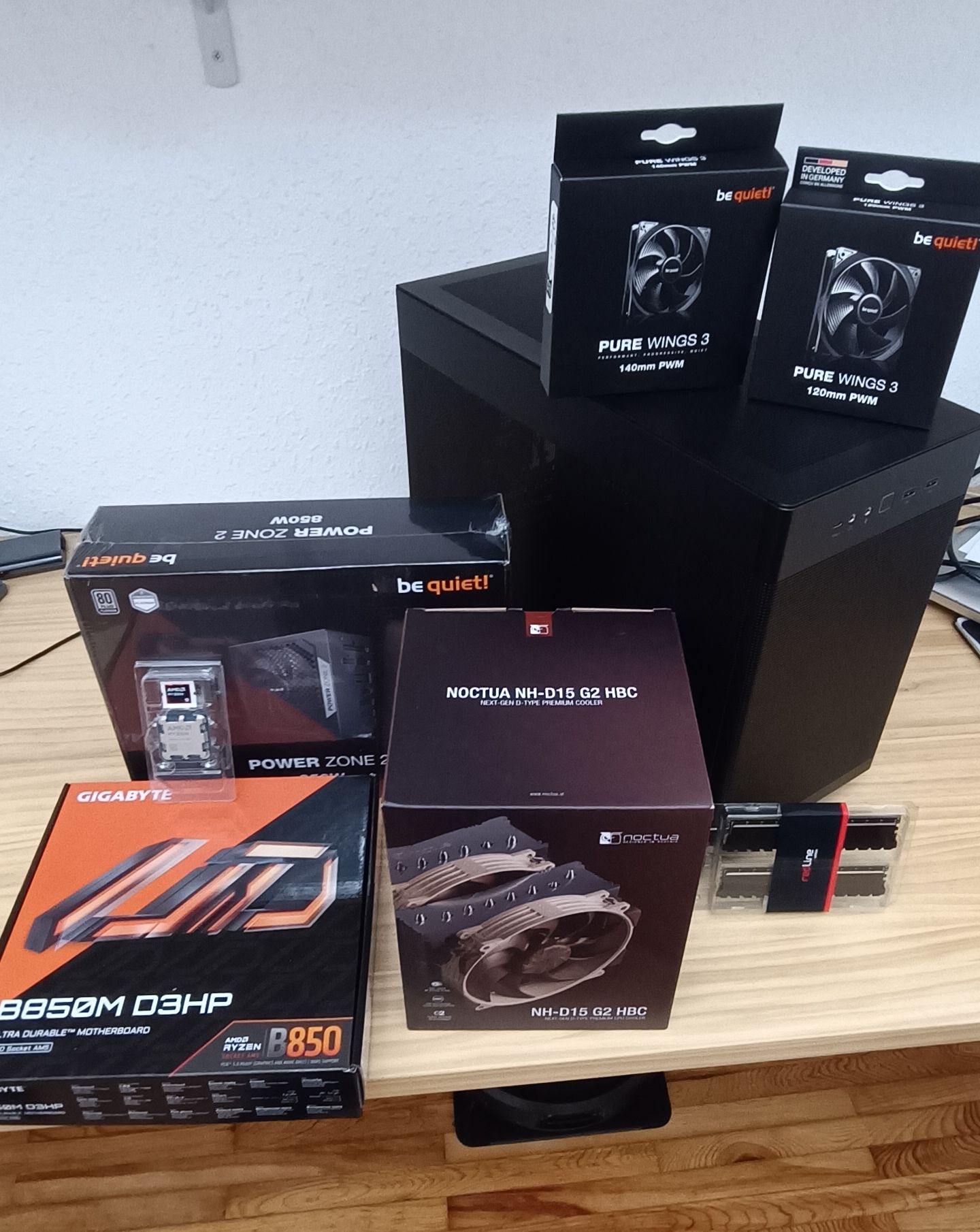
The heatsink is a monstrosity. I didn't expect it to be so big. Let's see if everything fits now.
Toda la actualidad en la portada de Hardlimit
Mis cacharros -
I said I would start this weekend but I couldn't resist. I'm going to do a small review of each thing (more of a first impression).
Noctua NH-D15 G2 HBC
Well as I said before, it's a monster. Inside the main box, there are two other boxes: one with tools, anchors and screws and another with the heatsink.
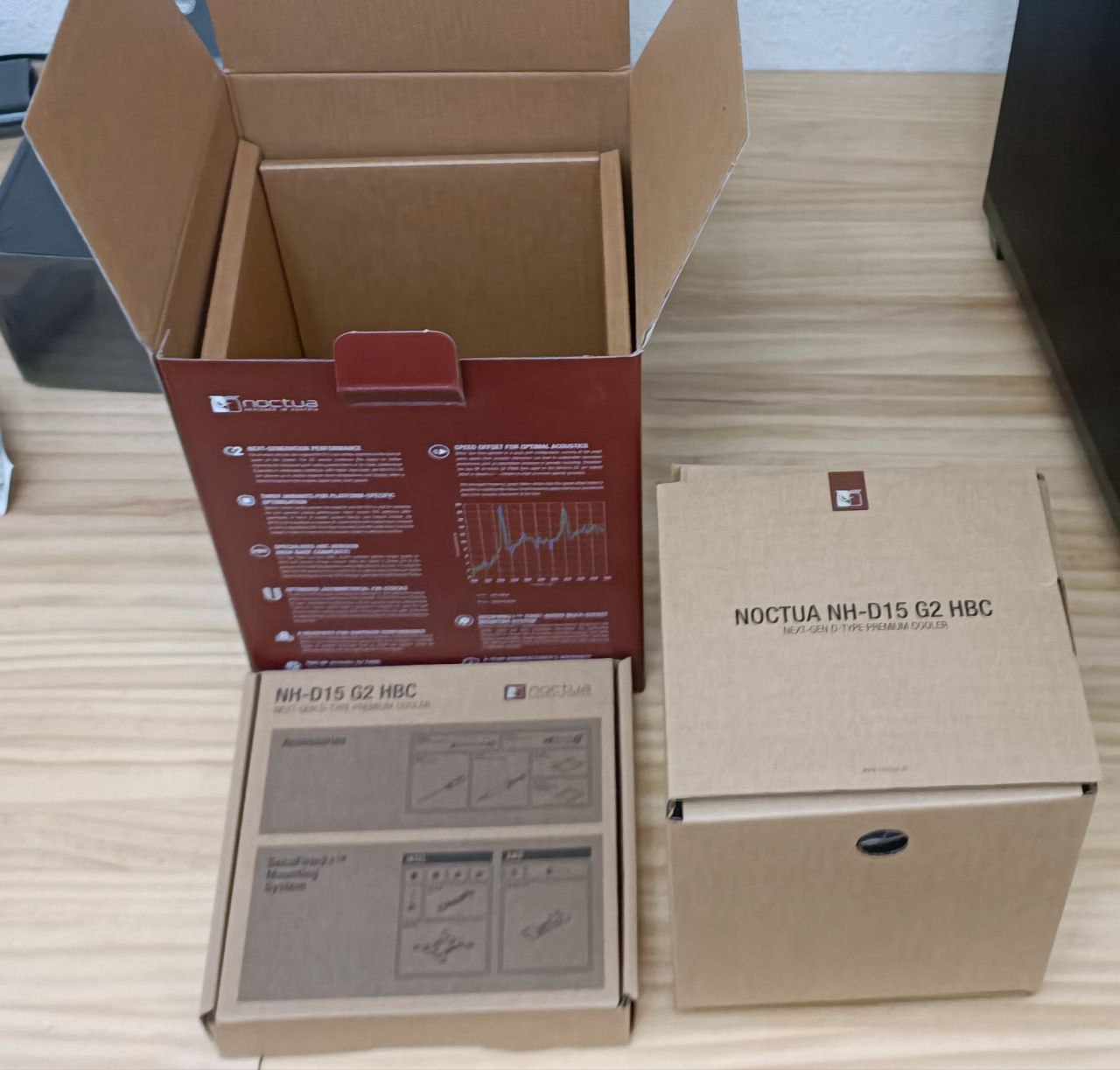
The tool box is a bit fancy. It's divided into compartments and comes with a screwdriver that looks pretty good (certainly much better than the typical ones that usually come with other things). It comes with:
- An installation manual
- Cables to adapt the fan connector to different standards
- An accessory called NM-ISW1 that is said to improve contact on LGA 1700 sockets (doesn't apply to me).
- A mask to help apply thermal paste on AM5 socket.
- Screws and anchors (separated according to whether it's for Intel or AMD sockets).
- Thermal paste
- A Noctua badge that's pretty cool, because it's metallic and quite thick.
Everything well organized and very clear. So that even a fool can assemble it. I hope that a very fool like me is capable.
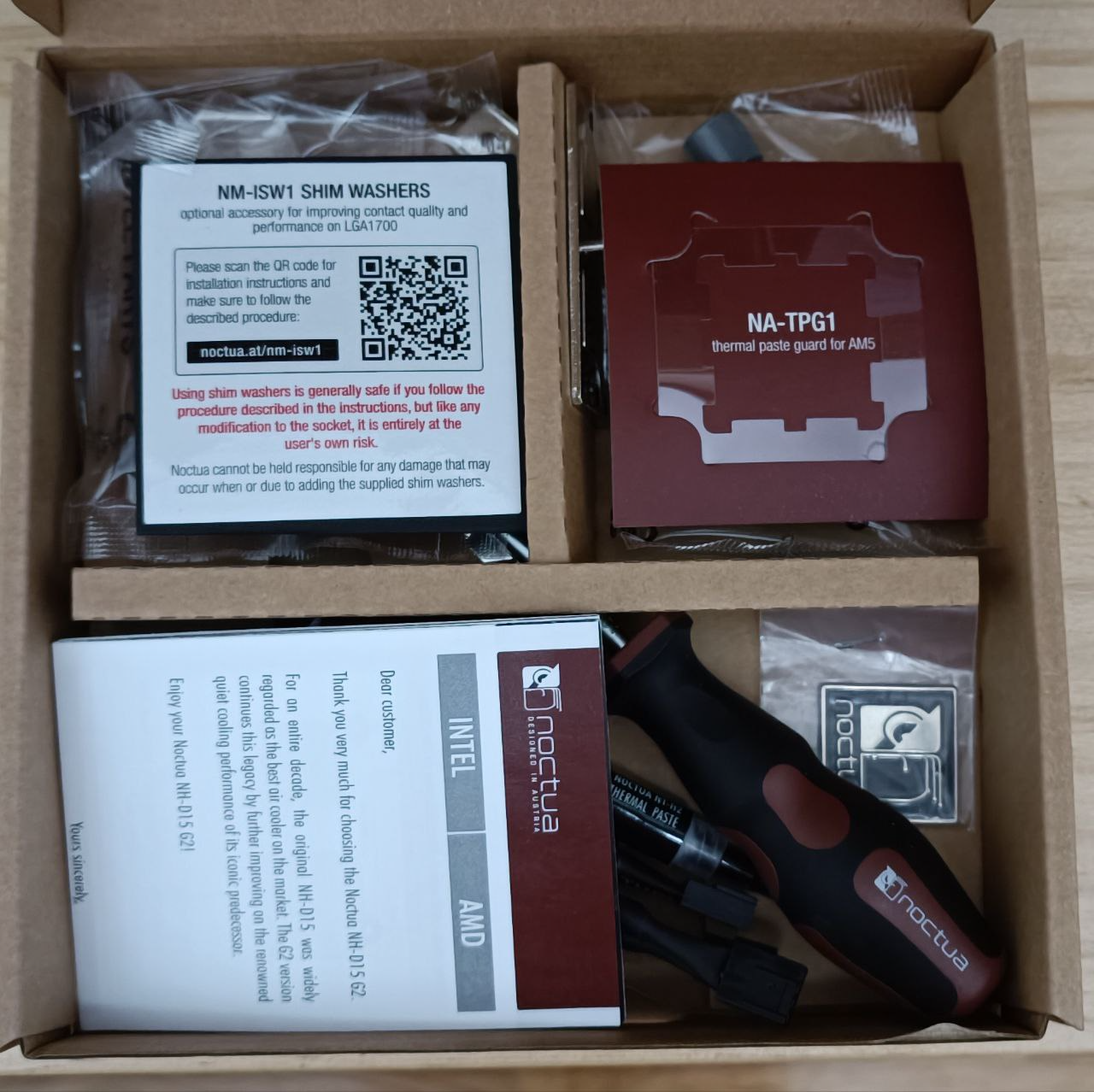
The heatsink itself is quite tall and very, very wide. In fact, it's practically a regular cube. It weighs quite a lot and the fans look good (watch out for them, they have a protection and the interior fan has to be removed to take it off).
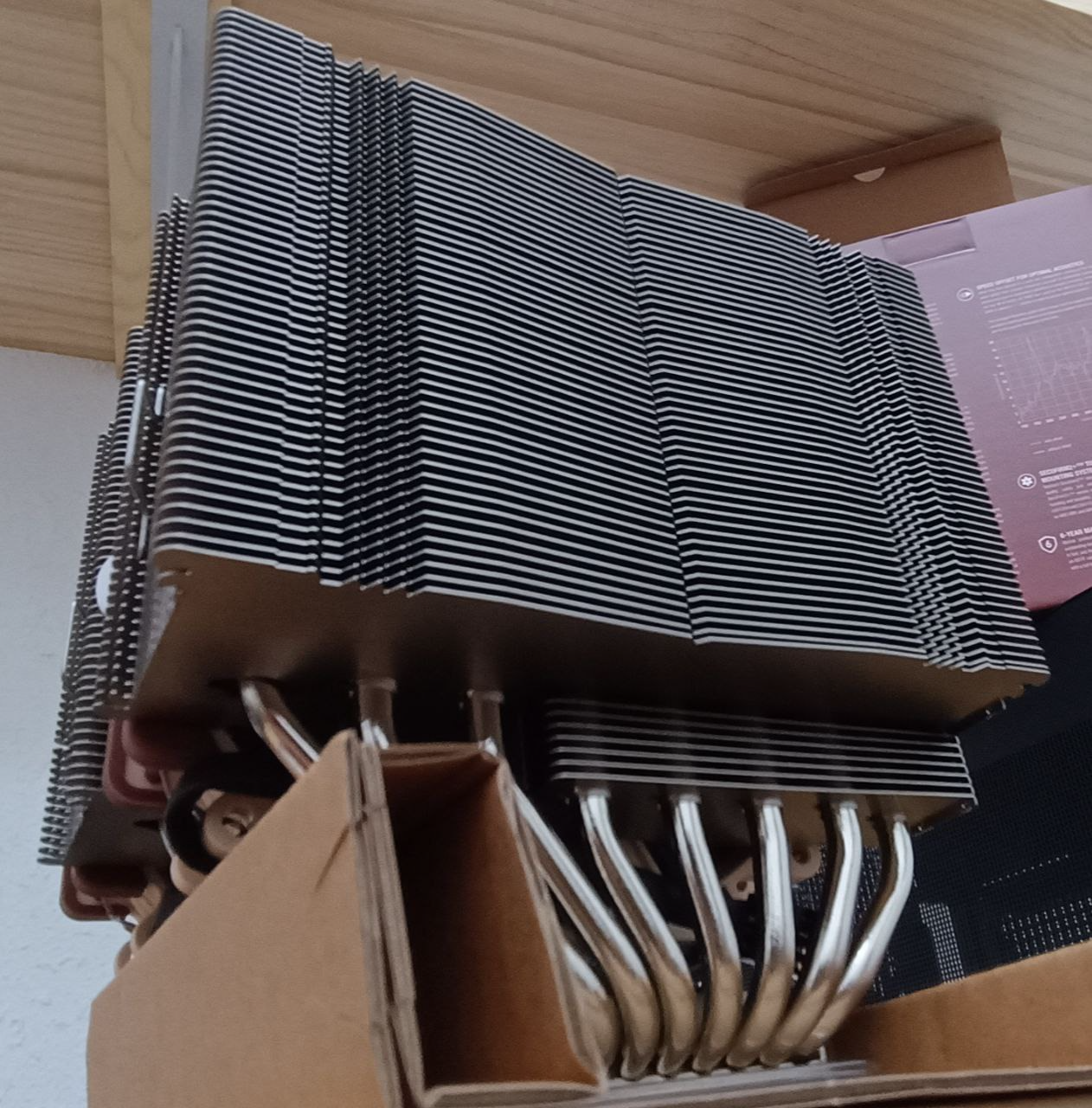
Regarding performance, I'll say something when I start pushing it.
The next micro-review will be of the motherboard, but tomorrow.
Toda la actualidad en la portada de Hardlimit
Mis cacharros -
@cobito said in PC for intensive processing:
The heatsink itself is quite tall and very, very wide. In fact, it is practically a regular cube. It weighs quite a bit and the fans look good (be careful with them, they have a protection and the internal fan has to be removed to take it off).
!!8 HEAT PIPES!! Well, Noctua has a very good reputation. They say that this heatsink cools better than some liquids (I suppose all-in-one low-end ones with very thin radiators).
-
@cobito What a thrill to see so many new toys together

Indeed, the powerful Noctua are a beast in size (and weight).
At the risk of the professionals tearing me apart, between you and me, I recommend fitting it from below or tying it from above, something ultimately to counteract the torque force it exerts on the motherboard.
Yes, they end up bending because of the tremendous weight of these heatsinks... Otherwise, they are a marvel in efficiency.Best regards!
>> i7-2600K Sandy Bridge @4.4GHz || Noctua NH-D14 || ASRock Z77 Extreme4 || 4x8Gb G.Skill Ripjaws X DDR3 1600MHz || XFX RX 5700 XT 8Gb || SSD Samsung 850 PRO 256Gb & 850 EVO 500Gb || WD Caviar Green 1Tb || Barracuda 1Tb || Corsair TX650 V2 || M-Audio Fast Track Pro || KRK RP8 RoKit G3 || BenQ GW2750 27"
>> Athlon 64 X2 5600+ Brisbane @2.9GHz || Gigabyte GA-M61PME-S2 || 2x2Gb DDR2 Kingston 800MHz || Sapphire Radeon HD 5850 Xtreme 1Gb || Maxtor 320Gb SATA2 || OCZ ModXStream 500W Modular || TEAC PowerMax 120/2 || Acer X243w 24"
>> Intel Core2Duo E6600 Conroe @2.4GHz || Asus P5N32-SLI SE DELUXE || 2x1Gb DDR2 Kingston 800MHz || Asus nVidia GeForce 9800GT 1Gb GDDR3 || Seagate Barracuda IDE 80Gb 7200RPM || Linkworld LPK12-35 450W -
@Sylver said in PC for intensive processing:
@cobito What a joy to see so many new toys together
As if the Three Kings had arrived.
Well, I've been busy with the case. As a positive surprise, all sides can be removed without a screwdriver, which I didn't expect. In addition, the holes for screwing in the fans have some slack that allows you to position the fans precisely to match key parts of the motherboard such as the air outlet of the heatsink and the heatsink of the power mosfets.
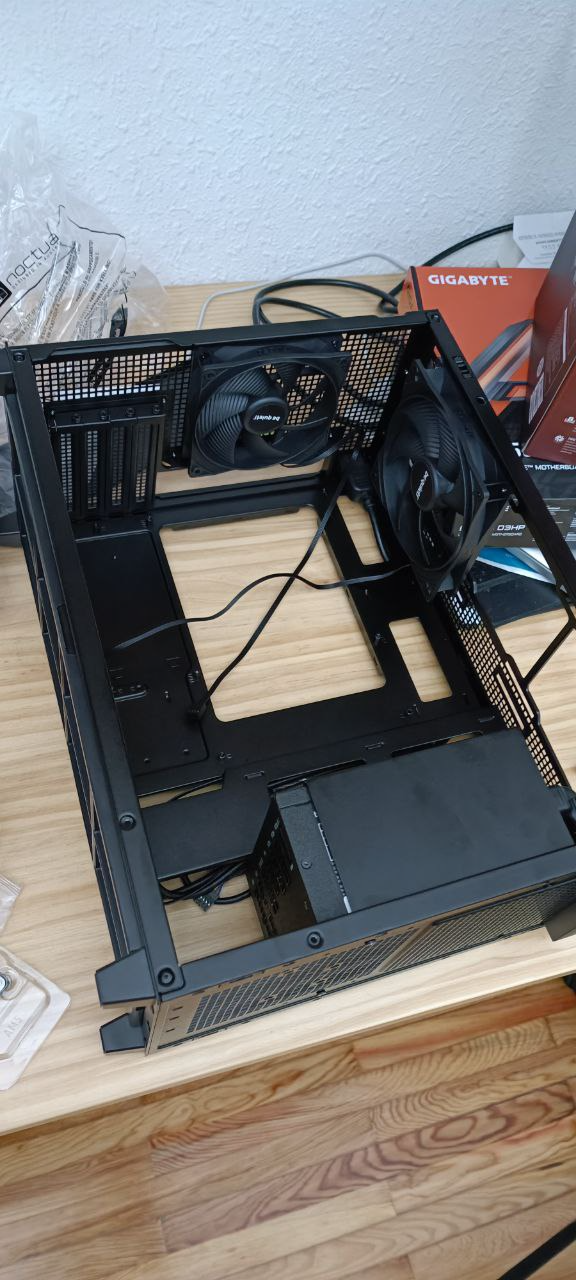
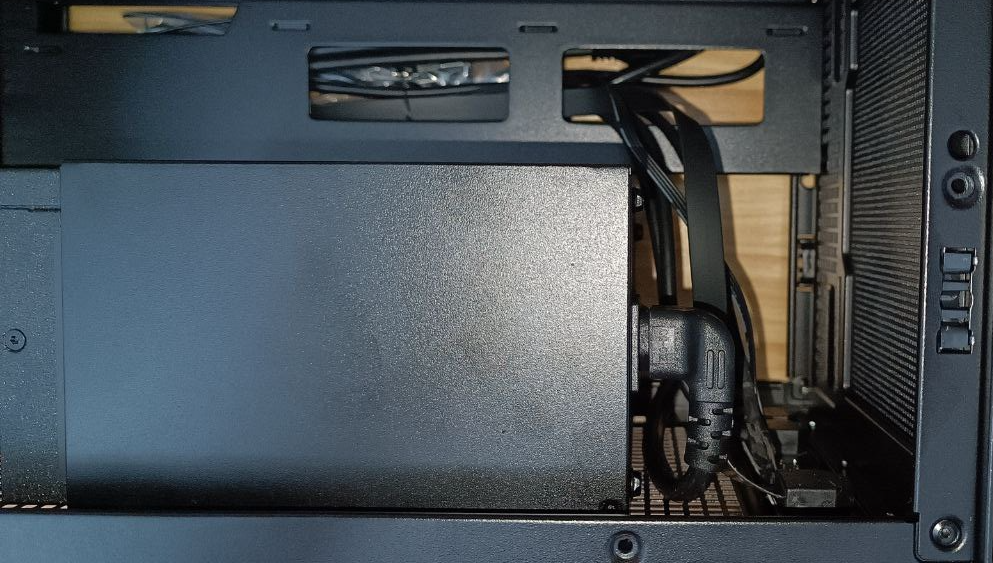
But it has two downsides: one is not very important, which is that it doesn't have disk activity LEDs. Surely today, storage is not such a bottleneck as before and it's no longer necessary (or it's the fashion not to have it), but this PC is going to mount a mechanical drive and being able to visualize the activity helps to know how things are going.
The second problem is a compatibility issue between the case and the power supply. It consists in that the elbow of the power cable of the case is in the opposite direction to what it should be, so you have to force the cable a bit so that it bends. It's not a critical failure but it doesn't look quite right.
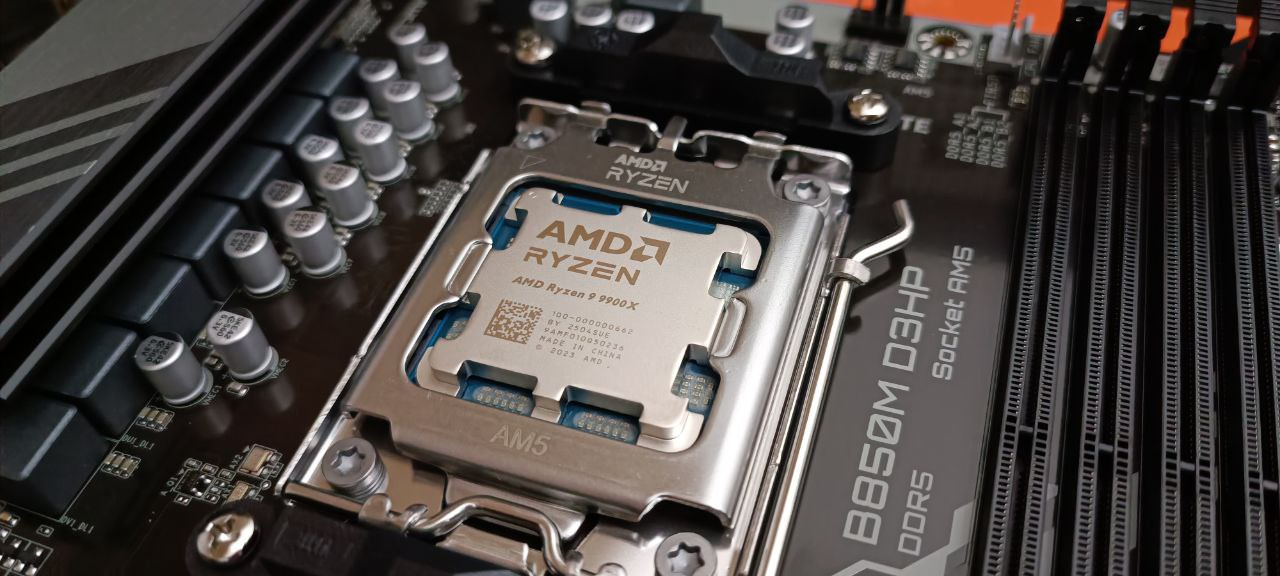
To finish, I left the processor installed, something that doesn't have much relevance but it looks so beautiful!
On the board, at first glance it meets everything I need in the sense that it has exactly two connectors for two CPU fans and two more for two case fans. That is, that per board, you couldn't control a fifth fan. So in that sense, it's fair with what I had in mind.
Let's see if tomorrow I can mount the heatsink, which is what scares me the most.
Toda la actualidad en la portada de Hardlimit
Mis cacharros -
@cobito said in PC for intensive processing:
To finish, I have left the processor installed, something that does not have much relevance but it looks so beautiful!
The Ryzen AM5s are beautiful. I have the 7700 and it's a shame about the heatsink, which doesn't let you see it.
-
Last night I wanted to mount just the heatsink but one thing led to another and in the end it was almost ready. The heatsink wasn't that great. In the end, the board with all its components looks like this:
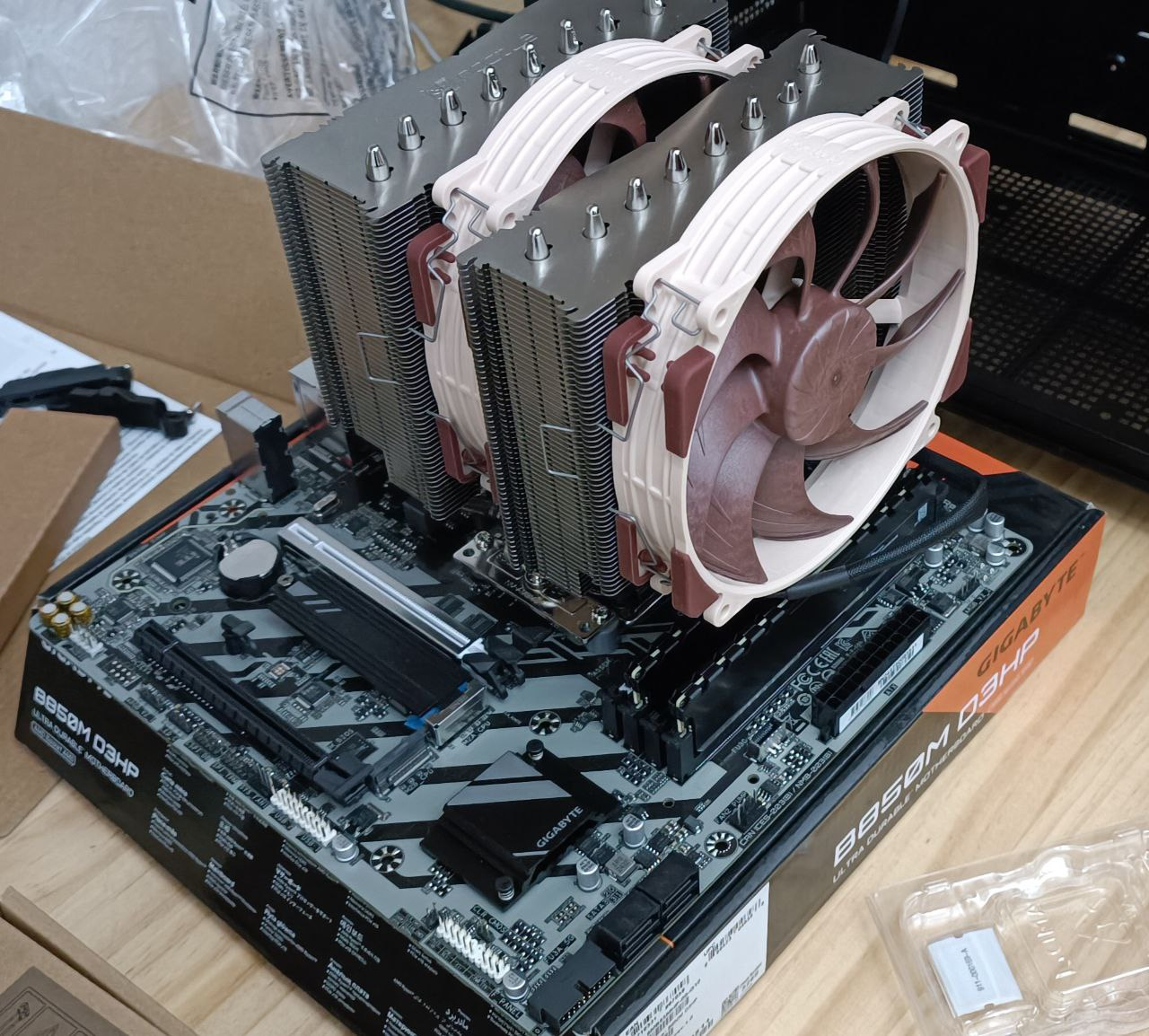
At first I thought I would have to remove the heatsink to be able to plug in the memories but no, you just have to remove the external fan.
Then I installed the board in the case. It wasn't easy because of the weight, but helping myself with the heatsink (don't let anyone know), I was able to put it in. One of the screws was a bit difficult because of the heatsink. I'm not sure if it would have been better to install the heatsink afterwards because it's easy to screw it to the anchors.
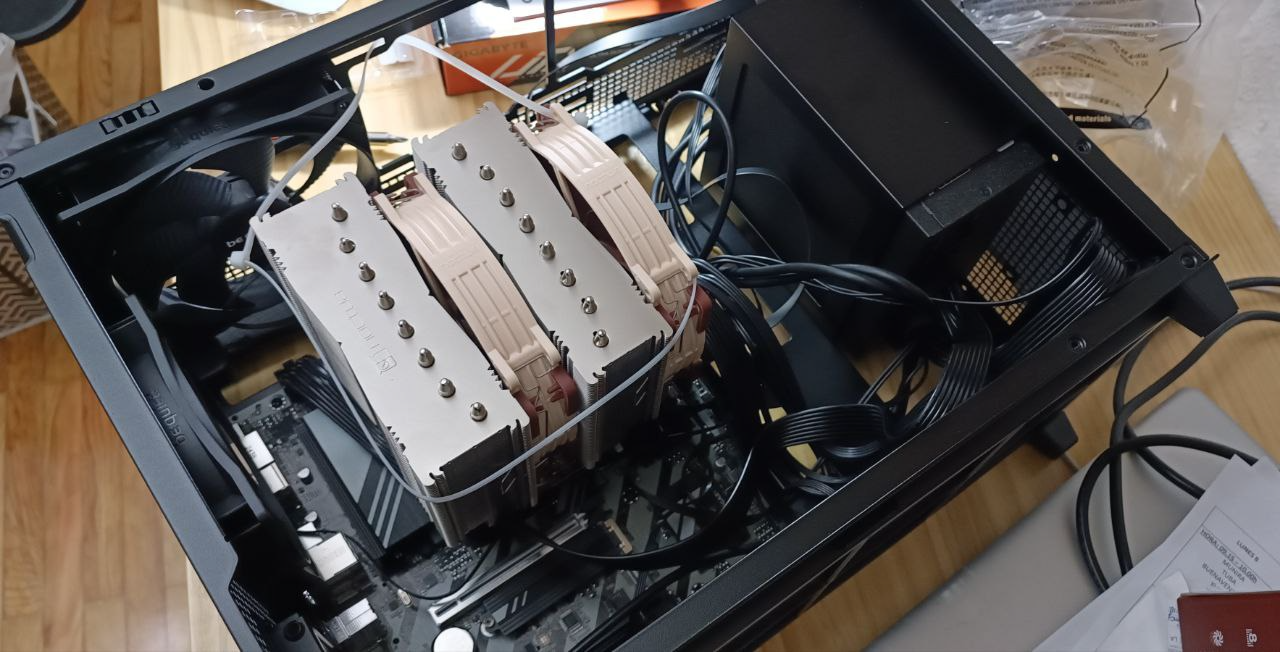
@Sylver said in PC for intensive processing:
At the risk of professionals lambasting me, between you and me, I recommend fitting it underneath or tying it from above, something ultimately to counteract the torque force it exerts on the motherboard.
I put a bracket around the entire heatsink to transmit part of the mechanical load to the case. I didn't tighten it much and made sure there was some slack with the external fan.
Regarding the motherboard, I don't like that the P8 power connector is right above the heatsink of the mosfets. I understand that it's the best place from an electrical point of view, for distance to the load, but from a thermal point of view it's very bad as it obstructs the convection flow of hot air. Even with the 140mm fan on top, that cable makes cooling difficult. I don't know if it's a thing of this model, the brand or the fact that it's microATX and there's no other way to do it.
Regarding the lack of a hard drive activity LED, the final solution was to use the case's power-on LED as an activity LED.
Then I connected a screen, a keyboard, the power supply and... it didn't do anything. A red LED that said dram lit up. After searching a bit, the only thing I found was that I had to change the RAM configuration, but if there was no video signal or anything, little could be done.
I got a bit desperate because I thought I had fried something. I tried both modules separately in all the slots and nothing. I took out the BIOS battery, cleared the CMOS and it was still the same. In the end, I installed the memories, turned it on and left it for a while. After a while (maybe minutes), it gave a video signal and started to work.
I configured the BIOS and since then it boots up fast and on the first try. I don't know if this is normal behavior or if the board isn't very compatible with the memories.
Now I'm installing Windows 11 to test it. I hope to be able to put it into production next weekend.
Toda la actualidad en la portada de Hardlimit
Mis cacharros -
I'm glad it's almost ready @cobito
Don't worry, no one will ever know about helping with the heatsink to fit the board (when I did it, no one noticed either
 ).
).
Good point about the brackets, even if it's not the most orthodox, it will help a lot to mitigate the weight on the board.Unfortunately, the location of connectors in very small form factors is always uncomfortable, either for accessibility or for interfering with other tasks, small things always have some small drawback, but as they say, anything goes.
I suppose you'll pass the HL test to see if you make the top 10, you'll let us know

Best regards!
>> i7-2600K Sandy Bridge @4.4GHz || Noctua NH-D14 || ASRock Z77 Extreme4 || 4x8Gb G.Skill Ripjaws X DDR3 1600MHz || XFX RX 5700 XT 8Gb || SSD Samsung 850 PRO 256Gb & 850 EVO 500Gb || WD Caviar Green 1Tb || Barracuda 1Tb || Corsair TX650 V2 || M-Audio Fast Track Pro || KRK RP8 RoKit G3 || BenQ GW2750 27"
>> Athlon 64 X2 5600+ Brisbane @2.9GHz || Gigabyte GA-M61PME-S2 || 2x2Gb DDR2 Kingston 800MHz || Sapphire Radeon HD 5850 Xtreme 1Gb || Maxtor 320Gb SATA2 || OCZ ModXStream 500W Modular || TEAC PowerMax 120/2 || Acer X243w 24"
>> Intel Core2Duo E6600 Conroe @2.4GHz || Asus P5N32-SLI SE DELUXE || 2x1Gb DDR2 Kingston 800MHz || Asus nVidia GeForce 9800GT 1Gb GDDR3 || Seagate Barracuda IDE 80Gb 7200RPM || Linkworld LPK12-35 450W -
I already have Windows 11 installed and updated. I have also updated all the drivers and the BIOS with the Gigabyte tool. I have anchored the hard drive, collected the cables and the PC is closed. In the end it ended up like this:\n
\nAs far as the assembly is concerned, I consider it finished.\n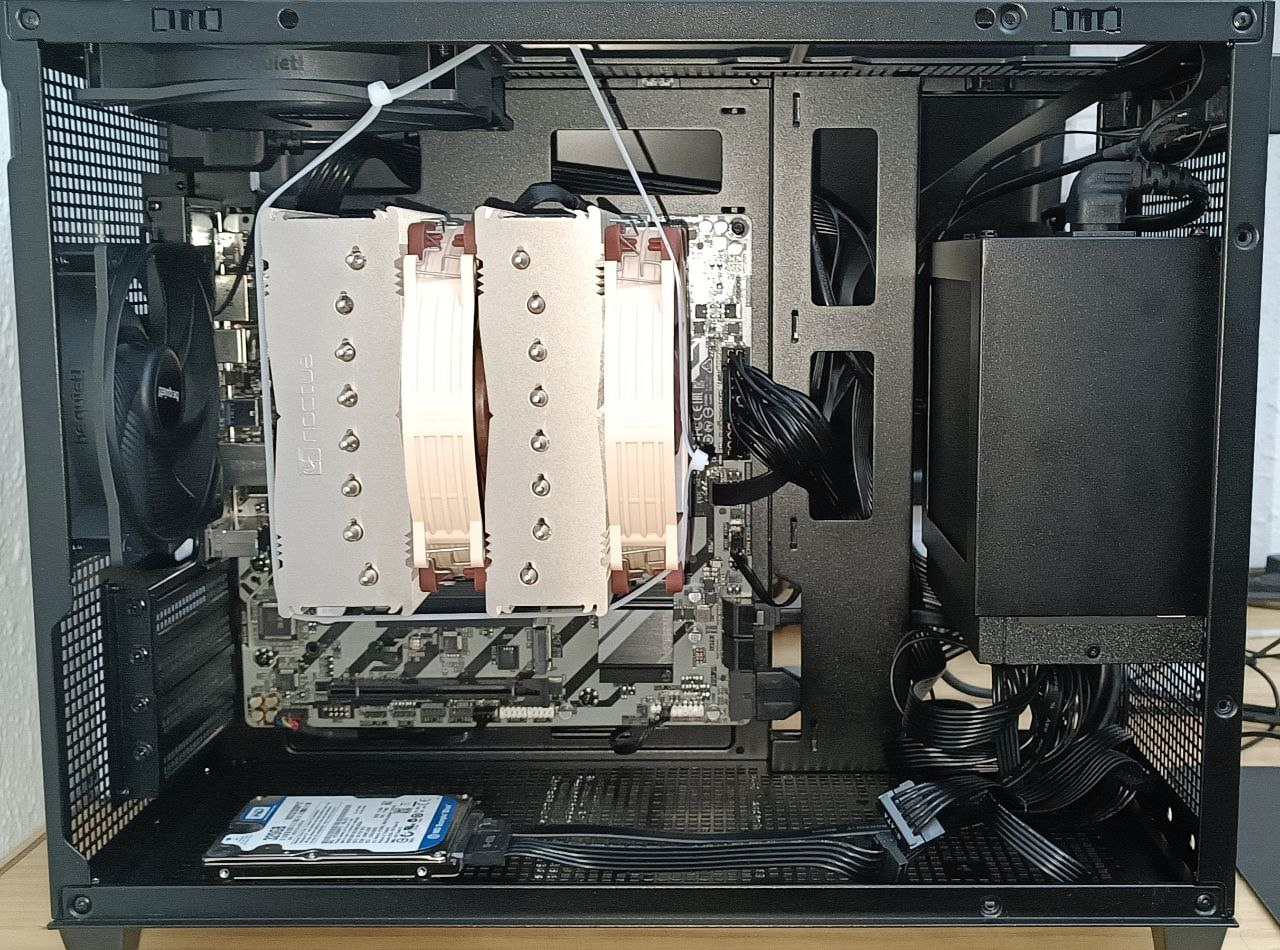
@Sylver said in PC for intense processing:\n
\n
\nThat was the first thingI suppose you will pass the HL test to see if you make it to the top 10, you will let us know
\n\n . Third in single-core and twenty-second in multi-core. A substantially better and worse result respectively compared to another 9900X that someone sent a while ago. I see that we both use some memories with a similar performance, so the difference is due to pure CPU.\n
There is one thing I am noticing: when I use a single thread of execution, the temperature skyrockets to 70ºC and the fans start to blow. On the other hand, when I launch 24 threads, the temperature stays around 60ºC and the fans are not heard. Is that normal? In the first case, the frequency is 5.6GHz and in the second it goes to 4.4Ghz, that is, according to specifications.\n
PS: By the way, what a damn hell is Windows 11 with a mechanical drive. It is noticeable that they have invested zero cents in recent years to optimize the system in that sense.
Toda la actualidad en la portada de Hardlimit
Mis cacharros -
@cobito said in PC for intensive processing:
\n\n
\nThat was the first thing
\n. Third in single-threaded and twenty-second in multi-threaded. A substantially better and worse result respectively compared to another 9900X that someone posted a while ago. I see that both of us use some memories with a similar performance, so the difference is due to pure CPU.Congratulations on the podium in single-threaded
\n Now we close the validations and leave the ranking symbolically like this
 @cobito said in PC for intensive processing:
\n\n
\nThere is one thing I am noticing: when I use a single thread of execution, the temperature skyrockets to 70ºC and the fans start to blow. On the other hand, when I launch 24 threads, the temperature stays around 60ºC and the fans are not heard. Is that normal? In the first case, the frequency is 5.6GHz and in the second it goes to 4.4Ghz, that is, according to specifications.
\nThe temperature itself is good. Regarding the noise, it is true that my NH-D14 increased its speed progressively when it passed 70ºC with the 2600K, but not to the point of saying that it was blowing a lot.
\n
What really blows is what my RX 5700 XT does when I play with everything on ultra, that is really a scandal
Have you checked the temperature/fan settings in the BIOS? Surely it can be regulated from there, in case that when it works as a server it makes some extra noise.Best regards!
-
@Sylver said in PC for intensive processing:
\n\n
\nDon't worry, no one will ever know about using the heatsink to fit the motherboard (when I did it, no one noticed either
\n ).
Good point about the brackets, even if it's not the most orthodox, it will help a lot to mitigate the weight on the motherboard.Ah, but it's not asynchronous? Oh... I don't do that either, do I?
\n@cobito said in PC for intensive processing:
\n\n
\nPS: By the way, what a damn hell Windows 11 is with a mechanical drive. It's clear they've invested zero cents in the last few years to optimize the system in that sense.
\nThat's why I don't want to know anything about that operating system. I was testing with a Ryzen mini PC on Linux and I didn't have to install a single driver. When I reinstalled W11 for my wife to use it, I realized why I don't like using it...
 Even to install it, I had to install the Realtek drivers first because Windows wouldn't even let me install them. And then (this is Chuwi's fault), I had to download the drivers through one of these software (I don't remember which one, but it was open source)...
 -
I'm almost finished with the tests. Last night I got hooked on Counter Strike Source, which I know isn't the greatest, but it's been my first game on a decent PC in many years. Playing at 200fps with everything maxed out and an integrated GPU isn't bad at all, even though it's a pretty old game.\nApart from that, I've significantly reduced the noise by modifying the temperature/rpm profile from the BIOS as @Sylver suggested. Now I can see in more detail that the temperature spikes when the memory test starts, reaching 85°C (for me it's an excessive temperature but not dangerous). On the other hand, the moment the multithreading starts, the temperature drops. I see the same behavior with other programs. For example, when the Steam client demands power from a single core and the rest is at rest, it also heats up quite a bit and with Firefox it's the same. But when I start a demanding game (eg: Counter-Strike 2), the temperature drops again quite a bit.\nThe profile stays this way, unless you tell me that it's not advisable to get close to 90°C even occasionally.\nThere's another thing happening to me: when I activate the EXPO or XMP profile of the memory, it seems that SMT is deactivated. From the HL benchmark I see that the performance of the memory test doubles its result while the pure CPU tests remain more or less the same. I think it's not normal that SMT is deactivated but as I don't see any penalty in CPU performance and the memory improves quite a bit, for now I'm not going to give it much importance. I suspect it's a bug in the BIOS, but I read that it can be a limitation of the memory controller. Anyway, in a few weeks I'll change the memories, so I'm not going to spend more time on this.\nI've also tested the energy consumption at rest, under load with one thread and with full load. The measurement was made with a power meter measuring from the AC outlet of the power supply. This is the result:\n- At rest: 42W.\n- HL benchmark, one-thread test\n· Test #1: 87W\n· Test #2: 83W\n· Test #3: 88W\n· Test #4: 92-115W\n- Multithread test:\n· Test #1: 152W\n· Test #2: 148W\n· Test #3: 152W\n· Test #4: 158W\n- BeamNG.drive (normal quality): 77-85W\n- Counter-Strike 2 (default settings): 83-91W.\nThe consumption is similar to the i5-3570K that is currently on the market while the performance is about 13 times superior in general terms when they are at full load.\nI'm going to install Debian Stable now, which is the system it's going to stay with.Toda la actualidad en la portada de Hardlimit
Mis cacharros -
 C cobito referenced this topic on



Hello! It looks like you're interested in this conversation, but you don't have an account yet.
Getting fed up of having to scroll through the same posts each visit? When you register for an account, you'll always come back to exactly where you were before, and choose to be notified of new replies (either via email, or push notification). You'll also be able to save bookmarks and upvote posts to show your appreciation to other community members.
With your input, this post could be even better 💗
Registrarse Conectarse