Inverted bottleneck?
-
@clipper Yes, it makes perfect sense.
Indeed, when the GPU is at 100% and the rest of the components are at low/medium gas, you are experiencing a bottleneck where the graphics card is not keeping up with the rest of the components, resulting in an imbalance in the results (games, applications, etc.).
As I mentioned to you in the other thread, do the calculation in the Bottleneck Calculator, marking GPU-intensive tasks, and you will see that your system is around 40% bottlenecked in the GPU compared to the CPU.
Best regards
-
@Sylver vamos...que te vendó mi rtx and I got another

-
@clipper before you didn't get the most out of your GPU and now you don't get the most out of the CPU

In the end you have to do business with @Sylver!!Well, maybe you should look at an RX 6700XT or similar to get the most out of the CPU, although for now you can try to hold out to see if you find a good deal now that the price is dropping (slowly) of the graphics cards.
Regards!!
-
@clipper It's not that I want to force it
 in fact I thought the team was going to be much more balanced... But it seems that the new platform you've picked up is much more powerful than I thought in proportion to the performance of the RX 580...
In any case, I am still looking for an RX 580 of 8Gb, in case you decide to replace it at some point
But as @_Neptunno_ rightly says, try to hold or even relax CPU frequencies (if possible with your card), in order to bring one closer to the other and stabilize the performance until you see the opportunity to change.
Regards
-
I would have sworn that my GPUs have always gone to 100% in games, all my life
 now you make me doubt.
 -
@krampak I think that no component always renders at 100% except in stress tests.
Maybe with the game Crysis...
But in the rest I have never had the graphics at 100% constantly.
Regards -
@clipper well I just started looking at it in World of Warcraft (a game that has always been more CPU-intensive than GPU) and there it is, pegged at 100% xD while the CPU curiously has more margin:
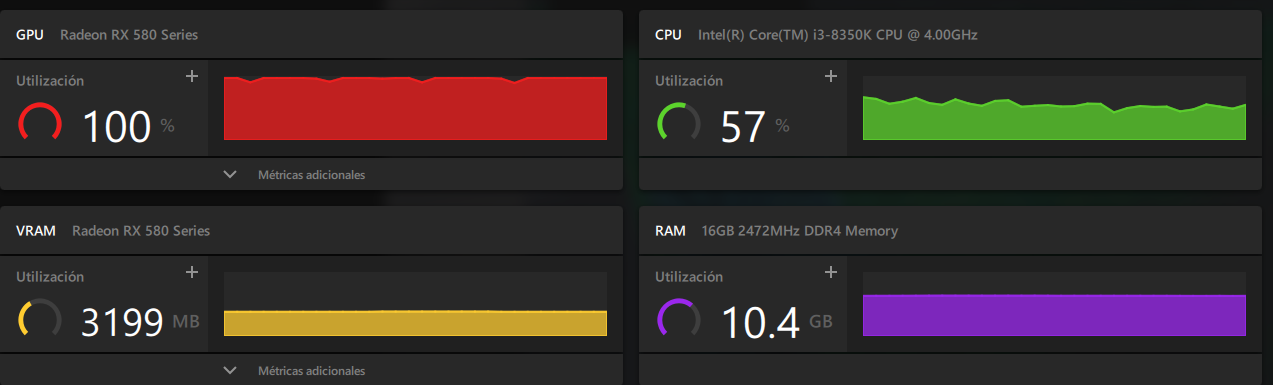
-
@krampak Looks like a clear example of the GPU bottleneck that Clipper was talking about.
Your CPU is eating a potato with the RX 580... No, you'll all get rid of the RX 580s now that I finally found one... Life is a joke
Saludos!
>> i7-2600K Sandy Bridge @4.4GHz || Noctua NH-D14 || ASRock Z77 Extreme4 || 4x8Gb G.Skill Ripjaws X DDR3 1600MHz || XFX RX 5700 XT 8Gb || SSD Samsung 850 PRO 256Gb & 850 EVO 500Gb || WD Caviar Green 1Tb || Barracuda 1Tb || Corsair TX650 V2 || M-Audio Fast Track Pro || KRK RP8 RoKit G3 || BenQ GW2750 27"
>> Athlon 64 X2 5600+ Brisbane @2.9GHz || Gigabyte GA-M61PME-S2 || 2x2Gb DDR2 Kingston 800MHz || Sapphire Radeon HD 5850 Xtreme 1Gb || Maxtor 320Gb SATA2 || OCZ ModXStream 500W Modular || TEAC PowerMax 120/2 || Acer X243w 24"
>> Intel Core2Duo E6600 Conroe @2.4GHz || Asus P5N32-SLI SE DELUXE || 2x1Gb DDR2 Kingston 800MHz || Asus nVidia GeForce 9800GT 1Gb GDDR3 || Seagate Barracuda IDE 80Gb 7200RPM || Linkworld LPK12-35 450W -
@sylver well I don't know, I have my doubts that it is that.
-
Maybe the comparison should be with the same game.
I think the one that we all possibly have is battlefield 3.
Regards
P.d and it gives me a lot of trouble to look for the origin account.
Regards 2 -
@sylver said in Inverted bottleneck?:
@krampak It seems a clear example of the GPU bottleneck that Clipper was talking about.
Your CPU eats potatoes with the RX 580... No, in the end you'll all get rid of the RX 580 now that I've finally found one... Life is a joke
Best regards!
But the RX 580/590 (Polaris) was top of the range, before Vega appeared, in 2017. Krampak's i3 is from 2017, although it's true that it was practically like an i7 since it was 4/8.
So, being low-end in theory, the CPU should cause "something" of a bottleneck, but with some OC it will have a bit more performance and it's not a bad processor, despite being just an "i3" hehe. We must also look at the resolution at which you play, the graphics options enabled, programs running in the background and the optimization of the games.
Honestly, I don't think you have to worry about the GPU and CPU running at 100% to be concerned about the bottleneck issue, I would understand it as problematic (the PC is unbalanced) to see the GPU at 100% and the CPU below 30-40%. But of course that's in all games, not just a specific game because the optimization can play tricks on you and make you think what isn't.
Returning to Clipper's topic, I'm sure that if a test of the game was done with both teams at 720P, you would notice a lot of improvement in the Ryzen and how it gets the most out of the RX580. Certainly the CPU has some bottleneck, but it's sure to be good enough to play more than we think, only that for this game that Clipper is most interested in, the improvement isn't as noticeable.
By the way, good monitor, although to get the most out of the 165hz, you need a more powerful GPU and possibly you wouldn't go below an RTX 3080 to ensure good performance for a long time, we're talking about at least a 3070ti.Best regards!
-
@_neptunno_ so we'll have to wait until Friday "silly" to get the GPU, even though after seeing my "work schedule" I might be able to set up a tri SLI, just with the hours

Regards -
@krampak Well you're right, the 8350K is theoretically even a bit weak for the RX580, I hadn't done the calculation... Unless the micro's OC makes it far surpass the graphics, something must not be going well...
>> i7-2600K Sandy Bridge @4.4GHz || Noctua NH-D14 || ASRock Z77 Extreme4 || 4x8Gb G.Skill Ripjaws X DDR3 1600MHz || XFX RX 5700 XT 8Gb || SSD Samsung 850 PRO 256Gb & 850 EVO 500Gb || WD Caviar Green 1Tb || Barracuda 1Tb || Corsair TX650 V2 || M-Audio Fast Track Pro || KRK RP8 RoKit G3 || BenQ GW2750 27"
>> Athlon 64 X2 5600+ Brisbane @2.9GHz || Gigabyte GA-M61PME-S2 || 2x2Gb DDR2 Kingston 800MHz || Sapphire Radeon HD 5850 Xtreme 1Gb || Maxtor 320Gb SATA2 || OCZ ModXStream 500W Modular || TEAC PowerMax 120/2 || Acer X243w 24"
>> Intel Core2Duo E6600 Conroe @2.4GHz || Asus P5N32-SLI SE DELUXE || 2x1Gb DDR2 Kingston 800MHz || Asus nVidia GeForce 9800GT 1Gb GDDR3 || Seagate Barracuda IDE 80Gb 7200RPM || Linkworld LPK12-35 450W -
@sylver but that it is at 57% CPU usage should not mean that the performance is bad, just that the processor does not need to use all its potential. I have read on the Steam forum people complaining about having the CPU at 100% and having stutters in the game because of other applications running in the background. What I don't understand in this case is the use that WOW will make of it, no matter how CPU demanding it is, if the 8350k is up to the task, it should not be necessary to be at 100%.
Surely with the classic Tomb Raiders the CPU is at 2% and the graphics the same hahahaGreetings!!
-
@_neptunno_ Yes, I guess it will be a matter of trying it out in more games to see how the CPU and GPU behave under other conditions.
Man of course, with the old Tomb Raiders, the components don't even wake up hahaha
Greetings!
-
Out of boredom today I tried it. The ARK with high settings, everything on high and something on "epic"
78 stable FPS and the GPU at 100% CPU RAM and other things at most at 15%
So the issue of the bottleneck... seems like not.
Regards -
Hello.
No, that percentage is not a direct indicator of, let's say, how much gpu you have left.
I have read that it is not so, and I have also observed it for myself. Apparently, only if the graphics card starts doing something "worthy of its capabilities" will it approach or hit that 100%, but that is not net performance, it still has a lot of juice left.
The gpu's performance ceiling is reached when the framerate starts to drop, or rather, it is being reached. When the framerate is not satisfactory with the graphics quality you want to have then your graphics card has hit the ceiling.As for the "bottleneck", whoever reads this is going to think that the graphics card is getting less performance because of working with a bigger micro Jjj, if you came across an opportunity for a top-notch graphics card, and then you weren't enjoying it because you couldn't upgrade the micro, that would be a big hassle.
Come on, without beating around the bush, we all love updating hardware


By the way, what graphics options are you thinking about when the time comes?
-
@defaultuser
Well, in my case, if the economy allows it at the time...
To double...
I mean, if I have one with 8 GB
Look for something with 10 or 16 GB of VRAM
And a preference for AMD.
Regards -
I think like krampak, if the game uses all the cores of the GPU, then it will be full loaded, as the CPU would be if the game used the CPU basically, as in the case of chess programs, but reading this, you make me doubt too (I have to try an engine that uses CUDA, to see if I can put a graph of the use of the Nvidia RTX3060).Cluster MPI de tres nodos formado por tres SERVIDORRES HP PROLIANT DL360P 1U 2X E5-2680V2 CPU'S, 20 cores, 40 hilos a una frecuencia base de 2,8GHz. 192 GB de memoria RAM DDR3 ECC (8 x módulos de16 GB 800Mhz)´+ 1U 2X E5.-2697 V2 a una frecuencia base de 2,8 Ghz 192 GB de Ram ECC (8 módulos de 16 Gb 800 mhz) 24 Cores 48 hilos ( 44c/88T)+ 1u 2xE5 2603v2 con una frecuencia base de 1,9ghz 64 Gb DDR3 ecc (4x módulos de 16)
-
Hello.
I am thinking about changing the GPU
Which is the last thing I need to update.
The current one is an rx580 xfx 8 gigas
My monitor is only compatible with AMD (I know there are options to use the "greens") but I prefer, unless someone says it's a mistake to use the reds (AMD).
The idea would be a series lower than the top, that is, an RX 5800xt
With 16 gs of RAM
And the time would be Black Friday
The budget now would be 600/700 €
For Black Friday I can raise it, but it's not planned...
I hope they lower the price something.
And in case I have a lot of money left over, I can go up to the 5900 XT series
Is it really worth it?
What do you think?





Hello! It looks like you're interested in this conversation, but you don't have an account yet.
Getting fed up of having to scroll through the same posts each visit? When you register for an account, you'll always come back to exactly where you were before, and choose to be notified of new replies (either via email, or push notification). You'll also be able to save bookmarks and upvote posts to show your appreciation to other community members.
With your input, this post could be even better 💗
Registrarse Conectarse