OC to a 4790K
-
How beautiful those K7 Thunderbird for 462 looked...
Those were the days... it seems like a seventh of a century has passed... but it's a little less :risitas:
Hey Espi, can you help me with the design of a new modding for my cutrecaja? You seem handy

Only if you take care of my sheep in farmville

Great work, good luck with that fancy machine, and try the pasta thing that Obione told you if you dare to uncork it :sisi:
Thanks, I'll keep you updated
-
I premiered the proce this weekend, and of course I haven't even thought about lapping or similar things... 240€ hurt a lot if I mess it up:llorar::ugly: Anyway, until I save up to put proper cooling on it, I won't do OC... and at stock I'm delighted with the difference from the i7950. I'll follow this thread, for when I do OC.
-
Estrené el proce este finde, y desde luego ni he pensado en lapping ni cosas similares… 240€ duelen mucho si me lo cargo:llorar::ugly:
Yo con mi antiguo Opteron 175 emplee el típico método de la cuchilla… es el peor porque es muy facil cortarse, llevarte por delante resistencias o que la cuchilla se clave en el PCB... el mejor método y el que voy a usar yo es el del "Vice":
Puede parece una burrada "quitarlo a matillazos" pero os puedo asegurar que tiene su explicación técnica de porque se despega si se hace bien: Tensión cortante - Wikipedia, la enciclopedia libre… básicamente para los no iniciados en elasticidad y resistencia de materiales la fuerza que se aplica actúa como si una cuchilla de espesor infinitesimal en toda la sección... puesto que el cobre del IHS y el material del PCB tienen mayor resistencia que la silicona de la junta esta se deforma superando su limite elastico y rompe.
También decir que esto se debe hacer con mucha calma y aplicando la fuerza lo más paralela al plano de corte sino no aparecerá el cortante... aparecerán otras tensiones que pueden romper el PCB.
De todos modos hasta que no ahorre para ponerle refrigeración en condiciones, ni le hago OC…y estado stock estoy encantado la diferencia con el i7950.
Yo tambien lo tengo de stock y con el Noctua parece que el equipo esté apagado, además rinde genial y no gasta nada aunque creo que deberias testear ahora que esta de serie cuanto se calienta y los vatios que disipa o incluso el undervolt que acepta porque lo que yo me estoy dando cuenta es que como no bajen mucho la temperaturas al destaparlo ni de coña le voy a poder subir el voltaje para uso 24/7… es decir le pones 4.6Ghz/1.2V con 4.4Ghz de cache y puedes benchear lo que quieras o comprimir vídeo de alta definición en H264 que no peta pero en cuanto le metes Prime o LinX la temperatura se dispara y se acabo.
Está claro que hay gente para la que esta estabilidad que yo exijo es excesiva pero voy a usar el equipo para trabajar y busco el mayor rendimiento pero también la mayor fiabilidad... bastante inestables por si solos se vuelven algunos programas para andar preocupándome del OC :ffu:
Seguiré este hilo, para cuando le haga OC.
Iré poniendo cosillas y si alguien más se une al club que ponga su batch y sus resultados.
PD: Lo que comento de los programas que fallan lo digo porque el software de diseño que uso no autoguarda… tiene para hacer y deshacer pero no autoguarda como Word porque cuando le das a guardar te puedes ir a tomar una cafe si andas con un megaensablaje y te da para un croissant. Claro me tire 4horas a saco haciendo tareas de desdoblado de chapa y sus respectivos planos para enviarlas al cortar... elegi no se que opción para plotear /exportar los planos y el programa colgado 100% por culpa ADOBE... 4horas tiradas a la basura, me dio un gusto :ffu:
-
I saw him hit the computer with a couple of hammer blows, and that's when I realized that I would never do that with a new computer :wall:
Anyway, good luck and you'll tell us.
-
@Espinetenbolas What were you saying was the master you were preparing, man? ;D
It was very nice when you theorized the hammer method hehe. The truth is that the other day I thought I saw that some bring a capacitor very close to the putty, literally on top of it.By the way, is the blade test looking at it backlit to see if there's a gap? Better to move it 2 millimeters over fine sandpaper, or if not, to trace a little on carbon paper with a sheet in between, or something like that.
-
I've seen them hit the micro with a couple of hammer blows, and that's when I realized I would never do that with a new micro :wall:
It all depends on how you want to see it… as soon as you take it out of the box, it's no longer new to me :troll:
@Espinetenbolas ¿What were you saying about the master you're preparing, man? ;D
Integrated design and manufacturing assisted by computer CAD-CAM-CIM
You learn to model, parameterize, assemble and make plans with NX Unigraphics and Pro/ENGINEER, to perform multiphysics analysis by finite elements with Nastran and ANSYS, CNC/Lathe programming (by hand and assisted for complex parts), plastic injection simulation with MoldFlow, composite part forming with PAM-RTM, manufacturing project management with MS Project, industrial automation, robotics with Matlab, ecodesign, optimization, integration (basically consists of selecting materials or the productive process according to the type of part, DFM (Design for Manufacturing) analysis and some other things about cost calculation and tolerances), prototyping… although some are optional and I haven't taken them but I have the notes.
It was very funny when you theorized the hammer method lol. The other day I actually saw that some bring a capacitor very close to the putty, literally on top of it.
I learned that in college… and if it's too close those resistors/capacitors... from my experience the blade, no matter how thin, doesn't go in without a lot of force.
By the way, is the blade test looking at it against the light to see if there's a gap? Better to move it 2 millimeters over fine sandpaper, or if not, trace a little on carbon paper with a sheet in between, or something like that.
If the blade test is against the light:

Who says a blade says a caliper or something straight

If not, we go to the Pro engineering level we have a white paper film that changes color under pressure:

The best part is the version where you digitize the sheet and with the specific software you can see the real pressure distribution and compare it with the theoretical one (the one you calculated). Basically, this is used to verify prototypes of parts that need to fit under pressure and also later in quality control if we're dealing with high-responsibility parts that won't be disassembled again… petrochemical and aerospace industries $$$$.
-
it's the worst because it's very easy to cut yourself, to overcome resistance
This is how I ruined the FX-55 after paying €900 for it… :ffu::ffu:
-
Not bad, mine came out a little better
Prime95
4.5Ghz 1.1v
4.7Ghz 1.2v
It does 5Ghz with 1.36v
5.11Ghz with 1.43vWith two cores it benches at 5.35Ghz with less than 1.5v
It's a lottery these 4790k :facepalm:
-
Okay, but you have the NB at 4ghz thief
As for what is better, I don't know what to say, it depends on the cooling and ambient temperature you have, we can compare. For example, I run the SupePi32M 5Ghz with NB at 4.7ghz with VCore1.326V and Vcache 1.25V
With the same configuration (which is not optimized because I've tinkered little) for 5.1Ghz and 1.35v it's not stable and I don't want to put more heat into it
I suppose you mean by better that your IHS is better placed because what mine is for headbutting a wall... :wall: :wall: :wall:
By the way, could you post some screenshots with the HWifo to see how much it consumes, mainly to compare the watts dissipated and also your Batch
By the way, Xevipiu, I sent you a PM about a matter in which you could help me, since you've been involved in extreme cooling issues and stuff.
-
Lo comfieso, has changed the paste on the IHS, I put

Yesterday I overclocked a 4690k by removing the IHS, I overloaded the communication channels, since I was doing it while talking on the phone on an erotic line and I had no concentration :ugly:


Regarding voltages, I go by feel, I always put something more, since I'm jumping parameters from software, but here I leave you some sample


This test is one of the most balls to the wall, but I'll go through it
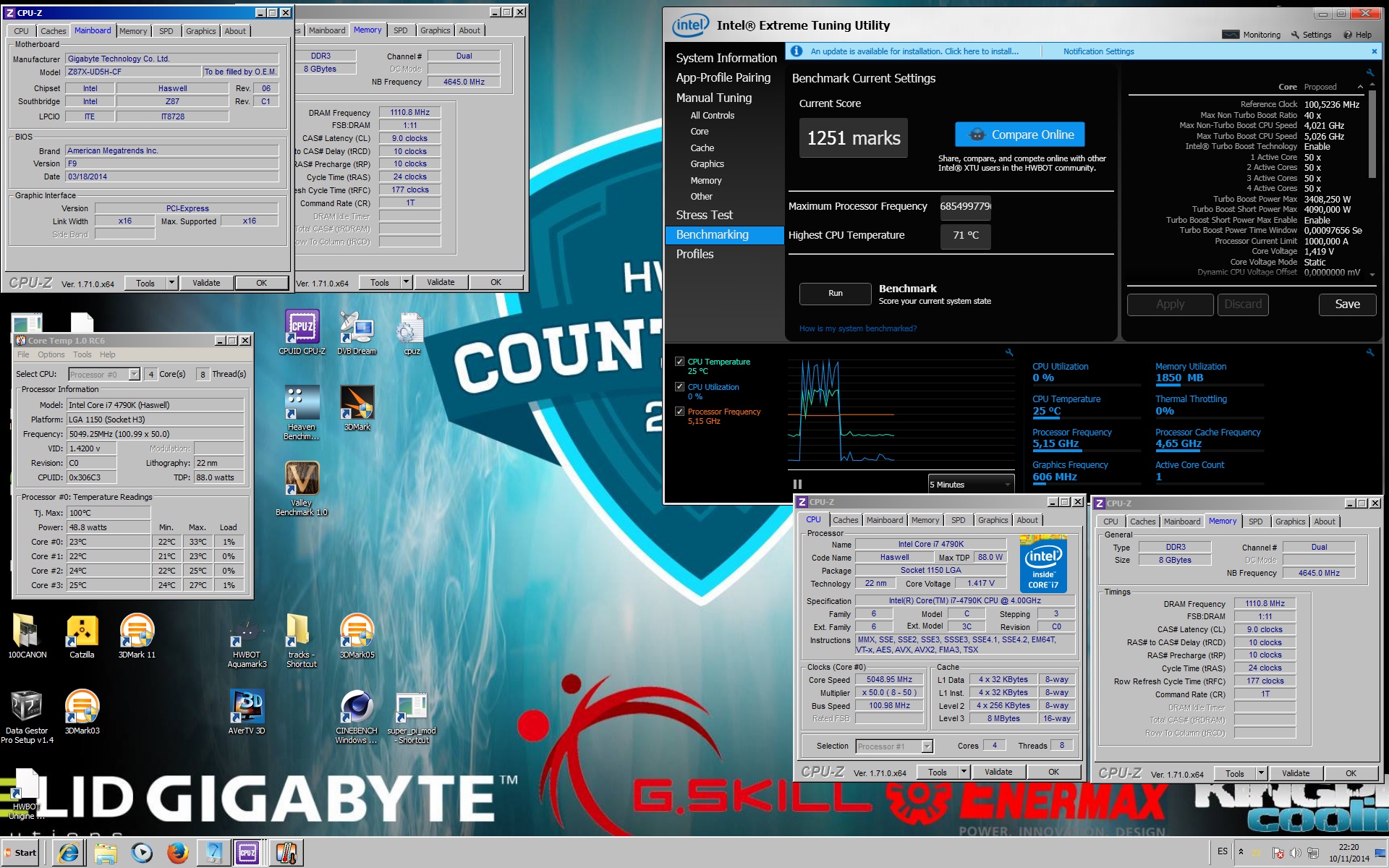
The cooling is water, which now we have better ambient temperatures to test ;D
-
Ah, I have not tried with uncore/NB at x47, for SuperPi it does not go below x48 or x50 if I have it stabilized

-
Jopeta, I see that you can't edit the posts, I'll keep following


I only have one of these 3 micros left, the other two have passed on :wall:After that I have to go back to see if the 4690k shows any signs of life, so I can take the opportunity to give you the Step of the 4790k that I'm using now ;D
Intel 8088 7.15Mhz, 512Kb RAM, CGA 4coleretes, HD 10Mb
-
I'm already here again, I checked the voltage it needs for 5Ghz the Spi32 with more than x47 of unicoreSpi32 5Ghz 1.29v - x48 uncore

For the Spi2 with a lot of over-voltage on top
Spi2m 5.35Ghz

-
HWinfo
5Ghz at 1.34v

5Ghz at 1.37v

Here you have the consumptions, without giving you the step of this
-
The truth is that it is noticeable that you have opened it and that you are going by liquid and I by air now I have not looked at it but I suppose that something will have improved… in any case I am going to open it as soon as I have a moment.
-
[…]I only have one of these 3 micros left, the other two have passed on :wall:[…]
This is where I looked at my salary and started crying. :eoh:
By the way spii, when you decide, document it if you're going to do it with hammer blows. :sisi:
-
By the way, spidey, when you decide, document it if you're going to do it with hammer blows. :sisi:
You want me to record it in case I mess it up and ruin the mic ¬¬ … I second that :troll:
-
You want me to record it in case I mess it up and ruin the mic ¬¬ … I second that :troll:
I second that :wall:
Two pics of two dead micros for having bad hands with the cutter :facepalm:
A 4690k for 210€


And a 4770K also top quality from the same hand

-
Well well… in the end I took it off, sanded the IHS and also the Nocuta :troll:... the improvement is approximately 24ºC with LinX applying Coolaboratoy Liquid Ultra to the IHS and MX-4 on the cooler.
The truth is that it is noticeable a lot and I have not yet tested with OC, I started everything by defcto and it shows very good figures.
Ambient temperature 27º
**AIDA 64 CPU-> Max 51º dissipating around 66W
AIDA 64 FPU-> Max 62º dissipating around 107W
Prime 95 28.5 SmallFFT -> Max 65º dissipating around 122W
LinX-0.6.5.7_MOD_11.3.0.004 -> Max 69ºC dissipating around 135W
**
And so, with the fans self-regulating without reaching full speed… the truth is that it is a pleasure... I will put captures and some photos soon. -
In the end you did it :osvaisacagar:
Well, congratulations that everything went very well and you have improved the temperatures a lot. Enjoy it.






Hello! It looks like you're interested in this conversation, but you don't have an account yet.
Getting fed up of having to scroll through the same posts each visit? When you register for an account, you'll always come back to exactly where you were before, and choose to be notified of new replies (either via email, or push notification). You'll also be able to save bookmarks and upvote posts to show your appreciation to other community members.
With your input, this post could be even better 💗
Registrarse Conectarse