• Portada
    • Recientes
    • Usuarios
    • Registrarse
    • Conectarse
    1. Foro
    2. Belzebu
    3. Temas
    Desconectado
    • Perfil
    • Siguiendo 0
    • Seguidores 0
    • Temas 8
    • Mensajes 36
    • Grupos 0

    Temas

    • BelzebuB

      Asus X555LD - CMOS battery charging system

      Siguiendo Ignorando Programado Fijo Cerrado Movido Dispositivos móviles y portátiles
      4
      1
      2 Votos
      4 Mensajes
      365 Visitas
      FassouF

      According to the teardown video, there is no button cell battery in sight, so it must also be powered by the main battery.

      Salu2!

    • BelzebuB

      Compatibility Motherboard Toshiba L750

      Siguiendo Ignorando Programado Fijo Cerrado Movido Procesadores, placas base y memorias
      6
      0 Votos
      6 Mensajes
      518 Visitas
      pos_yoP

      @Belzebu Let's see, it seems that everything is compatible and should work but it's hard to be sure because in laptops, since everything is often proprietary connectivity, unpredictable things can happen. I would take a risk, I tell you that too but I like the risk... I have a desktop board with a laptop processor from the brand Erying... With that I tell you everything... ?

    • BelzebuB

      Toshiba Satellite L750 - No video

      Siguiendo Ignorando Programado Fijo Cerrado Movido Dispositivos móviles y portátiles
      31
      0 Votos
      31 Mensajes
      3k Visitas
      BelzebuB

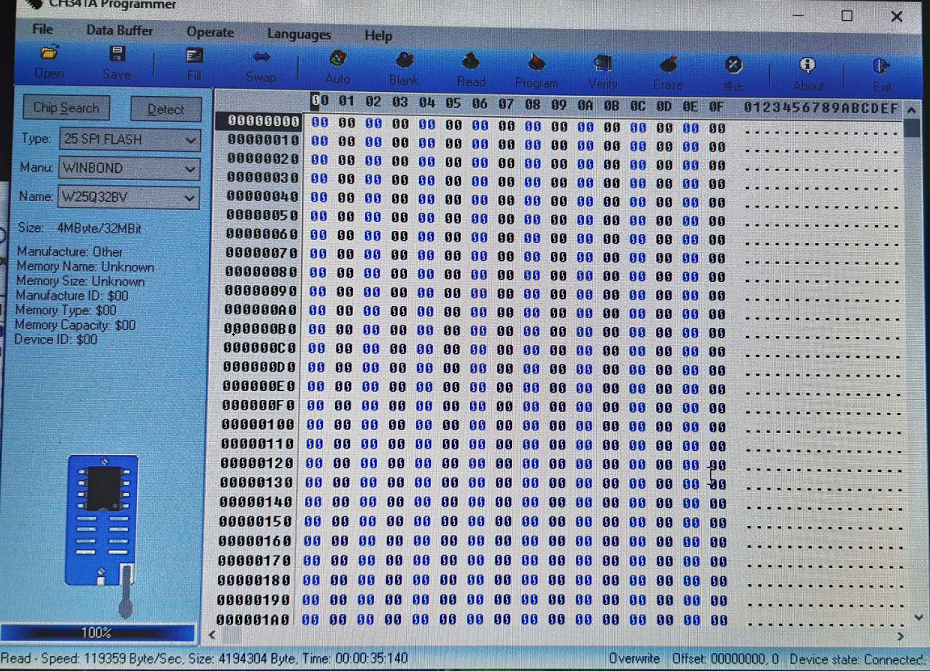
      I have made the measurements with the tester... and indeed they give 4.9v on several pins.
      On the other hand, I have tried to do the whole process with another different laptop and the results have been these:

      • In detect, on the left side the values are at 0.
      • The reading process reaches 100%, although there is no data
        then it no longer allows you to perform the following steps....
        Here I have several doubts:
      1. The chip recognizes and works well with the 4.9v, and the problem is found in a bad connection of the clamp.
      2. The chip is blank or fried.
      3. How can you check the status of the chip (25Q32BV) in a simple way (Without oscilloscope)

      84bb155c-9161-4942-9cd8-eda27f8db0ee-imagen.png

    • BelzebuB

      There is a device to diagnose smartphone batteries

      Siguiendo Ignorando Programado Fijo Cerrado Movido Dispositivos móviles y portátiles
      4
      0 Votos
      4 Mensajes
      388 Visitas
      cobitoC

      A reliable way would be to cycle the battery and measure the energy it can store. This could be done by comparing the duration of a battery in good condition under intense and constant load. There are apps like this one, that serve for that. Once you have the duration of the type battery, you can compare other batteries.

      If you want to build yourself an invention, with a multimeter and a resistor, it could be worth it. You would have to measure how long it takes for the battery to discharge and take voltage or current points from time to time. With that and some simple calculations using Ohm's law, you can find out the percentage of charge left in the battery.

      If you want to automate the process, a cheap way would be with Arduino, which would also allow you to check multiple batteries simultaneously. If the battery is less than 5V (unless you are going to check laptop batteries, that would be the case), you can connect it directly to an analog input of the microcontroller. If you are going to use batteries of higher voltage, you can use a voltage divider (once again, Ohm's law is your friend). You put a resistor and write a program that periodically measures the voltage. Knowing the value of the resistor, the voltage over time and total discharge time, you can find both the total charge (Ah) and the total energy (Wh) and that value you can compare directly with the battery specifications. The calculation can be done in the Arduino programming and returned through the serial port.

    • BelzebuB

      Change Chromebook to Win 10

      Siguiendo Ignorando Programado Fijo Cerrado Movido Sistemas operativos
      12
      0 Votos
      12 Mensajes
      1k Visitas
      BelzebuB

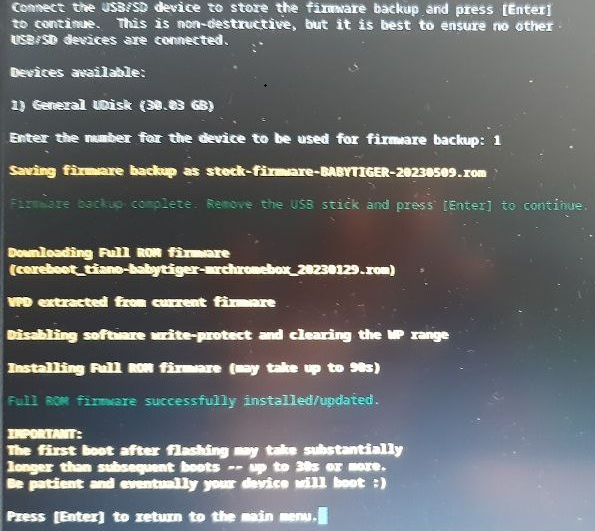
      Hello again... and with good news, I have finally been able to complete the installation process. The problem was that it must be in UEFI, instead of RW_Legacy.
      6d46ba63-04ba-46f4-8af3-2b3fe4cd9e01-imagen.png

      I hope my experience can be useful to other users....

    • BelzebuB

      Install 2nd 2.5 SATA + M.2 2280 SATA Drive

      Siguiendo Ignorando Programado Fijo Cerrado Movido Dispositivos móviles y portátiles
      6
      0 Votos
      6 Mensajes
      468 Visitas
      BelzebuB

      Well, I'm happy to say that I've finally managed to do it... I've accessed the disk admi and assigned a drive letter to the 2nd disk.

      Thanks to everyone and bye for now.

    • BelzebuB

      Asus X551CA..boot error

      Siguiendo Ignorando Programado Fijo Cerrado Movido Dispositivos móviles y portátiles
      3
      0 Votos
      3 Mensajes
      738 Visitas
      FassouF

      Looking at the Asus website, I see drivers for W7 x64 so it seems that it does support that OS.

      You do not indicate the size of the old disk or the new one, nor the time when the blue screens started.

      Did you complete the installation? Were you able to use W7 for some time before it failed?...

      If the answers are yes, I would start by looking into how to disable the Asus HDD Protection in BIOS, or from a safe mode boot.

      Salu2!

    • BelzebuB

      Latitude E5510 charger compatibility

      Siguiendo Ignorando Programado Fijo Cerrado Movido Dispositivos móviles y portátiles
      2
      0 Votos
      2 Mensajes
      742 Visitas
      FassouF

      Looking at the DELL website, I see this charger as an original accessory:

      Dell Parts: 332-1833

      Which in turn is compatible with an endless list of models of their laptops.

      Salu2!

    • 1 / 1