• Portada
    • Recientes
    • Usuarios
    • Registrarse
    • Conectarse
    1. Foro
    2. cinusara
    3. Temas
    C
    Desconectado
    • Perfil
    • Siguiendo 0
    • Seguidores 0
    • Temas 27
    • Mensajes 120
    • Grupos 0

    Temas

    • C

      Buy or build a gaming PC

      Siguiendo Ignorando Programado Fijo Cerrado Movido Configuraciones completas
      6
      0 Votos
      6 Mensajes
      2k Visitas
      C

      Many thanks gentlemen, your opinions and knowledge have helped me make a decision and it is the one that has given me @Fassou, Many thanks ?

    • C

      Hello, a question

      Siguiendo Ignorando Programado Fijo Cerrado Movido Configuraciones completas
      6
      0 Votos
      6 Mensajes
      520 Visitas
      _Neptunno__

      @cinusara I would also opt for the i5, because the i7 is a good processor but those extra cores for gaming are not going to help you, it's another thing if you wanted to give it a use for more productivity applications. But let's go with that equipment you will be able to play very calmly for a long time.

      Greetings!!

    • C

      What does Alexa buy

      Siguiendo Ignorando Programado Fijo Cerrado Movido Dispositivos móviles y portátiles
      3
      0 Votos
      3 Mensajes
      402 Visitas
      C

      @Sylver Hello and thank you very much for responding and for the congratulation, you see that was my idea but there are so many devices on the market that I don't know which one would be the most appropriate and that has Chat GPT, I think I will go to Mediamarkt and that the employees advise me.
      Thank you very much.

    • C

      Problem with the DNI reader

      Siguiendo Ignorando Programado Fijo Cerrado Movido Dispositivos móviles y portátiles
      27
      0 Votos
      27 Mensajes
      8k Visitas
      FassouF

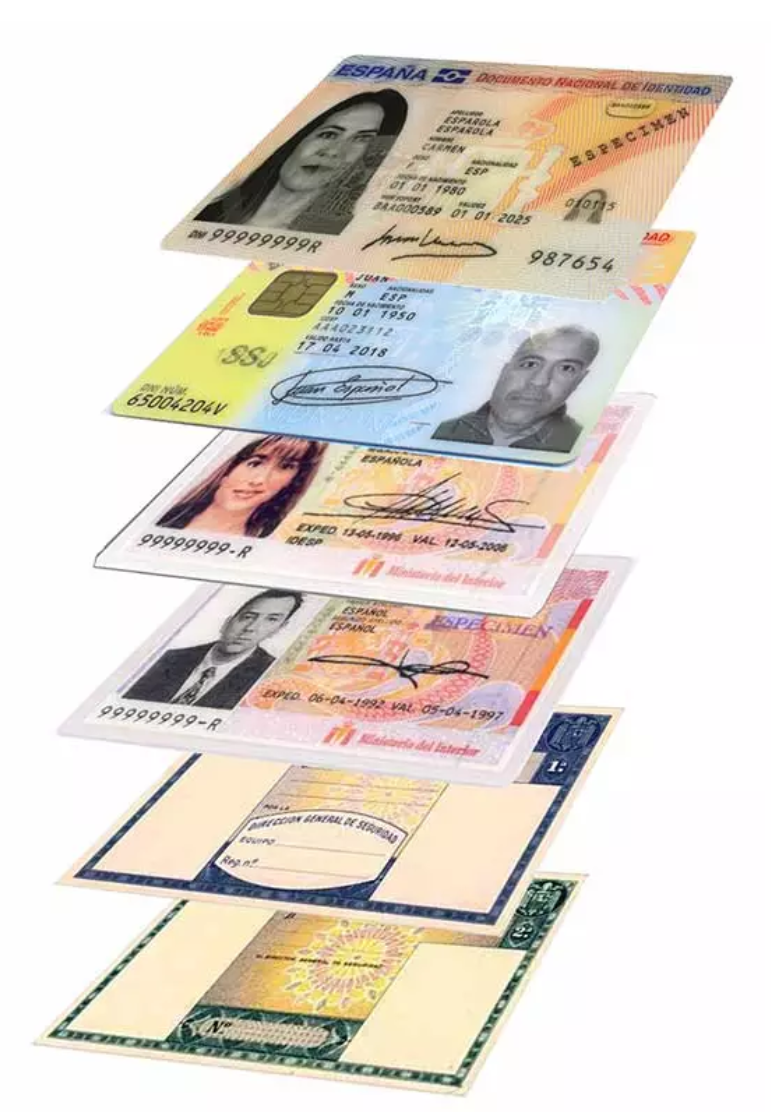
      @defaultuser I now have the 3.0 as I suppose most do, but before I had the first DNIe (the top two in the photo).

      521ea0b9-872f-4b9c-bebc-e7d2b343669c-imagen.png

      And I have used both without any problem with the same reader, with the known limitations that I talk about above, as a way of advice to use it easily (original and updated Windows 10 / W11, and connect the Smart Card reader a few seconds before opening Microsoft Edge, so that it is configured, a matter of drivers that Windows itself already has and so on).

      Simply using another browser, or using it on another OS that is not Windows, requires extra effort and configuration, or it may make the task impossible.

      Salu2!

    • C

      can a acer aspire E1-53G WON laptop run windows 10

      Siguiendo Ignorando Programado Fijo Cerrado Movido Dispositivos móviles y portátiles
      6
      0 Votos
      6 Mensajes
      579 Visitas
      ClipperC

      @cinusara look at what the maximum data transfer of your sata port is and buy an SSD accordingly, if it's higher it will run at the maximum speed of your motherboard, not faster... So you might be throwing your money away (unless you want to reuse it in another newer PC (doubtful since new ones come with M2))
      Regards

    • C

      unknown application

      Siguiendo Ignorando Programado Fijo Cerrado Movido Sistemas operativos
      5
      0 Votos
      5 Mensajes
      329 Visitas
      C

      Fine thanks, I have already found it on google. I will follow the steps that are indicated. thanks.

    • C

      Problems with GeForce Experience

      Siguiendo Ignorando Programado Fijo Cerrado Movido Tarjetas Gráficas
      3
      0 Votos
      3 Mensajes
      385 Visitas
      C

      I have done as you wrote to me and everything is perfect.

      Thank you very much

    • C

      Doubts about ports in nvidia graphics

      Siguiendo Ignorando Programado Fijo Cerrado Movido Tarjetas Gráficas
      3
      0 Votos
      3 Mensajes
      701 Visitas
      C

      Thanks Fassou for answering and clarifying my doubts, I have looked at the ports and with a magnifying glass I have seen them well,
      the card has a DVI-I connector, a DVI-D, an HDMI, and four DisplayPorts,
      In the end I connected the screens one to HDMI and the other to DVI-D, I really don't know which are the best connectors or what the DisplayPorts are for, but the screens are working.
      Thanks for clarifying things for me.

    • C

      I can't recover Windows 7

      Siguiendo Ignorando Programado Fijo Cerrado Movido Sistemas operativos
      13
      0 Votos
      13 Mensajes
      759 Visitas
      FassouF

      Backups are the best friends of anyone who gets close to a computer.

      By now you should have a copy of the content that might interest you from the SSD with W7, and even from the W10 one.

      To see the SSDs in tools like HBCD you should use a more current version.

      My experience with multi-booting on desktops always ends with the recommendation to put a disk rack with independent power, like this one, because of the advantages it offers.

      Be clear about what you want to achieve, and forget about using W7 recovery tools, if you don't want to mess up access to W10.

      If the one with W10 interests you less or you're willing to reinstall it (I get the feeling that here you imply that you reinstalled it again and that could be the origin of the problem), if you have two identical SSDs, you leave only the one with W10 whose relevant content you already have saved elsewhere, you install W7 from scratch and when you're already in the file copying phase after booting from the SSD, you exit (if you want to do the full installation it's up to you, it's to save time), you turn it off, you connect the second SSD and with a program like Ghost or any other that allows you to clone partitions, you overwrite the partitions of the SSD you want to recover on the one you just installed.

      You remove the damaged one again, and you try to boot, and it should work.

      All this is thinking that you haven't been touching anything in BIOS, nor have the SATA data cables fallen to pieces or similar things.

      Best regards.

    • C

      External screen on old laptop

      Siguiendo Ignorando Programado Fijo Cerrado Movido Dispositivos móviles y portátiles
      7
      0 Votos
      7 Mensajes
      2k Visitas
      FassouF

      I think the issue is that you configured the monitor (external) from Windows, as an additional screen.

      But so that you can see the BIOS, that is, that the external monitor always works, you will have to use the keyboard shortcut, which in some is Fn + F2 (for yours it is better to put a photo of those keys, to see which one it is).

      In some it has three states, one for the laptop monitor, another for the external one, and another in which they work simultaneously.

      Of course, all this is usually explained in the laptop manual ?

      Salu2!

    • C

      New motherboard H97M does not work

      Siguiendo Ignorando Programado Fijo Cerrado Movido Procesadores, placas base y memorias
      4
      0 Votos
      4 Mensajes
      2k Visitas
      whoololonW

      Check that the SATA configuration is set to AUTO and AHCI mode is enabled.

      http://dlcdnet.asus.com/pub/ASUS/mb/LGA1150/H97M-PLUS/E9011_H97M-PLUS.pdf

    • C

      Graphic Council new

      Siguiendo Ignorando Programado Fijo Cerrado Movido Tarjetas Gráficas
      11
      0 Votos
      11 Mensajes
      3k Visitas
      whoololonW

      It seems to me that a good seller would assure that "it will work for all the games that exist and that will come out", especially by mounting a 2 GB graphics card in a set without the possibility of upgrading it. This would refer to browser games.

      The team proposed by Sylver is what is usually recommended, and believe me that it is a very balanced configuration and that if necessary you can squeeze it with some OC, which improves its amortization.
      If it is due to distrust of buying on the internet, in my case this team I bought it by pieces and they assembled it for me, and the truth is that I am very satisfied.

      In any case, the decision is yours

    • C

      Problem with system image

      Siguiendo Ignorando Programado Fijo Cerrado Movido Sistemas operativos
      6
      0 Votos
      6 Mensajes
      2k Visitas
      C

      Thanks Fassou. I will follow your advice, I have already installed the programs and made a disk and a system image like before, but apparently I will repeat it with another external program, thanks.

    • C

      Help with another laptop

      Siguiendo Ignorando Programado Fijo Cerrado Movido Dispositivos móviles y portátiles
      15
      0 Votos
      15 Mensajes
      4k Visitas
      whoololonW

      Well, for lack of a better idea, and assuming that this W7 is original (or at least a reliable version), I would reformat its partition, no quick formatting or reinstalling. Once done, reinstall W7.

      And returning to the Vista issue, if your brother hasn't been very thorough and meticulous when formatting, you might still have the (hidden) recovery partition that contains the OS and the original software package. When you get to the POST screen, press F11 (Recovery Manager).
      Using System Recovery, Factory Reset and Minimized Image Recovery Options Compaq Presario C700 CTO Notebook PC | HP® Support

      Edit: I put the C700 model because some version would mount the C2Duo at 1.6, and it could also have other variations at the hardware level. The model usually comes on the back.

      Edit: Try with a driver finder, Driver Easy worked well for me and is one of those "use and throw away" programs.

    • C

      Help with old laptop

      Siguiendo Ignorando Programado Fijo Cerrado Movido Dispositivos móviles y portátiles
      5
      0 Votos
      5 Mensajes
      2k Visitas
      C

      well I already know, with the Windows XP disk and in the recovery console I ran chkdsk and it says that one or more unrecoverable problems.
      Well if anyone has an idea of where I could get a hard drive. Thanks

    • C

      Enter safe mode win7

      Siguiendo Ignorando Programado Fijo Cerrado Movido Sistemas operativos
      9
      0 Votos
      9 Mensajes
      2k Visitas
      C

      Well, after trying and looking in the bios I gave up and did what Krampak says, that is, the brute force method, and that's how I got the safe mode option and was able to solve the problem. Thanks, gentlemen, for your advice.

    • C

      Put Windows 7 on Packard Bell Easynote MX52-B-071

      Siguiendo Ignorando Programado Fijo Cerrado Movido Dispositivos móviles y portátiles
      7
      0 Votos
      7 Mensajes
      7k Visitas
      C

      Thanks to all of you, you have been a great help, I will work on it this weekend, I hope everything goes well, I repeat, thank you

    • C

      Graphics or processor

      Siguiendo Ignorando Programado Fijo Cerrado Movido Tarjetas Gráficas
      5
      0 Votos
      5 Mensajes
      1k Visitas
      SylverS

      It is likely that either the graphics card was causing problems when you reassembled it (perhaps inaccurately) or during disassembly and cleaning, the bios may have reset for some reason (battery removed or slightly worn out, pressing the start button empty without power...)
      The fact is that when the reboots started, the boot probably got messed up, which is why the recovery disk must have solved the problem.

      Regards

    • C

      Help with drivers

      Siguiendo Ignorando Programado Fijo Cerrado Movido Procesadores, placas base y memorias
      11
      0 Votos
      11 Mensajes
      2k Visitas
      C

      Thanks fjavi for responding, I went to the guru page and unfortunately they no longer have those files
      but I am downloading the ones from gygabyte and will try to see if there is any luck if not what are we going to do.
      Thanks
      If they work I will let you know.

    • C

      What graphics card do I need

      Siguiendo Ignorando Programado Fijo Cerrado Movido Tarjetas Gráficas
      14
      0 Votos
      14 Mensajes
      3k Visitas
      Bm4nB

      Man, I would buy a decent mid-range graphics card, and then if you change your PC for a better one, you'll keep using it because I see that they last a long time. A 7850/70 with 2GB of memory would be just right, without a doubt prioritize the graphics card because the rest of your equipment might limit you 10% I don't think much more.

    • 1
    • 2
    • 1 / 2