• OC to a 4790K

    35
    0 Votos
    35 Mensajes
    13k Visitas
    EspinetenbolasE
    For now I have stabilized the 4.6Ghz at 1.19V with LinX... the Prime is stable with less but LinX won't let me pass one... the problem is that it's still hot (26-27ºC in the room) but I'm going to try to stabilize the 4.7Ghz... according to my calculations it shouldn't exceed 95ºC and therefore it's within the range, but if the Vcore goes through the roof we've already messed up... let's cross our fingers that it doesn't ask for more than 1.24V :troll:

    Capture at 4.6Ghz-Cache 4.2Ghz- Memos 1886-CL9 (1.199V-1.154V) - VCCIN 1.96V

    Then I'll tweak the memos and see if I can increase the cache by a point ;D

  • [LN2] Intel Core i5 6600K + Asus M8G + Kingston HyperX DDR4

    1
    0 Votos
    1 Mensajes
    1k Visitas
    Nadie ha respondido aún
  • Help

    4
    0 Votos
    4 Mensajes
    2k Visitas
    amd125A

    I recommend the MSI Afterburner program. It's free and easy to use. It has some stress tests, but the best test you can run is a 3D Mark-like program.

    Here's a video with a similar graphic, although with 1 GB of memory, explaining how to use the program with that graphic.

    [YOUTUBE-HD]DMr7R87HK30&list=RDDMr7R87HK30[/YOUTUBE-HD]

    My recommendation: Increase the processor core frequency by more than 4-5%. Run a test to check temperatures, artifacts, etc. If it holds up, then increase the frequency by 10 at a time. Once you see that you've achieved a good OC, don't push it to the limit. If at frequency X artifacts appear or the temperature is very high, lower the OC by a few megahertz - don't lower it by only 10, lower it by 40-50 MHz, so that the graphic doesn't go to the limit. Do the same with the memory.

    By the way, you may need to increase the graphic's voltage, but don't overdo it. And always control the temperatures when you touch the voltage. It's essential. The graphic may not show artifacts in a stress test, but if the temperatures are high, you'll end up burning the graphic.

    If it turns out to be good, you'll go beyond 1200 on the core, and you'll probably be able to put more than 5-7% OC on the memory; but since every graphic is different, you have to try.

    By the way, use GPU-Z to know the Asics of the graphic. The Asic is a % that tells you the quality of the graphic for overclocking. The higher the %, the more OC you can theoretically do, in addition to being able to afford to do that OC with a lower voltage or consumption.

    And welcome to the forum.

  • Extreme MultiGPU performance with Zotac/HyperX/SeaSonic/GB

    1
    0 Votos
    1 Mensajes
    1k Visitas
    Nadie ha respondido aún
  • Zotac GeForce GTX 980Ti AMP! Extreme

    1
    0 Votos
    1 Mensajes
    1k Visitas
    Nadie ha respondido aún
  • Oc a i7 3820 en x79

    8
    0 Votos
    8 Mensajes
    2k Visitas
    amd125A

    Congratulations on the OC, I think it's very good for that micro. You have a micro for a good season. Enjoy that cucumber. ;D

    PD: If you get bored of the micro and donate it, give me a touch :cry:

  • Presentation and some OC

    1
    0 Votos
    1 Mensajes
    1k Visitas
    Nadie ha respondido aún
  • Why is my "BIOS" so limited?

    13
    0 Votos
    13 Mensajes
    7k Visitas
    V

    Thanks, I feel flattered! I usually have initiative, what I usually lack is knowledge, money and time. Last summer I put together a pentium 2 with an old motherboard and case, some discarded rams from a friend, the power supply I took from my PC and some recovered ATA hard drives. It was just for fun and to tinker, because the PC is not worth anything, but it works.

    Well, thank you all very much for explaining to me what was going on with my BIOS. I will take into account what you say about changing the motherboard and keeping the rest. I will look at prices and stuff, I will investigate how it is done and if it is worth it for the rest of my components. And I will be a nuisance around here again. ;D

    You can close the thread.

  • Help to OC i7 4770K

    1
    0 Votos
    1 Mensajes
    2k Visitas
    Nadie ha respondido aún
  • 0 Votos
    1 Mensajes
    2k Visitas
    Nadie ha respondido aún
  • Error in BIOS

    2
    0 Votos
    2 Mensajes
    3k Visitas
    cobitoC

    Perhaps it has issues with the values you set and reverts to factory settings. Try leaving the stock values of all components and make small modifications to see if it saves them.

  • [MOD] Support for Xeon micros LGA771 on LGA775 boards

    4
    0 Votos
    4 Mensajes
    3k Visitas
    XevipiuX
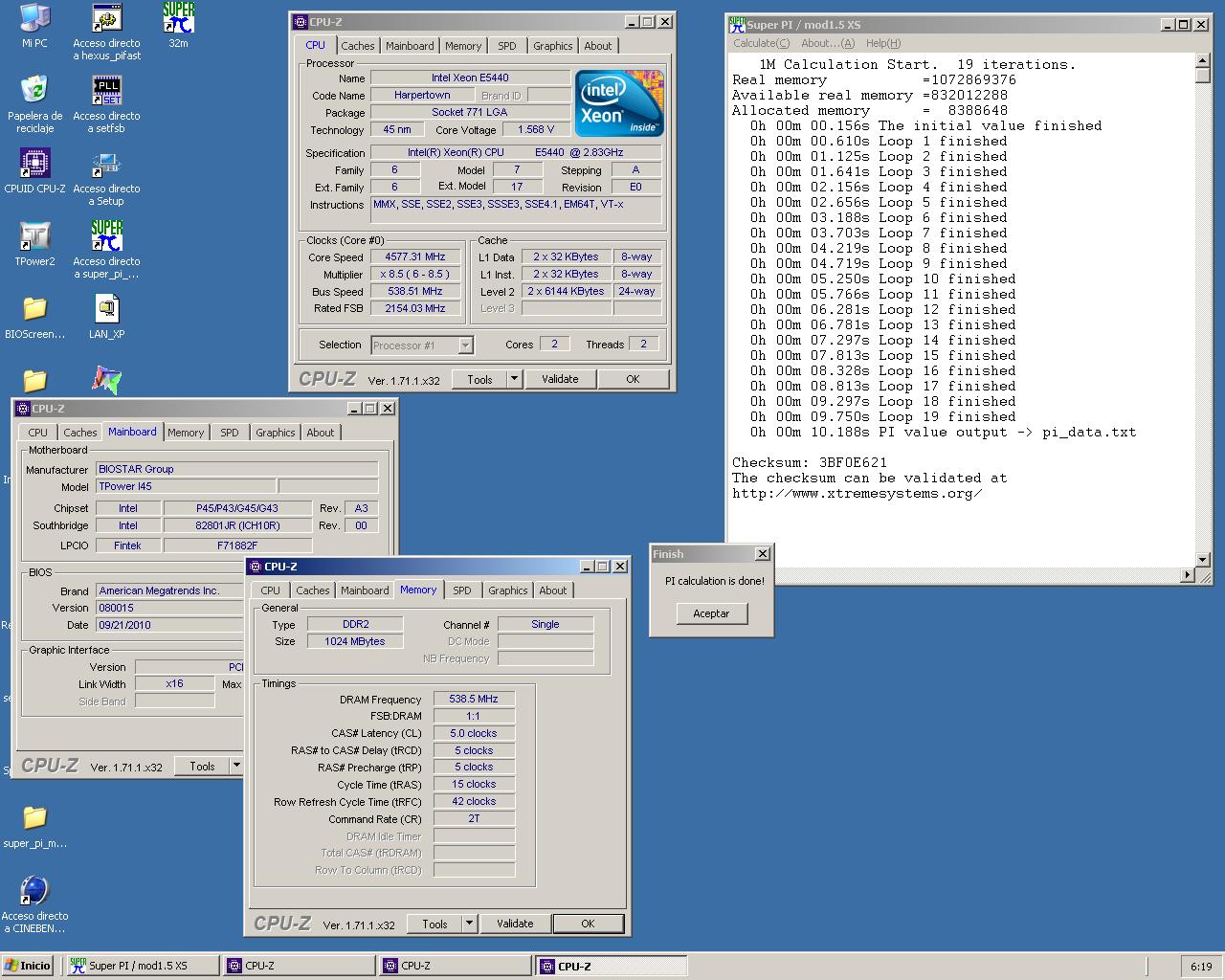
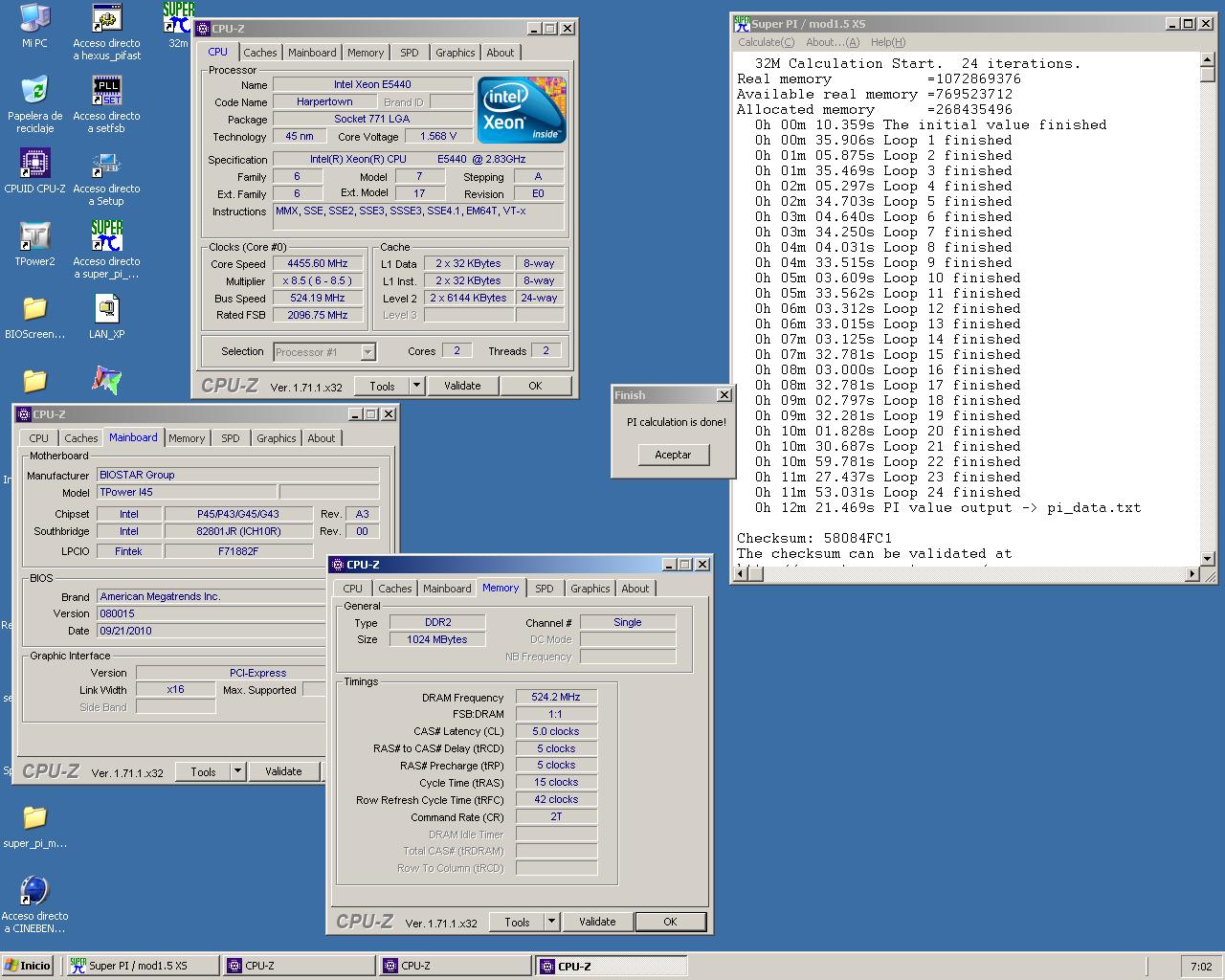
    Well, to kill time, another WR on this Xeon E5440 E5440 E0 2.83Ghz 1m 32m
  • Doubt about the RAM voltage

    2
    0 Votos
    2 Mensajes
    1k Visitas
    FassouF

    If the value you see changing is in the AIDA64, you can be sure it is not real, if you see it in the utility of the motherboard manufacturer, it is not normal :nono:, although if it is for a few seconds you should not worry.

    Salu2!

  • [Testing] Xeon x5660 - Socket 1366 6/12 threads Low-Cost

    1
    0 Votos
    1 Mensajes
    1k Visitas
    Nadie ha respondido aún
  • Set DDR3 to 2000 Mhz

    2
    0 Votos
    2 Mensajes
    1k Visitas
    EspinetenbolasE

    @chascos69:

    Hace tiempo (mucho) puse un hilo de como podía poner mis memorias en 2000Mhz pq por defecto en auto sale 1066: Asus P6T y DDR a 2000Mhz como es el OC? - HardLimit

    Esto no es un OC propiamente, es config de la DDR como toca… mis RAMS son estas: 6GB OCZ DDR3 PC3-16000 2000MHz Blade Series CL9 Triple Channel kit (9-9-9-30)

    La cuestión es que me respondisteis pero no me enteraba de nada. NO tengo ni idea de OC, lo máximo que se es ir a la BIOS y seleccionar X valor

    Creo que una rama en la que te contestaron varios usuarios y tiene tres paginas para resolver exclusivamente tu duda no te enteraste de nada es un poco para hacérselo uno mirar macho ?

    @chascos69:

    He leído que la memoria funciona a 1.65V y latencias 9-9-9-30. Entiendo que sería tan fácil como entra en BIOS y poner en QPI/DRAM core voltage 1.65… es lo q he hecho pero al arrancar BIOS me dice q sigue a 1066...??? se supone q con el voltaje apropiado se config solo no? Ahora no se si entrar en sección de latencias y ir poniendo los valores 9-9-9-30 a cada DIM... eso es suficiente?

    Puedes configurarlo de forma manual pero si la placa soporta perfiles XMP deberia de modificar ella todo automaticamente si en la bios seleccionas utilizar dicho perfil… otra cosa es que tu placa no soporte esa función o que tu no sepas como hacerlo... ambas cosas las puedes saber leyendo el manual de la placa base.

    @chascos69:

    Y si escojo el perfil de 2133 en la BIOS q pasa?

    Y me soporende que arranco el CPU-Z y en Memory me dice q voy a 2138 Mhz…??:

    Pues no lo se, no sera que la placa las pone a esa velocidad?… en todo caso esa resolución para la foto es excesiva y no veo nada... a mi pantalla le falta resolución :troll:

    @chascos69:

    Tb he visto q en AI Tweaker en vez de auto ahbía X.M.P (Creo) y otra con 4 siglas (no recuerdo)… DMHA, en esta última había un perfil de DDR3-2006Mhz... he escogido esa pq. creo q por 6 Mhz de más tpco se va a quemar. Estoy controlando la temp de CPU todo el rato y no sube de 55C

    D.O.C.P. tal vez?

    Creo que ahi explica muy bien que es cada cosa… en tu caso mejor el perfil XMP aunque es posible que tu placa no cambie el voltaje automáticamente.

    Instálate el HWiNFO y podras monitorizar todos los parametros de una tacada y luego ejecuta el LinX 0.6.5 y en tu caso con como mínimo 4Gb o el 75% de la RAM (deja libre mínimo 50 o 100Mb) y a ver si la configuración es estable.

    Saludos.

  • Intel unlocks OC on non-Z chipsets

    3
    0 Votos
    3 Mensajes
    1k Visitas
    SylverS

    For God's sake, and I who invested my fortune in a Z77 instead of in girls and land... Now I find out that the little cows in the city also give pasteurized milk.

    May Gargamel's beard save me!

  • Overclock Sapphire R9 280

    2
    0 Votos
    2 Mensajes
    1k Visitas
    FassouF

    Check the difference between the base clock and the boost speed, and half of that figure will be what you can get out of it in the best case scenario, pushing frequencies.

    Look for reviews of the specific model of your graphics card, to have more concrete references.

    Salu2!

  • [Help] ASRock G41 VS3 + Q8300

    3
    0 Votos
    3 Mensajes
    1k Visitas
    amd125A

    As your fellow user indicates, if you can't touch the Vcore of the micro, you won't be able to do much overclocking. The multiplier of the micro is low, which is why older micros like the Q6600 are better for overclocking, because they have an FSB of 266 and a multiplier of 9, to give you an example.

    It doesn't matter if you touch the voltage of the memories, the micro needs more power, more voltage, and you can't give it to him.

  • Overclock an Intel Dual Core E5300 2.60GHz

    6
    0 Votos
    6 Mensajes
    4k Visitas
    M

    @Fassou:

    The micro yes, some have even managed to put it at 4Ghz, but with that board you won't be able to do anything.

    Salu2!

    ps friend it's not possible through bios but if you do an overclock by vid mod and bsel to change from 200 to 266 with bridges on the processor maybe you can overclock that processor look for guides on bsel maybe they can help you and you know all that incurs a risk I just hope you know that salu2

  • OC 965 little problem

    1
    0 Votos
    1 Mensajes
    1k Visitas
    Nadie ha respondido aún

Foreros conectados [Conectados hoy]

0 usuarios activos (0 miembros y 0 invitados).
febesin, pAtO,

Estadísticas de Hardlimit

Los hardlimitianos han creado un total de 543.5k posts en 62.9k hilos.
Somos un total de 34.9k miembros registrados.
roymendez ha sido nuestro último fichaje.
El récord de usuarios en linea fue de 123 y se produjo el Thu Jan 15 2026.