• DDR2 voltage problem Different brands!

    Movido
    5
    0 Votos
    5 Mensajes
    2k Visitas
    FassouF

    It is done as it has always been done, by entering the BIOS and setting the values manually.

    Salu2!

  • DDR3 compatibility

    Movido
    5
    0 Votos
    5 Mensajes
    2k Visitas
    F

    @M@rkos13:

    well, if fjavi finally installed those four 2gb modules at 1599 (1600mhz) it started doing strange things like the pc freezing in the middle of nowhere or in a game.

    What voltage did you put on the memory?

    Did you increase the MCH or NB voltage?

    I don't know about DDR3, but I used to put my 4GB DDR2 in 4 modules in the P5K up to 1300mhz, although I usually left them stable for daily use at 1200 with 2.10 or 2.15v, in DDR3 you should be able to put more frequency, it's complex because the modules with more density, that is, more GB, are more difficult to configure, at least at first.

    Look, see if lowering the memory multiplier makes them more stable, it would be to look for a lower frequency.

    regards

  • Kaveri and its powerful computing cores

    Cerrado Movido
    6
    0 Votos
    6 Mensajes
    2k Visitas
    cobitoC

    @whoololon:

    Well, after reading and re-reading the source, I'm left with the impression: "Hello, I'm a new micro that needs 12 cores to get close to the performance of others with only 4 cores, but I'll be the favorite of manufacturers of laptops and pre-assembled desktop PCs."

    …it hasn't been noticed much that I don't like the APU thing, right? :troll:

    The APU thing is actually quite interesting, as is Intel's integration of their graphics into the micros, as they are offering very good graphics performance, at low prices and with moderate consumption. These micros have applications in any task with surprising performances, except for gaming.

    How AMD catches up with Intel is irrelevant as long as they do it under the same conditions, that the available software can take advantage of the benefits and consumption is kept up to date.

    @Bm4n:

    The doubt I have is whether the market for these micros is disappearing, replaced by ARM…

    From my point of view, clearly not. In fact, I see two clearly differentiated market segments, and when x86 tablets become popular, they will have users very different from those of ARM tablets. This AMD APU has no rival in ARM. If you put it to execute tasks that pull on the GPU like programs that make use of OpenCL, video encoding or any other GPGPU application, I think the AMD product will be very, very competent, light years ahead of the performance that the best ARM can offer.

    Now, with higher consumption as well.

    We are talking about a platform that can face practically any task (APUs) versus a platform whose purpose is to offer 4 basic services (ARM).

    If there were a serious operating system for ARM with a rich repertoire of serious software, which would require focusing ARM on desktop environments, things would change.

    By the way, here you have a comparison of Intel's product vs AMD's on Linux using free drivers. These results should be taken with a grain of salt because Kernel 3.13 has caused regressions in Hashwell's graphics and the free AMD driver for this range is still being polished.


  • Asus U3S6 compatibility with Asus P5K3 Deluxe

    3
    0 Votos
    3 Mensajes
    2k Visitas
    hAyOH

    I also have an Asus card installed, PCIE USB3, which was indicated for the P6xx and P5xx, that is, the first generation of i7/i3/i5, and I have had it mounted in a P5Q for a couple of years now, where it works without any problems.

  • AMD newbie: can't I set the RAM that my A4's graphics use?

    Movido
    3
    0 Votos
    3 Mensajes
    2k Visitas
    FassouF

    In the analyses, everyone talks about the improvement in graphic performance when using memories of 1600Mhz or higher, but they never talk about changing the amount of memory allocated to the iGPU, so I don't think it can be set at will.

    Salu2!

  • Help please!!!.. Half of the slots are not recognized!!!

    3
    0 Votos
    3 Mensajes
    1k Visitas
    F

    @KEMPOKA:

    Hello!!! I'm telling you about my problem that I haven't been able to solve and I can't find an idea on the internet or among my friends!!!…
    The thing is, I just built a NEW machine with a motherboard Gigabyte GA X79 UD5 SOCKET 2011
    AND BIOS VERSION F12
    Video card gforce 670gtx

    Supports up to 64 gb of Ram
    I bought Corsair memory: CMZ16GX3M4A1600C9

    It has 8 memory slots, 4 gray and 4 black
    so when assembling the memory if I put the memory in the gray slots it starts up ok (BUT I ONLY SEE HALF OF THE MEMORY, I MEAN I PUT 4 MEMORIES OF 4 AND IT SHOWS ME 2 OF 4=8gb).
    On the other hand, if I put them in the black slots or fill all the slots it doesn't start up giving endless continuous beeps, I DON'T UNDERSTAND WHAT'S HAPPENING!!!
    THE MEMORIES WORK. I HAVE MORE AND THEY GIVE THE SAME ERROR
    IN THE BIOS I DON'T HAVE THE OPTION TO ENABLE ANYTHING, I THINK!!!
    PLEASE IF ANYONE KNOWS HOW TO SOLVE IT GIVE ME A HAND!!!!

    Maybe you've already solved it, but did you put the CPU in correctly?
    I say this because there are sockets that if the CPU deviates a little it may not recognize the memory, this happened in X58 and I think I also heard something about X79, it's about taking out the CPU and placing it well, without forcing anything just making sure it fits well in the slots.

    You can also enter the bios with the two that work and manually configure the memory the VCCIO and those voltages, then keep in mind that if the X79 has 8 memory slots you must plug the 4 in the same color, because being quad channel they all go to the same color, in Asus the primaries I think go to the right and if you put more they already go to yellow, but that the 4 to red or the same color.

    regards

  • Go back to the previous version of the bios!!!!

    4
    0 Votos
    4 Mensajes
    2k Visitas
    M

    in the end I end up with the new bios already configured!!!!Thanks.

  • Dell Inspiron 15r Ram Upgrade

    Movido
    1
    0 Votos
    1 Mensajes
    2k Visitas
    Nadie ha respondido aún
  • Portable i3 on PC?

    Movido
    3
    0 Votos
    3 Mensajes
    2k Visitas
    darkoD

    Thanks for clarifying it for me Fassou… I've already done the screen thing, I connect it via VGA and I can see the screen, the problem is that the VGA signal activates when it reaches the Linux login, before that the screen is completely black, and the Xenserver installation is in text mode and I can't see anything.
    I've tried all the options that "I know" to be able to see something as soon as I turn on the laptop but there's no way, I don't see anything in the bios or "nada"...
    Thanks!!!

  • Remove CPU from heatsink

    Movido
    9
    0 Votos
    9 Mensajes
    3k Visitas
    daniikkiD

    The truth is that I thought that only the heatsink would come out, it was the standard one, which already came with thermal paste applied, or super glue because it is very stuck, when I removed it and everything came out and I saw the CPU anchorage, I was scared, I thought I had ruined the CPU or worse, the motherboard anchorage. Apparently I have not ruined anything, but next time I go to remove it I will have to make sure to remove the heatsink carefully first. Now on the CPU that I took out I will try to do what I have been told, a little lever with a flat screwdriver and see if I can peel it off…
    Thanks to everyone for your comments and suggestions, you are great!!!!

    Sent from my GT-I9100 using Tapatalk

  • Mid-to-high range motherboard

    4
    0 Votos
    4 Mensajes
    1k Visitas
    FassouF

    If you don't do Overclock, DDR3 memory at 1600, also called: PC3_12800

    Salu2!

    PD: We continue in the other post

  • Normal temperature of an i7 3930-K

    Movido
    6
    0 Votos
    6 Mensajes
    4k Visitas
    gamingpyG

    @Franziskaner:

    well you already know ….. you run the "core temp" to see the temps at idle and then you run a CPU burn per core to stress the CPU to the max and see the maximum temps.
    regards

    Hello Franziskaner thanks for responding to me, you know what happened is that my CPU is connected to an energy stabilizer so I realized I plugged the CPU and the TV in the same place so it couldn't handle it because it had low watts, right now I'm testing at 4.4ghz at 1.304V and it has reached 74 degrees maximum for the hottest core for about 18 minutes I think I can lower the voltage to get a better temperature although I don't know if I should stay with this one.

    I opted for the 4.4 because when I set it to 4.5 it gets too hot reaching 77 to 78 degrees and from my point of view those temps are no longer normal for 24/7 use

  • DDR4 for next month

    Movido
    14
    0 Votos
    14 Mensajes
    3k Visitas
    F

    @Bm4n:

    DDR3 seems to have gone up in price back then, I suppose that like everything else, it's due to lower demand. Once Intel's new main platform with DDR4 comes out, it will start to be manufactured in bulk and prices will drop, that's just how things work, we buy for novelty not for necessity so when they see sales drop they come out with something new...

    I think the price increase for ddr3 has been pure speculation, memory manufacturers have a history of price-fixing agreements, with ddr3 they used the supposed fire at a hynix factory, the other manufacturers instead of releasing more memory did what they could to wait and see if prices would go up.

    It's like the hard drive floods, it's like a mafia.

    regards

  • Amd fx 8150 overheats.

    Movido
    5
    0 Votos
    5 Mensajes
    2k Visitas
    whoololonW

    Well, according to what I have read, your temperatures have gone up lately.
    Noticias3D - Article: CPU Cooling Thermaltake Water 2.0 Pro
    So, I wouldn't look for problems beyond the heatsink, which in principle, according to what you say, was working well for you. Take it apart, clean the surfaces again and apply a GOOD thermal paste, which is what I think is causing the problem because it has reached the end of its useful life.
    Best regards.

    @amd125: saying that the heatsinks that AMD mounts by default are "a bit chestnut" is being too merciful. ;D

  • Change phenom 2 for fx?

    Movido
    12
    0 Votos
    12 Mensajes
    2k Visitas
    daniikkiD

    Very well, so thank you very much, so I will do that, the 8320 with the master hyper 212 evo, besides what I have seen it has very good ratings, it is one of the most valued.
    Regards!

    Sent from my GT-I9100 using Tapatalk

  • Problem updating the BIOS of MSI 990XA-GD55

    7
    0 Votos
    7 Mensajes
    4k Visitas
    wintersW

    @Jhanseek:

    **Hello….. I have the same MSI 990XA GD55 motherboard. I had the BIOS version E7640vN1 and I wanted to update to the latest E7640vN2 and it failed! during the update in Windows everything ended well. but when the computer rebooted I was left with a black screen. The Mobo does not start.

    Alfrosende, has that procedure of removing the battery worked for you?**

    Be careful with BIOS updates under Windows, they usually cause problems, the best thing is either with a floppy disk drive (new motherboards no longer have it), or with a bootable USB drive, with the program to update the bios and the bios you want to update..

    BIOS Flashing - A "How To ~ Qflash Guide"

  • i5 4570 or fx 8320

    Movido
    6
    0 Votos
    6 Mensajes
    2k Visitas
    SylverS

    I give my vote to the i5, you overclock it a little with a decent cooler and it runs a bit faster consuming less and at a better temperature. The rest is controlling the graphics card so that it doesn't ask for more voltage than necessary, due to the limitation of the power supply, which excludes the goal of overclocking it, but doesn't prevent you from putting in up to an r9 280x as Obione tells you.

    Regards

  • HELP - Toshiba Satellite A550 DEAD after BIOS Update

    5
    0 Votos
    5 Mensajes
    3k Visitas
    F

    @Varyamo:

    Thanks fjavi, very kind to reply.

    I have no idea if it's AMI or AWARD, no matter how much I search the specs on the internet, I can't find that information. I've taken apart the RAM slot trying to find a way to get to the battery, but it's not there. I've seen on YouTube that in some Toshiba laptop models, using a jumper, you can reset the BIOS, but the Satellite A550 doesn't have that option or at least I can't find it.

    My next option is to take apart the whole laptop and pray to God that the battery isn't soldered to the motherboard. I haven't tried the USB floppy option, but it makes me very doubt its functionality if it doesn't work with a USB BOOT or a DVD BOOT.

    Thanks.

    You should look at the laptop underneath the label and put the exact model, even the serial number, as I read that it has a G45 chip and according to the manufacturer, you could recover it with the driver CD.

    The battery won't do much if the BIOS is corrupted, the best thing is to get the model that says or the reference number to see if we can see what BIOS it has, check if it's this one.

    Toshiba Support Forums: Satellite A550-14K: VT virtualization …

    regards

  • Error 162-system

    4
    0 Votos
    4 Mensajes
    2k Visitas
    T
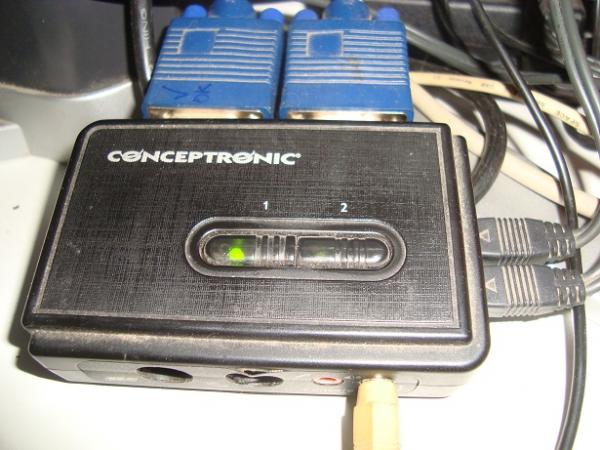
    SOLVED: ? Here we have the culprit:

    The thing is that the keyboard is not USB, I don't know what happened, because on other computers it works perfectly for me.
    I solved it by disconnecting everything and connecting only what is necessary to the PC.

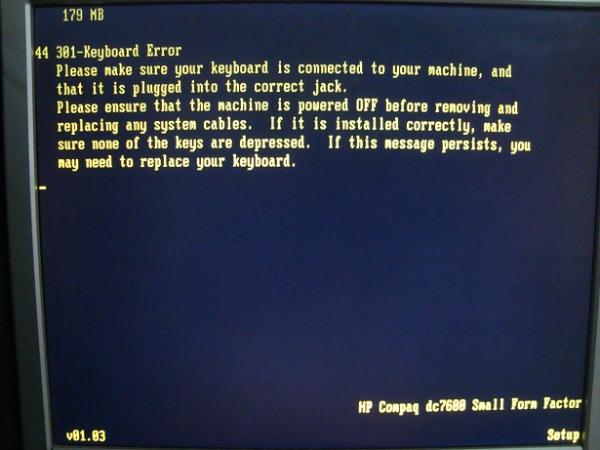
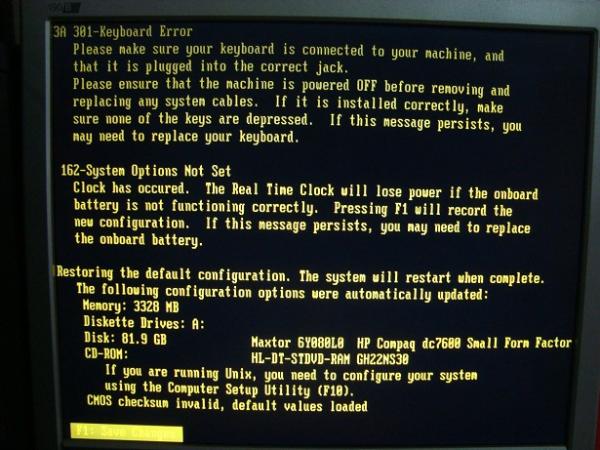
    After many attempts, and even with everything well connected the PC did not pick up the keyboard and I got several errors which I show below:

    SOLUTION:

    The keyboard did not let me select the F1 option, as the companions in this forum have helped me, I tried disconnecting the Centronic adapter and connecting directly to the PC to repair, but even so I got the errors that I put in the photos, I tried at least 12 times, until finally the BIOS caught the keyboard.

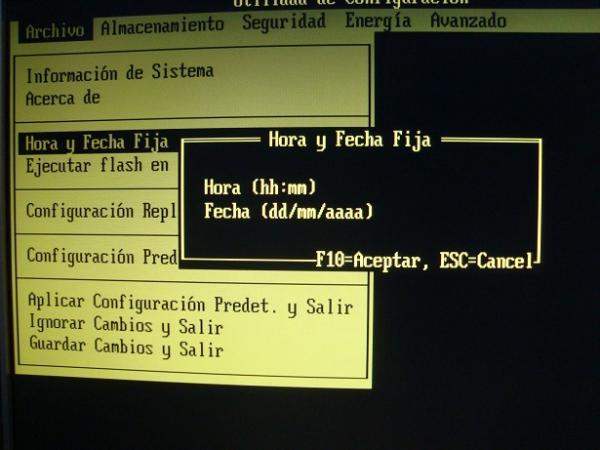
    You have to keep the F10 key pressed until you see on the screen (set up)
    Then configure the date and time
    And finally reset the factory values.
    In my case I reinstalled the entire operating system (Windows XP Professional SP3 32 bit)

    And well, now I am very happy <:(

    Thanks a lot to everyone, I will not forget the help provided, I owe you a few beers ?
    attachment_p_560720_0_conceptronic-fallo-teclado.jpg
    attachment_p_560720_1_error-301-teclado.jpg
    attachment_p_560720_2_errores-301-teclado-162-systema.jpg
    attachment_p_560720_3_fecha-y-hora-bios.jpg

  • Intel processor doubt

    Movido
    4
    0 Votos
    4 Mensajes
    1k Visitas
    SylverS

    AMD is your ally if you have a low budget and are looking for a not too demanding performance. For your child, I think any that fits your budget with a normal graphics card like the 7770 will be perfect. Back in the days when I inherited a computer, I was satisfied with a Pentium MMX and a 4Mb graphics card and from there I jumped to a PII at 333Mhz with a Voodoo 3 of 16MB. So if it comes from a single-core or similar, the change will seem incredible ?

    Best regards!

Foreros conectados [Conectados hoy]

0 usuarios activos (0 miembros y 0 invitados).
febesin, pAtO,

Estadísticas de Hardlimit

Los hardlimitianos han creado un total de 543.5k posts en 62.9k hilos.
Somos un total de 34.9k miembros registrados.
roymendez ha sido nuestro último fichaje.
El récord de usuarios en linea fue de 123 y se produjo el Thu Jan 15 2026.