• Advantages of Quad Channel

    Cerrado Movido
    10
    0 Votos
    10 Mensajes
    8k Visitas
    X

    Currently I have the Gskill Ripjaws from the old X58 3x4gb 9-9-24 1600Mhz, I bought on amazon uk 1x4gb to have Quad Channel. I had the problem that it arrived defective and it took 1 month to Rma and they indicate that they will return the €
    The problem is that I can't find that model(1x4gb) anywhere and to spend 65€ + Shipping on two identical ones. Then I read on forums the Asus motherboard there are models that it doesn't recognize and this Gskill model is not on the Asus website as supported memory.
    Don't even look at the price increase of the Ram memories. I got the 3x4Gb for 50€ and now they are double. I just bought these:

    http://www.4frags.com/catalog/product_info.php?products_id=44787&name=f3-17000cl9q-16gbzh+-+memoria+gskill+ripjawsz+4x4+2133+mhz

    I hope they work, from the Asus website they indicate that they are compatible.

  • ¡Este tema ha sido eliminado!

    1
    0 Votos
    1 Mensajes
    7 Visitas
    Nadie ha respondido aún
  • Z87 plates

    9
    0 Votos
    9 Mensajes
    2k Visitas
    F

    @Falkemberg:

    mmm the black asus looks quite similar to the sabertooth... will they change the name to Haswell but with a similar aesthetic configuration? The red one will be a Maximus for Haswell.

    It seems that the black Asus is going to be the new ROG, possibly they will stop releasing Maximus and put that new one, although for now there is nothing official.

    regards

    @ferelxyx:

    ECS has three Z87H3-AX Extreme, Golden Z87H3-AX, and H87H3 M4.
    The two Z87H3-AX seem to be identical to the boards in the 7 series, the gold version Z87H3-AX with gold components and heatsinks.
    The PCH Z87 Z77 successor to the current z77, with support for overclocking, in addition to all the features of the platform, including Small Business Advantage.
    The other board H87H3-M4 is the micro-ATX version of ECS based on the H87 chipset.
    The H87 supports almost all the features of the Z87 although it does not support Overclock
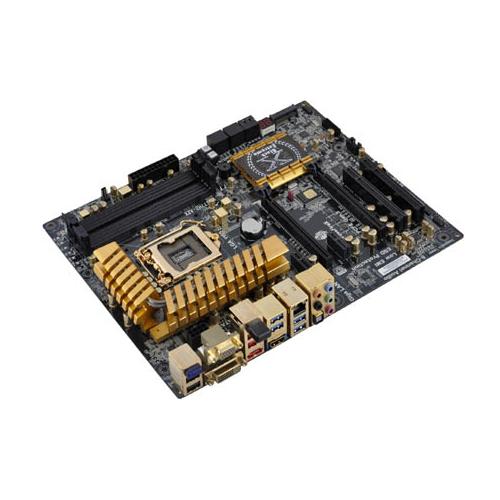
    I don't understand Intel's strategy. A Z87 does the same as an H87 and if the latter doesn't allow OC, I see it as a waste of time and money, although of course I suppose that H87 will be cheaper and will go to clone assemblers, but it will always be better to go for an economical Z87, it has video connection and also allows OC.

    I also think that if Intel continues to cap OC, many people will continue not to update because from an i7 920 or an i5 750 you already have a good CPU and it's not as necessary to update as it was with SB or 1366,
    the latter was also worth it for moving from 775, but right now the improvement doesn't compensate for those who have an SB, SB-E or ivy, even with a good 920 or a 750 you still have a good CPU, so if Haswell doesn't allow good OC maybe Intel will regret it as with Ivy.

    I put that ECS in the first message although it will also be seen in yours, I hope you don't mind, it's to put all the ones at the beginning that can be seen, we will keep putting the new images that come out.

    Here Asus already shows its Z87 and fails. The Gryphon is a microATX board, it continues with Maximus VI and Gene.

    http://wccftech.com/asus-z87-motherboards-unveiled-maximus-vi-extreme-maximus-vi-hero-z87-sabertooth-z87-gryphoon-pictured/

    regards

  • Limited ASRock G31M-GS motherboard?

    6
    0 Votos
    6 Mensajes
    4k Visitas
    S

    @ferelxyx:

    hello and welcome, well if you are right that chipset can't do more

    BOARD
    Compatible with all CPUs with FSB1600/1333/1066/800MHz
    Works with DDR2 800/667 in dualchannel
    Intel Graphics® 3100, DirectX 9.0 and maximum shared memory of 384MB
    PCIexpress 1X and 16X

    PROCESSOR
    CPU clock of 2.5Ghz
    Bus speed: 800Mhz
    Multiplier (Ratio/Clock): 12.5x
    L2 cache size: 2Mb
    Manufacturing technology: 45nm
    Core Stepping: –
    Thermal design power: 65w
    Thermal specification: 74.1 C
    Voltage range: 0.85V - 1.3625V

    I'll explain how you can overclock it a bit more

    if you want to overclock at 800mhz (EG: go from 2.5ghz to 3.3ghz) you move the jumper 1 to position 2-3 next to the micro:

    this is how the original jumper configuration looks

    to overclock at 800mhz you move jumper 1 to position 2-3

    if you want to continue increasing the MHZ: in the BIOS, go to advanced, enter cpu configuration
    and here you will change the overclock option to:
    CPU,PCI-E SYNC –--- if you have a video card
    CPU,PCI-E ASYNC---- you don't have a video card

    and start increasing the values by 2 remember that you are increasing the FSB which is the value that will be multiplied to give the CPU speed (the voltage adjusts automatically).
    don't increase the values all at once, always by 2 until you find the maximum, remember that you have already overclocked to 800mhz I think that's quite a lot...

    PD: remember that this is not a gaming board and you are squeezing all the potential out of it and that chipset can't do much

    regards

    Thank you very much I have managed to go up to 3.2Ghz, I haven't tried to go higher but it's good for me :ugly:
    The CPU still has a very good temperature of 25 º "at rest" it's a shame that you can't get more out of the micro because of the board but well.

    Regards and thanks to everyone

  • It doesn't turn on or off

    5
    0 Votos
    5 Mensajes
    1k Visitas
    SylverS

    Hello

    Check the memory, it could be faulty. A memtest helps in these cases, you should also examine the slots, which on occasion are very troublesome.

    Out of curiosity, what are the stock power supplies and the new one? Brand, model, power, efficiency... For quality issues, it's not that this system consumes a lot, but it's good to know.

    Another option, although more remote, is that a component has been damaged in relation to its power supply and in some starts it is causing a slight sporadic short circuit, but as I say it is very unlikely.

    Regards

  • Help with drivers

    11
    0 Votos
    11 Mensajes
    2k Visitas
    C

    Thanks fjavi for responding, I went to the guru page and unfortunately they no longer have those files
    but I am downloading the ones from gygabyte and will try to see if there is any luck if not what are we going to do.
    Thanks
    If they work I will let you know.

  • QDI Superb 4LE V2.0... a little help please!

    4
    0 Votos
    4 Mensajes
    2k Visitas
    R

    Man, if you can get the manual, it wouldn't hurt, since we'd have to look at a couple of things...

    The woman gave me this heavy piece of equipment... with two drives, one 20 and another 40... the 20 one, when you turn it on, makes a very strange noise, it's really, really noisy. I shake it, and there's a clacking sound inside. I'm not sure if I should let it fall a little to test it or just skip it directly.

    On the other one, I'm trying to install Ubuntu 10.04... the PC had 256mb of RAM, so I put a 512mb RAM in it that I had lying around, and for now it's working with 768, let's see how the installation goes, it already gave me an error once... xDD This is going downhill...

    One question, the PC had an ATI Club-3D Radeon 7500 XT graphics card, I put an ATI Club x1550 in it that I had lying around the house, this second one should be much better, right?

  • Like water in May AMD Vishera

    Movido
    5
    0 Votos
    5 Mensajes
    1k Visitas
    FranziskanerF

    @Sylver:

    It's going well, it's important for AMD to carve out a small space in desktops, they could be a very good alternative if these new micros come out at a lower price than intel with similar performance, even for low-budget gaming rigs with more than decent performance.
    The truth is that if intel releases another new range of i5s, I don't know to what extent it will benefit us, the first generations will already be obsolete and support will start to be less, etc... But in general, I agree with what Bm4n says: let's hope that the software improves to make better use of more cores together in the processors, it could be the key for the user to benefit when choosing one platform or another.

    Thanks for the contribution Franziskaner
    Best regards!

    well man …. you in nothing, because for that you have a new and shiny I5 but all the others who want to upgrade the PC wouldn't find with A: a second option to the I5 2500K (in my particular case as a "faithful" AMD user I could almost save myself the change of motherboard) B a forced price drop by intel (which if the AMD comes out good in my opinion there are only two options: lower prices (which they really go overboard) or come out with something better, like the I5s at a similar price, with which the I5s would have to lower their price.
    I repeat, these are personal opinions but if the new AMDs don't go over 180 euros and perform better than the I5 2500K :troll: we'll have guaranteed fun, I'm eager to say that one of:
    the king is dead LONG LIVE THE KING. (clear allusion to the death of the I5 and the new reign of the 8350. that if I'm not a king, then they better not be the ones from the deck :troll::troll:)
    P.D about the contribution..... for a good one what do I do ;D
    best regards

  • Change processor to laptop.

    Movido
    7
    0 Votos
    7 Mensajes
    3k Visitas
    F

    @rkhd033:

    I'll stick with what I have then, if after almost three years with this laptop it's not worth upgrading the processor, then I don't need it

    Thank you very much

    Of course that processor is still pretty good for a laptop, if you wanted it for gaming then it's better to change the graphics, although that laptop seems to have a low resolution and that's why it doesn't need much graphics either, what you should do is put it on maximum performance, when you need the CPU to be faster and it will go to 2800mhz, here it's called extreme turbo, I don't think it will fall short, some like that still defend themselves very well on the desktop like the i5 750 or the famous i7 920, they are processors similar to that. here you can see how to put that turbo thing.

    http://shop.asus.es/shop/es/es-ES/Home/1-Productos/5-Ordenadores/24-Portatiles/90NYLB562X13F5VL63FY-ASUS-G60JX-portatil.aspx

    regards

  • They are buzzed

    Movido
    3
    0 Votos
    3 Mensajes
    1k Visitas
    FranziskanerF

    well honestly Kynes I've tried to destroy your theory and ….. I couldn't :wall: I had to have a lot of willpower to cancel the order at the last click :eoh:
    anyway it doesn't make sense that on the main page they have a price and you can be redirected to the same one but with another price
    regards and thanks
    P.D although I still have the temptation to upgrade my 9950

  • Comparison Intel i7 3930K @ 4.8 Vs AMD Fx-8350 @ 4.8 Ghz.

    Movido
    68
    0 Votos
    68 Mensajes
    17k Visitas
    JotoleJ
    @Wargreymon: Por cierto Jotole, ¿Has probado a monitorizar con el AB el uso de CPU durante el juego? Sería bastante interesante… . Hoy me he acordado de esto que comentabamos el otro día, y he dejado una aplicación corriendo mientras jugaba, el openhardwaremonitor. Esta aplicación te permite saber a que niveles maximos ha llegado desde el uso de cpu, a memoria, temp, o incluso voltajes. A mi megusta mucho porque controla todo los niveles del pc, y te dice cual es el punto maximo. [image: usodecpu.jpg] En la columna mas a la derecha tenemos los valores maximos, y en la de la izquierda el actual. El uso de cpu, para todos los cores oscila desde el 50 al 60%, fijaos que el uso de la memoria ram solo con el Crysis 3 abierto se va hasta los 5,3 Gb… @unicoor: Esto me suena a mi :ugly: Jejejejeee ;). Salu2…
  • Debunking the myth of the thermal paste on Ivy Bridge S1155

    Movido
    12
    0 Votos
    12 Mensajes
    7k Visitas
    Bm4nB

    Uh I didn't know that lol, I only took it off my P4 when I changed my computer and it wasn't easy, but I hated the AMDs that you could see the corners peeling off :@

    Anyway, the more secure the micros are, the better, I was happy when they removed the pins, I'd rather fry a micro due to overvoltage than anything physical

  • Intel could skip Ivy Bridge E and focus on Haswell E

    Movido
    8
    0 Votos
    8 Mensajes
    2k Visitas
    JotoleJ

    @Bm4n:

    Jolote el de la firma si deberías cambiarlo :risitas: De todas no conozco a nadie que no esté contento con la 2011 y como bien dices si no hay una mejora considerable de rendimiento es una tontería ?

    Pues yo conozco unos pocos, no por el procesador en sí, que es una mala bestia, si no por las placas X79, que se salvan con los dedos de una mano las que no hacen cosas raras, reseteos de bios, fallo de sonido integrado, fallos de USB, etc..

    Yo sin ir mas lejos he pasado por una Rampage IV Extreme, una Asrock Extreme 7, y por fin parece que he dado con una placa estable sin problemas (tocaré madera….......xD)

    Lo de la firma, es que soy un nostálgico y al regresar a este foro, me encontré con el equipo que tenía cuando me registré y tan buenos momentos me hizo pasar en un CRT de 17"..........:ugly:

    Ahora voy camino de un Surround de U2711, Madre como cambian los tiempos......!!

    Igual pronto la cambio, pero para lo que me duran los componentes, no sé que poner.........xD.

    Perdon por el offtopic.

    Salu2...

  • Intel will solder the microchips to the motherboards

    Movido
    19
    0 Votos
    19 Mensajes
    3k Visitas
    FalkembergF

    @deeiivid:

    But equally, this closes a lot of work for those of us who professionally or to make a little money (like me) dedicate ourselves to repairing computers of that type... Or even to give them a second life in the future.

    Well yes... but they have done this like the cars.... you can't even change a headlight without dismantling half the car... so only the workshops could repair (with the subsequent economic anger of the normal user).... well, almost the same thing... only the assemblers could repair their equipment... making a profit from it.

  • Doubt about intel socket

    Movido
    3
    0 Votos
    3 Mensajes
    4k Visitas
    T

    ok, thanks

  • Duda with SABERTOOTH 990FX/GEN3 R2.0

    7
    0 Votos
    7 Mensajes
    3k Visitas
    T
    I hadn't realized it, I'm sorry. and thanks for the info, in the end I decided on intel, now the thing is to choose between which i5 or which i7 xd.
    for me to close the topic
  • Update BIOS with USB

    7
    0 Votos
    7 Mensajes
    3k Visitas
    ferelxyxF

    I updated many from Windows and no problem

    the best is, in the bios put system defaults and then update
    then put system defaults start the windows and if everything goes well
    go to the bios and put it to the liking and needs of each one

    PD: I already imagined that your motherboard by USB would not serve you for that

    regards

  • Upgrade from 2gb to 4gb - Asus A8N-E

    Movido
    6
    0 Votos
    6 Mensajes
    2k Visitas
    amd125A
    Man 40€ is not expensive compared to the current price of DDR 400, but as I told you, that computer has a big bottleneck in the micro. I would look for selling your parts, add the 40€ you were thinking of spending on the memory and you will add about 80€ or more.

    Asrock H61M-DGS 90-MXGLE0-A0UAYZ Placa Base Placa 41
    Kingston ValueRAM 4GB DDR3 1333 PC3-10600 CL9 KVR1333D3N9/4G Memoria DDR3 Memos 24
    Intel Celeron G1610 2.6Ghz Box BX80637G1610 Procesador Micro 38

    This is just an example, for just over 100€ you can put together a pretty good little setup, mind you, it's just an example, for a little more you can get an AMD 3-core or even 4-core micro, and see if the micro already comes with a heatsink. And DDR3, even with a price increase in recent weeks, is very cheap. I know it will seem like a hassle, but there is no possible comparison between your equipment and this one, which is just an example.

    If despite everything you want DDR 400. I would buy it, and as soon as you can, change the platform and sell the components. There are still many people who buy DDR 400 for old equipment, and that memory will sell easily. I would sell the 512 modules and the change would cost you 20€ or less.

    Regards.

  • Compact Flash, SD wifi and other stuff

    Movido
    12
    0 Votos
    12 Mensajes
    3k Visitas
    krampakK

    Sure the 400D would suit you a bit better :troll:

  • GSKILL 32GB recognition issues

    Movido
    10
    0 Votos
    10 Mensajes
    2k Visitas
    cobitoC

    Sometimes hard drive capacities are given in Gb (1000 Mb) instead of in Gib (1024 MiB). Since the operating system measures in GiB, the advertised amounts are reduced. On the other hand, the initial capacity is reduced by formatting, so the final usable space of the hard drive is usually far from what the manufacturer promised.

    As for the OS taking up too much space, it wouldn't be surprising. Anyway, check the partition table.

Foreros conectados [Conectados hoy]

0 usuarios activos (0 miembros y 0 invitados).
febesin, pAtO,

Estadísticas de Hardlimit

Los hardlimitianos han creado un total de 543.5k posts en 62.9k hilos.
Somos un total de 34.9k miembros registrados.
roymendez ha sido nuestro último fichaje.
El récord de usuarios en linea fue de 123 y se produjo el Thu Jan 15 2026.

