• Considering a NAS for storage, backup, VPN, Plex

    8
    0 Votos
    8 Mensajes
    1k Visitas
    _Neptunno__

    @krampak said in Considering a NAS for storage, backup, VPN, Plex:

    @_Neptunno_ said in Considering a NAS for storage, backup, VPN, Plex:

    but keep in mind that the larger the size, the longer it takes to rebuild a volume in case of a failure and the more risks you have that during that reconstruction the system will fail again and you'll be left with a broken system.

    But we're talking about hours, right? What are the probabilities? I've had to replace a couple of disks in RAID5 servers and it's been very convenient. What does decrease the performance while it's doing the reconstruction, at least in my case.

    Well, as I mentioned, it depends a lot on the size of the Raid 5 and to a lesser extent on the type of disks and the controller itself. The truth is that it's a topic to talk about at length, I think a Raid 5 is a good solution although you should also consider the server where it's mounted and the model of the disks.
    I say this because in small companies or some local administration, for not investing money in a good server and disks for that environment, a raid 5 can give some problems since during the reconstruction time users continue working and they notice that slowdown of the system... and for the administrator it's a pain because it can take hours during which you know that if another disk fails, you're in big trouble.
    The issue of disks seems trivial but in the long run I realize it's fundamental, sometimes those disks stop working in raid but in normal mode they don't give problems. With a raid 1, if that disk fails, you can even plug it into another machine and access that information. I'm talking about typical disks like WD blue, or green... it's not the same as the red ones, to give an example.

    But in the case of the equipment we set up in my company, they are digital preservation systems and they handle many Terabytes of information, so to rebuild a Raid 5 of 20-40TB (just to give an example) is crazy for Raid5. I think what my colleagues do is make smaller groups in raid 5 and avoid having to spend several days on reconstruction.

    I'm not saying a Raid 5 is bad, maybe I'm explaining myself wrong, but I mean that there are certain conditions that can be a bit of a pain... having a backup shouldn't be a problem even if you have a total loss of the raid.
    But I'm talking more at the level of a home or small business or organization, where a raid 1 of 2 or 4TB disks plus two other disks aside in a server for copies save you more than enough... of course the performance offered by the 5 is a plus to consider and more if you have many users working.

    In short, I think it's important to see what you need in each circumstance since there are people who prioritize performance, space, security and above all money.

    Sorry for the long post!!

  • Pauses or interruptions in video transmission

    3
    0 Votos
    3 Mensajes
    421 Visitas
    cobitoC

    @ricky21-0 What operating system and browser do you use on each computer? Do you have antivirus on the Lenovo? Have you tried with another cable and from another rj45 socket on the router?

  • Hard drive with lost partition and inaccessible data.

    Movido
    4
    0 Votos
    4 Mensajes
    405 Visitas
    C

    I didn't know anything about this Win10 problem, what I do know for sure is that this happened during the month of May, the month in which the update you mention was released, but it's very strange, since the disk hadn't done anything strange until it stopped being accessible.

    I'm using Remo recover to see what I can recover, so far 4 days and 8% scanned, let's hope there are no power cuts or any OS crashes.

    Thanks.

  • Questions about pins in Ethernet wiring

    2
    0 Votos
    2 Mensajes
    339 Visitas
    lforosL

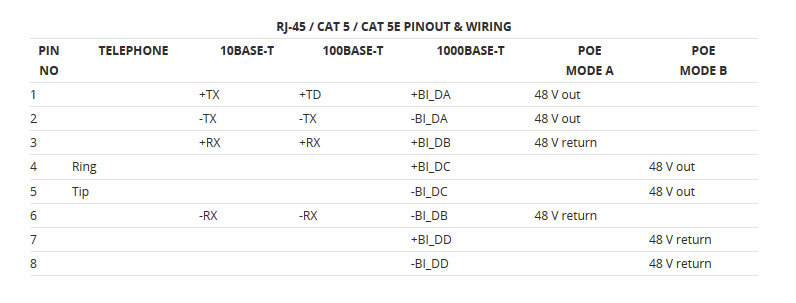
    Indeed, in 10BaseT/100BaseT only 2 pairs are used (the orange and green in positions 1, 2, 3, and 6 if you use the T568A standard). From 1000BaseT onwards, all four pairs are used.

    The standard PoE only uses two pairs but it depends on the type. If it is Mode A, it also uses the same pairs 1-2, 3-6 as the 10/100 so you might only need the 2 pairs. If it is Mode B, it uses the alternating pairs for power and you would need all eight. If it is 4PPoE mode, you need all 4 pairs for power (usually for cameras with high consumption).

    For 1Gb and above, you will always need all 8 in any case.

    70088c18-8689-4b01-9597-063559b99260-imagen.png

  • 2.5" external hard drive is going to stumble

    Movido
    5
    0 Votos
    5 Mensajes
    459 Visitas
    cobitoC

    @whoololon It's a drive that comes pre-assembled and the casing has no screws. I don't want to try to disassemble it, break a tab or anything else and then not have it fit properly.

    Regarding having physical problems, supposedly HDDRegenerator checks the entire physical surface of the drive. There should have been something seen there and it found nothing, curiously, without any apparent performance drops during the check.

    I had also thought about the power supply, but when the copy gets stuck, the drive doesn't sound like it has that problem but rather that it has normal activity. On the data drive I've had that kind of problem on other PCs and the noise it makes is quite evident.

    What @kynes comments about is more like what happens to me. The thing is that I made the copy and when it finished I did a diff to see if the data had been corrupted, but both drives are identical.

    The curious thing is that during the diff check, both drives were running at cruising speed. I wasn't watching all the time, but it was going at 90-120MB/s with some drops I suppose due to small files and decreasing as the drive progressed (that is, normal). That is, the cuts occur in writing but not in reading. Since I don't push it too hard, I don't even know if this has been happening to me with the data drive.

    The PC I use for these things has an Asus P8B75-V with B75 chipset that has a BIOS from 2012 (I've never updated it). I don't have a PC with a couple of USB 3.x with Linux handy where I can confirm this.

    Anyway. The full backup is something I do a couple of times a year and taking 7 or 8 hours instead of 3 or 4 doesn't bother me too much. The relevant thing here is that it seems that the data isn't corrupted, which is what I was most worried about.

    Thanks to both of you for the answers.

  • I'm going crazy trying to configure the AP button on a TP-LINK VR900 router

    9
    0 Votos
    9 Mensajes
    825 Visitas
    DixmanD

    @Fassou

    No, that is another war that I am still trying to fight.... ?

  • I need a Wi-Fi access point that also acts as a switch

    19
    0 Votos
    19 Mensajes
    2k Visitas
    DixmanD

    @whoololon said in I need a wifi access point that also acts as a switch:

    If the only problem is that it has a power outlet, the rest is not a problem.

    With dual gigabit ports and dual band, that has a power outlet, you have to go for the PLC as Sylver and cobito already mentioned.

    The rest always has something wrong, either it only has one RJ45 port, or it doesn't have a power outlet, or it doesn't have dual band... or all of the above.

    Surely some little-known manufacturer has a model that meets all the requirements, with my few resources, the closest I've been able to get is this.

    Link + Link

    Yes, the extender model you present I had already seen and it was one of the options. If I can't find one with a power outlet I'll have to adapt to what's available. Thanks to everyone for your contributions.

  • Security flaw in Cisco devices

    3
    1 Votos
    3 Mensajes
    140k Visitas
    cobitoC
    Here is a video demonstration:

  • The wifi on my laptop disconnects

    5
    0 Votos
    5 Mensajes
    374 Visitas
    O

    Ok thanks. I will try this and see how it goes.

  • PLC could drive down SSD prices

    Movido
    3
    0 Votos
    3 Mensajes
    54k Visitas
    garfieldG

    But as it says there, and as you rightly say, it can be worth it for many reads, and if the ssd's capacity improves and the price is much lower, then even better. And also, in the article it talks about NAS and RAID0. There it will greatly improve its speed and it won't be noticeable compared to SLC, and it doesn't replace the others.
    That said, for home use, for price/performance I'll stick with an MLC

  • How to label cabling?

    10
    0 Votos
    10 Mensajes
    15k Visitas
    rul3sR

    @krampak said in How to label wiring?:

    @chuli I think that 11 years later he will already have it labeled... xD

    Let yourself be surprised that "I'll do it later" sometimes surprises you... xD

  • LiveBox 2.1 as an access point

    5
    0 Votos
    5 Mensajes
    1k Visitas
    whoololonW
    Well, it's definitely going to be that, it's fried, because the same thing happens on the laptop... anyway, thank you very much for your interest. ☺
  • HDD and casing for making copies

    Movido
    3
    0 Votos
    3 Mensajes
    675 Visitas
    whoololonW

    I do not recommend that idea of having an external drive for backups at all.

    Besides, only 2.5 drives can be powered by USB without additional power; 3.5 drives must be powered by their corresponding adapter, making them as cumbersome as if they were using external SATA.

    My suggestion, since you do not want to set up a NAS, look for a case that allows you to set up a RAID1, or perhaps a cloud service.

  • PLC network has stopped working

    10
    0 Votos
    10 Mensajes
    4k Visitas
    ObioneO

    With good electrical installation and short runs, without gadgets that can create interference, a PLC can work really well. To give an example, a new build duplex where the wifi doesn't even go through a floor, the PLC works great in a different floor.

    I'm in a house with an old installation (lots of thin cable), 2 pumps (the one that brings power to the water inlet and the pool) and I'm near an electrical substation. There's a lot of interference at play.

    I usually get OK speeds but, there are certain hours, when the irrigation is turned on or I don't know what else, it sometimes fails. I've tried more than once on the office equipment when it gets cut off and I see that it works perfectly by cable.

    Editing: I guess it's all about trying it out, and if it suits you, enjoy it. It's worked for me to a certain extent, I've gone through wifi and this, and I don't want any more failures, it's not much of a hassle to run cable and I'm going to do it.

  • 0 Votos
    4 Mensajes
    4k Visitas
    rul3sR

    I'm going to update this topic with the "temporary" results obtained.

    Indeed, thanks to the UDP HOLE PUNCHING technique, I was able to connect a VPN server and client without needing to open ports, but there's a BUT.

    As you may know, lately ISPs have started using CG-NAT, which is a HUGE SCAM, because the UDP HOLE PUNCHING technique doesn't work under CG-NAT because it does a PORT RANDOMIZE and then the Source Port of the VPN server changes with each connection it makes, for example.

    If I have a PC with the VPN server on port 1194 UDP and behind a CG-NAT, when sending packets to another computer, that 1194 probably leaves the CG-NAT through another port, which WE DON'T KNOW because it applies a PORT RANDOMIZE and maybe it ends up going out through 55123.

    I've tried using a 3rd server where the "vpn server" sends some packets to be able to discover the SRC PORT behind the CG-NAT, but of course, that assignment waiting for a response is only for that 3rd server, to which the client tries to connect through that hole, the CG-NAT blocks the connection since it wasn't the original recipient, that's what HOLE PUNCHING is about.

    Do you have any idea or know of any procedure to "jump" over this barrier? I know it's possible to ask the company to take us out of CG-NAT, but that's not a valid option because in the end, the one who will run the VPN server may even be behind a shared mobile connection, where there's no way to open/redirect ports either.

    I know what I'm asking for is quite complex, but you never know where one might find the solution!

    Best regards.

    P.D: @krampak I mention you just in case ?

  • RAID controller compatibility doubt

    Movido
    5
    0 Votos
    5 Mensajes
    1k Visitas
    whoololonW
    That's where I was going, because I was told that, everything that is not RAID1, it's better to do it with software; because I don't know to what extent the motherboard drivers are compatible with each other. ? Once we reach that catastrophic point, the fact that "only" had to be rebuilt would be the least of my worries; not losing the information would be enough for me to be happy. Thanks for the clarification.
  • NAS... or something like that :)

    6
    1 Votos
    6 Mensajes
    1k Visitas
    YorusY

    I did some tests at home. With Wifi N, even with a short distance and with just a Pladur wall in between, it didn't reach 4MB/s, with a 100 network it was close to 11MB/s and with gigabit it was around 80/90MB/s. If they are small documents it doesn't matter, but if they are videos or files of several gigas it is noticeable.

  • Network problems between 2 computers in Windows 10 x64

    6
    0 Votos
    6 Mensajes
    2k Visitas
    kynesK

    Try to see if you can connect to the computers through the ip, by writing directly in the browser bar the ip of the other computer, with double slash in front: \\\\192.168.1.23 p.ej.

    By the way, the last windows update removes the home group, it has surely given more headaches than solutions.

  • 2.4GHz, 5GHz controller or wired after failure with PLC

    2
    0 Votos
    2 Mensajes
    907 Visitas
    krampakK

    With 2 walls of 3-4 fingers, forget about 5Ghz, you won't get much (at least with the little I've been able to tinker with in 5Ghz). If you're too lazy to pull 20m of cable, make a couple of holes and pull 6m xD otherwise there's no other option than to try to get a good signal at 2.4Ghz (once you've ruled out the PLC).

  • Problem with SSHD FireCuda

    Movido
    6
    0 Votos
    6 Mensajes
    1k Visitas
    A

    @whoololon @krampak

    Hello guys, sorry for not responding before, I don't know why I'm not receiving forum notifications.

    In the end, I ended up buying a WD Black (7200 rpm), and so far it's working perfectly. Too bad, the hybrid option seemed ideal, but I won't buy one of these again for the rest of my life.

    Thanks for everything ?.

    Best regards!

Foreros conectados [Conectados hoy]

1 usuarios activos (1 miembros y 0 invitados).
febesin, pAtO,

Estadísticas de Hardlimit

Los hardlimitianos han creado un total de 543.5k posts en 62.9k hilos.
Somos un total de 34.9k miembros registrados.
roymendez ha sido nuestro último fichaje.
El récord de usuarios en linea fue de 123 y se produjo el Thu Jan 15 2026.