• Our PCs

    Fijo
    16
    2 Votos
    16 Mensajes
    12k Visitas
    pos_yoP

    @Sylver It was a metallic blue, I don't remember the exact color code.

  • Buy or build a gaming PC

    6
    0 Votos
    6 Mensajes
    2k Visitas
    C

    Many thanks gentlemen, your opinions and knowledge have helped me make a decision and it is the one that has given me @Fassou, Many thanks ?

  • PC for intensive processing

    20
    5 Votos
    20 Mensajes
    1k Visitas
    cobitoC
    I'm almost finished with the tests. Last night I got hooked on Counter Strike Source, which I know isn't the greatest, but it's been my first game on a decent PC in many years. Playing at 200fps with everything maxed out and an integrated GPU isn't bad at all, even though it's a pretty old game.\nApart from that, I've significantly reduced the noise by modifying the temperature/rpm profile from the BIOS as @Sylver suggested. Now I can see in more detail that the temperature spikes when the memory test starts, reaching 85°C (for me it's an excessive temperature but not dangerous). On the other hand, the moment the multithreading starts, the temperature drops. I see the same behavior with other programs. For example, when the Steam client demands power from a single core and the rest is at rest, it also heats up quite a bit and with Firefox it's the same. But when I start a demanding game (eg: Counter-Strike 2), the temperature drops again quite a bit.\nThe profile stays this way, unless you tell me that it's not advisable to get close to 90°C even occasionally.\nThere's another thing happening to me: when I activate the EXPO or XMP profile of the memory, it seems that SMT is deactivated. From the HL benchmark I see that the performance of the memory test doubles its result while the pure CPU tests remain more or less the same. I think it's not normal that SMT is deactivated but as I don't see any penalty in CPU performance and the memory improves quite a bit, for now I'm not going to give it much importance. I suspect it's a bug in the BIOS, but I read that it can be a limitation of the memory controller. Anyway, in a few weeks I'll change the memories, so I'm not going to spend more time on this.\nI've also tested the energy consumption at rest, under load with one thread and with full load. The measurement was made with a power meter measuring from the AC outlet of the power supply. This is the result:\n- At rest: 42W.\n- HL benchmark, one-thread test\n· Test #1: 87W\n· Test #2: 83W\n· Test #3: 88W\n· Test #4: 92-115W\n- Multithread test:\n· Test #1: 152W\n· Test #2: 148W\n· Test #3: 152W\n· Test #4: 158W\n- BeamNG.drive (normal quality): 77-85W\n- Counter-Strike 2 (default settings): 83-91W.\nThe consumption is similar to the i5-3570K that is currently on the market while the performance is about 13 times superior in general terms when they are at full load.\nI'm going to install Debian Stable now, which is the system it's going to stay with.
  • Hello, a question

    6
    0 Votos
    6 Mensajes
    520 Visitas
    _Neptunno__

    @cinusara I would also opt for the i5, because the i7 is a good processor but those extra cores for gaming are not going to help you, it's another thing if you wanted to give it a use for more productivity applications. But let's go with that equipment you will be able to play very calmly for a long time.

    Greetings!!

  • PC for LOL, no pretensions

    4
    4 Votos
    4 Mensajes
    358 Visitas
    Kernel1.0K

    Thanks for your contributions, I'm glad to see that you're still around, in the end I'm going to order the loose parts.

    I've been looking at the Nvidia card, and yes, both raw power and technologies are ahead, now with the discount it's a good buy. I'm not sure but I think I haven't bought the brand since I had a TNT2 one day ?.
    In the configuration I put, I'm missing the heatsink which is going to be a cooler master Hyper 212 that isn't necessary for that processor but well.
    Everything is going to be 760 euros, the idea was for it to be less but it can't be helped ?.
    Time to place the order and not look at hardware prices in the next 5 years, every time I open the page I see some price change.
    Thanks

  • gaming team advice

    7
    1 Votos
    7 Mensajes
    815 Visitas
    _Neptunno__

    @darko said in gaming team advice:

    "It's not the same to play the sims as a biosock / stalker" ? ? ?
    good question... I imagine powerful games but I'm not sure if they are the latest generation.
    In the end, with what pos_yo was telling me, with those components he said the budget would skyrocket and as he wanted a built computer, I recommended this one I saw on pccomponentes.
    You can upgrade the disk in the future and increase the memory to 32gbytes...?
    https://www.pccomponentes.com/pcvip-hydrus-v1-amd-ryzen-5-5500-16gb-1tb-500gb-ssd-rtx-3060
    I'm not sure if I got it right or NOT... but as he told me about the budget, that he should go with this one, you can't ask for the impossible ?
    Many thanks to both of you for your help
    bye!!!

    I think the only thing I would improve about the computer is the CPU, a Ryzen 5600/5600X would have been "perfect"
    The 5500 has half the L3 cache, if I remember correctly. And that is noticeable in games, especially at minimum settings... which is where you notice more when you're just right to make games run more smoothly.

    The good thing is that you could upgrade it in time and look for a 5700X or if it were a 5800X3D it would be great. But well... a 5600 is also good. It's all a matter of money and "offers" you see.

    The 3600 is a good GPU although I hope you are aware that it's already had its time and it will be insufficient sooner than it should, unless you are willing to lower the resolution, etc.

    I hope you enjoy your PC, it's true that it's what you want the most when you have your new computer ?

    Best regards!

  • F.A compatibility with H.P tower

    8
    0 Votos
    8 Mensajes
    1k Visitas
    SylverS

    @Clipper said in F.A compatibility with H.P tower:

    The million dollar question.
    Does anyone know which connector to bridge for the F.A to start up and verify output voltages?
    Regards

    From what I've read around, normally the green and black wires of the P2 connector are bridged if it has one (similar to how it's done in traditional power supplies).
    If it doesn't have one or has different colors, the purple and yellow wires are bridged on the P1 connector (again, if it has those colors).

    I don't know if there are more variations regarding the models and versions of the power supplies/equipment, but in those cases it works.

    Regards

  • PCI-E I'm missing slots

    3
    0 Votos
    3 Mensajes
    328 Visitas
    pos_yoP

    I'm going to give you a very drastic solution that I WOULD NOT DO. But it is a valid option... ?

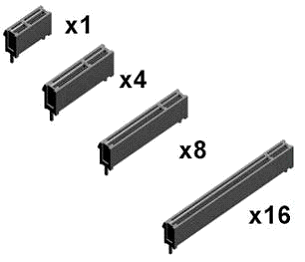
    Alright, PCIe connectors have a common part which is the first part that is the pins for power. The rest, which is where there are different "sizes", are the data lines. The more lines, the more bandwidth, and the faster the data transfer speed.

    e60ee01a-89f5-445d-bb2f-4b859a52a896-imatge.png

    Now comes the "destroyer" DIY... Well, if you dare, you can cut the stop that is in the back that makes the PCI card not fit. If you decide, you have to do it very carefully so as not to damage any pin of the connector...

    Anyway, I'm giving you a tip that I would never do on my main board...

  • Cluster 3 nodes of Hp ProLiant DL360p Gen8

    3
    4 Votos
    3 Mensajes
    1k Visitas
    jordiquiJ

    @cobito said in Cluster 3 nodes of Hp proliant dl360p gen8:

    @jordiqui You mean the MPi topic that you commented on here, right?

    It's noted. It will be the first change in the next iteration, but I don't know when. I have many changes noted from all the pages and I need to organize the work to optimize time.

    To be honest, it would be very interesting (and an uncommon feature).

    Let's see how 2024 comes in...

    That's @cobito: But with everything you do with the forum, etc. when you can because I imagine integrating MPi must have its own challenges. A hug and a Merry Christmas in advance ?

  • CPU for office work and gaming

    4
    0 Votos
    4 Mensajes
    707 Visitas
    defaultuserD
    Hello.
    Seeing that you are not following it, and from the micro you were coming from, if you want something moderate for that graphics you mention, I can suggest a Ryzen 5 3600, it has 64 mb of cache and is priced low.
    with a motherboard with 550 chipset and with ddr4.
    It would be very economical and would be suitable for the graphics you mention.

    Regarding the two graphics, one does ray tracing and the other does not. with the amd there is no ray tracing, but for now you won't notice it too much and it's a bit more powerful in the basic work.

    If you were to get into more graphics, or if you want the pc to be busy with things that are a bit thick while you play, then I think you would need more micro (more cores) or if you put more graphics it would be more frequency and more cores even.

    With that config and an rtx 2060 that runs at 2000Mhz you can play wonderfully comfortably for example Borderlands 3 at 1080p.
    To play for example Cyberpunk I can't tell you yet as I don't have the game optimized and the graphics look ugly, but the micro apparently runs well.

    If you want more rig, and taking advantage of the fact that prices are better, you could get into a series 5000 or even a 7000, depending on budget, but moderate with the micro and board if it's for playing, since the graphics will be the central part in that case, and the rest only has to accompany.

    Regards.

    PD: the motherboard for example an msi gaming or a gigabyte gaming, that has heatsinks on the mosfet as a minimum.

  • 4-bay NAS configuration

    montar un nas
    3
    0 Votos
    3 Mensajes
    366 Visitas
    E

    @cobito thanks for the help.....

  • Mid-high range gaming PC.

    72
    2 Votos
    72 Mensajes
    7k Visitas
    ClipperC

    Due to lack of time I haven't done anything...
    Well, yes.
    I have flipped the rear fan and used holy water.
    It no longer sounds like a turbine.
    The most ridiculous thing is that I read an article about the position of fans with grilles and did the worst thing you could do ?
    When I have time I have many open wars I will comment more.
    Regards

  • pccom giveaways

    10
    1 Votos
    10 Mensajes
    868 Visitas
    defaultuserD

    My Chrome has not given me any problems.

  • Raspberry pi 3 b

    3
    0 Votos
    3 Mensajes
    323 Visitas
    jordiquiJ

    @sylver said in Raspberri pi 3 b:

    Buenas @jordiqui

    Sometimes it happens, read errors and data corruption in Raspberrys are more or less frequent.

    What SD card do you have? From what I have read, it must be a Class 10 original (not cloned) and experts recommend that it be SanDisk Extreme pro or Samsung for greater reliability.

    Regards

    SAndisk vpro I think he has.

  • Do you know if the Corsair iCUE H150i cooler comes with thermal paste included?

    53
    0 Votos
    53 Mensajes
    7k Visitas
    defaultuserD

    @clipper said in Do you know if the Corsair iCUE H150i cooling system includes thermal paste?:

    In the first stress test photo, everything is maxed out, pump and fans included.
    And there is no difference between everything maxed out and relaxed in relation to the water temperature.

    Of course, there was always enough water, it's in the micro where you could improve a little, did you do it?

    @clipper said in Do you know if the Corsair iCUE H150i cooling system includes thermal paste?:

    In theory, with iCUE you can make different curves in the management of fans and I suppose also of the pump.

    Look at it, it's convenient that the pump is at maximum during moments of maximum heat production.
    The fans, on the other hand, in a liquid system should rotate based on the water temperature only.

    @clipper said in Do you know if the Corsair iCUE H150i cooling system includes thermal paste?:

    The doubt would be: can a D5 be connected to the GPU so that the GPU controls it? Or does it need another "gadget"?

    Yes, it can.

    If your graphics card has a 4-pin PWM connector to connect an external fan, you can already do it. The pump must also be PWM, of course, and the only thing you need is an adapter that takes the 2 + and - 12v cables from the pump to a Molex connector from the power supply, and the other 2 cables (tachometer and PWM control) from the pump to the 4-pin connector of the graphics card.

    In cases where the motherboard and graphics card exchange information, you can do the same but using a connector from the motherboard and sending it according to the graphics card's temperature.

    You could even control the pump with the PWM signal of one of the series fans (since you're going to remove them), but that already requires tinkering with the wiring or locating the specific connector model to make yourself an adapter.

    @clipper said in Do you know if the Corsair iCUE H150i cooling system includes thermal paste?:

    P.D. to avoid contaminating this post, I think it would be better to open a new one.

    Yes... better ? ?

  • SERVER HP DL380P G8 2XE5-2680V2 2.8GHZ

    13
    3 Votos
    13 Mensajes
    1k Visitas
    jordiquiJ

    @jordiqui 1.jpg 2.png
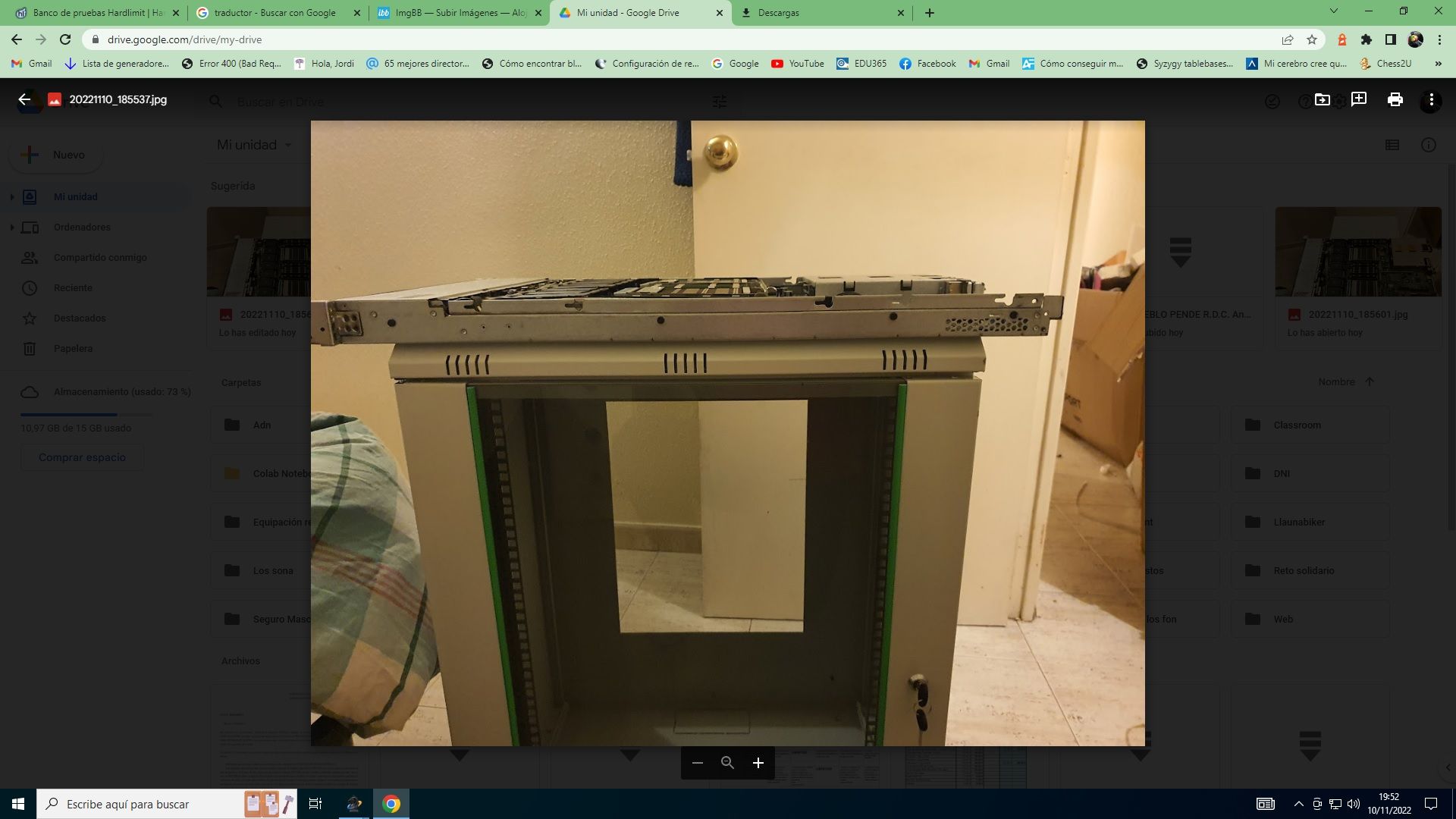
    Look at the server and look at the wardrobe. My joy in a well.....

  • 2 xeon e5-2660 v2 hp proliant gen 8

    5
    5 Votos
    5 Mensajes
    2k Visitas
    jordiquiJ

    Hello colleagues. Looking at these photographs, now from a distance, I get goosebumps because these gadgets are designed to fit into a closet. One wrong contact and a short circuit at the edge, then goodbye, who knows, the board, etc. Today I am excited because this is coming to me that you can see in the link:
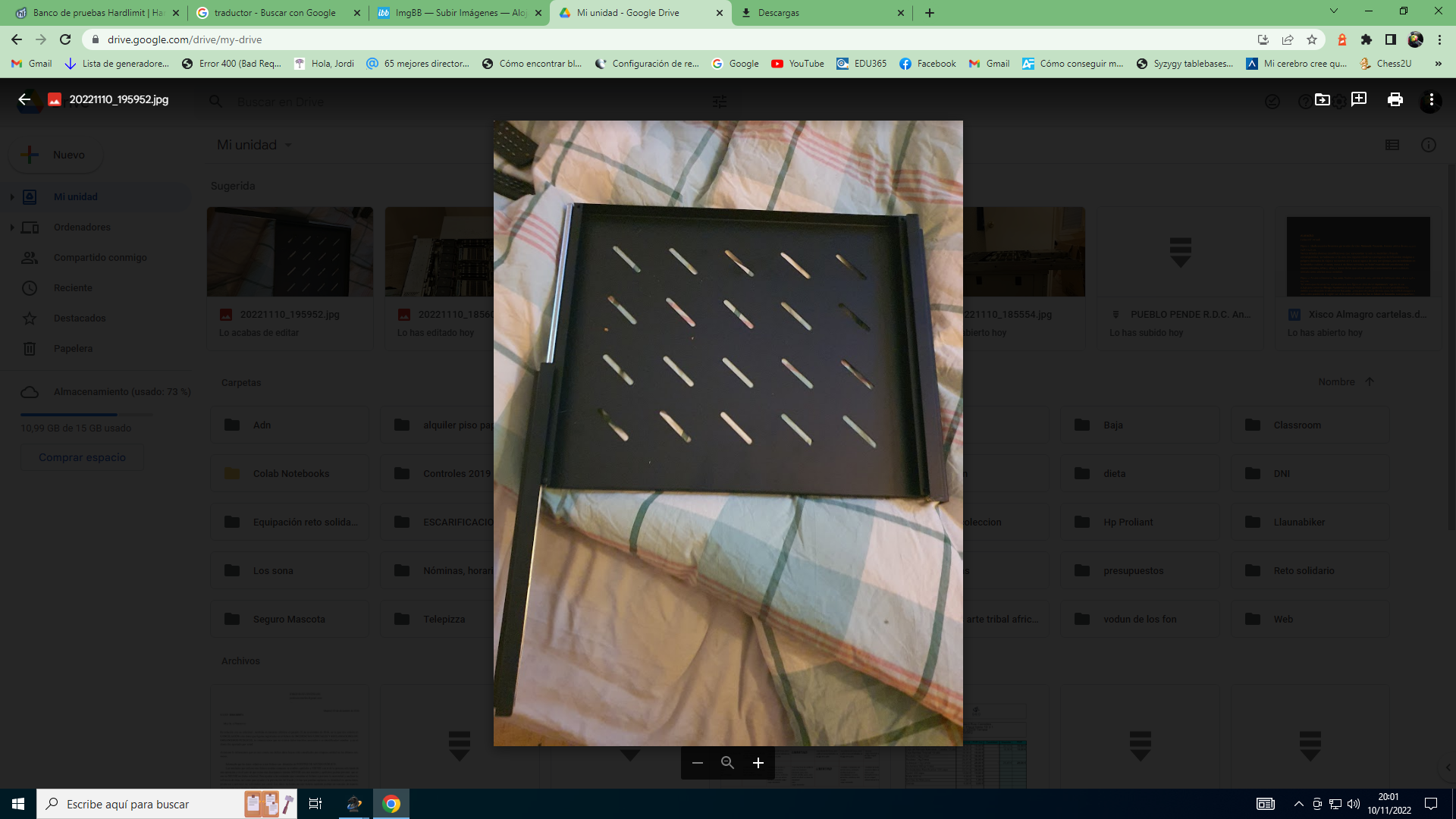
    Rack Cabinet
    with its two corresponding trays for the two U. We will leave quite a bit of space between them, because the final goal is to mount four nodes (now I have four CPUs unused, two e5 2660v2 and 2 2651v2). As soon as I have everything mounted I will share the photographs with you. Since I am at it, I will ask you this question (I have already seen information, but I like to know your opinions) before with the simple swift I had enough, but they recommend a good one and last generation network cables. Any suggestions? in second hand, physical store, they have had one with quite a few ports for a while and I understand that it must be 100-1000gbs. You will tell me.

  • I ask you to look at this pc configuration that I have made

    20
    0 Votos
    20 Mensajes
    1k Visitas
    defaultuserD

    Usually, the more modern version is worth it even if it's a slightly inferior model, I'm not up to date with intel but from what jordiqui says, it seems that's what's happening in this case.
    If the platform is also more modern, it would be worth looking into as there could be other advantages or improvements beyond the net performance of the cpu.

  • Update Amd3+ to?

    25
    0 Votos
    25 Mensajes
    2k Visitas
    ClipperC

    There have been some rumors that AMD is considering releasing a series of AMD 5 series processors for the Amd4 socket.
    Of course, without compatibility for DDR5 and PCI 5 and the same for SSDs.
    Personally, I see it as a step backwards.
    It's kind of like buying a castrated thoroughbred...
    I think I'll skip AMD 5 and upgrade to AMD 4 mid-range / high.
    And I'll open the corresponding post to comment on any doubts.
    Regards

  • Pc gamer I ask for opinion

    9
    0 Votos
    9 Mensajes
    1k Visitas
    QVENGADORQ

    @mystique I will try to see how it went. Thanks.

Foreros conectados [Conectados hoy]

1 usuarios activos (1 miembros y 0 invitados).
febesin, pAtO,

Estadísticas de Hardlimit

Los hardlimitianos han creado un total de 543.5k posts en 62.9k hilos.
Somos un total de 34.9k miembros registrados.
roymendez ha sido nuestro último fichaje.
El récord de usuarios en linea fue de 123 y se produjo el Thu Jan 15 2026.